Contents
 Claude
  ChatGPT
  Perplexity
  Google AI
 Contents
This guide covers the case where your pipeline makes the videos and clients receive finished files without ever touching an interface. If you want your users to create videos themselves inside your product, that is the other half of this pair: our guide to adding video creation to your app.
TL;DR
- Yes, there’s an API for this. You build one master template with placeholders, keep a small brand record for each client, and render every client’s video by sending that template’s ID plus a set of merge fields.
- A 30-second promo costs cents to render, and thousands of renders run concurrently.
- Adding your fourth client is a database row rather than an afternoon in an editor.
What you’ll build
A working pipeline for three fictional clients: a real-estate agency, a travel company and a skate brand, each with their own footage, font, color and music. One template produces all three, in three aspect ratios each. Nine finished videos by the end.
Prerequisites
You need Node 18 or later (the code uses the global fetch) and a free Shotstack API key. Sign up at dashboard.shotstack.io, then find your keys under API Keys. Shotstack issues separate keys for the sandbox and production environments.
We’ll use the sandbox throughout, so store that key in an environment variable rather than committing it anywhere:
export SHOTSTACK_API_KEY="your_sandbox_api_key"
Three things to know about the sandbox before your first render: output carries a watermark, videos are capped at 10 minutes, and your account needs at least one credit available to use the environment even though ordinary sandbox renders don’t consume any. Nothing is broken if your first video comes back watermarked.
We’ll assume you know roughly what templates and merge fields are; our bulk generation guide covers them if not. And if you’re completely new to the API, start with rendering your first video. Everything here is about what changes when there’s more than one client.
The shape of the pipeline
Every video follows the same path. Your code picks a client, expands their brand record into merge fields, and posts those to Shotstack along with a template ID. Shotstack queues the render and immediately hands back a render ID. Some time later the finished file is ready, and you find out either by asking (polling) or by being told (webhook); either way it lands wherever you pointed it. If the work arrives continuously rather than per campaign, our guide to running the render loop on a schedule puts this same path under cron with a submission history.
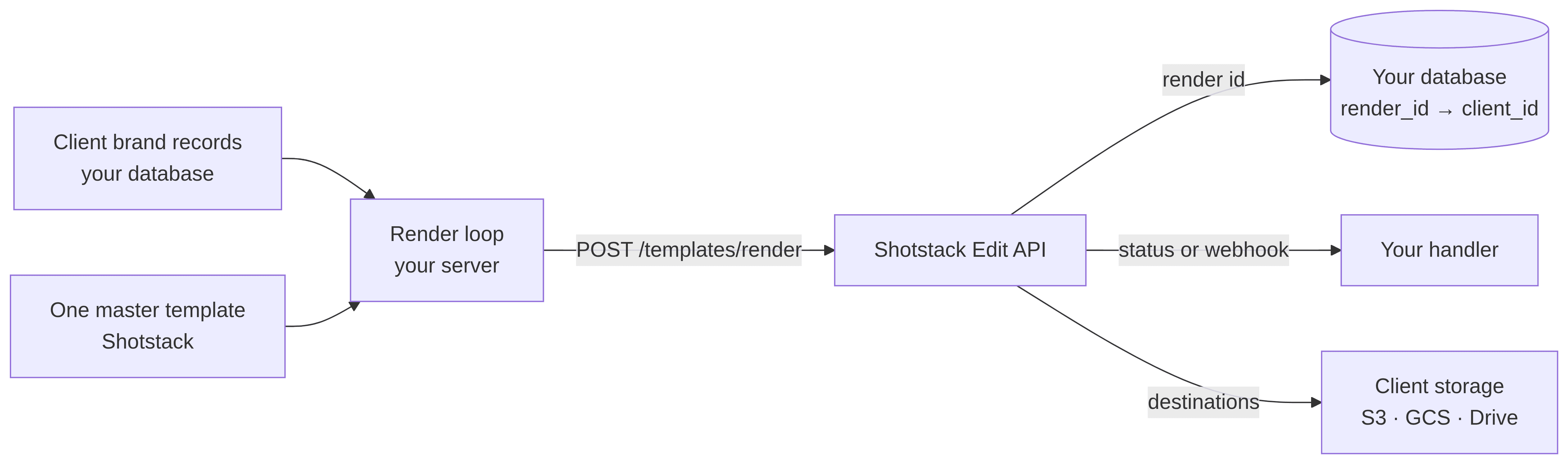
One step in there matters more than the others: writing the render ID to your own database. Shotstack has no endpoint that lists your renders, so if you don’t record which client an ID belongs to the moment you get it, that link is gone permanently. Step 3 covers how to handle it.
Step 1: create the master template
One template serves every client. You don’t build a template per client. Instead you build one design with placeholders wherever something is client-specific, then supply different values at render time.
Here’s the template we’ll use. Save it as template.json:
{
  "name": "Client promo v1",
  "template": {
    "timeline": {
      "background": "#000000",
      "tracks": [
        {
          "clips": [
            {
              "asset": {
                "type": "rich-text",
                "text": "{{ HEADLINE }}",
                "font": {
                  "family": "{{ FONT }}",
                  "size": 48,
                  "weight": 700,
                  "color": "#ffffff"
                },
                "stroke": { "width": 3, "color": "#000000" },
                "align": { "horizontal": "center", "vertical": "middle" },
                "animation": { "preset": "fadeIn", "duration": 1 }
              },
              "start": 0.5,
              "length": 4.5,
              "width": 1000,
              "height": 260
            }
          ]
        },
        {
          "clips": [
            {
              "asset": { "type": "svg", "src": "{{ BRAND_MARK }}" },
              "start": 0.5,
              "length": 4.5,
              "width": 120,
              "height": 120,
              "fit": "contain",
              "position": "topLeft",
              "offset": { "x": 0.06, "y": -0.06 }
            }
          ]
        },
        {
          "clips": [
            {
              "asset": { "type": "video", "src": "{{ FOOTAGE }}" },
              "start": 0,
              "length": 5,
              "fit": "crop",
              "effect": "zoomIn"
            }
          ]
        },
        {
          "clips": [
            {
              "asset": {
                "type": "audio",
                "src": "{{ MUSIC }}",
                "volume": 0.35,
                "effect": "fadeOut"
              },
              "start": 0,
              "length": "end"
            }
          ]
        }
      ]
    },
    "output": {
      "format": "mp4",
      "size": { "width": "{{ WIDTH }}", "height": "{{ HEIGHT }}" }
    }
  }
}
Five things in there are worth pausing on, because they’re the ones people get wrong.
Tracks stack in reverse. tracks[0] is the top layer, not the bottom. That’s why the headline comes first and the background footage comes third. If your text renders behind your video, this is why.
fit: "crop" fills the frame without distorting. Shotstack’s fit values don’t match CSS instincts: cover stretches the asset and will visibly squash footage when the aspect ratio changes. crop scales while preserving aspect ratio and trims the overflow, which is almost always what you want for a background. It’s also the default, so you could omit it.
You don’t need to host a font. Shotstack ships eleven built-in fonts (Roboto, Montserrat, Open Sans, Work Sans, Uni Neue, Arapey, Clear Sans, Didact Gothic, MovLette, Permanent Marker and Sue Ellen Francisco), so {{ FONT }} only ever holds a family name. Three of them give our three clients visibly different personalities with nothing to upload.
If you need a font that isn’t on the list, add its URL to timeline.fonts[] and reference its family name.
scale is a fraction of the viewport, not of the asset. The brand mark clip sets width and height to match the SVG’s own dimensions and uses fit: "contain" instead. Reach for scale here and 0.5 gives you a logo covering half the frame, and because the default fit stretches, a square mark comes out as a rectangle. Explicit dimensions leave fit nothing to distort.
The output size is a placeholder too. Placeholders work in any string value, not just visible text: src, color, family, and numeric fields like width. That single fact is what lets one template produce every aspect ratio in Step 4.
Create it:
curl --fail-with-body --silent --show-error \
  --request POST \
  --url https://api.shotstack.io/edit/stage/templates \
  --header "Content-Type: application/json" \
  --header "x-api-key: ${SHOTSTACK_API_KEY}" \
  --data @template.json
You should get similar output:
{
  "success": true,
  "message": "Created",
  "response": {
    "message": "Template Successfully Created",
    "id": "6577caaf-15b1-4822-9710-2050a07d624b"
  }
}
The important value is response.id: the template ID. You’ll reference it every time you render, so store it in an environment variable alongside your key:
export SHOTSTACK_TEMPLATE_ID="your_template_id"
Step 2: add your first client
A brand kit isn’t a Shotstack feature: it’s a record in your own database that you expand into merge fields at render time. There’s no brand-kit endpoint to call and nothing to configure in the dashboard. This is your data.
Create clients.mjs:
const TEMPLATE_V1 = process.env.SHOTSTACK_TEMPLATE_ID;

export const clients = {
  'meridian-realty': {
    name: 'Meridian Realty',
    templateId: TEMPLATE_V1,
    headline: 'Twelve new listings this week.',
    font: 'Montserrat',
    footage:
      'https://shotstack-ingest-api-v1-sources.s3.ap-southeast-2.amazonaws.com/35tqpmb0ya/zzz01m08-qxa25-864e6-zty3t-3sttne/source.mp4',
    music:
      'https://s3-ap-southeast-2.amazonaws.com/shotstack-assets/music/moment.mp3',
    brandMark:
      '<svg xmlns="http://www.w3.org/2000/svg" width="120" height="120"><rect x="10" y="10" width="100" height="100" rx="16" fill="#1b6ca8"/></svg>',
  },
};
Every client reads the same TEMPLATE_V1 for now, but the ID lives on the client record rather than being used directly. That looks redundant with one client and stops looking redundant the moment you need to change a layout; the reference section at the end explains why.
The brandMark is inline SVG rather than a hosted image. Shotstack’s svg asset takes raw markup and supports shapes (path, rect, circle, ellipse, line, polygon, polyline), so a simple geometric mark costs you nothing to host. Two limits worth knowing: <text> isn’t supported, so use a rich-text asset for any words, and SVG animation elements like <animate> are ignored; animate the clip instead.
The xmlns declaration is not optional. Leave it off and the markup won’t parse, but nothing rejects your request: Shotstack accepts the render, substitutes an invisible one-pixel placeholder for the clip, and the job eventually fails with a generic “Rendering failed” message that says nothing about SVG. The real explanation is buried in response.data, on the clip’s asset, as metadata.error.
Create render.mjs and render that client’s video by sending the template ID and the merge fields:
import { clients } from './clients.mjs';

if (!process.env.SHOTSTACK_API_KEY || !process.env.SHOTSTACK_TEMPLATE_ID) {
  console.error('Set SHOTSTACK_API_KEY and SHOTSTACK_TEMPLATE_ID before rendering.');
  process.exit(1);
}

const API = 'https://api.shotstack.io/edit/stage';

const client = clients['meridian-realty'];

const res = await fetch(`${API}/templates/render`, {
  method: 'POST',
  headers: {
    'Content-Type': 'application/json',
    'x-api-key': process.env.SHOTSTACK_API_KEY,
  },
  body: JSON.stringify({
    id: client.templateId,
    merge: [
      { find: 'HEADLINE', replace: client.headline },
      { find: 'FONT', replace: client.font },
      { find: 'BRAND_MARK', replace: client.brandMark },
      { find: 'FOOTAGE', replace: client.footage },
      { find: 'MUSIC', replace: client.music },
      { find: 'WIDTH', replace: 1280 },
      { find: 'HEIGHT', replace: 720 },
    ],
  }),
});

const { response } = await res.json();
console.log(response.id);
Run it:
node render.mjs
It prints a render ID. Store that one too, so the status command stays copy-pasteable:
export RENDER_ID="your_render_id"
Then check on it. Once status is done, the response carries a url you can open:
curl --fail-with-body --silent --show-error \
  --request GET \
  --url "https://api.shotstack.io/edit/stage/render/${RENDER_ID}" \
  --header "Accept: application/json" \
  --header "x-api-key: ${SHOTSTACK_API_KEY}"
You’ll get a response like this, trimmed here for readability:
{
  "success": true,
  "message": "OK",
  "response": {
    "id": "697579fa-7455-4685-a068-b7e826247246",
    "owner": "6173csoh17",
    "plan": "sandbox",
    "status": "done",
    "error": "",
    "duration": 5,
    "billable": 5,
    "renderTime": 5139.91,
    "totalRenderTime": 14820,
    "renderStartedAt": "2026-08-12T12:15:05.753Z",
    "url": "https://shotstack-api-stage-output.s3-ap-southeast-2.amazonaws.com/6173csoh17/697579fa-7455-4685-a068-b7e826247246.mp4"
  }
}
A five-second render takes roughly fifteen seconds end to end in the sandbox: a few seconds of that is the render itself and the rest is queue time. If it’s still queued after a minute, something is wrong rather than slow.
That’s one client’s video. The rest of the tutorial is about the other two, and about not losing track of which is which.
One constraint that catches people: every asset URL must be publicly reachable. Shotstack downloads them server-side, so signed URLs work only if they outlive the render queue, and private buckets don’t work at all.
Clients rarely hand you assets in that state (a logo arrives inside a slide deck), which is what the Ingest API is for: it fetches or accepts uploads, hosts the result, and returns URLs you store in the brand record.
That is exactly where this tutorial’s footage comes from. The three clips are AI-generated and were uploaded through the Ingest API, which returned the Shotstack-hosted URLs sitting in the brand records above.
When a render fails, read response.data before anything else. The top-level error field is usually generic (“Rendering failed. Please retry”), but data holds the fully resolved edit, and a failing clip’s asset carries a metadata.error explaining what went wrong. That’s where you’ll find out a font didn’t load or an SVG didn’t parse.
Adding ?data=true&merged=true to the status request also shows you every placeholder resolved, which is the fastest way to confirm your merge fields did what you expected.
Step 3: render for every client at once
Batch rendering is a loop of concurrent render calls; there’s no batch endpoint. That sounds like a gap and mostly isn’t: every plan supports thousands of concurrent renders, so throughput is limited by your submission code, not by the API.
Add the other two clients to the clients object in clients.mjs, alongside meridian-realty:
'driftwood-retreats': {
  name: 'Driftwood Retreats',
  templateId: TEMPLATE_V1,
  headline: 'Off-season rates end Sunday.',
  font: 'Open Sans',
  footage: 'https://shotstack-ingest-api-v1-sources.s3.ap-southeast-2.amazonaws.com/35tqpmb0ya/zzz01m08-qxkz1-xz4yp-pfbj3-14r3s3/source.mp4',
  music: 'https://s3-ap-southeast-2.amazonaws.com/shotstack-assets/music/spirit.mp3',
  brandMark: '<svg xmlns="http://www.w3.org/2000/svg" width="120" height="120"><circle cx="60" cy="60" r="50" fill="#c1701e"/></svg>',
},

'apex-skate': {
  name: 'Apex Skate Co.',
  templateId: TEMPLATE_V1,
  headline: 'New deck drop. Friday.',
  font: 'Permanent Marker',
  footage: 'https://shotstack-ingest-api-v1-sources.s3.ap-southeast-2.amazonaws.com/35tqpmb0ya/zzz01m08-qy60n-yb4w2-ks55h-tej73h/source.mp4',
  music: 'https://shotstack-assets.s3-ap-southeast-2.amazonaws.com/music/unminus/lit.mp3',
  brandMark: '<svg xmlns="http://www.w3.org/2000/svg" width="120" height="120"><polygon points="60,10 110,105 10,105" fill="#b7f32b"/></svg>',
},
Three clients now need the same seven merge fields built the same way, so pull that into a helper. Add it to clients.mjs too, since it belongs with the shape of the data it reads:
/** Expand a client + variant into the merge array the render endpoint expects. */
export function mergeFieldsFor(client, variant) {
  return [
    { find: 'HEADLINE', replace: client.headline },
    { find: 'FONT', replace: client.font },
    { find: 'BRAND_MARK', replace: client.brandMark },
    { find: 'FOOTAGE', replace: client.footage },
    { find: 'MUSIC', replace: client.music },
    { find: 'WIDTH', replace: variant.width },
    { find: 'HEIGHT', replace: variant.height },
  ];
}
You also need somewhere to record which render belongs to which client. In production that’s your database; for this tutorial a file does the job. Create db.mjs:
import { appendFile, readFile } from 'node:fs/promises';

const FILE = new URL('./renders.jsonl', import.meta.url);

export const db = {
  renders: {
    // One JSON object per line, appended. Nine renders submit concurrently, so
    // reading the whole file, pushing a row and writing it back would lose
    // rows: two writers read the same state and the second overwrites the
    // first. Appends don't interleave.
    async insert(row) {
      await appendFile(FILE, JSON.stringify(row) + '\n');
    },

    async all() {
      try {
        const text = await readFile(FILE, 'utf8');
        return text
          .trim()
          .split('\n')
          .filter(Boolean)
          .map((line) => JSON.parse(line));
      } catch {
        return [];
      }
    },
  },
};
That comment is the tutorial’s one concession to the fact that this isn’t a real database. Postgres would handle concurrent writes for you; a file won’t, and a pipeline that fires nine renders at once will find out.
Now replace the contents of render.mjs with the loop. There’s one line in here that matters more than the rest:
import { clients, mergeFieldsFor } from './clients.mjs';
import { db } from './db.mjs';

if (!process.env.SHOTSTACK_API_KEY || !process.env.SHOTSTACK_TEMPLATE_ID) {
  console.error('Set SHOTSTACK_API_KEY and SHOTSTACK_TEMPLATE_ID before rendering.');
  process.exit(1);
}

const API = 'https://api.shotstack.io/edit/stage';

async function renderForClient(clientId, client) {
  const res = await fetch(`${API}/templates/render`, {
    method: 'POST',
    headers: {
      'Content-Type': 'application/json',
      'x-api-key': process.env.SHOTSTACK_API_KEY,
    },
    body: JSON.stringify({
      id: client.templateId,
      merge: mergeFieldsFor(client, { width: 1280, height: 720 }),
    }),
  });

  if (!res.ok)
    throw new Error(`${clientId}: ${res.status} ${await res.text()}`);

  const { response } = await res.json();

  // Persist BEFORE anything else can fail.
  await db.renders.insert({
    renderId: response.id,
    clientId,
    submittedAt: new Date().toISOString(),
  });

  return response.id;
}

async function renderAll(concurrency = 10) {
  const jobs = Object.entries(clients);
  const results = [];

  for (let i = 0; i < jobs.length; i += concurrency) {
    const batch = jobs.slice(i, i + concurrency);
    results.push(
      ...(await Promise.allSettled(
        batch.map(([id, client]) => renderForClient(id, client)),
      )),
    );
  }

  return results;
}

const results = await renderAll();

for (const r of results.filter((r) => r.status === 'rejected'))
  console.error(r.reason.message);

console.log(
  `${results.filter((r) => r.status === 'fulfilled').length}/${results.length} submitted`,
);
Promise.allSettled never throws, so the loop over rejected results is what surfaces a failed submission. Without it, a bad template ID reports “0/3 submitted” and nothing else.
Run it again and all three go at once:
node render.mjs
3/3 submitted
The render IDs are now in renders.jsonl, each against its client.
{"renderId":"c7b46ad9-5c63-40e0-b8ba-90364cec97e1","clientId":"apex-skate","submittedAt":"2026-08-12T12:27:01.657Z"}
{"renderId":"b93542c8-9406-4511-a35e-dd535a1be23c","clientId":"meridian-realty","submittedAt":"2026-08-12T12:27:05.258Z"}
{"renderId":"2400c959-f3d7-440f-96a4-5692974f7364","clientId":"driftwood-retreats","submittedAt":"2026-08-12T12:27:05.419Z"}
There is no endpoint that lists your renders. You get an ID when you submit, and GET /edit/{version}/render/{id} looks up exactly one. Keep track of the ID in your own database. So the rule for a multi-client pipeline is to write render_id → client_id at submit time: in the same function, before anything else can throw.
You also can’t attach arbitrary metadata to a render. An edit accepts timeline, output, merge, callback, disk and instance; there’s no metadata or tags field. That leaves three ways to keep client context attached, and a solid pipeline uses all three:
| Mechanism | How | What it gives you |
|---|---|---|
| Your database | render_id → client_id at submit time | The source of truth. Non-negotiable. |
| Callback query string | ?client=meridian-realty on the callback URL | Context arrives with the webhook, no lookup needed |
| Destination path | prefix: "clients/meridian-realty/2026-08" | Files self-organize; the path is the audit trail |
Two smaller notes. Promise.allSettled rather than Promise.all is deliberate: one client’s bad asset URL shouldn’t abort every other submission in the batch, which matters more at fifty clients than at three. And the concurrency cap stops one client’s 200-video campaign from starving everyone else’s.
On isolation, be honest with clients about what you have. A Shotstack account has one flat template list and one set of credentials; there are no per-client sub-accounts. You separate clients by naming convention and destination path, not by permission boundary. If a client contractually requires hard isolation, that means a separate Shotstack account per client and the overhead that implies.
Step 4: ship every aspect ratio
One template covers every aspect ratio, because output dimensions are merge fields like anything else. A campaign usually needs 16:9 for YouTube, 9:16 for Stories and Reels, and 1:1 for feeds, so the loop becomes clients × variants, and three clients becomes nine renders.
Add the sizes to clients.mjs:
/**
 * Aspect ratio variants.
 *
 * Explicit width/height rather than output.aspectRatio: numeric fields accept
 * "{{ PLACEHOLDER }}" strings, but aspectRatio is an enum and may reject one.
 */
export const variants = [
  { name: '16x9', width: 1920, height: 1080 },
  { name: '9x16', width: 1080, height: 1920 },
  { name: '1x1', width: 1080, height: 1080 },
];
Use explicit width and height rather than output.aspectRatio. The dimensions are numeric fields, and numeric fields accept placeholders: the docs do exactly this with "length": "{{ DURATION }}". aspectRatio is an enum, and a {{ PLACEHOLDER }} string may be rejected against an enum.
Because mergeFieldsFor() already takes a variant, render.mjs barely changes. A job becomes a client and a variant, and both get stored:
import { clients, variants, mergeFieldsFor } from './clients.mjs';
import { db } from './db.mjs';

if (!process.env.SHOTSTACK_API_KEY || !process.env.SHOTSTACK_TEMPLATE_ID) {
  console.error('Set SHOTSTACK_API_KEY and SHOTSTACK_TEMPLATE_ID before rendering.');
  process.exit(1);
}

const API = 'https://api.shotstack.io/edit/stage';

async function renderVariant(clientId, client, variant) {
  const res = await fetch(`${API}/templates/render`, {
    method: 'POST',
    headers: {
      'Content-Type': 'application/json',
      'x-api-key': process.env.SHOTSTACK_API_KEY,
    },
    body: JSON.stringify({
      id: client.templateId,
      merge: mergeFieldsFor(client, variant),
    }),
  });

  if (!res.ok)
    throw new Error(
      `${clientId}/${variant.name}: ${res.status} ${await res.text()}`,
    );

  const { response } = await res.json();

  await db.renders.insert({
    renderId: response.id,
    clientId,
    variant: variant.name,
    submittedAt: new Date().toISOString(),
  });

  return response.id;
}

async function renderAll(concurrency = 10) {
  // Every client × every variant, flattened into one work queue.
  const jobs = Object.entries(clients).flatMap(([id, client]) =>
    variants.map((variant) => ({ id, client, variant })),
  );

  const results = [];

  for (let i = 0; i < jobs.length; i += concurrency) {
    const batch = jobs.slice(i, i + concurrency);
    results.push(
      ...(await Promise.allSettled(
        batch.map((j) => renderVariant(j.id, j.client, j.variant)),
      )),
    );
  }

  return results;
}

const results = await renderAll();

for (const r of results.filter((r) => r.status === 'rejected'))
  console.error(r.reason.message);

console.log(
  `${results.filter((r) => r.status === 'fulfilled').length}/${results.length} submitted`,
);
Step 3’s three renders are still in renders.jsonl: the file only appends, it never rewrites. Clear it so the next status check shows just the nine:
rm renders.jsonl
node render.mjs
9/9 submitted
Note that the variant goes into the database alongside the client. Attributing a failure to “Meridian Realty” isn’t much use when the 16:9 and 1:1 cuts shipped fine and only the vertical one broke.
This is also where fit: "crop" earns its keep. The same 16:9 source footage renders into a 9:16 frame by cropping the sides, not by squashing the picture. Had we used fit: "cover", the vertical and square cuts would come out visibly distorted, and nothing in the API would warn you.
Here are three of the nine, one per client and one per aspect ratio. Same template, three sets of merge fields:
Meridian Realty, 16:9. Montserrat headline, blue square mark, real-estate footage.
Driftwood Retreats, 9:16. Open Sans headline, orange circle mark, coastal footage.
Apex Skate Co., 1:1. Permanent Marker headline, lime triangle mark, skatepark footage.
Step 5: get each client’s files where they belong
The render URL is temporary: the file behind it is deleted after 24 hours. A copy does land on Shotstack’s CDN hosting by default, but getting each client’s files into their storage makes delivery part of the pipeline rather than an afterthought. You have two mechanisms, and they solve different halves.
Polling is fine while you’re building. Because you stored every render ID, you can check all nine at once. Create status.mjs:
import { db } from './db.mjs';

if (!process.env.SHOTSTACK_API_KEY) {
  console.error('Set SHOTSTACK_API_KEY before checking render status.');
  process.exit(1);
}

const API = 'https://api.shotstack.io/edit/stage';

for (const row of await db.renders.all()) {
  const res = await fetch(`${API}/render/${row.renderId}`, {
    headers: { 'x-api-key': process.env.SHOTSTACK_API_KEY },
  });

  const { response } = await res.json();
  console.log(`${row.clientId} ${row.variant ?? ''} → ${response.status}`);

  if (response.status === 'done') console.log(`  ${response.url}`);
  if (response.status === 'failed') console.log(`  error: ${response.error}`);
}
node status.mjs
meridian-realty 9x16 → done
  https://shotstack-api-stage-output.s3-ap-southeast-2.amazonaws.com/6173csoh17/d5dbe2f9-9c60-4171-a2f4-ca92fe1e7f66.mp4
driftwood-retreats 9x16 → done
  https://shotstack-api-stage-output.s3-ap-southeast-2.amazonaws.com/6173csoh17/8508bf69-0a66-43ae-82fd-63dbf552e210.mp4
apex-skate 16x9 → done
  https://shotstack-api-stage-output.s3-ap-southeast-2.amazonaws.com/6173csoh17/9f6ec136-d773-4af7-b67d-fbaa1a979a7e.mp4
meridian-realty 1x1 → done
  https://shotstack-api-stage-output.s3-ap-southeast-2.amazonaws.com/6173csoh17/4fb69394-e95f-44f1-ad65-b3978a696bc8.mp4
apex-skate 1x1 → done
  https://shotstack-api-stage-output.s3-ap-southeast-2.amazonaws.com/6173csoh17/592de62e-961b-414b-8676-be7b7225eb11.mp4
meridian-realty 16x9 → done
  https://shotstack-api-stage-output.s3-ap-southeast-2.amazonaws.com/6173csoh17/ff19693f-dbd8-4ef4-a32a-415a16328d69.mp4
driftwood-retreats 16x9 → done
  https://shotstack-api-stage-output.s3-ap-southeast-2.amazonaws.com/6173csoh17/b5a51460-19d8-4333-8a6f-7f9494df1fa2.mp4
driftwood-retreats 1x1 → done
  https://shotstack-api-stage-output.s3-ap-southeast-2.amazonaws.com/6173csoh17/5d78295f-7bd9-4b60-9892-ad1b8bb56eee.mp4
apex-skate 9x16 → done
  https://shotstack-api-stage-output.s3-ap-southeast-2.amazonaws.com/6173csoh17/dfb52b8a-06d1-448d-97f0-274c62ff000b.mp4
Statuses run queued → fetching → preprocessing → rendering → saving → done, or failed. Note that this view is only possible because of the render_id → client_id write in Step 3; there’s no API call that would produce it.
Webhooks are what you use in production. Set callback on the render and Shotstack POSTs to you when it finishes:
{
  "id": "your_template_id",
  "merge": [
    { "find": "HEADLINE", "replace": "Twelve new listings this week." }
  ],
  "callback": "https://your-agency.com/hooks/render?client=meridian-realty&variant=16x9"
}
The payload arrives with status, and on success a url. Three things to build in from the start:
- Respond within 10 seconds or the request is cancelled and retried, so return
200immediately and do the real work in a background job. - Branch on
statusrather than assuming aurl, because failures fire the same hook. - Payloads aren’t signed, so if the callback triggers anything consequential, re-fetch the render by ID with your API key and confirm before acting.
Destinations skip your server entirely and push the finished file straight to storage. Available providers are the Shotstack CDN (on by default), AWS S3, Google Cloud Storage, Azure Blob Storage, Google Drive, Akamai NetStorage, Mux, TikTok and Vimeo. You add credentials once in the dashboard’s integrations page, then name the destination in the render’s output:
"destinations": [
  {
    "provider": "s3",
    "options": {
      "region": "ap-southeast-2",
      "bucket": "meridian-realty-media",
      "prefix": "video/2026-08",
      "filename": "twelve-new-listings-16x9"
    }
  }
]
You don’t need this to finish the tutorial; the sandbox already hosts your renders on Shotstack’s CDN. But when you do wire it up, put the variant in the filename. Render three aspect ratios to the same bucket, prefix and filename and each one silently overwrites the last. No error, no warning; the client just receives one video where they expected three.
How to change a template safely
PUT overwrites a template in place, and Shotstack keeps no version history. With one client that’s harmless. Across forty, one edit silently changes every future render for everyone using that template, and you lose the ability to reproduce what you delivered last month.
Two habits make this safe. Treat templates as immutable once clients are live. To change a layout, create a new template and migrate clients onto it deliberately, one or two first, then the rest once you’ve seen the output. That’s why templateId sits on the client record rather than in a constant: it turns a roster-wide blast radius into a per-client one, and makes “which clients are still on v1?” a query.
And keep the merged JSON for anything you’ve delivered. GET /edit/{version}/render/{id}?data=true&merged=true returns the exact edit that rendered with placeholders resolved. Store it against the render and you can reconstruct a delivered video whatever happened to the template afterwards.
Track failures back to the right client
The webhook fires on failure exactly as it does on success, and on failed the error field carries the reason. Renders fail for ordinary causes (a source URL 404s, a client swaps a logo for a 40 MB PNG), and across fifty clients that’s an operations problem rather than an email.
Because you stored render_id → client_id at submit time, you can attribute any failure without guessing. If you drive renders from the CLI, exit code 2 means transient and safe to retry while 1 means permanent, so retrying just burns time.
Hand production to an AI agent
Shotstack ships an MCP server and a CLI, so a coding agent can run client production directly rather than through code you maintain.
The MCP server sits at https://mcp.shotstack.io/ over HTTP, authenticated with OAuth or an API key, and connects Claude, ChatGPT, Cursor, VS Code Copilot, Codex CLI, Gemini CLI, Windsurf, Zed, JetBrains, Goose and Raycast. Setup for each is walked through in how to connect Shotstack to your AI tools with MCP. For Claude Code:
claude mcp add --transport http shotstack https://mcp.shotstack.io
It exposes studio, render_video, get_render_status, create_studio_link, get_shotstack_guide, and the full template set.
The CLI suits scripted work and ships a companion Claude Code Skill:
npm install -g @shotstack/cli
shotstack login
npx skills add shotstack/shotstack-cli
shotstack validate edit.json      # offline schema check: no API call, no credits
shotstack render edit.json --watch
shotstack studio edit.json        # open a draft for review, no credits spent
What changes when an agent writes the JSON is the failure mode. Agents write confident, wrong Edit JSON: they reverse track order, reach for CSS property names, invent fonts, and work from stale training data. The guardrails are their own guide, agentic video editing best practices.
Three habits contain it. Have the agent call get_shotstack_guide (or read the skill) before it writes anything; both return the same Edit JSON conventions, which is worth reading yourself. Run shotstack validate first, since it’s free and offline and catches most of it. And default to studio over render_video, so a human clicks Render.
That last one doubles as your client approval step: shotstack studio edit.json opens a draft in the browser and create_studio_link generates a shareable shotstack.studio/s/{slug} URL; neither spends a render credit. A client can sign off on a draft before you spend anything.
Run it without writing code
Zapier and Make integrations are included on every plan. The shape is the same as the code path (a trigger maps fields onto merge fields and the render fires), with a visual builder instead of a loop.
| Code | Zapier / Make | |
|---|---|---|
| Concurrency control | Yours to set | Platform-managed |
| Render-to-client tracking | Your database | Manual reconciliation |
| Aspect-ratio variants | A nested loop | One zap per variant |
| Best for | A roster you’re scaling | One recurring workflow per client |
The honest limit: they’ll happily run a hundred clients, but once something fails, working out which render belonged to whom becomes manual.
What this does to your pricing
A 30-second client promo costs cents to render. You pay per minute of video, billed by the second, and the rate drops on a monthly plan. See current pricing.
Rendered output from the production environment carries no Shotstack branding, so what the client receives is simply your deliverable.
That gap between marginal cost and billable value is the argument for productizing. Three models work:
- Retainer upsell: bundle unlimited campaign variants into a higher tier. Easiest to sell, since the client sees more output and your marginal cost is near zero.
- Usage-based add-on: base retainer plus a per-video rate above an included count.
- Standalone product: sell the pipeline itself, which is where a service business becomes a software business and clients start wanting a login.
Two practical notes. Shotstack bills at the account level, not per client. There’s no per-client usage API, so if you rebill you compute it yourself. You already have what you need: the render_id → client_id table joined against render durations is a billing report.
And cap any automated run. A clients × variants loop is one bad config away from ten times the output you intended, so limit the job count before submitting and keep testing on the free stage environment.
For reference, the ceilings: three hours per render, 1080p on pay-as-you-go and subscription plans, 4K on high volume, 60fps throughout.
One template, every client: try it on Shotstack
One template, three clients, three aspect ratios, nine videos, and a pipeline where adding a fourth client is a record in clients.mjs rather than a new template, a new script, or an afternoon in an editor.
The complete runnable example can be found in the multi-client-video-automation example in the Shotstack cookbook.
Create a free API key. The sandbox is free for development, and you start with 10 free credits, valid for 30 days, for production renders.
Frequently asked questions (FAQs)
Do templates work in both the sandbox and production?
Templates belong to the environment they were created in, so a template built with your sandbox key doesn’t exist in production. When a client goes live, re-create the template with your production key and store the new ID on their record. Keeping the template ID per client makes that switch a one-field update.
Do I need a new template for every campaign?
No. The template defines the layout, and the merge fields carry the campaign. A new promotion for an existing client is usually just a different headline or footage URL in the render call, with the template untouched. You only create a new template when the design itself changes.
Can I resell the videos to my clients?
Yes. Production output carries no Shotstack branding, so the finished videos ship as your deliverable under your pricing. Shotstack bills your account for render minutes regardless of what you charge for the videos, which is what makes the margin work.
Can clients see their videos without access to my Shotstack account?
There is no client-facing dashboard, so clients never need to see Shotstack at all. Deliver finished files straight to their storage with destinations, or share a Studio link when you want sign-off on a draft before rendering. Anything more self-serve than that, like clients editing their own videos, is a different architecture.
Get started with Shotstack's video editing API in two steps:
- Sign up for free to get your API key.
- Send an API request to create your video:
curl --request POST 'https://api.shotstack.io/v1/render' \
--header 'x-api-key: YOUR_API_KEY' \
--data-raw '{
  "timeline": {
    "tracks": [
      {
        "clips": [
          {
            "asset": {
              "type": "video",
              "src": "https://shotstack-assets.s3.amazonaws.com/footage/beach-overhead.mp4"
            },
            "start": 0,
            "length": "auto"
          }
        ]
      }
    ]
  },
  "output": {
    "format": "mp4",
    "size": {
      "width": 1280,
      "height": 720
    }
  }
}'

Published August 18, 2026
Joyce Echessa is a full-stack web developer specializing in JavaScript, currently expanding into AI engineering through hands-on learning and projects. She writes developer tutorials for Shotstack. More from Joyce
Experience Shotstack for yourself.
- Seamless integration
- Dependable high-volume scaling
- Blazing fast rendering
- Save thousands