Personalized video isn’t exactly a new concept, but the ROI it’s driving right now absolutely is. We all know the drill: generic email blasts get ignored, and cookie-cutter ads get scrolled past immediately. People just don’t pay attention unless something feels like it was made specifically for them.
The numbers back this up. McKinsey’s personalization research shows that companies nailing this strategy are pulling in 40% more revenue than average players. And video is the undisputed king of delivering that experience. Dropping a personalized video into an email can spike click-through rates by up to 300%, yet the vast majority of marketing teams are still blasting out the exact same static PDF or standard video to their entire list.
With consumers now expecting a personalized touch (and getting openly annoyed when they don’t get it), modern video platforms have stepped up. They allow you to deliver 1-to-1 experiences to your whole database without needing an army of video editors.
But picking the wrong tool can burn through the budget and waste months of your time. Let’s break down the 8 best personalized video software and tools on the market right now so you can find the right fit for your stack.
At a Glance: Personalized Video Software Compared
| Tool | Best For | Starting Price | Notable Feature |
|---|---|---|---|
| Idomoo | Large Enterprises | ~$50K+/yr (custom) | Cinematic, data-driven video at scale |
| SundaySky | Enterprise CX | Custom (enterprise) | Scene-based editor with AI templates |
| Shotstack | Developers & Apps | $39/mo | API-first for building custom workflows |
| Vidyard | Sales Teams | Free / $59/mo | 1:1 messaging & CRM integration |
| Hippo Video | Sales Enablement | $20/user/mo (annual) / $30/user/mo (monthly) | Interactive elements & AI text-to-video |
| Pirsonal | Marketing Campaigns | $296/mo (annual) | No-code builder with “Magic Links.” |
| Sendspark | SDR Outreach | $49/mo | AI voice cloning for scale |
| Bonjoro | Customer Success | Free / $15/mo | Triggered personal video tasks |
Note: Idomoo and SundaySky do not publish pricing. Ballpark figures are based on industry reporting and represent typical annual contract values for mid-market customers. Verify directly before budgeting.
1. Idomoo: The Enterprise Powerhouse
Best for:
Large enterprises (Finance, Insurance, Telecom) needing Hollywood-quality visuals.
Idomoo is widely considered the pioneer of the personalized video space, famous for their “Native Personalization” technology. Unlike simpler tools that float text on top of a video, Idomoo integrates data directly into the scene—your customer’s name written in fireworks, appearing on a coffee cup, or graffiti-sprayed onto a wall.
Their platform is built for massive scale. If you’re a bank needing to send 5 million “Year in Review” videos to customers in a single day, Idomoo’s patented rendering engine is one of the few that can handle that volume without breaking a sweat. They also offer a full-service agency model, handling the creative, strategy, and execution for you.
Key Features:
- Cinematic quality rendering,
- ISO 27001 & SOC 2 security compliance,
- interactive video player with clickable in-video CTAs.
Pros:
Unmatched visual quality and scalability. Full-service support removes the burden from internal teams. Proven at Fortune 500 scale.
Verdict:
If you have a significant enterprise budget and need to impress millions of customers with TV-quality personalized video, Idomoo is the gold standard. Skip it if your volume doesn’t justify the six-figure investment.
2. SundaySky: The Customer Journey Specialist
Best for:
Enterprises focused on customer experience (CX), education, and retention.
SundaySky has evolved from a pure personalization engine into a comprehensive “Video-Powered Experience” platform. Their focus leans heavily toward Customer Experience—specifically helping industries like healthcare, telecom, and utilities explain complex information in a way that reduces friction and support costs.
A classic use case: a telco sends a personalized video explaining a customer’s first bill, breaking down every charge line-by-line. Fewer confused customers means fewer calls to the support center. Their modular, scene-based architecture and drag-and-drop editor make it easier for marketing teams to update content without a film crew involved.
Key Features:
- Modular scene construction,
- strong drop-off analytics,
- multi-channel distribution (web, email, in-app).
Pros:
Robust template library speeds up creation. Proven track record at reducing customer churn and support volume.
Verdict:
A strong all-in-one choice for large organizations that want to modernize customer communication. The enterprise sales cycle means implementation takes time—don’t expect to launch in a week.
3. Shotstack: The Developer’s Choice
Best for:
Tech-savvy marketing teams, startups, and agencies building custom or white-label solutions.
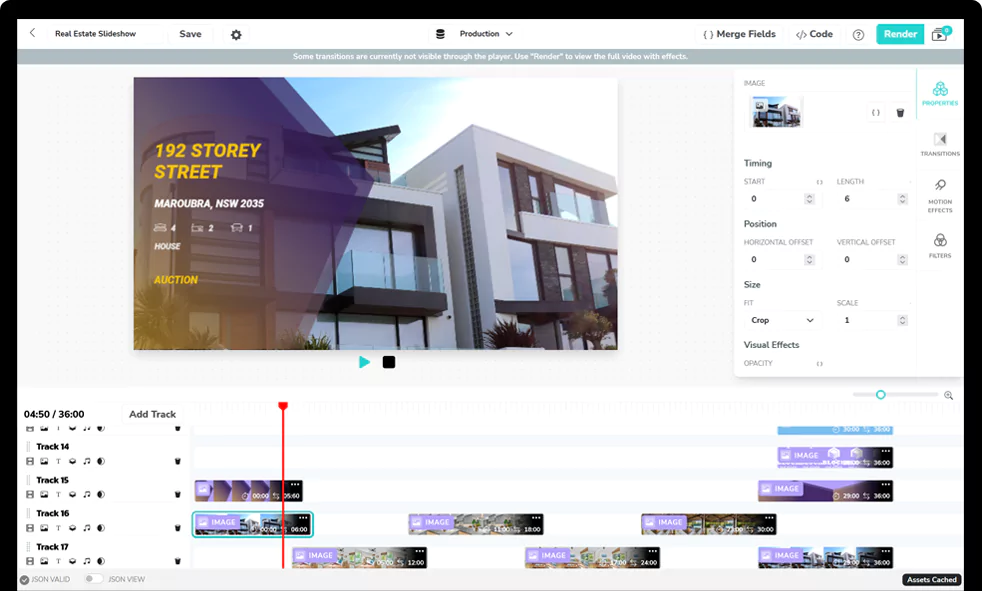
Shotstack flips the traditional video software model. Along with a dashboard with pre-made templates, Shotstack provides a cloud-based Video Editing API, which is essentially infrastructure-as-code for video production.
This means developers can build personalized video automation directly into their own applications, pipelines, and products. You generate thousands of videos in minutes using JSON to dynamically swap images, text, audio, and video clips.
Here is exactly how Shotstack separates itself from the rest of the pack:
- True Headless Automation: Because it’s API-first, it transforms any live data source—CRMs, weather feeds, sports scores, or inventory—into video. For example, a new real estate listing can instantly trigger, render, and publish a branded video tour to YouTube with zero human intervention. For a deeper look at what data-driven video can do for conversion rates, see our guide on data-driven personalization.
- The White-Label Editor SDK: Beyond a backend engine, Shotstack offers an open-source frontend video editor you can drop directly into your own app. It saves your engineering team thousands of hours while giving your users a premium, fully on-brand editing interface.
- Massive Scale and Cost Efficiency: Instead of traditional rendering queues, Shotstack uses concurrent cloud rendering to process 10 or 10,000 videos simultaneously without bottlenecks. The pricing is also flat: rendering a 4K or 60fps video costs the same as 720p or 30fps.
- The Ultimate AI Orchestrator: Shotstack’s Create API acts as the glue for modern generative AI. You can stitch together an OpenAI script, an ElevenLabs voiceover, and a D-ID avatar in a single payload. We even provide an MCP server so coding assistants like Claude or Cursor can write your video pipelines instantly, making it one of the best AI video personalization tools for marketing and beyond.
Key Features:
- API-first architecture,
- concurrent cloud rendering,
- SDKs for major languages,
- transparent usage-based pricing starting at $39/mo.
Pros:
Infinite flexibility; massive scalability; far more affordable than enterprise agency models; true white-label capability.
Verdict:
The best engine for building automated, custom video pipelines at scale. Not for non-technical users—but if you have a developer (or even a confident Zapier power user), the ceiling is essentially unlimited.
4. Vidyard: The Sales Standard
Best for:
Sales and marketing teams doing prospecting, demos, and account-based marketing.
Vidyard is about helping a single sales rep record one video that closes a deal. It’s the de facto standard tool for B2B sales teams. Their browser extension lets reps record screen shares, webcam messages, or hybrid videos and embed them directly into emails or LinkedIn messages within seconds.
Where Vidyard really earns its place is in the analytics layer. It integrates natively with HubSpot, Salesforce, and Marketo to track exactly when a prospect watches your video and for how long—giving sales reps “viewer intent data” so they can follow up at the precise moment interest is highest.
Key Features:
- Chrome extension for instant recording,
- animated GIF thumbnails for email previews,
- deep CRM analytics integration.
Pros:
Extremely intuitive. Good free tier to get started with no commitment. Removes the psychological barrier of being on camera for less experienced reps.
Verdict:
Essential for B2B sales teams, replacing cold calls with warm video outreach. Just understand that personalization here is manual and rep-driven—you can’t use it to generate 5,000 unique videos in a batch.
5. Hippo Video: The Interactive All-in-One
Best for:
Sales enablement and interactive marketing campaigns.
Hippo Video positions itself as a holistic video engagement platform—it handles hosting, recording, editing, and personalization under one roof. The real standout, though, is interactivity. Rather than a passive viewing experience, Hippo Video lets you embed clickable CTAs, lead generation forms, polls, and calendar booking links directly inside the video player, turning views into conversion events.
They’ve also invested heavily in AI, offering text-to-video generation tools that help sales reps build scripts and video flows quickly without staring at a blank page.
Key Features:
- In-video CTA buttons,
- AI script generator,
- teleprompter,
- and hyper-personalization for landing pages.
Pros:
Rich feature set for the price point. Great for driving immediate action from viewers without requiring a separate landing page build.
Verdict:
A versatile option for teams that want recording, hosting, and interactivity in one package. The breadth of features is both the appeal and the risk—it can feel overwhelming compared to tools that do one thing exceptionally well.
6. Pirsonal: The Marketer’s Friend
Best for:
Marketing teams running automated campaigns and personalized landing pages.
Pirsonal is built for flexible, no-code automation. Marketers can create dynamic video templates where scenes, text, and audio change based on user data pulled from a spreadsheet or CRM—no developer required.
Their smartest feature is “Magic Link” technology, which addresses a real cost problem: on most platforms, you pay to render a video whether the recipient watches it or not. With Pirsonal, the video renders on-demand only when the user clicks the link. For large send lists with typical open rates, this can meaningfully reduce wasted compute spend.
Key Features:
No-code template builder, render-on-demand Magic Links, personalized landing page builder.
Pros:
Smart cost management. Solid automation integrations (Zapier, etc.). Accessible for marketers without IT support.
Verdict:
A well-balanced mid-market solution. The visual output won’t match the cinematic depth of Idomoo, but for most automated campaign use cases, it doesn’t need to.
7. Sendspark: The AI Voice Cloner
Best for:
SDRs, BDRs, and high-volume outbound sales teams.
Sendspark is generating real buzz in 2026 for a specific problem it solves better than anyone else: recording 100 customized sales videos takes all day. Sendspark eliminates that bottleneck.
A rep records one base video—say, “Hi [Name], I noticed you’re hiring for sales roles…”—and Sendspark’s AI clones the rep’s voice and lip movements to generate 100 versions that each say “Hi John,” “Hi Sarah,” “Hi Mike,” with a seamless, natural delivery. The platform also supports dynamic background replacement, scrolling the prospect’s own website behind the rep to add an extra layer of personalization.
Key Features:
- AI voice and lip-sync cloning,
- dynamic background replacement,
- and integrations with Apollo and Outreach.io.
Pros:
Dramatically scales the volume of “personal” outreach. Saves hours of recording time. Native integrations with the outbound tools SDRs already use.
Verdict:
A genuine game-changer for high-volume prospecting. Know the limitations going in: the AI can hit the uncanny valley on difficult name pronunciations, and it works best for short 30-60 second intro videos rather than longer demos.
8. Bonjoro: The Human Touch
Best for:
Customer success, onboarding, and high-touch welcome workflows.
Bonjoro is the deliberate anti-automation tool. While every other platform on this list is trying to simulate human connection at scale, Bonjoro helps you deliver the real thing for the moments that matter most.
It connects to your CRM or eCommerce store and listens for specific triggers—a new trial signup, a high-value purchase, a renewal. When that trigger fires, Bonjoro pushes a notification to your phone. You tap it, record a quick 30-second video for that specific person, and hit send. It’s the kind of “unscalable” gesture that builds outsized brand loyalty—a founder personally welcoming a new customer, a CSM checking in after a big launch.
Key Features:
- Mobile-first recording workflow,
- funnel-based task management,
- branded video delivery pages.
Pros:
An authentic human connection that no AI can replicate. Affordable entry point ($15/mo). Extremely fast adoption curve.
Verdict:
Unbeatable for high-touch businesses—coaches, SaaS onboarding teams, boutique agencies—where the relationship is the product. Unscalable by design, and that’s the point.
Which Personalized Video Software Is Right for You?
The right tool depends entirely on your team structure and your goals.
- If you’re a sales rep doing 1:1 outreach and need analytics on who watched what, use Vidyard—it’s the standard for good reason.
- If you’re an enterprise with a budget for cinematic quality and full agency support, Idomoo is the gold standard.
- If you’re an SDR trying to hit aggressive daily volume targets with personalized outreach, Sendspark’s AI voice cloning is worth a serious look.
- If you’re building high-touch customer relationships where authenticity matters more than volume, Bonjoro is in a category of its own.
If, however, you’re a developer or have a technical team building a scalable product, a white-label video feature, or a custom automation pipeline, Shotstack is the only choice. It’s the only platform on this list that functions as genuine infrastructure, giving you the engine to build anything, rather than constraining you to someone else’s template library. At $39/mo to start, it’s also the most accessible path to serious scale. Get started for free today.
Frequently Asked Questions
What is personalized video software?
Personalized video software is a platform or tool that dynamically generates individual video content tailored to a specific viewer. Instead of producing one video for all recipients, the software substitutes data — such as a person’s name, location, account details, or browsing history — into a video template at render time. The result: every viewer receives a video that feels like it was created specifically for them. Use cases range from B2B sales outreach and onboarding emails to large-scale marketing campaigns and customer retention.
What is the best personalized video platform for enterprises?
For large enterprises with high-volume needs and significant budgets, Idomoo is widely considered the gold standard. Their patented “Native Personalization” technology integrates data directly into the scene at cinematic quality — not just floating text over a video. SundaySky is also a strong enterprise choice, particularly for customer experience and retention workflows in healthcare, telecom, and financial services. Both require a custom contract and a longer implementation cycle.
Can I automate personalized video creation with an API?
Yes. Shotstack is purpose-built for this. Its cloud-based Video Editing API lets developers programmatically generate thousands of unique videos by passing dynamic data (from a CRM, spreadsheet, or any data source) into a JSON template. Videos render concurrently in the cloud — so producing 10 or 10,000 personalized videos takes roughly the same time. It’s the only tool on this list that functions as true infrastructure rather than a user-facing application.
How does personalized video software work?
Most personalized video platforms operate on a template-plus-data model. A video template defines the structure — layout, scenes, music, branding — while variable data fields mark the points where individual content is injected at render time. When a campaign runs, the platform merges each recipient’s data with the template and renders a unique video for that person. More advanced systems (like Shotstack) expose this process via API, allowing developers to trigger renders from any data source and integrate the workflow directly into their own applications or pipelines.
Get started with Shotstack's video editing API in two steps:
- Sign up for free to get your API key.
- Send an API request to create your video:
curl --request POST 'https://api.shotstack.io/v1/render' \
--header 'x-api-key: YOUR_API_KEY' \
--data-raw '{
  "timeline": {
    "tracks": [
      {
        "clips": [
          {
            "asset": {
              "type": "video",
              "src": "https://shotstack-assets.s3.amazonaws.com/footage/beach-overhead.mp4"
            },
            "start": 0,
            "length": "auto"
          }
        ]
      }
    ]
  },
  "output": {
    "format": "mp4",
    "size": {
      "width": 1280,
      "height": 720
    }
  }
}'

Experience Shotstack for yourself.
- Seamless integration
- Dependable high-volume scaling
- Blazing fast rendering
- Save thousands