Creating one video is straightforward. The challenge begins when you need a different version for every product in a catalog, property in a feed, customer in a campaign or onboarding flow, listicle a publication runs, or location your business serves. Editing each one by hand quickly stops being practical.
Generating hundreds of videos in one repeatable run is feasible because you can separate the design from the changing content. With Shotstack, you create one reusable template and add merge fields wherever the text, images, colors, or other values should change. Your program then reads the dataset one row at a time and calls POST /edit/{version}/templates/render once for each video. Shotstack does not accept an entire CSV in a single Edit API request.
Keeping those responsibilities separate makes the batch easier to manage. The template controls how every video looks, the dataset supplies the content for each version, and the code handles validation, submission, status tracking, and failures. The same approach works whether the data comes from a spreadsheet, database query, CRM export, or structured output produced by an LLM.
TL;DR
- Build one Shotstack template with merge fields, then submit one template-render request per CSV row — the API does not accept a whole CSV in a single request.
- Validate every row before spending credits, and preflight the edge cases before rendering the full batch.
- This tutorial renders 100 three-second videos and records every render ID in a resumable manifest, then collects permanent hosted URLs when the renders finish.
- AI can generate the copy or source assets, but it should feed the same deterministic rendering pipeline.
This is programmatic video at its most useful: one approved design, structured inputs, and a repeatable rendering process. The same architecture is what makes personalized video at scale manageable without turning every output into a separate editing project.
This tutorial assumes that you have already rendered at least one video with Shotstack. If you haven’t, start with Render your first video with the Shotstack API, the companion guide that covers the zero-to-one path. Then return here to build the one-to-many pipeline around that first working render.
What bulk video generation looks like
The workflow has six parts:
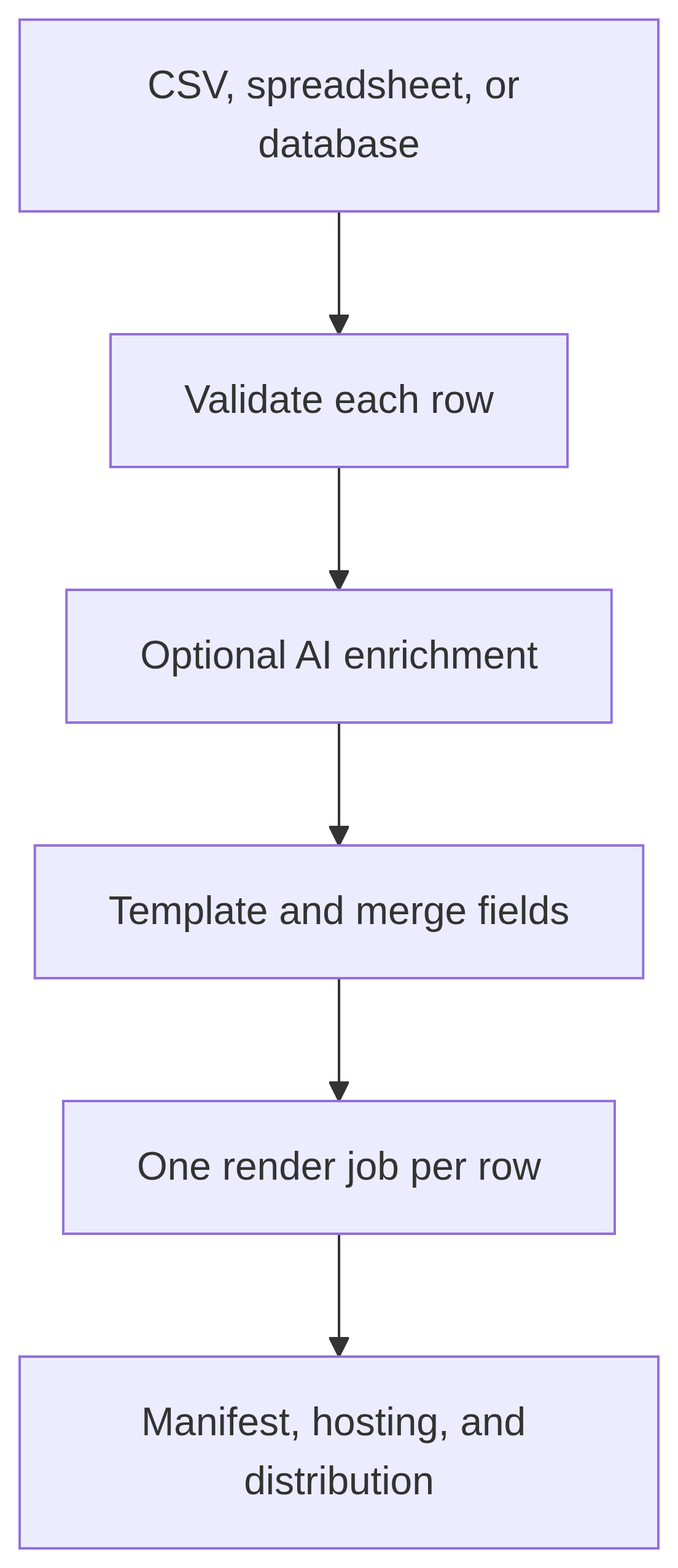
For this tutorial, we’ll create 100 vertical catalog-promotion videos. Every video uses the same three-second design, but the product name, headline, price, image, and background color change. Here is one finished video, rendered from the exact template this tutorial builds with one row of product data merged in — swap the five values and you have a different video:
This is also a useful way to separate three ideas that are often grouped under “bulk AI video generator”:
| Layer | What it does |
|---|---|
| Template rendering | Reliably assembles text and assets into finished videos |
| Generative AI | Optionally writes copy or creates images, narration, and clips |
| AI agent | Helps design, validate, or operate the pipeline |
AI is not a replacement for the template-and-data architecture. It is another possible producer of the data and assets that enter it.
What the 100-video example costs
Each output in this tutorial is three seconds long:
100 videos × 3 seconds = 300 seconds = 5 minutes
The whole batch adds up to five minutes of finished video, and rendering cost scales with output duration. Generating images, speech, or AI video assets is charged separately from rendering. Check the current Shotstack pricing and credit consumption guide for the rates on your plan before running a larger or AI-heavy batch.
Use the stage environment while developing. Sandbox videos are watermarked and require at least one available credit, while v1 creates production outputs. The sandbox supports up to 150 Edit API requests per 60 seconds, and production supports 300. Status polls count against the same Edit API limit as render submissions, so the scripts below deliberately pace every request at one per second, which is comfortably below either limit. You can review the current limits in the Shotstack documentation.
You will need:
- A Shotstack account, and stage and production API keys
- Node.js 18+ or Python 3+
- Publicly accessible HTTPS image URLs
- A terminal and a text editor
Create one reusable video template
A template is a saved Shotstack Edit. You don’t have to write it as JSON by hand: you can design the video visually in Shotstack Studio, or start from a gallery template in the dashboard, and copy the generated template ID and API snippet — merge fields work identically either way. This tutorial builds the template as JSON so every property is visible. Instead of changing the whole timeline for every product, you put placeholders in the properties that should vary:
| CSV column | Merge field | Where it is used |
|---|---|---|
product_name | {{PRODUCT_NAME}} | Main title |
headline | {{HEADLINE}} | Supporting copy |
price | {{PRICE}} | Price label |
image_url | {{IMAGE_URL}} | Image asset source |
brand_color | {{BRAND_COLOR}} | Timeline background |
row_id | None | Local correlation with the render ID |
The find value sent to the API excludes the braces. For example, a template containing {{PRICE}} receives a merge field whose find value is PRICE.
Merge replacements are not limited to strings. The current schema allows any valid JSON type, so a placeholder used for a numeric duration should be replaced with a number rather than "3". They are not limited to text either — this template merges an image URL into an asset src, and a video clip’s src can be swapped the same way. You can read more about this in the merging data guide. Merge fields also work on an inline Edit posted straight to the render endpoint, but a saved template is the right unit for a batch.
Save the following as template.json:
{
  "name": "Bulk catalog promo - 3 seconds",
  "template": {
    "timeline": {
      "background": "{{BRAND_COLOR}}",
      "tracks": [
        {
          "clips": [
            {
              "asset": {
                "type": "rich-text",
                "text": "{{PRICE}}",
                "font": {
                  "family": "Montserrat",
                  "size": 52,
                  "weight": 800,
                  "color": "#111827"
                },
                "background": {
                  "color": "#ffffff",
                  "opacity": 1,
                  "borderRadius": 24
                },
                "padding": 20,
                "align": {
                  "horizontal": "center",
                  "vertical": "middle"
                }
              },
              "start": 0,
              "length": 3,
              "width": 320,
              "height": 120,
              "position": "bottom",
              "offset": {
                "y": 0.05
              },
              "transition": {
                "in": "fade"
              }
            }
          ]
        },
        {
          "clips": [
            {
              "asset": {
                "type": "rich-text",
                "text": "{{HEADLINE}}",
                "font": {
                  "family": "Montserrat",
                  "size": 38,
                  "weight": 600,
                  "color": "#ffffff"
                },
                "align": {
                  "horizontal": "center",
                  "vertical": "middle"
                }
              },
              "start": 0,
              "length": 3,
              "width": 620,
              "height": 120,
              "position": "bottom",
              "offset": {
                "y": 0.2
              },
              "transition": {
                "in": "fade"
              }
            }
          ]
        },
        {
          "clips": [
            {
              "asset": {
                "type": "rich-text",
                "text": "{{PRODUCT_NAME}}",
                "font": {
                  "family": "Montserrat",
                  "size": 58,
                  "weight": 800,
                  "color": "#ffffff"
                },
                "align": {
                  "horizontal": "center",
                  "vertical": "middle"
                }
              },
              "start": 0,
              "length": 3,
              "width": 620,
              "height": 180,
              "position": "top",
              "offset": {
                "y": -0.08
              },
              "transition": {
                "in": "fade"
              }
            }
          ]
        },
        {
          "clips": [
            {
              "asset": {
                "type": "image",
                "src": "{{IMAGE_URL}}"
              },
              "start": 0,
              "length": 3,
              "width": 560,
              "height": 560,
              "fit": "crop",
              "position": "center",
              "offset": {
                "y": 0.04
              },
              "effect": "zoomInSlow",
              "transition": {
                "in": "fade"
              }
            }
          ]
        }
      ]
    },
    "output": {
      "format": "mp4",
      "resolution": "hd",
      "aspectRatio": "9:16",
      "fps": 25
    }
  }
}
The first track is the top visual layer, and the final track is the bottom layer. This is the reverse of the order developers often expect from CSS stacking. We’ve therefore placed the price and text tracks before the image track.
The template also uses the current rich-text and image assets. Avoid the older html and title assets, which are deprecated. The current Edit JSON conventions recommend rich-text for text, and svg for vector shapes beyond the basic rectangles, circles, and lines the shape asset covers.
One template does not have to serve every row. When segments of your audience need visibly different designs, save a template per segment, put each row’s template ID in the dataset, and branch before the submit loop — the render call itself is identical. The same trick produces multiple formats from one dataset: duplicate the template with a different output.aspectRatio (a 16:9 landscape or 1:1 square version of this 9:16 design) and render each row once per format.
Set your stage API key and create the template:
export SHOTSTACK_API_KEY="YOUR_STAGE_API_KEY"
export SHOTSTACK_ENV="stage"

curl --fail-with-body \
  --request POST \
  "https://api.shotstack.io/edit/${SHOTSTACK_ENV}/templates" \
  --header "Accept: application/json" \
  --header "Content-Type: application/json" \
  --header "x-api-key: ${SHOTSTACK_API_KEY}" \
  --data-binary @template.json
A successful request returns HTTP 201 and a response containing the template ID:
{
  "success": true,
  "message": "Created",
  "response": {
    "message": "Template Successfully Created",
    "id": "71a2030d-6b9d-4c01-8edd-4a27219959f1"
  }
}
Keep that ID. Templates belong to the environment in which you create them, so repeat the create-template request with your production key and SHOTSTACK_ENV=v1 before the final production run. The stage and production template IDs may be different.
Generate and validate the 100-row CSV
In a real application, this data might come from PostgreSQL, a product catalog, a CRM, or an LLM. We’ll use generated demo rows so the tutorial is reproducible without another service.
The resulting CSV begins like this:
row_id,product_name,headline,price,image_url,brand_color
product-001,Limited Edition Travel Backpack - XL Pro,Longest approved headline checks wrapping before launch,From $199,https://shotstack-assets.s3.amazonaws.com/images/slideshow1.jpeg,#0f766e
product-002,Mug,New,$9.00,https://shotstack-assets.s3.amazonaws.com/images/slideshow2.jpeg,#1d4ed8
product-003,"Café ""Voyager"", Édition","Built for Nairobi, Montréal, and everywhere between",From $49,https://shotstack-assets.s3.amazonaws.com/images/slideshow3.jpeg,#7c3aed
Save the following as generate-data.mjs:
import { writeFile } from 'node:fs/promises';

const imageUrls = [
  'https://shotstack-assets.s3.amazonaws.com/images/slideshow1.jpeg',
  'https://shotstack-assets.s3.amazonaws.com/images/slideshow2.jpeg',
  'https://shotstack-assets.s3.amazonaws.com/images/slideshow3.jpeg',
  'https://shotstack-assets.s3.amazonaws.com/images/slideshow4.jpeg',
  'https://shotstack-assets.s3.amazonaws.com/images/slideshow5.jpeg',
  'https://shotstack-assets.s3.amazonaws.com/images/slideshow6.jpeg',
  'https://shotstack-assets.s3.amazonaws.com/images/slideshow7.jpeg',
];

const headlines = [
  'New this week',
  'Made for everyday use',
  'A customer favorite',
  'Limited release',
  'Built to last',
];

const brandColors = ['#0f766e', '#1d4ed8', '#7c3aed', '#be123c', '#b45309'];

const preflightRows = [
  {
    row_id: 'product-001',
    product_name: 'Limited Edition Travel Backpack - XL Pro',
    headline: 'Longest approved headline checks wrapping before launch',
    price: 'From $199',
    image_url: imageUrls[0],
    brand_color: brandColors[0],
  },
  {
    row_id: 'product-002',
    product_name: 'Mug',
    headline: 'New',
    price: '$9.00',
    image_url: imageUrls[1],
    brand_color: brandColors[1],
  },
  {
    row_id: 'product-003',
    product_name: 'Café "Voyager", Édition',
    headline: 'Built for Nairobi, Montréal, and everywhere between',
    price: 'From $49',
    image_url: imageUrls[2],
    brand_color: brandColors[2],
  },
];

const csvEscape = (value) => {
  const text = String(value);
  return /[",\n]/.test(text) ? `"${text.replaceAll('"', '""')}"` : text;
};

const rows = Array.from({ length: 100 }, (_, index) => {
  const number = index + 1;

  if (index < preflightRows.length) {
    return preflightRows[index];
  }

  return {
    row_id: `product-${String(number).padStart(3, '0')}`,
    product_name: `Demo Product ${String(number).padStart(3, '0')}`,
    headline: headlines[index % headlines.length],
    price: `$${29 + ((number * 7) % 170)}.00`,
    image_url: imageUrls[index % imageUrls.length],
    brand_color: brandColors[index % brandColors.length],
  };
});

const columns = [
  'row_id',
  'product_name',
  'headline',
  'price',
  'image_url',
  'brand_color',
];

const csv = [
  columns.join(','),
  ...rows.map((row) =>
    columns.map((column) => csvEscape(row[column])).join(','),
  ),
].join('\n');

await writeFile('products.csv', `${csv}\n`, 'utf8');
console.log(`Created products.csv with ${rows.length} rows.`);
Run it:
node generate-data.mjs
You should now have products.csv with 100 data rows plus the header. The images are public Shotstack placeholder assets.
We’ll use the first three rows as a visual preflight before rendering all 100 videos. Their text values will test different edge cases, and their images will test different source shapes.
In the generated CSV file, the first three rows are deliberately awkward: one uses the maximum permitted headline and product-name lengths, one uses unusually short values, and one verifies Unicode plus CSV escaping for commas and quotation marks. Later, we’ll replace their three image URLs with extreme aspect-ratio test images: wide landscape (16:9), tall portrait (9:16), and square (1:1).
Validate before you render
The scripts in the next section reject the entire CSV before making an API request if they find:
- A missing required value
- A duplicate or unsafe
row_id - A product name longer than 40 characters
- A headline longer than 55 characters
- A price longer than 20 characters
- A non-HTTPS image URL
- An invalid six-digit hex color
Those limits are part of the design, not arbitrary API restrictions. A fixed template has to account for the longest realistic content. Test the longest product name, the longest headline, unusual image aspect ratios, and every fallback value before running the full batch.
This tutorial deliberately stops the entire batch when it finds invalid data. In a production pipeline, normalize the source data and apply approved fallback values before it reaches this validation step. A neutral fallback is better than rendering “Hello, NULL” or exposing data a customer did not expect to see. When producing personalized videos, prefer first-party data and make the personalization useful rather than invasive.
Submit one template render for every row
The current template-render request accepts a template id and an optional merge array. It does not accept a CSV file, a batch of rows, a callback, or a new destination configuration. Callback and destination settings belong to the saved template; the loop only sends the values that change.
The scripts below have three commands:
| Command | Purpose |
|---|---|
submit | Validate the CSV and queue rows without render IDs |
status | Refresh non-terminal render statuses and retrieve hosted URLs |
summary | Read the local manifest without calling an API |
Both implementations intentionally avoid an unbounded Promise.all() or thread pool. Concurrency controls how many requests are in flight, but it does not by itself enforce a per-minute limit. Explicit pacing does.
Node.js implementation
The complete code for both implementations is also available in the bulk-csv-videos example in the Shotstack cookbook.
Create a project and install the CSV parser used by the script:
npm init -y
npm install csv-parse@7
Save the following as bulk-render.mjs:
import { createHash } from 'node:crypto';
import { readFile, rename, writeFile } from 'node:fs/promises';
import { parse } from 'csv-parse/sync';

const command = process.argv[2] ?? 'submit';
const validCommands = new Set(['submit', 'status', 'summary']);

if (!validCommands.has(command)) {
  console.error('Usage: node bulk-render.mjs [submit|status|summary]');
  process.exit(1);
}

const API_KEY = process.env.SHOTSTACK_API_KEY;
const ENVIRONMENT = process.env.SHOTSTACK_ENV ?? 'stage';
const TEMPLATE_ID = process.env.SHOTSTACK_TEMPLATE_ID;
const CSV_PATH = process.env.CSV_PATH ?? 'products.csv';
const MANIFEST_PATH = process.env.MANIFEST_PATH ?? 'batch-results.json';
const REQUEST_INTERVAL_MS = Number(
  process.env.SHOTSTACK_REQUEST_INTERVAL_MS ?? '1000',
);
const ROW_LIMIT = Number(process.env.SHOTSTACK_ROW_LIMIT ?? '0');
const RETRY_FAILED = process.env.SHOTSTACK_RETRY_FAILED === 'true';
const MAX_RATE_LIMIT_RETRIES = 3;
const EDIT_BASE = (
  process.env.SHOTSTACK_EDIT_BASE ??
  `https://api.shotstack.io/edit/${ENVIRONMENT}`
).replace(/\/$/, '');
const SERVE_BASE = (
  process.env.SHOTSTACK_SERVE_BASE ??
  `https://api.shotstack.io/serve/${ENVIRONMENT}`
).replace(/\/$/, '');

if (!['stage', 'v1'].includes(ENVIRONMENT)) {
  throw new Error('SHOTSTACK_ENV must be stage or v1.');
}

if (!Number.isFinite(REQUEST_INTERVAL_MS) || REQUEST_INTERVAL_MS < 0) {
  throw new Error('SHOTSTACK_REQUEST_INTERVAL_MS must be zero or greater.');
}

if (!Number.isInteger(ROW_LIMIT) || ROW_LIMIT < 0) {
  throw new Error('SHOTSTACK_ROW_LIMIT must be a non-negative integer.');
}

if (command !== 'summary' && !API_KEY) {
  throw new Error('Set SHOTSTACK_API_KEY before running this command.');
}

if (command === 'submit' && !TEMPLATE_ID) {
  throw new Error('Set SHOTSTACK_TEMPLATE_ID before submitting renders.');
}

const sleep = (milliseconds) =>
  milliseconds > 0
    ? new Promise((resolve) => setTimeout(resolve, milliseconds))
    : Promise.resolve();

const hashRow = (row) =>
  createHash('sha256')
    .update(JSON.stringify(row, Object.keys(row).sort()))
    .digest('hex');

const responseMessage = (body) =>
  body?.response?.error ??
  body?.response?.message ??
  body?.message ??
  JSON.stringify(body);

async function parseResponse(response) {
  const text = await response.text();

  if (!text) {
    return {};
  }

  try {
    return JSON.parse(text);
  } catch {
    return { message: text };
  }
}

async function saveManifest(manifest) {
  manifest.updatedAt = new Date().toISOString();
  const temporaryPath = `${MANIFEST_PATH}.tmp`;
  await writeFile(temporaryPath, `${JSON.stringify(manifest, null, 2)}\n`);
  await rename(temporaryPath, MANIFEST_PATH);
}

async function loadManifest({ create = false } = {}) {
  try {
    const manifest = JSON.parse(await readFile(MANIFEST_PATH, 'utf8'));

    if (manifest.environment !== ENVIRONMENT) {
      throw new Error(
        `${MANIFEST_PATH} belongs to ${manifest.environment}, not ${ENVIRONMENT}.`,
      );
    }

    if (
      TEMPLATE_ID &&
      manifest.templateId &&
      manifest.templateId !== TEMPLATE_ID
    ) {
      throw new Error(`${MANIFEST_PATH} belongs to a different template.`);
    }

    return manifest;
  } catch (error) {
    if (error.code !== 'ENOENT' || !create) {
      throw error;
    }

    return {
      version: 1,
      environment: ENVIRONMENT,
      templateId: TEMPLATE_ID,
      createdAt: new Date().toISOString(),
      updatedAt: new Date().toISOString(),
      rows: [],
    };
  }
}

async function loadRows() {
  const rows = parse(await readFile(CSV_PATH, 'utf8'), {
    bom: true,
    columns: true,
    skip_empty_lines: true,
    trim: true,
  });

  const requiredColumns = [
    'row_id',
    'product_name',
    'headline',
    'price',
    'image_url',
    'brand_color',
  ];
  const seenIds = new Set();
  const errors = [];

  rows.forEach((row, index) => {
    const line = index + 2;

    for (const column of requiredColumns) {
      if (!row[column]) {
        errors.push(`Line ${line}: ${column} is required.`);
      }
    }

    if (!/^[A-Za-z0-9_-]+$/.test(row.row_id ?? '')) {
      errors.push(
        `Line ${line}: row_id may contain only letters, numbers, _ and -.`,
      );
    }

    if (seenIds.has(row.row_id)) {
      errors.push(`Line ${line}: duplicate row_id ${row.row_id}.`);
    }
    seenIds.add(row.row_id);

    if ((row.product_name ?? '').length > 40) {
      errors.push(`Line ${line}: product_name must be 40 characters or fewer.`);
    }

    if ((row.headline ?? '').length > 55) {
      errors.push(`Line ${line}: headline must be 55 characters or fewer.`);
    }

    if ((row.price ?? '').length > 20) {
      errors.push(`Line ${line}: price must be 20 characters or fewer.`);
    }

    try {
      const imageUrl = new URL(row.image_url);
      if (imageUrl.protocol !== 'https:') {
        throw new Error('not HTTPS');
      }
    } catch {
      errors.push(`Line ${line}: image_url must be a valid HTTPS URL.`);
    }

    if (!/^#[0-9A-Fa-f]{6}$/.test(row.brand_color ?? '')) {
      errors.push(`Line ${line}: brand_color must be a six-digit hex color.`);
    }
  });

  if (errors.length > 0) {
    throw new Error(`CSV validation failed:\n${errors.join('\n')}`);
  }

  return ROW_LIMIT > 0 ? rows.slice(0, ROW_LIMIT) : rows;
}

function mergeFields(row) {
  return [
    { find: 'PRODUCT_NAME', replace: row.product_name },
    { find: 'HEADLINE', replace: row.headline },
    { find: 'PRICE', replace: row.price },
    { find: 'IMAGE_URL', replace: row.image_url },
    { find: 'BRAND_COLOR', replace: row.brand_color },
  ];
}

function retryDelay(response, retryNumber) {
  const retryAfter = response.headers.get('retry-after');

  if (retryAfter && /^\d+$/.test(retryAfter)) {
    return Number(retryAfter) * 1000;
  }

  if (retryAfter) {
    const dateDelay = Date.parse(retryAfter) - Date.now();
    if (Number.isFinite(dateDelay) && dateDelay > 0) {
      return dateDelay;
    }
  }

  return 60_000 * 2 ** retryNumber;
}

async function submitTemplate(row) {
  const payload = {
    id: TEMPLATE_ID,
    merge: mergeFields(row),
  };

  for (let retry = 0; retry <= MAX_RATE_LIMIT_RETRIES; retry += 1) {
    let response;

    try {
      response = await fetch(`${EDIT_BASE}/templates/render`, {
        method: 'POST',
        headers: {
          Accept: 'application/json',
          'Content-Type': 'application/json',
          'x-api-key': API_KEY,
        },
        body: JSON.stringify(payload),
        signal: AbortSignal.timeout(30_000),
      });
    } catch (error) {
      return {
        kind: 'unknown',
        error: `No definitive API response: ${error.message}`,
      };
    }

    const body = await parseResponse(response);

    if (response.status === 429) {
      if (retry === MAX_RATE_LIMIT_RETRIES) {
        return {
          kind: 'rejected',
          statusCode: 429,
          error: responseMessage(body),
        };
      }

      const delay = retryDelay(response, retry);
      console.warn(`Rate limited. Waiting ${Math.ceil(delay / 1000)} seconds.`);
      await sleep(delay);
      continue;
    }

    if (response.status === 201 && body?.response?.id) {
      return { kind: 'accepted', renderId: body.response.id };
    }

    if (response.status >= 400 && response.status < 500) {
      return {
        kind: 'rejected',
        statusCode: response.status,
        error: responseMessage(body),
      };
    }

    return {
      kind: 'unknown',
      statusCode: response.status,
      error: `Unexpected response: ${responseMessage(body)}`,
    };
  }
}

async function submitRows() {
  const rows = await loadRows();
  const manifest = await loadManifest({ create: true });

  console.log(`Validated ${rows.length} rows from ${CSV_PATH}.`);

  for (const [index, row] of rows.entries()) {
    let entry = manifest.rows.find((item) => item.rowId === row.row_id);

    if (entry?.status === 'submitting') {
      entry.status = 'unknown';
      entry.error =
        'The previous process stopped during submission. Check the dashboard before retrying.';
      await saveManifest(manifest);
    }

    if (entry?.status === 'unknown') {
      console.warn(`[${row.row_id}] skipped: previous outcome is unknown.`);
      continue;
    }

    const canRetry =
      RETRY_FAILED &&
      (entry?.status === 'failed' || entry?.status === 'submission_failed');
    const currentHash = hashRow(row);

    if (entry?.inputHash && entry.inputHash !== currentHash && !canRetry) {
      throw new Error(
        `Row ${row.row_id} changed after its first submission. ` +
          'Use a new row_id, or retry it only after confirming the previous request failed.',
      );
    }

    if (entry?.renderId && !canRetry) {
      console.log(`[${row.row_id}] skipped: already has a render ID.`);
      continue;
    }

    if (entry?.status === 'submission_failed' && !canRetry) {
      console.log(`[${row.row_id}] skipped: set SHOTSTACK_RETRY_FAILED=true.`);
      continue;
    }

    if (!entry) {
      entry = { rowId: row.row_id, attempts: 0 };
      manifest.rows.push(entry);
    }

    if (canRetry) {
      if (entry.renderId) {
        entry.previousRenderIds = [
          ...(entry.previousRenderIds ?? []),
          entry.renderId,
        ];
      }
      delete entry.renderId;
      delete entry.temporaryUrl;
      delete entry.hostedUrl;
      delete entry.hostingStatus;
      delete entry.statusUpdatedAt;
      delete entry.completedAt;
      delete entry.submittedAt;
      delete entry.statusCode;
    }

    entry.inputHash = currentHash;
    entry.status = 'submitting';
    entry.error = null;
    entry.attempts += 1;
    entry.lastAttemptAt = new Date().toISOString();
    await saveManifest(manifest);

    const result = await submitTemplate(row);

    if (result.kind === 'accepted') {
      entry.renderId = result.renderId;
      entry.status = 'queued';
      entry.submittedAt = new Date().toISOString();
      console.log(
        `[${index + 1}/${rows.length}] ${row.row_id} -> ${result.renderId}`,
      );
    } else if (result.kind === 'rejected') {
      entry.status = 'submission_failed';
      entry.statusCode = result.statusCode;
      entry.error = result.error;
      console.error(`[${row.row_id}] rejected: ${result.error}`);
    } else {
      entry.status = 'unknown';
      entry.statusCode = result.statusCode;
      entry.error = result.error;
      console.error(`[${row.row_id}] unknown outcome: ${result.error}`);
    }

    await saveManifest(manifest);
    await sleep(REQUEST_INTERVAL_MS);
  }

  printSummary(manifest);
}

async function getJson(url) {
  const response = await fetch(url, {
    headers: {
      Accept: 'application/json',
      'x-api-key': API_KEY,
    },
    signal: AbortSignal.timeout(30_000),
  });
  const body = await parseResponse(response);
  return { response, body };
}

async function updateStatuses() {
  const manifest = await loadManifest();

  for (const entry of manifest.rows) {
    if (
      !entry.renderId ||
      entry.status === 'failed' ||
      (entry.status === 'done' && entry.hostedUrl)
    ) {
      continue;
    }

    if (entry.status !== 'done') {
      try {
        const { response, body } = await getJson(
          `${EDIT_BASE}/render/${entry.renderId}?data=false`,
        );

        if (response.ok && body?.response?.status) {
          entry.status = body.response.status;
          entry.error = body.response.error || null;
          entry.temporaryUrl = body.response.url || null;
          entry.statusUpdatedAt = body.response.updated || null;

          if (entry.status === 'done' || entry.status === 'failed') {
            entry.completedAt = body.response.updated || null;
          }
        } else {
          console.warn(
            `[${entry.rowId}] status lookup failed: ${response.status} ${responseMessage(body)}`,
          );
        }
      } catch (error) {
        console.warn(`[${entry.rowId}] status lookup failed: ${error.message}`);
      }
    }

    if (entry.status === 'done' && !entry.hostedUrl) {
      try {
        const { response, body } = await getJson(
          `${SERVE_BASE}/assets/render/${entry.renderId}`,
        );

        if (response.ok && Array.isArray(body.data)) {
          const video = body.data.find(
            (asset) =>
              asset?.attributes?.status === 'ready' &&
              asset?.attributes?.filename?.endsWith('.mp4'),
          );
          const firstAsset = body.data[0]?.attributes;

          entry.hostingStatus = video
            ? 'ready'
            : (firstAsset?.status ?? 'pending');
          entry.hostedUrl = video?.attributes?.url ?? null;
        } else {
          entry.hostingStatus = 'pending';
        }
      } catch {
        entry.hostingStatus = 'pending';
      }
    }

    await saveManifest(manifest);
    await sleep(REQUEST_INTERVAL_MS);
  }

  printSummary(manifest);
}

function printSummary(manifest) {
  const counts = {};

  for (const entry of manifest.rows) {
    counts[entry.status] = (counts[entry.status] ?? 0) + 1;
  }

  console.table(
    Object.entries(counts)
      .sort(([left], [right]) => left.localeCompare(right))
      .map(([status, count]) => ({ status, count })),
  );
  console.log(
    `Hosted videos ready: ${manifest.rows.filter((row) => row.hostedUrl).length}/${manifest.rows.length}`,
  );
}

if (command === 'submit') {
  await submitRows();
} else if (command === 'status') {
  await updateStatuses();
} else {
  printSummary(await loadManifest());
}
The manifest is written before and after each submission. It also stores a hash of the source row and refuses to reuse a submitted row_id with changed data. If the process stops after sending a request but before receiving a definitive response, that row is marked unknown instead of being resubmitted automatically. The Edit API does not document an idempotency key for template renders, so blindly retrying an uncertain POST could create a duplicate video.
The only automatic POST retry is for HTTP 429. Shotstack uses fixed 60-second rate-limit windows and recommends waiting for the current window to reset before retrying with exponential backoff.
Python implementation
The Python version uses only the standard library, so it does not require a package installation. Save it as bulk_render.py:
#!/usr/bin/env python3

import csv
import hashlib
import json
import os
import re
import sys
import time
from pathlib import Path
from urllib.error import HTTPError, URLError
from urllib.parse import urlparse
from urllib.request import Request, urlopen


COMMAND = sys.argv[1] if len(sys.argv) > 1 else "submit"
VALID_COMMANDS = {"submit", "status", "summary"}

if COMMAND not in VALID_COMMANDS:
    raise SystemExit("Usage: python3 bulk_render.py [submit|status|summary]")

API_KEY = os.environ.get("SHOTSTACK_API_KEY")
ENVIRONMENT = os.environ.get("SHOTSTACK_ENV", "stage")
TEMPLATE_ID = os.environ.get("SHOTSTACK_TEMPLATE_ID")
CSV_PATH = Path(os.environ.get("CSV_PATH", "products.csv"))
MANIFEST_PATH = Path(os.environ.get("MANIFEST_PATH", "batch-results.json"))
REQUEST_INTERVAL_MS = int(os.environ.get("SHOTSTACK_REQUEST_INTERVAL_MS", "1000"))
ROW_LIMIT = int(os.environ.get("SHOTSTACK_ROW_LIMIT", "0"))
RETRY_FAILED = os.environ.get("SHOTSTACK_RETRY_FAILED") == "true"
MAX_RATE_LIMIT_RETRIES = 3
EDIT_BASE = os.environ.get(
    "SHOTSTACK_EDIT_BASE", f"https://api.shotstack.io/edit/{ENVIRONMENT}"
).rstrip("/")
SERVE_BASE = os.environ.get(
    "SHOTSTACK_SERVE_BASE", f"https://api.shotstack.io/serve/{ENVIRONMENT}"
).rstrip("/")

if ENVIRONMENT not in {"stage", "v1"}:
    raise SystemExit("SHOTSTACK_ENV must be stage or v1.")

if REQUEST_INTERVAL_MS < 0:
    raise SystemExit("SHOTSTACK_REQUEST_INTERVAL_MS must be zero or greater.")

if ROW_LIMIT < 0:
    raise SystemExit("SHOTSTACK_ROW_LIMIT must be a non-negative integer.")

if COMMAND != "summary" and not API_KEY:
    raise SystemExit("Set SHOTSTACK_API_KEY before running this command.")

if COMMAND == "submit" and not TEMPLATE_ID:
    raise SystemExit("Set SHOTSTACK_TEMPLATE_ID before submitting renders.")


def sleep_between_requests():
    if REQUEST_INTERVAL_MS > 0:
        time.sleep(REQUEST_INTERVAL_MS / 1000)


def row_hash(row):
    payload = json.dumps(
        row,
        sort_keys=True,
        separators=(",", ":"),
        ensure_ascii=False,
    ).encode("utf-8")
    return hashlib.sha256(payload).hexdigest()


def response_message(body):
    if not isinstance(body, dict):
        return str(body)
    response = body.get("response")
    if isinstance(response, dict):
        return response.get("error") or response.get("message") or str(response)
    return body.get("message") or str(body)


def save_manifest(manifest):
    manifest["updatedAt"] = time.strftime("%Y-%m-%dT%H:%M:%SZ", time.gmtime())
    temporary_path = MANIFEST_PATH.with_name(f"{MANIFEST_PATH.name}.tmp")
    temporary_path.write_text(
        json.dumps(manifest, indent=2) + "\n", encoding="utf-8"
    )
    os.replace(temporary_path, MANIFEST_PATH)


def load_manifest(create=False):
    if MANIFEST_PATH.exists():
        manifest = json.loads(MANIFEST_PATH.read_text(encoding="utf-8"))

        if manifest.get("environment") != ENVIRONMENT:
            raise RuntimeError(
                f"{MANIFEST_PATH} belongs to {manifest.get('environment')}, "
                f"not {ENVIRONMENT}."
            )

        if (
            TEMPLATE_ID
            and manifest.get("templateId")
            and manifest["templateId"] != TEMPLATE_ID
        ):
            raise RuntimeError(f"{MANIFEST_PATH} belongs to a different template.")

        return manifest

    if not create:
        raise FileNotFoundError(MANIFEST_PATH)

    now = time.strftime("%Y-%m-%dT%H:%M:%SZ", time.gmtime())
    return {
        "version": 1,
        "environment": ENVIRONMENT,
        "templateId": TEMPLATE_ID,
        "createdAt": now,
        "updatedAt": now,
        "rows": [],
    }


def load_rows():
    with CSV_PATH.open(newline="", encoding="utf-8-sig") as csv_file:
        rows = list(csv.DictReader(csv_file))

    required_columns = [
        "row_id",
        "product_name",
        "headline",
        "price",
        "image_url",
        "brand_color",
    ]
    seen_ids = set()
    errors = []

    for index, row in enumerate(rows, start=2):
        for column in required_columns:
            if not row.get(column):
                errors.append(f"Line {index}: {column} is required.")

        row_id = row.get("row_id", "")
        if not re.fullmatch(r"[A-Za-z0-9_-]+", row_id):
            errors.append(
                f"Line {index}: row_id may contain only letters, numbers, _ and -."
            )

        if row_id in seen_ids:
            errors.append(f"Line {index}: duplicate row_id {row_id}.")
        seen_ids.add(row_id)

        if len(row.get("product_name", "")) > 40:
            errors.append(
                f"Line {index}: product_name must be 40 characters or fewer."
            )

        if len(row.get("headline", "")) > 55:
            errors.append(f"Line {index}: headline must be 55 characters or fewer.")

        if len(row.get("price", "")) > 20:
            errors.append(f"Line {index}: price must be 20 characters or fewer.")

        image_url = urlparse(row.get("image_url", ""))
        if image_url.scheme != "https" or not image_url.netloc:
            errors.append(f"Line {index}: image_url must be a valid HTTPS URL.")

        if not re.fullmatch(r"#[0-9A-Fa-f]{6}", row.get("brand_color", "")):
            errors.append(
                f"Line {index}: brand_color must be a six-digit hex color."
            )

    if errors:
        raise ValueError("CSV validation failed:\n" + "\n".join(errors))

    return rows[:ROW_LIMIT] if ROW_LIMIT > 0 else rows


def merge_fields(row):
    return [
        {"find": "PRODUCT_NAME", "replace": row["product_name"]},
        {"find": "HEADLINE", "replace": row["headline"]},
        {"find": "PRICE", "replace": row["price"]},
        {"find": "IMAGE_URL", "replace": row["image_url"]},
        {"find": "BRAND_COLOR", "replace": row["brand_color"]},
    ]


def request_json(method, url, payload=None):
    data = json.dumps(payload).encode() if payload is not None else None
    headers = {
        "Accept": "application/json",
        "x-api-key": API_KEY,
    }
    if data is not None:
        headers["Content-Type"] = "application/json"

    request = Request(url, data=data, headers=headers, method=method)

    try:
        with urlopen(request, timeout=30) as response:
            text = response.read().decode()
            body = json.loads(text) if text else {}
            return response.status, body, response.headers
    except HTTPError as error:
        text = error.read().decode()
        try:
            body = json.loads(text) if text else {}
        except json.JSONDecodeError:
            body = {"message": text}
        return error.code, body, error.headers


def retry_delay(headers, retry_number):
    retry_after = headers.get("Retry-After") if headers else None
    if retry_after and retry_after.isdigit():
        return int(retry_after)
    return 60 * (2**retry_number)


def submit_template(row):
    payload = {"id": TEMPLATE_ID, "merge": merge_fields(row)}

    for retry in range(MAX_RATE_LIMIT_RETRIES + 1):
        try:
            status_code, body, headers = request_json(
                "POST", f"{EDIT_BASE}/templates/render", payload
            )
        except (URLError, TimeoutError, OSError) as error:
            return {
                "kind": "unknown",
                "error": f"No definitive API response: {error}",
            }

        if status_code == 429:
            if retry == MAX_RATE_LIMIT_RETRIES:
                return {
                    "kind": "rejected",
                    "statusCode": 429,
                    "error": response_message(body),
                }
            delay = retry_delay(headers, retry)
            print(f"Rate limited. Waiting {delay} seconds.", file=sys.stderr)
            time.sleep(delay)
            continue

        render_id = (
            body.get("response", {}).get("id") if isinstance(body, dict) else None
        )
        if status_code == 201 and render_id:
            return {"kind": "accepted", "renderId": render_id}

        if 400 <= status_code < 500:
            return {
                "kind": "rejected",
                "statusCode": status_code,
                "error": response_message(body),
            }

        return {
            "kind": "unknown",
            "statusCode": status_code,
            "error": f"Unexpected response: {response_message(body)}",
        }

    raise RuntimeError("Unreachable")


def submit_rows():
    rows = load_rows()
    manifest = load_manifest(create=True)
    print(f"Validated {len(rows)} rows from {CSV_PATH}.")

    for index, row in enumerate(rows, start=1):
        entry = next(
            (item for item in manifest["rows"] if item["rowId"] == row["row_id"]),
            None,
        )

        if entry and entry.get("status") == "submitting":
            entry["status"] = "unknown"
            entry["error"] = (
                "The previous process stopped during submission. "
                "Check the dashboard before retrying."
            )
            save_manifest(manifest)

        if entry and entry.get("status") == "unknown":
            print(
                f"[{row['row_id']}] skipped: previous outcome is unknown.",
                file=sys.stderr,
            )
            continue

        can_retry = RETRY_FAILED and entry and entry.get("status") in {
            "failed",
            "submission_failed",
        }
        current_hash = row_hash(row)

        if (
            entry
            and entry.get("inputHash")
            and entry["inputHash"] != current_hash
            and not can_retry
        ):
            raise RuntimeError(
                f"Row {row['row_id']} changed after its first submission. "
                "Use a new row_id, or retry it only after confirming the "
                "previous request failed."
            )

        if entry and entry.get("renderId") and not can_retry:
            print(f"[{row['row_id']}] skipped: already has a render ID.")
            continue

        if (
            entry
            and entry.get("status") == "submission_failed"
            and not can_retry
        ):
            print(
                f"[{row['row_id']}] skipped: set SHOTSTACK_RETRY_FAILED=true."
            )
            continue

        if entry is None:
            entry = {"rowId": row["row_id"], "attempts": 0}
            manifest["rows"].append(entry)

        if can_retry:
            if entry.get("renderId"):
                entry["previousRenderIds"] = [
                    *entry.get("previousRenderIds", []),
                    entry["renderId"],
                ]
            entry.pop("renderId", None)
            entry.pop("temporaryUrl", None)
            entry.pop("hostedUrl", None)
            entry.pop("hostingStatus", None)
            entry.pop("statusUpdatedAt", None)
            entry.pop("completedAt", None)
            entry.pop("submittedAt", None)
            entry.pop("statusCode", None)

        entry["inputHash"] = current_hash
        entry["status"] = "submitting"
        entry["error"] = None
        entry["attempts"] = entry.get("attempts", 0) + 1
        entry["lastAttemptAt"] = time.strftime(
            "%Y-%m-%dT%H:%M:%SZ", time.gmtime()
        )
        save_manifest(manifest)

        result = submit_template(row)

        if result["kind"] == "accepted":
            entry["renderId"] = result["renderId"]
            entry["status"] = "queued"
            entry["submittedAt"] = time.strftime(
                "%Y-%m-%dT%H:%M:%SZ", time.gmtime()
            )
            print(
                f"[{index}/{len(rows)}] {row['row_id']} -> {result['renderId']}"
            )
        elif result["kind"] == "rejected":
            entry["status"] = "submission_failed"
            entry["statusCode"] = result.get("statusCode")
            entry["error"] = result["error"]
            print(
                f"[{row['row_id']}] rejected: {result['error']}",
                file=sys.stderr,
            )
        else:
            entry["status"] = "unknown"
            entry["statusCode"] = result.get("statusCode")
            entry["error"] = result["error"]
            print(
                f"[{row['row_id']}] unknown outcome: {result['error']}",
                file=sys.stderr,
            )

        save_manifest(manifest)
        sleep_between_requests()

    print_summary(manifest)


def update_statuses():
    manifest = load_manifest()

    for entry in manifest["rows"]:
        if (
            not entry.get("renderId")
            or entry.get("status") == "failed"
            or (entry.get("status") == "done" and entry.get("hostedUrl"))
        ):
            continue

        if entry.get("status") != "done":
            try:
                status_code, body, _ = request_json(
                    "GET",
                    f"{EDIT_BASE}/render/{entry['renderId']}?data=false",
                )
                response = body.get("response", {}) if isinstance(body, dict) else {}

                if 200 <= status_code < 300 and response.get("status"):
                    entry["status"] = response["status"]
                    entry["error"] = response.get("error") or None
                    entry["temporaryUrl"] = response.get("url")
                    entry["statusUpdatedAt"] = response.get("updated")

                    if entry["status"] in {"done", "failed"}:
                        entry["completedAt"] = response.get("updated")
                else:
                    print(
                        f"[{entry['rowId']}] status lookup failed: "
                        f"{status_code} {response_message(body)}",
                        file=sys.stderr,
                    )
            except (URLError, TimeoutError, OSError) as error:
                print(
                    f"[{entry['rowId']}] status lookup failed: {error}",
                    file=sys.stderr,
                )

        if entry.get("status") == "done" and not entry.get("hostedUrl"):
            try:
                status_code, body, _ = request_json(
                    "GET",
                    f"{SERVE_BASE}/assets/render/{entry['renderId']}",
                )
                assets = body.get("data", []) if isinstance(body, dict) else []

                if 200 <= status_code < 300 and isinstance(assets, list):
                    video = next(
                        (
                            asset.get("attributes", {})
                            for asset in assets
                            if asset.get("attributes", {}).get("status") == "ready"
                            and asset.get("attributes", {})
                            .get("filename", "")
                            .endswith(".mp4")
                        ),
                        None,
                    )
                    first_asset = (
                        assets[0].get("attributes", {}) if assets else {}
                    )
                    entry["hostingStatus"] = (
                        "ready" if video else first_asset.get("status", "pending")
                    )
                    entry["hostedUrl"] = video.get("url") if video else None
                else:
                    entry["hostingStatus"] = "pending"
            except (URLError, TimeoutError, OSError):
                entry["hostingStatus"] = "pending"

        save_manifest(manifest)
        sleep_between_requests()

    print_summary(manifest)


def print_summary(manifest):
    counts = {}
    for entry in manifest["rows"]:
        status = entry.get("status", "unknown")
        counts[status] = counts.get(status, 0) + 1

    print("status\tcount")
    for status in sorted(counts):
        print(f"{status}\t{counts[status]}")

    hosted = sum(bool(row.get("hostedUrl")) for row in manifest["rows"])
    print(f"Hosted videos ready: {hosted}/{len(manifest['rows'])}")


if COMMAND == "submit":
    submit_rows()
elif COMMAND == "status":
    update_statuses()
else:
    print_summary(load_manifest())
Use either implementation for a batch, then keep using that implementation for the rest of the run. Both use the same manifest fields, but running two submitters at once can still create duplicate requests.
Preflight three rows before submitting 100
Do not make the complete CSV your first visual test. A valid API payload can still produce an ugly video if text wraps badly or an image crop hides the important part.
The data generator deliberately puts the maximum-length text case, the shortest-text case, and the Unicode/CSV-escaping case in rows 1-3. Replace the image URLs of the three rows with the links of the following images:
- Row 1: a wide landscape image, 1920 × 1080 px (16:9)
- Row 2: a tall portrait image, 1080 × 1920 px (9:16)
- Row 3: a square image (1:1)
This checks whether the template’s fit: "crop" setting crops all three shapes acceptably inside its fixed 560 × 560 image area.
For the Node.js version, export the stage template ID and render only three rows:
export SHOTSTACK_API_KEY="YOUR_STAGE_API_KEY"
export SHOTSTACK_ENV="stage"
export SHOTSTACK_TEMPLATE_ID="YOUR_STAGE_TEMPLATE_ID"
export SHOTSTACK_ROW_LIMIT="3"
export MANIFEST_PATH="batch-results-stage.json"

node bulk-render.mjs submit
node bulk-render.mjs status
For Python, use the same environment variables and replace the final two commands:
python3 bulk_render.py submit
python3 bulk_render.py status
The first status pass may find a render still queued or rendering. Wait a short while and run status again until the three rows are done or failed.
Check:
- The longest text does not clip or overlap.
- Square, portrait, and landscape images crop acceptably.
- The short values do not leave the layout looking unbalanced.
- The accented characters, comma, and quotation marks render correctly.
- Every price is legible.
- The background color gives enough text contrast.
- The manifest maps each
rowIdto the correctrenderId. hostedUrlis present after the default hosting transfer finishes.
The fit: "crop" setting keeps different source aspect ratios inside the fixed image box while preserving their proportions. If showing the entire image matters more than filling the box, change it to contain and decide how you want to handle the empty space.
Run the 100-video production batch
Once the three test cases are correct, create the same template in v1, switch to the production key and template ID, remove the row limit, and use a new manifest:
export SHOTSTACK_API_KEY="YOUR_PRODUCTION_API_KEY"
export SHOTSTACK_ENV="v1"
export SHOTSTACK_TEMPLATE_ID="YOUR_PRODUCTION_TEMPLATE_ID"
export MANIFEST_PATH="batch-results-v1.json"
unset SHOTSTACK_ROW_LIMIT

time node bulk-render.mjs submit
Or with Python:
time python3 bulk_render.py submit
You should see a similar output:
┌─────────┬──────────┬───────┐
│ (index) │ status   │ count │
├─────────┼──────────┼───────┤
│ 0       │ 'done'   │ 3     │
│ 1       │ 'queued' │ 97    │
└─────────┴──────────┴───────┘
Hosted videos ready: 3/100

real	3m28.835s
user	0m1.891s
sys	0m0.552s
At the default one-request-per-second pace, submitting 100 rows takes roughly 100 seconds, plus request latency and any rate-limit retries. Submission time is not render completion time: each accepted response only means the render has been queued.
Run a status pass after the submissions:
node bulk-render.mjs status
Or:
python3 bulk_render.py status
Below, we can see that all 100 videos are done rendering and they all rendered successfully:
┌─────────┬────────┬───────┐
│ (index) │ status │ count │
├─────────┼────────┼───────┤
│ 0       │ 'done' │ 100   │
└─────────┴────────┴───────┘
Hosted videos ready: 100/100
A fully completed batch reports 100 done renders and 100 ready hosted videos. If you check the batch-results-v1.json file, you’ll see data on the 100 rendered video, similar to:
{
  "rowId": "product-004",
  "attempts": 1,
  "inputHash": "364912946293253383caa9611a6afb79a3242887b1b30c539f8ea07e593242b2",
  "status": "done",
  "error": null,
  "lastAttemptAt": "2026-08-04T22:51:08.168Z",
  "renderId": "e5137cb6-5792-470e-84d9-152640483d33",
  "submittedAt": "2026-08-04T22:51:11.674Z",
  "temporaryUrl": "https://shotstack-api-v1-output.s3-ap-southeast-2.amazonaws.com/q5sxmwnv7f/e5137cb6-5792-470e-84d9-152640483d33.mp4",
  "statusUpdatedAt": "2026-08-04T22:51:17.261Z",
  "completedAt": "2026-08-04T22:51:17.261Z",
  "hostingStatus": "ready",
  "hostedUrl": "https://cdn.shotstack.io/au/v1/q5sxmwnv7f/e5137cb6-5792-470e-84d9-152640483d33.mp4"
}
The current Edit API exposes these statuses:
| Status | Meaning |
|---|---|
queued | Waiting for a renderer |
fetching | Downloading source assets |
generating | Generative AI assets are being created |
preprocessing | Preparing video assets for compatibility |
rendering | Compositing the output |
saving | Writing the rendered file |
done | Render completed |
failed | Render could not be completed |
The scripts check pending jobs sequentially at the same conservative pace, passing data=false so the status response omits the full edit JSON — the parameter currently defaults to true, though the docs mark that default as deprecated. This bounded polling is convenient for a local tutorial. For an application that continuously renders hundreds or thousands of videos, use webhooks instead.
Nothing about the pipeline changes at larger scale. Rendering 1,000 videos instead of 100 is the same loop with a longer runtime — the validation, manifest, pacing, and retry rules carry over unchanged, and because the request ceilings are per minute, a bigger batch simply takes proportionally longer at the same pace. If you need more throughput than the published limits allow, contact Shotstack about raising them.
Use webhooks in a production application
Add the callback URL to the saved Edit template, not the body sent to /templates/render. When a render finishes or fails, Shotstack posts a payload containing its render ID and status. Use the render ID to find the corresponding row in your manifest or database.
A production webhook handler should:
- Return a successful response quickly and move longer work to a queue.
- Be ready for several callbacks arriving close together.
- Handle retries without processing the same render twice.
- Verify important events by requesting the render with your API key.
Shotstack currently does not sign Edit API webhook payloads, so the verification step is important when a callback triggers customer-facing or sensitive work.
Keep the batch resumable and retry only confirmed failures
The manifest is what makes the loop safe to resume. Each entry records the input hash, attempt count, render ID, render status, latest status-update time, completion time, temporary URL, and hosted URL.
If you rerun submit, rows that already have a render ID are skipped. If Shotstack definitely rejects a request, it is marked submission_failed. If a render reaches failed, correct its data or source asset and resubmit only failed entries:
export SHOTSTACK_RETRY_FAILED="true"
node bulk-render.mjs submit
unset SHOTSTACK_RETRY_FAILED
For Python:
export SHOTSTACK_RETRY_FAILED="true"
python3 bulk_render.py submit
unset SHOTSTACK_RETRY_FAILED
The previous render ID is retained in previousRenderIds, which gives you an audit trail.
Do not automatically retry an unknown entry. That status means the client did not receive enough information to know whether the API accepted the request. Check the Shotstack dashboard or reconcile it with your own logs before deciding whether to resubmit.
Store and distribute the finished videos
The Edit API’s completed render response includes a temporary URL that expires after 24 hours. By default, Shotstack also copies rendered assets to its permanent hosting service and CDN. The status scripts call GET /serve/{version}/assets/render/{id} and save the ready MP4 URL as hostedUrl. There can be a short delay between an Edit render reaching done and the hosted asset becoming ready.
If you prefer your own storage or a supported publishing destination, configure one such as Amazon S3, Google Cloud Storage, Azure Blob Storage, Google Drive, Akamai NetStorage, Vimeo, or TikTok in the template’s output.destinations. The TikTok destination is currently in beta, and Shotstack does not recommend using it in production workflows yet. Destination credentials are configured separately. Because the template-render body only accepts id and merge, any dynamic filename or prefix must be represented by a placeholder inside the saved template and replaced through a merge field.
See the destinations documentation and Serve API guide for the available providers and asset lookup behavior.
Shotstack hosting is enabled by default, even when you add another destination. If you explicitly exclude the Shotstack destination, the scripts’ Serve lookup will remain pending; collect the URL or asset identifier returned by your chosen destination instead.
A webhook is a completion notification, not a social publishing system. To auto-post a finished video, use a supported destination or pass its hosted URL to the social platform’s API, Zapier, Make, or your own job worker.
Where AI belongs in a bulk video pipeline
The core example uses an ordinary CSV because deterministic inputs are easier to validate, rerun, and price. An AI-powered version keeps the same render loop and adds a preprocessing stage.
For example, an LLM could receive a product record and return:
| Field | Constraint |
|---|---|
product_name | Existing catalog value; do not rewrite |
headline | At most 55 characters |
image_url | One URL from an approved asset list |
brand_color | One approved six-digit hex color |
Ask the model for structured output, validate it with the same rules as imported CSV data, and write the accepted values to the dataset. Do not let an LLM invent asset URLs. Give it an allowlist, or generate and upload the asset first so the model receives a real public URL.
The same rule applies to AI-created images, clips, and voiceovers:
- Generate the asset.
- Wait until the asset is ready.
- Store or cache its public URL.
- Validate the completed row.
- Submit the deterministic template render.
This separation prevents an intermittent model failure from being confused with a video-rendering failure. It also lets you reuse an expensive generated asset across several videos. If you are still choosing a generative service for this stage, see our comparison of AI video generator APIs.
Shotstack supports AI asset generation directly in the Edit API through asset types such as text-to-image, image-to-video, and text-to-speech. AI generation has separate credit costs, including in the sandbox, so estimate the complete pipeline rather than only the final three-second render.
Add an AI step to the pipeline
AI can enter this pipeline in two places. The first is inside the template itself.
Shotstack’s generative assets are ordinary template assets, so merge fields work on them like everything else. Add a text-to-speech clip with its own placeholder, put a narration line in each row of the dataset, and every video gets its own voiceover:
{
  "asset": {
    "type": "text-to-speech",
    "text": "{{VOICEOVER}}",
    "voice": "Joanna"
  },
  "start": 0,
  "length": "auto"
}
The same works for images. A text-to-image asset takes its prompt from the dataset, so each row can generate its own background instead of pointing at a stock photo:
{
  "asset": {
    "type": "text-to-image",
    "prompt": "{{IMAGE_PROMPT}}",
    "width": 1280,
    "height": 720
  },
  "start": 0,
  "length": 3
}
Add the new columns to the CSV, add the matching merge fields to the submit loop, and nothing else changes. The assets are generated during the render, with their own generation costs on your Shotstack account.
These assets generate media. They do not write your data. The headline, the narration line, and the image prompt still come from the dataset. When the words themselves should come from AI, put a language model in front of the pipeline — and treat its output like any other input that needs validating.
The script below does that with Claude, Anthropic’s LLM. It sends the product rows to the model and asks for two things per row: a marketing headline, capped at the same 55 characters the validator enforces, and an image prompt for the text-to-image asset above. The response comes back as structured JSON against a schema. Every value is checked with the same rules as any other input. A row whose headline fails keeps its original one, and a row whose prompt fails gets a plain fallback prompt built from the product name. The output is a new CSV with an image_prompt column added. The render loop does not change at all.
Save the following as generate-data-ai.mjs (it reuses the csv-parse package installed earlier and needs an Anthropic API key):
import { readFile, writeFile } from 'node:fs/promises';
import { parse } from 'csv-parse/sync';

const API_KEY = process.env.ANTHROPIC_API_KEY;
const MODEL = process.env.ANTHROPIC_MODEL ?? 'claude-opus-5';
const CSV_IN = process.env.CSV_PATH ?? 'products.csv';
const CSV_OUT = process.env.CSV_AI_PATH ?? 'products-ai.csv';
const MAX_HEADLINE_LENGTH = 55;
const MAX_PROMPT_LENGTH = 300;

if (!API_KEY) {
  throw new Error('Set ANTHROPIC_API_KEY before running this script.');
}

const rows = parse(await readFile(CSV_IN, 'utf8'), {
  bom: true,
  columns: true,
  skip_empty_lines: true,
  trim: true,
});

const schema = {
  type: 'object',
  properties: {
    headlines: {
      type: 'array',
      items: {
        type: 'object',
        properties: {
          row_id: { type: 'string' },
          headline: {
            type: 'string',
            description: `Marketing headline, ${MAX_HEADLINE_LENGTH} characters or fewer`,
          },
          image_prompt: {
            type: 'string',
            description: `Text-to-image prompt for a product background, ${MAX_PROMPT_LENGTH} characters or fewer`,
          },
        },
        required: ['row_id', 'headline', 'image_prompt'],
        additionalProperties: false,
      },
    },
  },
  required: ['headlines'],
  additionalProperties: false,
};

const products = rows.map(({ row_id, product_name, price }) => ({
  row_id,
  product_name,
  price,
}));

const response = await fetch('https://api.anthropic.com/v1/messages', {
  method: 'POST',
  headers: {
    'content-type': 'application/json',
    'x-api-key': API_KEY,
    'anthropic-version': '2023-06-01',
  },
  body: JSON.stringify({
    model: MODEL,
    max_tokens: 16000,
    output_config: {
      effort: 'low',
      format: { type: 'json_schema', schema },
    },
    messages: [
      {
        role: 'user',
        content: [
          'For each product below, write one short marketing headline and one text-to-image prompt.',
          `Every headline must be ${MAX_HEADLINE_LENGTH} characters or fewer, plain text, no quotes or emoji.`,
          `Every image prompt must be ${MAX_PROMPT_LENGTH} characters or fewer and describe a clean product background photo.`,
          'Return exactly one entry per row_id.',
          '',
          JSON.stringify(products),
        ].join('\n'),
      },
    ],
  }),
  signal: AbortSignal.timeout(120_000),
});

if (!response.ok) {
  throw new Error(`Anthropic API error ${response.status}: ${await response.text()}`);
}

const body = await response.json();

if (body.stop_reason === 'refusal') {
  throw new Error('The model declined the request; keep the original headlines.');
}
if (body.stop_reason === 'max_tokens') {
  throw new Error('The response was truncated. Raise max_tokens or send fewer rows.');
}

const text = body.content.find((block) => block.type === 'text')?.text ?? '{}';
const generated = new Map(
  (JSON.parse(text).headlines ?? []).map((item) => [item.row_id, item]),
);

// Validate the model's output with the same rules as any other input.
let headlines = 0;
let prompts = 0;
for (const row of rows) {
  const item = generated.get(row.row_id);
  const headline = item?.headline?.trim();
  const imagePrompt = item?.image_prompt?.trim();

  if (headline && headline.length <= MAX_HEADLINE_LENGTH) {
    row.headline = headline;
    headlines += 1;
  }

  if (imagePrompt && imagePrompt.length <= MAX_PROMPT_LENGTH) {
    row.image_prompt = imagePrompt;
    prompts += 1;
  } else {
    // Deterministic fallback so the text-to-image asset always has a prompt.
    row.image_prompt = `Studio product photo of ${row.product_name} on a plain background`;
  }
}

const columns = ['row_id', 'product_name', 'headline', 'price', 'image_url', 'brand_color', 'image_prompt'];
const csvEscape = (value) => {
  const textValue = String(value);
  return /[",\n]/.test(textValue) ? `"${textValue.replaceAll('"', '""')}"` : textValue;
};
const csv = [
  columns.join(','),
  ...rows.map((row) => columns.map((column) => csvEscape(row[column])).join(',')),
].join('\n');

await writeFile(CSV_OUT, `${csv}\n`, 'utf8');
console.log(
  `Wrote ${CSV_OUT}: ${headlines}/${rows.length} headlines and ${prompts}/${rows.length} image prompts AI-generated.`,
);
Run it, then point the render script at the new dataset:
export ANTHROPIC_API_KEY="YOUR_ANTHROPIC_API_KEY"
node generate-data-ai.mjs
CSV_PATH=products-ai.csv node bulk-render.mjs submit
Nothing downstream changes. The same validation, submission, and manifest logic processes the AI-written rows. The model call is billed by Anthropic, separately from your Shotstack usage. If a row comes back over the limit or missing, the script falls back to a safe value instead of failing the batch. The deterministic pipeline stays in charge. The LLM is just another data source it validates.
This is where the two AIs connect. Claude writes the prompt into the CSV, the merge field carries it into the template, and Shotstack’s text-to-image asset turns it into that row’s background during the render. One model writes the words, the other generates the media, and the pipeline validates everything that passes between them.
Use an AI agent to build and operate the pipeline
An agent is useful here, but its best role is to work on the pipeline rather than hide it.
The Shotstack MCP server gives MCP-compatible clients tools for reading Shotstack conventions, creating and inspecting templates, rendering a template, and checking render status. It can help Claude, Codex, Cursor, or another coding agent:
- Check the current schema before editing
template.json - Create or inspect the reusable template
- Render and review a small preflight sample
- Generate the Node.js or Python batch program
- Diagnose failed rows from the manifest
The MCP server is currently beta, and its documented render_template operation renders one template invocation. It is not a separate CSV bulk endpoint. For a repeatable production batch, have the agent generate, review, and run a controlled script like the one above instead of asking it to make 100 opaque tool calls.
A useful agent instruction is:
Read the current Shotstack authoring guide and OpenAPI schema. Validate
template.json, inspect the three preflight rows, and reviewbulk-render.mjsfor current endpoints, explicit request pacing, resumability, and ambiguous POST handling. Do not submit production renders until I approve the preflight results.
Which one to use depends on where the agent runs. A coding agent with a shell — Claude Code, Cursor — is better served by the Shotstack CLI and its skill: the skill loads the current conventions automatically, and shotstack validate checks an Edit offline before it costs credits. A chat client without a shell, such as Claude Desktop, uses the MCP server instead — have it read the conventions guide before it writes any JSON. For setup, see How to connect Shotstack to AI tools with MCP.
Choose between code, automation tools, and MCP
You do not always need to own the submission loop. The right path depends on where the data lives and how much control the application needs.
| Approach | Best for | How rows enter | Main trade-off |
|---|---|---|---|
| Direct Edit API | Applications, scheduled jobs, and custom production systems | CSV, database, queue, or any code-readable source | Most control; you own validation and orchestration |
| Zapier or Make | Event-driven business automations | Spreadsheet row or application trigger | Convenient, but task usage can grow with volume |
| MCP and an AI agent | Development and supervised operation | Agent tools or an agent-run script | Excellent assistance; not a dedicated batch API |
The no-code path with Zapier or Make
Zapier and Make suit event-driven jobs: a new or updated spreadsheet row triggers an HTTP request to the template-render endpoint. Store the returned render ID with the source record, then use a completion webhook to start the next action.
For a large one-off CSV like this tutorial’s, a short script gives you validation, pacing, and a resumable manifest that no-code steps do not provide. For a steady trickle of rows arriving from business events, the automation platforms are often the simpler operational fit.
From one template to hundreds of videos
The rendering loop is the smallest part of a dependable bulk video generator. The complete system:
- Keeps the visual design in one reusable template.
- Treats every row as an independent job.
- Validates data and assets before spending credits.
- Preflights representative edge cases.
- Paces requests within the current API limits.
- Stores every render ID before moving on.
- Uses webhooks or bounded polling to collect terminal results.
- Retries confirmed failures without rerendering successful rows.
- Moves finished assets to permanent hosting and downstream distribution.
Once that foundation works, a spreadsheet, a database, an LLM, or an AI agent can all feed it. The source changes; the reliable template-and-render pipeline does not.
Create a free Shotstack account to get an API key, or browse the Shotstack developer documentation before adapting the example to your own data.
Frequently asked questions
Can I send a whole CSV to the Shotstack API in one request?
No. The Edit API renders one video per request. Your code reads the CSV and calls the template-render endpoint once per row — the scripts in this guide handle the pacing, tracking, and retries that loop needs.
How much does it cost to render 100 videos?
Rendering cost scales with the duration of the finished videos: one hundred three-second videos adds up to five minutes of output. AI-generated assets are charged separately from rendering. Check the Shotstack pricing page for the current rates on your plan before a production batch.
How do I avoid hitting the rate limit?
The Edit API allows 150 requests per 60 seconds in the sandbox and 300 in production, counted per API key across submissions and status polls. Pacing requests at one per second keeps a batch comfortably inside both limits; on an HTTP 429, wait for the window to reset and retry with exponential backoff.
Can AI generate the videos themselves?
AI is best used to produce the inputs — copy, images, narration — through asset types like text-to-image and text-to-speech, or an LLM writing rows of data. Validate AI output with the same rules as any other data, then feed it to the same deterministic template render.
Get started with Shotstack's video editing API in two steps:
- Sign up for free to get your API key.
- Send an API request to create your video:
curl --request POST 'https://api.shotstack.io/v1/render' \
--header 'x-api-key: YOUR_API_KEY' \
--data-raw '{
  "timeline": {
    "tracks": [
      {
        "clips": [
          {
            "asset": {
              "type": "video",
              "src": "https://shotstack-assets.s3.amazonaws.com/footage/beach-overhead.mp4"
            },
            "start": 0,
            "length": "auto"
          }
        ]
      }
    ]
  },
  "output": {
    "format": "mp4",
    "size": {
      "width": 1280,
      "height": 720
    }
  }
}'

Experience Shotstack for yourself.
- Seamless integration
- Dependable high-volume scaling
- Blazing fast rendering
- Save thousands