Contents
 Claude
  ChatGPT
  Perplexity
  Google AI
 Contents
TL;DR
- FFmpeg is a free, open-source toolkit for encoding, transcoding, and media processing. It runs wherever you deploy it: local machine, container, embedded device.
- A video API is a hosted rendering service. You send a structured JSON payload over HTTP and receive a rendered video URL, often through an async render job.
- The real distinction is not about which tool encodes better. It is about scope: FFmpeg is a component. A video API is a system.
- FFmpeg gives you maximum control and zero licensing cost. You own the infrastructure.
- A video API abstracts most of the rendering infrastructure. You pay per render instead of per server.
- Neither is universally better. The right answer depends on your scale, team size, and how much of the stack you want to own.
A Look at FFmpeg and Video Rendering APIs
FFmpeg is one of the most significant pieces of open-source software ever written. Started by Fabrice Bellard in 2000, FFmpeg and its libraries are widely used across media software, streaming platforms, browsers, and production video pipelines; it even runs on the Mars Perseverance rover. Large-scale platforms typically build on FFmpeg’s libraries (libavcodec, libavformat, libavutil) rather than calling the binary directly.
For a full breakdown of its capabilities and common commands, see how to use FFmpeg or the official FFmpeg documentation.
A video API is a hosted rendering service with an HTTP interface. You describe a video in structured JSON (assets, timelines, transitions, text overlays) and the API renders it and returns a URL.
The FFmpeg vs video API distinction matters because they operate at different layers. FFmpeg handles the encoding step. A video API wraps that step with orchestration, storage, async execution, status tracking, and delivery as a managed service. The choice is not about which tool is better. It is about how much of that surrounding system you want to own.
The Architectural Difference
The most common mistake in the FFmpeg vs video API discussion is treating both options as if they solve the same layer of the stack.
They do not.
FFmpeg is a media processing engine. It can decode, filter, transcode, mux, demux, and encode media. The official documentation describes ffmpeg as a universal media converter that can read multiple input types, filter and transcode them, and write many output formats.
A video editing API is a managed rendering system. It usually includes an encoding engine somewhere inside the platform, but the product you consume is not just encoding. It is orchestration, asset handling, async execution, status tracking, webhooks, storage, and delivery.
When you deploy FFmpeg in production, you are not just deploying a binary. You are building a video rendering system around that binary.
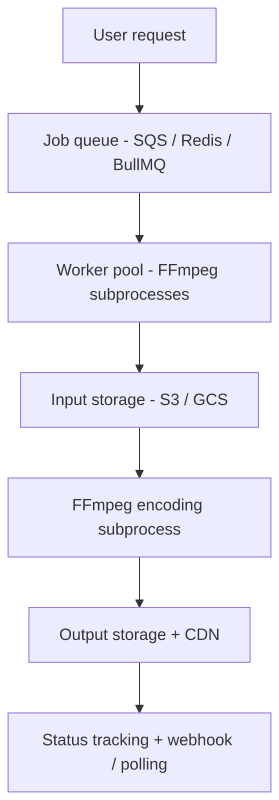
A typical FFmpeg production pipeline moves through four distinct layers: an inbound queue that accepts and retries jobs, a worker pool that runs FFmpeg processes under CPU, memory, and disk limits, a storage layer that handles asset downloads and output uploads, and a status layer that tracks each job’s state from queued to complete or failed.
A video API compresses most of that pipeline behind an HTTP interface: your application POSTs a JSON edit payload, receives a render ID, and polls for status or waits for a webhook callback.
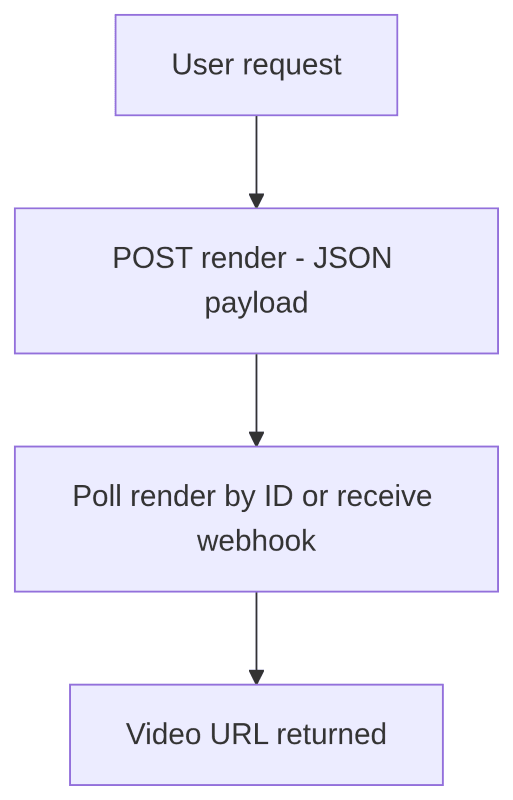
For example, Shotstack’s video editing API accepts an edit JSON payload, queues the render, downloads and caches assets, preprocesses compatible media, renders the timeline, and stores the final output. The render endpoint returns a queued render ID, and the status endpoint can be polled later for render status and a temporary asset URL. Shotstack also supports webhook callbacks when a render completes or fails.
The diagrams are not showing “hard vs easy”. They show how much of the surrounding system you are responsible for. FFmpeg handles media processing. A video API packages the processing step with infrastructure around it.
What FFmpeg Requires in Production
FFmpeg is free and powerful, but a production rendering product needs more than a binary. It was designed as a command-line tool and a set of media libraries, not a managed service. Here is what you own when you choose the FFmpeg route.
Job queue. SQS, Redis with BullMQ, RabbitMQ, or similar. Workers consume jobs, execute FFmpeg, update status, retry failures, and route persistent errors to a dead-letter queue. A minimal worker loop looks like this:
while worker is running:
    job = queue.receive()
    mark job as processing
    try:
        download input assets
        run FFmpeg
        validate output
        upload output
        mark job as done
        delete queue message
    except retryable error:
        increment attempt count
        release job for retry
    except permanent error:
        mark job as failed
        move message to dead-letter queue
    finally:
        clean up temporary files
This sounds simple until jobs fail halfway through a 600 MB upload, workers restart during an encode, or a user retries the same render three times.
Subprocess management. Spawning, monitoring, and stopping FFmpeg processes. Non-zero exit codes, timeouts, stderr capture, pipe buffering, and output cleanup all have specific failure modes. FFmpeg logs to stderr by default, which means production systems need to capture, parse, and route that output to get searchable logs.
Input and output storage. Downloading source assets to the encoding worker, writing FFmpeg output, uploading to object storage, and cleaning up temporary files. Concerns include signed URL expiration, partial downloads, disk capacity, upload retries, and CDN delivery.
Concurrency limits. Encoding competes for CPU, memory, disk I/O, and sometimes GPU. Worker concurrency must be tuned to the instance type; without back-pressure, high load will saturate the machine. A job can also fail quietly, completing with a zero exit code but producing corrupt output, which is why ffprobe validation matters.
Environment consistency. FFmpeg version, linked codecs, fonts, OS libraries, and GPU drivers all affect output. Pin your FFmpeg build in Docker and test across environments if consistent results are a requirement.
Example 1: Rendering 50 Videos Concurrently
The difference becomes clearer when the task is not “render one video on my laptop” but “render 50 videos from a data source.”
Suppose you have 50 product records and need to generate a short promo video for each one. With FFmpeg, the core command is straightforward. The production problem is everything around it.
Here is a simplified Python worker-pool version:
from __future__ import annotations

import json
import os
import subprocess
import tempfile
from concurrent.futures import ThreadPoolExecutor, as_completed
from dataclasses import dataclass
from pathlib import Path
from urllib.request import urlretrieve


MAX_WORKERS = int(os.getenv("MAX_RENDER_WORKERS", "4"))
RENDER_TIMEOUT_SECONDS = 10 * 60


@dataclass
class RenderJob:
    id: str
    product_name: str
    image_url: str
    music_url: str
    output_key: str


def download(url: str, destination: Path) -> Path:
    urlretrieve(url, destination)
    return destination


def upload_to_storage(local_path: Path, output_key: str) -> str:
    """
    Replace this with an S3/GCS upload.

    Return the public or signed URL for the uploaded video.
    """
    return f"https://cdn.example.com/{output_key}"


def validate_video(path: Path) -> None:
    """
    Use ffprobe to confirm that the output is readable.
    A zero ffmpeg exit code is useful, but it is not the same
    as validating the resulting media file for your application.
    """
    cmd = [
        "ffprobe",
        "-v",
        "error",
        "-show_entries",
        "format=duration",
        "-of",
        "json",
        str(path),
    ]

    result = subprocess.run(
        cmd,
        text=True,
        stdout=subprocess.PIPE,
        stderr=subprocess.PIPE,
        check=True,
    )

    metadata = json.loads(result.stdout)
    duration = float(metadata["format"]["duration"])

    if duration <= 0:
        raise RuntimeError(f"Output video has invalid duration: {path}")


def render_with_ffmpeg(job: RenderJob) -> dict:
    with tempfile.TemporaryDirectory() as tmpdir:
        workdir = Path(tmpdir)

        image_path = download(job.image_url, workdir / "image.jpg")
        music_path = download(job.music_url, workdir / "music.mp3")
        output_path = workdir / f"{job.id}.mp4"

        # This simplified example escapes a few common characters. Production code
        # should avoid interpolating user-controlled text directly into a filtergraph;
        # use drawtext=textfile=... or a dedicated escaping helper.
        safe_name = (
            job.product_name.replace("\\", "\\\\")
            .replace(":", "\\:")
            .replace("'", "\\'")
            .replace("[", "\\[")
            .replace("]", "\\]")
        )

        # The filtergraph labels the final video output as [v] and the audio
        # chain as [aout]. Explicit -map flags below select those streams
        # directly, which avoids FFmpeg's automatic stream selection, a source
        # of subtle bugs when a complex graph has multiple video or audio outputs.
        cmd = [
            "ffmpeg",
            "-y",
            "-loop",
            "1",
            "-i",
            str(image_path),
            "-i",
            str(music_path),
            "-filter_complex",
            (
                "color=c=black:s=1280x720:d=8[bg];"
                "[0:v]scale=900:-1,format=rgba,"
                "fade=t=in:st=0:d=0.4:alpha=1,"
                "fade=t=out:st=7.4:d=0.4:alpha=1[product];"
                "[bg][product]overlay=(W-w)/2:(H-h)/2,"
                "drawtext=text='%s':fontcolor=white:fontsize=54:"
                "x=(w-text_w)/2:y=h-110[v];"
                "[1:a]aformat=sample_fmts=fltp[aout]"
            )
            % safe_name,
            "-map", "[v]",
            "-map", "[aout]",
            "-t",
            "8",
            "-c:v",
            "libx264",
            "-pix_fmt",
            "yuv420p",
            "-c:a",
            "aac",
            "-shortest",
            str(output_path),
        ]

        try:
            completed = subprocess.run(
                cmd,
                text=True,
                stdout=subprocess.PIPE,
                stderr=subprocess.PIPE,
                timeout=RENDER_TIMEOUT_SECONDS,
            )
        except subprocess.TimeoutExpired as exc:
            raise RuntimeError(f"Render timed out for job {job.id}") from exc

        if completed.returncode != 0:
            raise RuntimeError(
                f"FFmpeg failed for job {job.id}\n"
                f"Exit code: {completed.returncode}\n"
                f"stderr:\n{completed.stderr[-4000:]}"
            )

        validate_video(output_path)
        video_url = upload_to_storage(output_path, job.output_key)

        return {
            "id": job.id,
            "status": "done",
            "url": video_url,
        }


def render_batch(jobs: list[RenderJob]) -> list[dict]:
    results: list[dict] = []

    with ThreadPoolExecutor(max_workers=MAX_WORKERS) as executor:
        future_to_job = {
            executor.submit(render_with_ffmpeg, job): job
            for job in jobs
        }

        for future in as_completed(future_to_job):
            job = future_to_job[future]

            try:
                results.append(future.result())
            except Exception as exc:
                results.append({
                    "id": job.id,
                    "status": "failed",
                    "error": str(exc),
                })

                # In production, this is where you update the DB,
                # increment retry count, or move the message to a DLQ.

    return results
This code is not complicated because FFmpeg is bad. It is complicated because production rendering is stateful, asynchronous, and failure-prone. A production version still needs a real queue, persistent status storage, retry limits, dead-letter handling, log routing, worker health checks, cleanup guarantees, resource-aware concurrency, and pinned FFmpeg builds.
With a video API, the concurrency problem moves up a level. Your application still decides how many API requests to send, but it is not directly scheduling local encoder processes.
The following example uses JavaScript, but the same HTTP interface works from any language or runtime:
const API_KEY = process.env.SHOTSTACK_API_KEY;
// Use 'stage' with your stage API key for development.
// Use 'v1' with your production API key for live output.
const BASE_URL = 'https://api.shotstack.io/edit/stage';

function buildEdit(job) {
  return {
    timeline: {
      background: '#000000',
      soundtrack: {
        src: job.musicUrl,
        effect: 'fadeInFadeOut',
      },
      tracks: [
        {
          clips: [
            {
              asset: {
                type: 'image',
                src: job.imageUrl,
              },
              start: 0,
              length: 8,
              effect: 'zoomIn',
            },
            {
              asset: {
                type: 'text',
                text: job.productName,
                font: {
                  color: '#ffffff',
                  size: 54,
                },
                alignment: {
                  horizontal: 'center',
                  vertical: 'center',
                },
              },
              start: 0.5,
              length: 7,
            },
          ],
        },
      ],
    },
    output: {
      format: 'mp4',
      resolution: 'hd',
      aspectRatio: '16:9',
    },
    callback: `https://example.com/webhooks/renders/${job.id}`,
  };
}

async function createRender(job) {
  const response = await fetch(`${BASE_URL}/render`, {
    method: 'POST',
    headers: {
      'Content-Type': 'application/json',
      Accept: 'application/json',
      'x-api-key': API_KEY,
    },
    body: JSON.stringify(buildEdit(job)),
  });

  const body = await response.json();

  if (!response.ok) {
    throw new Error(
      `Render request failed for ${job.id}: ${JSON.stringify(body)}`,
    );
  }

  return {
    id: job.id,
    status: 'queued',
    renderId: body.response.id,
  };
}

async function renderBatch(jobs) {
  const requests = jobs.map(async (job) => {
    try {
      return await createRender(job);
    } catch (error) {
      return {
        id: job.id,
        status: 'failed',
        error: error.message,
      };
    }
  });

  return Promise.all(requests);
}

// renderBatch returns render IDs, not final URLs. Video rendering is
// asynchronous: the URL is only available once the render completes.
// Use getRenderStatus to poll for completion, or add a callback URL
// to buildEdit() and receive the result via webhook instead.
async function getRenderStatus(renderId) {
  const response = await fetch(`${BASE_URL}/render/${renderId}`, {
    headers: {
      Accept: 'application/json',
      'x-api-key': API_KEY,
    },
  });

  const body = await response.json();

  if (!response.ok) {
    throw new Error(
      `Status check failed for ${renderId}: ${JSON.stringify(body)}`,
    );
  }

  const { status, url } = body.response;

  // status is one of: queued, fetching, preprocessing, rendering, saving, done, failed
  // url is only present when status === 'done'
  return { renderId, status, url: url ?? null };
}
renderBatch submits all 50 jobs concurrently and returns render IDs immediately. The final video URLs are not available yet; renders are queued and processed asynchronously. To collect URLs, poll getRenderStatus for each render ID until status === 'done', or set a callback URL in buildEdit() and receive a webhook when each render completes. In a production application, you would typically store render IDs in your database and update records as webhooks arrive rather than polling from the caller.
This version still needs product-level engineering: authentication, rate-limit handling, database updates, webhook verification, and user-facing status. But it does not need your application to run 50 local FFmpeg subprocesses, tune worker concurrency, or maintain encoding servers.
Example 2: Video Rendering Inside an AI Agent
The difference is even sharper in AI-driven workflows.
Modern AI agents call tools. A tool is usually described with a name, description, and structured input schema. OpenAI’s function calling documentation describes function tools as tools defined by JSON schema, allowing the model to pass structured data to application code.
That pattern maps naturally to a video API.
For example, an agent tool for video rendering might look like this. This example uses the newer OpenAI Responses API tool format. If you are using the Chat Completions API, nest name, description, parameters, and strict inside a function object.
const renderVideoTool = {
  type: 'function',
  name: 'render_video',
  description: 'Queue a short product video render and return a render ID.',
  parameters: {
    type: 'object',
    additionalProperties: false,
    properties: {
      productName: {
        type: 'string',
        description: 'The product name to display in the video.',
      },
      imageUrl: {
        type: 'string',
        description: 'A publicly accessible product image URL.',
      },
      soundtrackUrl: {
        type: 'string',
        description: 'A publicly accessible audio track URL.',
      },
      aspectRatio: {
        type: 'string',
        enum: ['16:9', '9:16', '1:1'],
        description: 'The output aspect ratio.',
      },
    },
    required: ['productName', 'imageUrl', 'soundtrackUrl', 'aspectRatio'],
  },
  strict: true,
};

async function renderVideo(args) {
  const edit = {
    timeline: {
      soundtrack: {
        src: args.soundtrackUrl,
        effect: 'fadeInFadeOut',
      },
      tracks: [
        {
          clips: [
            {
              asset: {
                type: 'image',
                src: args.imageUrl,
              },
              start: 0,
              length: 6,
              effect: 'zoomIn',
            },
            {
              asset: {
                type: 'text',
                text: args.productName,
              },
              start: 0,
              length: 6,
            },
          ],
        },
      ],
    },
    output: {
      format: 'mp4',
      aspectRatio: args.aspectRatio,
      resolution: 'hd',
    },
  };

  // Use 'stage' with your stage API key for development.
  // Use 'v1' with your production API key for live output.
  const response = await fetch('https://api.shotstack.io/edit/stage/render', {
    method: 'POST',
    headers: {
      'Content-Type': 'application/json',
      'x-api-key': process.env.SHOTSTACK_API_KEY,
    },
    body: JSON.stringify(edit),
  });

  const body = await response.json();

  if (!response.ok) {
    return {
      ok: false,
      error: body.message || 'Render request failed',
    };
  }

  return {
    ok: true,
    renderId: body.response.id,
    status: 'queued',
  };
}
The agent calls render_video, receives JSON, and can continue the workflow: store the render ID, poll later, wait for a webhook, or tell the user the render has started.
Calling FFmpeg directly from an agent is possible, but it is a weaker fit for the tool-calling pattern. The agent has to provide command arguments, your application has to sanitize them, spawn a subprocess, capture stderr, handle timeouts, parse failures, validate output, upload the file, and return a structured result. Any of those steps can break the agent loop.
That does not mean “never use FFmpeg with agents”. It means FFmpeg usually belongs behind a controlled backend service, not as a raw command the agent improvises. If you want to build this kind of workflow, see how to build an AI video agent and this guide to an agentic video editing pipeline.
When FFmpeg Is the Right Choice for Production
Use FFmpeg when you need low-level media control, local processing, experimentation speed, or deployment environments where a network-based rendering service does not fit.
Low-level Codec Control
FFmpeg is the stronger choice when codec-level control is the requirement. If you need to tune CRF values, bitrate ladders, GOP size, B-frames, pixel formats, color metadata, hardware encoder options, or custom filter graphs, FFmpeg gives you access to the underlying media pipeline. The FFmpeg codecs documentation notes that libavcodec exposes global codec options as well as private options specific to individual codecs. That level of control matters for broadcast pipelines, archival workflows, streaming ladders, and compliance-heavy systems.
For example, a complex filter graph might apply a LUT, create a side-by-side comparison, mix two audio sources, and encode with explicit x264 settings. Note that look.cube must be present on the local filesystem: lut3d reads it as a file path, and the command will fail if it is not found.
ffmpeg \
  -i original.mp4 \
  -i graded-reference.mp4 \
  -i voiceover.wav \
  -i music.wav \
  -filter_complex "
    [0:v]scale=960:540,lut3d=look.cube[left];
    [1:v]scale=960:540[right];
    [left][right]hstack=inputs=2[comparison];
    [2:a]volume=1.0[voice];
    [3:a]volume=0.18[music];
    [voice][music]amix=inputs=2:duration=first[aout]
  " \
  -map "[comparison]" \
  -map "[aout]" \
  -c:v libx264 \
  -crf 18 \
  -preset slow \
  -pix_fmt yuv420p \
  -c:a aac \
  -b:a 192k \
  output.mp4
This is where FFmpeg shines. FFmpeg’s filtering system supports filtergraphs with multiple inputs and outputs, and complex graphs can split, crop, flip, overlay, and recombine streams. Most managed APIs intentionally do not expose this entire surface area because their job is to provide a stable abstraction.
Research and Prototyping
FFmpeg is ideal for research and prototyping. You can test filters, compare CRF settings, inspect metadata, and encode samples without configuring a hosted render account or a webhook endpoint. For one-off experiments and internal tooling, that directness is an advantage.
Offline Batch Processing
If you have a fixed batch of videos and no user-facing concurrency requirement, FFmpeg is often the simplest option. Converting 200 internal training videos overnight is a different problem from letting 10,000 users generate personalized videos on demand: the first is bounded, manageable, and rerunnable manually. For the mechanics, see FFmpeg batch processing.
Embedded and On-device Processing
A video API requires a network call, which is not always viable. Mobile apps, desktop apps, IoT devices, and privacy-sensitive workflows may need local processing, and the libavcodec library makes that practical. For browser-based local processing, FFmpeg.wasm offers a client-side alternative. If the media cannot leave the device, or the application needs to work offline, a managed rendering API is the wrong boundary.
Specific Format or Container Requirements
FFmpeg supports a very broad range of codecs, containers, protocols, and edge cases. If you are dealing with unusual broadcast formats, legacy containers, scientific video, custom muxing requirements, or specialized subtitle handling, FFmpeg may be the only practical choice. Most managed APIs focus on the formats most common for web, social, and product workflows.
When a Video API Is the Right Choice for Production
Use a video API when video rendering is part of a production application and you want to replace your FFmpeg rendering pipeline with a managed service.
Concurrent, User-triggered Renders
A video API is strongest when rendering is user-triggered and concurrent. If 50 users request videos at once, an FFmpeg system has to queue jobs, schedule workers, control CPU usage, retry failures, and report progress to the product. With a video API, your application submits render jobs over HTTP, stores returned IDs, and reacts to status updates. The provider owns the render fleet.
For a practical walkthrough of this pattern, see how to bulk create videos from a data source. For production use cases at scale, see bulk AI video generation.
Consistent Output Across Environments
FFmpeg output can vary across environments when versions, linked libraries, codec builds, fonts, or hardware differ. That is not randomness; it is environment dependency. For template-based generation where the same data should always produce the same video, a dev/staging/prod mismatch caused by different FFmpeg builds or font availability is a real risk. A video API gives you a managed rendering environment: same payload, same assets, same output, provided source URLs and templates are stable.
No Dedicated Backend Team
Running FFmpeg in production is backend infrastructure work. For a small team, a credible first production version (queue, workers, storage, retries, observability) can take two to four weeks before you have written much application-specific video logic. That may be a worthwhile investment if video infrastructure is core to your business. It is a poor one if the value is in the content, not the encoder.
Webhook-driven Async Workflows
Video rendering is usually asynchronous. A video API fits event-driven application design naturally: create a render, store the render ID, return control to the user, and update your database when the webhook arrives. Shotstack accepts a callback URL on each render request and POSTs JSON to it when the render completes or fails. You can build that pattern around FFmpeg, but you have to build it yourself.
For a deeper look at how webhooks integrate with video pipelines, see webhooks in video applications. Shotstack’s Workflows product implements this async pattern natively.
Agentic and AI-driven Pipelines
AI agents work best with tools that have structured inputs and structured outputs. A video API fits that model naturally: the tool input is JSON, the tool output is JSON (render ID, status, URL, error). A direct FFmpeg subprocess is often too low-level for the agent boundary. The safer design is either a constrained backend service that wraps FFmpeg, or a video API that already exposes rendering as a structured HTTP operation. For most agentic product workflows, the second option is faster to build and easier to reason about.
If you are exploring this category, take a look at agentic video editing.
FFmpeg vs Video API: Side-by-side Comparison
| FFmpeg | Video API | |
|---|---|---|
| Cost | Free binary (infrastructure cost is real) | Usage-based or per-render pricing |
| Setup | Install, configure, and build the render pipeline around it | Send an HTTP render request |
| Codec control | Full control over codecs, filters, CRF, bitrate, pixel format, and encoder options | Abstracted parameters exposed by the API |
| Concurrent renders | Requires queue, workers, resource limits, and back-pressure | Built into the managed rendering service |
| Output consistency | Depends on version, build, libraries, fonts, OS, and hardware | Typically more consistent across runs (provider controls the environment) |
| Observability | Build your own logs, metrics, status, and validation | Status endpoints and webhooks are usually built in |
| Failure handling | Build retries, timeouts, dead-letter queues, and cleanup | API-level status and error responses; app still handles business logic |
| Agent/AI integration | Requires a wrapper service or subprocess handling | Native (JSON schema, structured response) |
| GPU acceleration | Available via NVENC, VA-API, VideoToolbox (self-managed) | Abstracted / provider-dependent |
| Best for | R&D, codec control, embedded processing, offline batches | Production products, scale, automated workflows, AI pipelines |
| Infrastructure you own | Encoding servers, workers, queue, storage, monitoring | Rendering infrastructure mostly abstracted; app workflow still yours |
Decision Framework
Use FFmpeg if:
- You need precise control over codec parameters, bitrate ladders, CRF, custom filter graphs, or hardware encoder behavior.
- You are processing a fixed batch and do not need user-facing render concurrency.
- You are building on-device, offline, embedded, mobile, desktop, or privacy-sensitive workflows.
- You are prototyping and want immediate local feedback.
- You have no software budget and can spend engineering time building the pipeline.
- You need support for a format, codec, container, or media operation that your chosen API does not expose.
Use a video API if:
- Multiple users can trigger renders simultaneously.
- Render failures have a direct user-facing or business cost.
- You need async rendering with status updates, polling, or webhooks.
- You do not want to build and maintain encoding workers.
- Your team does not have dedicated backend capacity for render infrastructure.
- You are integrating video rendering into an AI agent, automation workflow, or template-based generation system.
- Consistent output across environments matters more than low-level encoder control.
Use a hybrid approach if both are true.
For example, FFmpeg might handle a custom preprocessing step that requires a specific filter graph, then the processed output is passed into a managed video API for templating, rendering orchestration, hosting, and delivery. That pattern (FFmpeg for specialized processing, a managed API for orchestration and delivery) shows up in broadcast and streaming pipelines where teams need low-level control for specific steps but do not want to own the entire rendering stack.
Final Recommendation
Choose FFmpeg when media control is the hard part. Choose a video API when production rendering infrastructure is the hard part. When both matter, the hybrid approach is usually the right call: FFmpeg handles the step that requires low-level control, and a managed API handles orchestration, delivery, and scale. Compare approaches and FFmpeg alternatives or create a free account to start rendering inside the unlimited developer sandbox. Move to production when you’re ready.
FAQ
Is FFmpeg good enough for production?
FFmpeg can be used in production. The question is whether your team wants to build and maintain the surrounding system. A reliable FFmpeg render pipeline requires a job queue, worker pool, status tracking, retry logic, and a storage layer: all real engineering work before you write a single line of application code.
Is a video API a replacement for FFmpeg?
Sometimes, but not always. A video API can replace direct FFmpeg usage for many application-level rendering workflows, especially template-based video generation, user-triggered renders, and automation. It is not a full replacement when you need deep codec control, custom filter graphs, offline processing, or unusual format support.
Is FFmpeg cheaper than a video API?
The FFmpeg binary is free, but the total system is not. Running FFmpeg in production requires servers, storage, bandwidth, monitoring, and ongoing engineering time for maintenance and incident response. A video API adds direct per-render cost but removes the infrastructure overhead. For small teams or variable workloads, the managed cost is often lower overall.
When should I replace FFmpeg with a video API?
Consider replacing FFmpeg with a video API when your FFmpeg scripts become a render platform: queues, workers, retries, storage, logs, status pages, webhooks, and scaling logic. At that point, the trade-off is no longer “free tool vs paid API”; it is “own the render infrastructure vs use a managed service.”
Can I use FFmpeg and a video API together?
Yes. This is often the best architecture when you need both low-level media processing and production orchestration. Use FFmpeg for the specialized preprocessing step, then pass the output into a managed API for rendering, status tracking, delivery, and automated workflows. The two tools work cleanly together.
Get started with Shotstack's video editing API in two steps:
- Sign up for free to get your API key.
- Send an API request to create your video:
curl --request POST 'https://api.shotstack.io/v1/render' \
--header 'x-api-key: YOUR_API_KEY' \
--data-raw '{
  "timeline": {
    "tracks": [
      {
        "clips": [
          {
            "asset": {
              "type": "video",
              "src": "https://shotstack-assets.s3.amazonaws.com/footage/beach-overhead.mp4"
            },
            "start": 0,
            "length": "auto"
          }
        ]
      }
    ]
  },
  "output": {
    "format": "mp4",
    "size": {
      "width": 1280,
      "height": 720
    }
  }
}'

Published April 29, 2026
Derk Zomer is the founder and CEO of Shotstack. He writes about video automation, AI-generated media and building on the Shotstack API. More from Derk
Experience Shotstack for yourself.
- Seamless integration
- Dependable high-volume scaling
- Blazing fast rendering
- Save thousands