Contents
 Claude
  ChatGPT
  Perplexity
  Google AI
 Contents
An agentic video editing pipeline is a multi-layer system where an AI agent receives a goal, plans the work, calls the tools it needs, and produces a finished video without human intervention. Understanding how those layers connect and where they break down is what separates a working pipeline from one that fails in production.
This article breaks down each layer: what it does, how it interacts with the others, and where most of the complexity actually lives.
TL;DR
This article explains the architecture behind agentic video editing pipelines, not how to build one in code. Here is what to know upfront:
- The pipeline has four layers: input, orchestration, tool execution, and rendering.
- The LLM handles reasoning and planning. It does not generate the video.
- Layers 2 and 3 work in a feedback loop, not a straight sequence.
- Rendering is the hardest layer to get right. Frame timing, asset sync, and scale are infrastructure problems, not prompting problems.
- Vision models are beginning to close the loop by letting agents evaluate their own output.
What does an Agentic Video Pipeline Actually Look Like?
The diagram below shows the main layers of an agentic video editing pipeline:

- Input is what the system or the agent receives as a goal to work on. It can be a prompt, raw footage, a URL, or structured data.
- At the orchestration layer, the agent reads and interprets the input and plans the workflow (decides what to do next).
- Tools are external services that the agent calls to collect information or generate assets.
- At the rendering stage, the workflow is turned into an actual video file.
- Output is the final video, which can be a URL or a file.
The Four Layers of an AI Video Workflow
Layer 1: What Goes In
Every agentic video editing pipeline begins with an input: a goal the agent must act on. It can be a text prompt, a creative brief, raw footage files, a URL pointing to source content, or structured data, such as transcripts or slide decks.
What matters at this stage is not the format but what the agent needs to extract from it. Once the agent gets the input, its first job is always goal extraction. For example, from a long raw footage of an interview, the agent needs to extract key moments and highlights to create a 3-minute highlight reel with the best insights. Similarly, if the input is a spreadsheet containing product info, the agent needs to extract product benefits and selling points to create a product showcase video with 5 scenes.
This step is harder than it looks. The same input can produce very different outputs depending on the target platform, the tone, the length, and what the agent infers about intent.
A well-designed pipeline doesn’t treat this first layer as a parsing step, but as a planning prerequisite because how well the agent interprets the input and extracts the goal at Layer 1 directly impacts how well Layer 2 can plan.
Layer 2: The Agent Brain (Orchestration)
The orchestration layer is the LLM. At this stage, the LLM doesn’t just parse the input. It also creates a plan and decides which tools to call (including in what order and with what parameters).
A common misconception about an agentic video editing pipeline is that the LLM creates the video directly at this stage once it gets the input. However, in a well-designed pipeline, the LLM only decides what to do and hands those decisions off to other tools (Layer 3), which produce the actual video.
Another important thing to know here is that Layer 2 and Layer 3 are not actually sequential; rather, they work in a tight feedback loop. When the orchestration layer sends a tool call, Layer 3 executes it and returns structured data. This data is immediately fed back into the LLM’s context, and the LLM updates the plan accordingly. The loop does not move forward until Layer 3 provides something for Layer 2 to reason over.
For example, if the TTS voiceover runs four seconds over the target duration, the agent has to decide whether to trim the script, adjust timing, or cut a section. This decision-making in response to real outputs is what makes it a truly agentic video editing pipeline.
The flowchart below shows how this feedback loop works:
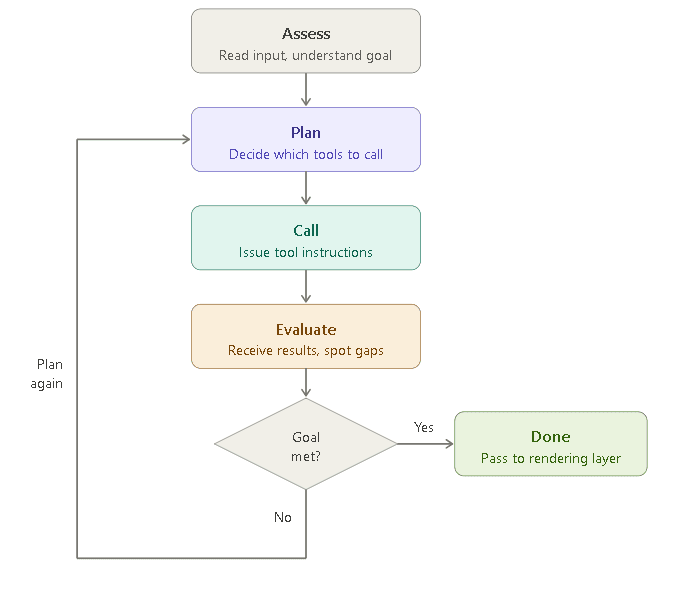
Since the orchestration layer relies heavily on tool calls, the quality of the output depends on how well the layer handles unexpected tool results and partial failures. For example, a voiceover can come back slightly too long, changing the downstream timing, or a scene detection result can miss a cut that changes the edit structure. A well-designed orchestration layer treats tool results as new information and uses them as needed. Most of those surprises fall into a handful of recurring patterns you can design out of the pipeline ahead of time.
Multi-agent architectures make this layer even more efficient. Instead of a single agent handling everything, specialized sub-agents split the work:
- Content understanding
- Script generation
- Asset retrieval
- Timeline construction
The orchestration layer coordinates between them.
Layer 3: What the Agent Uses to Build the Video
When the orchestration layer sends a tool call, Layer 3 is where it lands. This is the layer where execution actually happens, including API calls, model execution, and creation of the elements of the video.
The external tools used in an agentic AI video workflow fall into two broad categories: perception tools and asset generation tools.
Perception tools help the agent understand what it is working with. They do not produce the video — they provide structured data the agent uses to make decisions:
- Transcription converts speech to text with timestamps
- Scene detection identifies cut points in footage
- Video understanding models analyze what is happening visually: who is on screen, what objects are present, and the emotional register of a moment
Asset generation tools are the tools that provide the actual elements required to create the video. For example:
- Text-to-speech generates a voiceover
- Image generation creates visuals that don’t exist in the input
- Subtitle rendering produces styled caption tracks
- Music selection or music generation provides the audio for the video
A slow or unreliable Layer 3 tool does not just delay execution, but it also degrades the quality of every planning decision that follows.
LLMs like Claude, OpenAI’s GPT models, and Gemini all natively support tool calling, and the reliability of these integrations has improved significantly in recent model generations. Developers can now create agents that invoke external tools, receive structured results, and update their plan accordingly.
Layer 4: Where the Video Actually Gets Made
This is the final layer, also called the rendering layer. When the agent reaches this stage, it has a plan and the required assets, such as a script, a voiceover file, a set of clips, generated images, subtitle tracks, and background music. The agent uses these elements to create the actual video.
The layer takes the agent’s decisions as a timeline, which helps create the actual video. Depending on the rendering tool or infrastructure being used, this timeline can be in different formats. Some pipelines use JSON-based formats, while others rely on EDL (Edit Decision List), XML-based formats like Final Cut Pro XML, or custom SDKs provided by the rendering platform.
Many developers underestimate this layer. It is the hardest part of the pipeline to get right.
Shotstack’s video generation API handles this layer entirely: your agent sends a JSON timeline, a structured, time-coded description of what appears on screen, when it appears, with what transitions and at what audio levels, and Shotstack renders it and returns a URL.
How Does the Pipeline Work End to End?
To see how the four layers connect in practice, here is a concrete example: the input is a blog post URL, the output is a 60-second LinkedIn video.
Layer 1: Input The agent receives the URL, fetches the page, extracts the text, and identifies what a LinkedIn audience would want to take from this post.
Layer 2: Orchestration The LLM reads the content and creates a plan. A 60-second LinkedIn video typically follows a hook-point-point-CTA structure, so the agent decides on four sections and assigns duration targets: 10 seconds for the hook, 20 seconds each for two key points, and 10 seconds for the CTA. It also identifies the tools it needs: TTS for voiceover, image generation for background visuals, and subtitle rendering for captions.
Layer 3: Tool Execution The agent invokes the tools. Layer 3 returns the results: the TTS call produces a timestamped audio file, image generation returns background visuals. Each result comes back as structured data — file URLs, duration values, timestamp mappings. Since the input is a blog URL, perception tools are not needed here.
Layer 4: Rendering The agent constructs a JSON timeline: clip 1 starts at 0s with the hook voiceover and a fading background image, clip 2 begins at 10s, and so on. That timeline goes to the rendering API, which returns a video URL.
Why is the Rendering Layer the Hard Part?
Many developers assume the hard part in the pipeline is orchestration (getting the LLM to reason well about complex creative tasks) until they actually build an agentic video editing pipeline. While orchestration is difficult, rendering has its own challenges that we can’t solve with just better prompting.
Frame-accurate timing Every element in a video timeline — audio, video, image overlays, text — must be synchronized at the frame level. A voiceover that drifts 200 milliseconds out of sync with a cut can ruin the entire video. The rendering layer has to resolve this across every element in every scene, at scale.
Compute intensity Composing multiple video layers, applying transitions, and encoding to a target format is resource-heavy. It requires dedicated infrastructure — not the kind of workload you can run on a standard server.
Consistency at scale Agents require repeatable output: send the same timeline, get the same video. Self-managed rendering infrastructure rarely delivers that reliably at scale. These are infrastructure problems, not prompting problems.
Where is Agentic Video Editing Going?
With the advancements in technology, the agentic video editing pipeline is also evolving. Today, most agentic video pipelines are effectively blind to their own output. The agent builds a timeline, sends it to render, and returns a URL, but it has no way of knowing whether the result actually looks good.
Vision models are beginning to change this. Some implementations show that models can analyze rendered video frames and compare them against the original brief. This way, we can get a feedback loop that doesn’t require human intervention. With this loop, the agent can become a self-correcting system, iterating toward output quality rather than producing a single video. But this kind of self-correcting pipeline is still emerging.
Build Your First Agentic Video Pipeline
Understanding the architecture is the first step. If you’re ready to implement it, how to build an AI video agent walks through a complete working implementation in Python: tool schema, agent loop, render function, and example interactions.
If you want to trigger your pipeline from a messaging platform like Telegram or WhatsApp, how to build an OpenClaw skill covers exactly that.
To see how Shotstack fits into the rendering layer of a production pipeline, visit the agentic video editing solutions page.
Frequently Asked Questions
What’s the difference between an agentic video pipeline and standard video automation?
Standard automation follows a fixed sequence: input in, output out, with no decision-making in between. An agentic video pipeline uses an LLM to interpret the input, plan the steps, and adjust based on what tools return. The pipeline responds to what it encounters rather than following a predetermined path.
Which LLMs work with an agentic video editing pipeline?
Any LLM that supports tool use or function calling works: Claude, GPT-4o, and Gemini all support it natively. The LLM doesn’t need to understand video; it needs to call external tools and reason over structured results. The rendering layer is model-agnostic.
Do I need to build all four layers from scratch?
No. Layer 4 (rendering) is the most infrastructure-intensive and is typically handled by a purpose-built video API. Layers 2 and 3 rely on LLM providers and third-party tools. What you build is the orchestration logic: the agent loop, tool definitions, and system prompt that connects them.
What happens when a tool call fails mid-pipeline?
It depends on how the orchestration layer handles errors. A well-built pipeline treats a failed tool call as new information: the agent receives the error and decides whether to retry, fall back to an alternative, or abort. Without this logic, a single failure can break the entire pipeline silently.
Get started with Shotstack's video editing API in two steps:
- Sign up for free to get your API key.
- Send an API request to create your video:
curl --request POST 'https://api.shotstack.io/v1/render' \
--header 'x-api-key: YOUR_API_KEY' \
--data-raw '{
  "timeline": {
    "tracks": [
      {
        "clips": [
          {
            "asset": {
              "type": "video",
              "src": "https://shotstack-assets.s3.amazonaws.com/footage/beach-overhead.mp4"
            },
            "start": 0,
            "length": "auto"
          }
        ]
      }
    ]
  },
  "output": {
    "format": "mp4",
    "size": {
      "width": 1280,
      "height": 720
    }
  }
}'

Published April 14, 2026
Sidra Arif is a technical writer who writes extensively on video automation, media pipelines and how-to guides for developers. More from Sidra
Experience Shotstack for yourself.
- Seamless integration
- Dependable high-volume scaling
- Blazing fast rendering
- Save thousands