Contents
 Claude
  ChatGPT
  Perplexity
  Google AI
 Contents
Imagine this: every time a new product is added to your database, a 30-second promo video is automatically generated, complete with branding, text overlays, and music. No designer. No manual editing. No dashboard clicks. Just a trigger and a video URL. This tutorial shows you how to build an AI video agent that makes exactly that possible.
Most tools marketed under the “AI video agent” label are built for consumers (prompt in, video out) but offer no control, no APIs, and no way to integrate into real systems or reliably reproduce output at scale.
Here’s what you’ll build instead, a real AI video agent:
- Claude handles intent, structure, and decision-making
- Shotstack API handles deterministic video rendering
The result: a fully automated, programmable video generation pipeline that you control end-to-end.
What you’ll build: a Python agent that accepts a plain-text prompt, uses Claude to interpret it and structure a Shotstack render payload, calls the Shotstack video generation API to render a video, and returns a video URL, all without any human in the loop.
Prerequisites: Python 3.9+, a Shotstack API key, and an Anthropic API key.
TL;DR
This tutorial walks through building a working AI video agent in Python that takes a text prompt and returns a rendered video URL. Here is what you need to know upfront:
- An AI video agent uses an LLM for reasoning and a rendering API for output. Claude decides what to render. Shotstack renders it.
- You define a
render_videotool as a JSON schema. Claude calls it when the user requests a video. Your code executes the call. - The agent supports two template types: promo (product videos) and general (announcements, event videos).
- Renders complete in 20-60 seconds and return a hosted video URL.
- Prerequisites: Python 3.9+, an Anthropic API key, a Shotstack API key.
What Is an AI Video Agent?
An AI video agent is a software system that uses a large language model to interpret a user’s intent and automatically generate a video in response, without human intervention. The LLM handles reasoning and decision-making. A rendering API handles the actual video output. Together they form a pipeline where a prompt goes in and a video URL comes out.
The term gets used loosely, so it helps to understand the two distinct architectures it can refer to.
Consumer AI video tools: Sora, Runway, and HeyGen use generative models to create video from text or images. The output is model-generated: expressive, sometimes stunning, and fundamentally non-deterministic. Run the same prompt twice and you get two different clips. There’s no template, no reliable structure, and no clean API that lets you say “put this product name here and this image there”. They’re designed for creative use, not programmatic production.
An LLM + rendering API is a different architecture entirely. You use an LLM (Claude, in this case) as the reasoning layer, to understand what the user wants, pick the right template, and construct the exact JSON payload the rendering API expects. The rendering API (Shotstack) then executes that payload deterministically. The output is always structurally consistent, scales to thousands of renders without GPU costs, and is fully under your control.
| Consumer AI video | Claude + Shotstack | |
|---|---|---|
| Output | Non-deterministic | Deterministic |
| API-first | No | Yes |
| Scales to 1,000 renders | Expensive / slow | Built for it |
| Developer control | Low | Full |
The agent pattern is what connects these two layers in agentic video editing: the AI video agent receives a message, decides to call a video rendering tool, constructs the parameters, and hands off to Shotstack. You get the flexibility of natural language input with the reliability of a structured API output. And if you want to experience this pattern before writing any code, you can connect Claude directly to Shotstack’s MCP server and render videos by chatting.
Architecture
This agentic video pipeline has four layers:
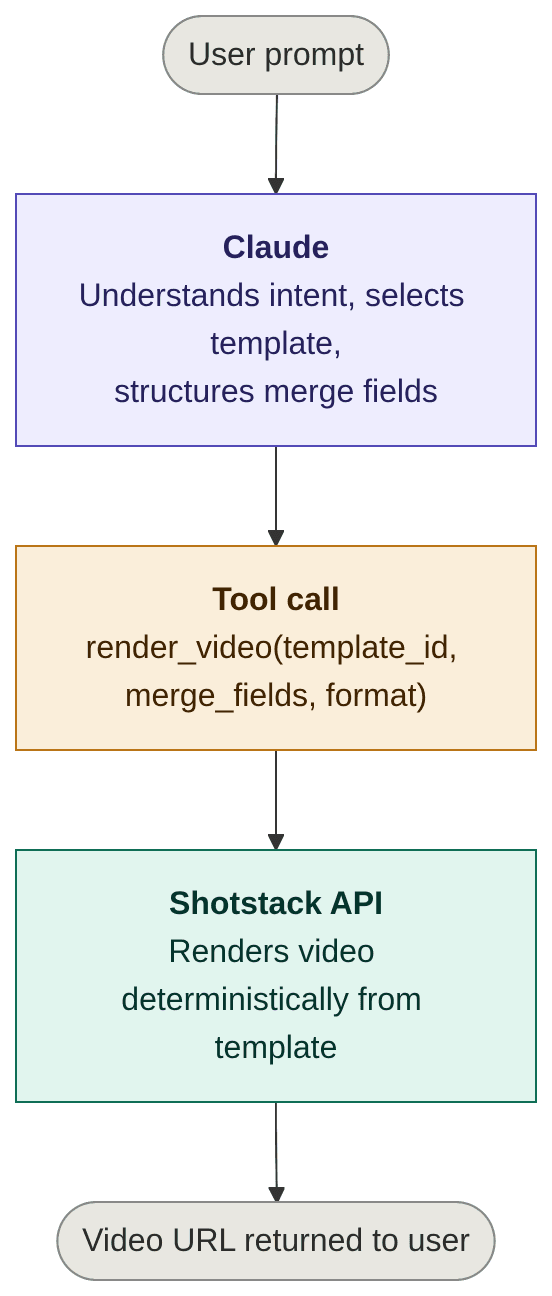
Claude never touches the video itself. It only produces the structured arguments for the tool call. Shotstack’s video generation API does the rendering. This separation is what makes the system scalable and testable: you can unit-test the LLM’s structured output independently of the render pipeline.
Setting Up Your Python Environment
Create and activate a virtual environment:
python3 -m venv venv
source venv/bin/activate
Install the required packages:
pip install anthropic requests
Export your API keys as environment variables:
export ANTHROPIC_API_KEY="your-anthropic-api-key"
export SHOTSTACK_API_KEY="your-shotstack-api-key"
This tutorial uses the Shotstack stage environment, which is free for testing. Switch the base URL to https://api.shotstack.io/edit/v1 for production.
How to Define the Video Tool Schema
Claude uses tools to take actions in the world. You define a tool as a JSON schema that describes what the function does, what parameters it accepts, and what types those parameters are. Claude reads the description to decide when and how to call the tool.
Our agent will use two templates that we have already created and intend to use repeatedly: promo and general, with different merge fields for each. The template to be used will depend on the user prompt.
Rather than exposing raw template UUIDs to Claude, the tool schema uses a video_type enum. Claude declares which template type fits the user’s intent, and Python maps that to the correct template ID constant. This keeps UUIDs out of the LLM’s reasoning entirely. They’re an implementation detail, not something Claude needs to know.
In the following code, we define the tools that will be available to the AI agent:
TEMPLATE_IDS = {
    "promo":   "YOUR_PROMO_TEMPLATE_UUID",
    "general": "YOUR_GENERAL_TEMPLATE_UUID",
}

video_tool = {
    "name": "render_video",
    "description": "Renders a video from a Shotstack template. Use this when the user asks to create or generate a video.",
    "input_schema": {
        "type": "object",
        "properties": {
            "video_type": {
                "type": "string",
                "enum": ["promo", "general"],
                "description": (
                    "The type of video to render. Use 'promo' for product promotions and launches. "
                    "Use 'general' for announcements, event videos, or any non-product content."
                ),
            },
            "merge_fields": {
                "type": "array",
                "description": (
                    "Array of find/replace pairs to populate the template placeholders. "
                    "Each item must have a 'find' key (the placeholder name, without braces) "
                    "and a 'replace' key (the value to substitute)."
                ),
                "items": {
                    "type": "object",
                    "properties": {
                        "find": {"type": "string"},
                        "replace": {"type": "string"},
                    },
                    "required": ["find", "replace"],
                },
            },
            "output_format": {
                "type": "string",
                "enum": ["mp4", "gif"],
                "description": "Output format. Use 'mp4' unless the user explicitly requests a GIF.",
            },
        },
        "required": ["video_type", "merge_fields", "output_format"],
    },
}
Notice video_type is an enum, not a free-form string, which constrains Claude to a valid choice and makes the downstream mapping in Python trivial.
The tool description is not documentation; it’s prompting. Claude reads it to decide:
- when to call the tool
- how to structure arguments
Be explicit and action-oriented with the description.
The system prompt is where you tell Claude about each template type, when to use it, and which merge fields each one requires:
system_prompt = """
You are an AI video agent. You can render two types of video using Shotstack templates.

PROMO
  Use for: product promotions, product launches, and promotional announcements.
  Merge fields:
    - PRODUCT_NAME: the name of the product
    - PRODUCT_FEATURE: a short description of the product's key feature
    - CTA: the call-to-action text (e.g. "Shop Now", "Order Now")
    - PRODUCT_IMAGE: a publicly accessible URL of the product image

GENERAL
  Use for: general announcements, event videos, or any non-product content.
  Merge fields:
    - DISPLAY_TEXT: the main text to display in the video
    - IMAGE_URL: a publicly accessible URL to use as the background image
    - MUSIC_URL: a publicly accessible URL of the background music track
    - DURATION: the duration of the video in seconds (must be a positive number)

When the user requests a video:
1. Determine whether their intent is 'promo' or 'general'. If it is not clear, ask for clarification.
2. Extract the required merge field values from their message.
3. If any required value is missing, ask the user for it before proceeding.
4. Call the render_video tool with the correct video_type and populated merge fields.
"""
This separation keeps the tool schema stable as your template library changes: adding or updating templates means editing the system prompt and the TEMPLATE_IDS dict, not the schema itself.
OpenAI equivalent: If you’re using GPT-4o, the same concept applies via function calling. Replace the
input_schemakey withparametersand wrap the definition inside a{"type": "function", "function": {...}}object. The Shotstack side of the code stays identical.
Implementing the Render Function
Now implement the Python function that Claude’s tool call will invoke. It maps the video_type to the right template ID, POSTs a render request to Shotstack, polls the status endpoint until rendering is complete, and returns the video URL.
import os
import time
import requests

SHOTSTACK_API_KEY = os.environ.get("SHOTSTACK_API_KEY")
SHOTSTACK_BASE_URL = "https://api.shotstack.io/edit/stage"

TEMPLATE_IDS = {
    "promo":   "YOUR_PROMO_TEMPLATE_UUID",
    "general": "YOUR_GENERAL_TEMPLATE_UUID",
}


def render_video(
    video_type: str,
    merge_fields: list[dict],
    output_format: str = "mp4",
) -> str:
    """
    Render a Shotstack template and return the video URL.

    Args:
        video_type:    "promo" or "general" — maps to the correct template ID.
        merge_fields:  List of {"find": str, "replace": str} dicts.
        output_format: "mp4" or "gif".

    Returns:
        The URL of the rendered video.

    Raises:
        Exception: If the render request fails, the render itself fails, or it times out.
    """
    template_id = TEMPLATE_IDS.get(video_type)
    if not template_id:
        raise ValueError(f"Unknown video_type: {video_type!r}")

    headers = {
        "Content-Type": "application/json",
        "x-api-key": SHOTSTACK_API_KEY,
    }

    payload = {
        "id": template_id,
        "merge": merge_fields,
        "output": {"format": output_format},
    }

    # Step 1: Submit the render job
    response = requests.post(
        f"{SHOTSTACK_BASE_URL}/templates/render",
        json=payload,
        headers=headers,
    )

    if response.status_code != 201:
        raise Exception(f"Shotstack API error ({response.status_code}): {response.text}")

    render_id = response.json()["response"]["id"]
    print(f"[Shotstack] Render queued: {render_id}")

    # Step 2: Poll until done or timed out
    max_attempts = 60  # 60 x 5s = 5 minutes
    attempts = 0

    while attempts < max_attempts:
        time.sleep(5)
        attempts += 1

        status_data = requests.get(
            f"{SHOTSTACK_BASE_URL}/render/{render_id}",
            headers=headers,
        ).json()["response"]

        status = status_data["status"]
        print(f"[Shotstack] Status: {status} (attempt {attempts})")

        if status == "done":
            return status_data["url"]

        if status == "failed":
            raise Exception(f"Render failed: {status_data.get('error', 'check assets and payload')}")

    raise Exception(f"Render timed out after 5 minutes. Render ID: {render_id}")
A few things worth noting:
- Template mapping happens in Python, not in the LLM.
TEMPLATE_IDSis a simple dict: to add a new template type, add one entry here and describe it in the system prompt. - Auth is a single
x-api-keyheader, with no OAuth, no token exchange. - The
outputkey wraps the format in the payload. This tells Shotstack which format to produce at render time. - Merge fields use the
{"find": "PLACEHOLDER_NAME", "replace": "value"}format. Your Shotstack template must have matching{{ PLACEHOLDER_NAME }}placeholders. If the names don’t match, the placeholder is left unreplaced with no error thrown, so double-check your template definitions. - Polling is the standard pattern for Shotstack. Renders typically complete in 20–40 seconds. The 5-minute ceiling handles edge cases without hanging indefinitely.
- GIF output is supported but has resolution and duration constraints. For most production use cases, stick with
mp4.
Prefer Node.js? The same pattern works with
@anthropic-ai/sdkand the nativefetchAPI. The Shotstack endpoint and payload format are identical.
Building the Agent Loop
With the tool and system prompt defined, you can wire up the full agent loop using the Anthropic Python SDK. The loop follows a standard pattern: send the user’s message, system prompt, and tool definition to Claude; check whether Claude decided to call the tool; execute the function; feed the result back to Claude; and return its final response.
import anthropic

client = anthropic.Anthropic()


def run_agent(user_message: str) -> str:
    """
    Run the video agent for a given user message.

    Returns the final text response from Claude, which includes
    the rendered video URL.
    """
    # Step 1: Send message + tool definition to Claude
    response = client.messages.create(
        model="claude-sonnet-4-6",
        max_tokens=1024,
        system=system_prompt,
        tools=[video_tool],
        messages=[{"role": "user", "content": user_message}],
    )

    # Step 2: If tool_use block returned, call render_video()
    if response.stop_reason == "tool_use":
        tool_use_block = next(
            block for block in response.content if block.type == "tool_use"
        )
        tool_input = tool_use_block.input

        print(f"[Agent] Tool call: render_video")
        print(f"[Agent] video_type: {tool_input['video_type']}")

        # Step 3: Execute the tool
        video_url = render_video(
            video_type=tool_input["video_type"],
            merge_fields=tool_input["merge_fields"],
            output_format=tool_input.get("output_format", "mp4"),
        )

        # Step 4: Return the tool result to Claude
        final_response = client.messages.create(
            model="claude-sonnet-4-6",
            max_tokens=1024,
            system=system_prompt,
            tools=[video_tool],
            messages=[
                {"role": "user", "content": user_message},
                {"role": "assistant", "content": response.content},
                {
                    "role": "user",
                    "content": [
                        {
                            "type": "tool_result",
                            "tool_use_id": tool_use_block.id,
                            "content": f"The video is ready: {video_url}",
                        }
                    ],
                },
            ],
        )

        # Step 5: Return Claude's final response
        return final_response.content[0].text

    # Claude responded without using the tool (e.g. asking a clarifying question)
    return response.content[0].text
When the user’s intent is ambiguous — for example, a message that doesn’t clearly indicate promo or general — Claude will ask a clarifying question rather than call the tool. The agent loop handles this naturally: response.stop_reason will be "end_turn" and the function returns Claude’s question as a plain text response. In an interactive application, you’d pass the user’s answer back into the loop as the next message.
Full Working Example
Here’s the complete runnable file. Replace YOUR_GENERAL_TEMPLATE_UUID and YOUR_PROMO_TEMPLATE_UUID with your actual Shotstack template UUID. You can find the full source on GitHub. The JSON for the templates used here is included in the repo’s README.md file so you can recreate the same templates on Shotstack.
import os
import time

import anthropic
import requests

# -- Configuration -------------------------------------------------------------
SHOTSTACK_API_KEY = os.environ.get("SHOTSTACK_API_KEY")
SHOTSTACK_BASE_URL = "https://api.shotstack.io/edit/stage"

TEMPLATE_IDS = {
    "promo":   "YOUR_PROMO_TEMPLATE_UUID",
    "general": "YOUR_GENERAL_TEMPLATE_UUID",
}

# -- System Prompt -------------------------------------------------------------
system_prompt = """
You are an AI video agent. You can render two types of video using Shotstack templates.

PROMO
  Use for: product promotions, product launches, and promotional announcements.
  Merge fields:
    - PRODUCT_NAME: the name of the product
    - PRODUCT_FEATURE: a short description of the product's key feature
    - CTA: the call-to-action text (e.g. "Shop Now", "Order Now")
    - PRODUCT_IMAGE: a publicly accessible URL of the product image

GENERAL
  Use for: general announcements, event videos, or any non-product content.
  Merge fields:
    - DISPLAY_TEXT: the main text to display in the video
    - IMAGE_URL: a publicly accessible URL to use as the background image
    - MUSIC_URL: a publicly accessible URL of the background music track
    - DURATION: the duration of the video in seconds (must be a positive number)

When the user requests a video:
1. Determine whether their intent is 'promo' or 'general'. If it is not clear, ask for clarification.
2. Extract the required merge field values from their message.
3. If any required value is missing, ask the user for it before proceeding.
4. Call the render_video tool with the correct video_type and populated merge fields.
"""

# -- Tool Definition -----------------------------------------------------------
video_tool = {
    "name": "render_video",
    "description": "Renders a video from a Shotstack template. Use this when the user asks to create or generate a video.",
    "input_schema": {
        "type": "object",
        "properties": {
            "video_type": {
                "type": "string",
                "enum": ["promo", "general"],
                "description": (
                    "The type of video to render. Use 'promo' for product promotions and launches. "
                    "Use 'general' for announcements, event videos, or any non-product content."
                ),
            },
            "merge_fields": {
                "type": "array",
                "description": "Array of find/replace pairs to populate the template placeholders.",
                "items": {
                    "type": "object",
                    "properties": {
                        "find": {"type": "string"},
                        "replace": {"type": "string"},
                    },
                    "required": ["find", "replace"],
                },
            },
            "output_format": {
                "type": "string",
                "enum": ["mp4", "gif"],
                "description": "Output format. Default to 'mp4'.",
            },
        },
        "required": ["video_type", "merge_fields", "output_format"],
    },
}

# -- Shotstack Function --------------------------------------------------------
def render_video(video_type: str, merge_fields: list[dict], output_format: str = "mp4") -> str:
    template_id = TEMPLATE_IDS.get(video_type)
    if not template_id:
        raise ValueError(f"Unknown video_type: {video_type!r}")

    headers = {
        "Content-Type": "application/json",
        "x-api-key": SHOTSTACK_API_KEY,
    }

    payload = {
        "id": template_id,
        "merge": merge_fields,
        "output": {"format": output_format},
    }

    response = requests.post(
        f"{SHOTSTACK_BASE_URL}/templates/render",
        json=payload,
        headers=headers,
    )

    if response.status_code != 201:
        raise Exception(f"Shotstack API error ({response.status_code}): {response.text}")

    render_id = response.json()["response"]["id"]
    print(f"[Shotstack] Render queued: {render_id}")

    max_attempts = 60
    attempts = 0

    while attempts < max_attempts:
        time.sleep(5)
        attempts += 1

        status_data = requests.get(
            f"{SHOTSTACK_BASE_URL}/render/{render_id}",
            headers=headers,
        ).json()["response"]

        status = status_data["status"]
        print(f"[Shotstack] Status: {status} (attempt {attempts})")

        if status == "done":
            return status_data["url"]
        if status == "failed":
            raise Exception(f"Render failed: {status_data.get('error', 'check assets and payload')}")

    raise Exception(f"Render timed out after 5 minutes. Render ID: {render_id}")


# -- Agent Loop ----------------------------------------------------------------
client = anthropic.Anthropic()


def run_agent(user_message: str) -> str:
    response = client.messages.create(
        model="claude-sonnet-4-6",
        max_tokens=1024,
        system=system_prompt,
        tools=[video_tool],
        messages=[{"role": "user", "content": user_message}],
    )

    if response.stop_reason == "tool_use":
        tool_use_block = next(b for b in response.content if b.type == "tool_use")
        tool_input = tool_use_block.input

        print(f"[Agent] Tool call: render_video")
        print(f"[Agent] video_type: {tool_input['video_type']}")

        try:
            video_url = render_video(
                video_type=tool_input["video_type"],
                merge_fields=tool_input["merge_fields"],
                output_format=tool_input.get("output_format", "mp4"),
            )

            final_response = client.messages.create(
                model="claude-sonnet-4-6",
                max_tokens=1024,
                system=system_prompt,
                tools=[video_tool],
                messages=[
                    {"role": "user", "content": user_message},
                    {"role": "assistant", "content": response.content},
                    {
                        "role": "user",
                        "content": [
                            {
                                "type": "tool_result",
                                "tool_use_id": tool_use_block.id,
                                "content": f"The video is ready: {video_url}",
                            }
                        ],
                    },
                ],
            )
            return final_response.content[0].text

        except Exception as e:
            return f"Error rendering video: {str(e)}"

    return response.content[0].text


# ── Run ───────────────────────────────────────────────────────────────────────
if __name__ == "__main__":
    print("Video Agent ready. Describe the video you want to create.")
    print("Type 'quit' to exit.\n")

    conversation_history = []

    while True:
        user_input = input("You: ").strip()
        if user_input.lower() in ("quit", "exit"):
            break
        if not user_input:
            continue

        conversation_history.append({"role": "user", "content": user_input})

        response = client.messages.create(
            model="claude-sonnet-4-6",
            max_tokens=1024,
            system=system_prompt,
            tools=[video_tool],
            messages=conversation_history,
        )

        if response.stop_reason == "tool_use":
            tool_use_block = next(b for b in response.content if b.type == "tool_use")
            tool_input = tool_use_block.input

            print(f"\n[Agent] Tool call: render_video")
            print(f"[Agent] video_type: {tool_input['video_type']}\n")

            try:
                video_url = render_video(
                    video_type=tool_input["video_type"],
                    merge_fields=tool_input["merge_fields"],
                    output_format=tool_input.get("output_format", "mp4"),
                )

                conversation_history.append({"role": "assistant", "content": response.content})
                conversation_history.append({
                    "role": "user",
                    "content": [{
                        "type": "tool_result",
                        "tool_use_id": tool_use_block.id,
                        "content": f"The video is ready: {video_url}",
                    }],
                })

                final_response = client.messages.create(
                    model="claude-sonnet-4-6",
                    max_tokens=1024,
                    system=system_prompt,
                    tools=[video_tool],
                    messages=conversation_history,
                )

                reply = final_response.content[0].text
                print(f"\nAgent: {reply}\n")
                break  # video rendered — exit the loop

            except Exception as e:
                print(f"\nAgent: Error rendering video: {e}\n")
                break

        else:
            reply = response.content[0].text
            conversation_history.append({"role": "assistant", "content": reply})
            print(f"\nAgent: {reply}\n")
The following shows the interaction between the user and the ai agent in the creation of both a promo and general video:
Example interaction — promo video:
Video Agent ready. Describe the video you want to create.
Type 'quit' to exit.

You: I want to create a promo video for the product Pixel Master

Agent: Sure! I can help you create a promo video for **Pixel Master**. I just need a few more details:

1. **Product Feature** – What is the key feature or tagline for Pixel Master? *(e.g. "Ultra HD Photography")*
2. **Call-to-Action (CTA)** – What action should viewers take? *(e.g. "Shop Now", "Order Today", "Learn More")*
3. **Product Image** – Please provide a publicly accessible URL to the product image.

You: The product feature is Instant Polaroid Camera, the cta is Buy Now and the image is https://images.unsplash.com/photo-1603918266459-4ca7fb39fe1c

[Agent] Tool call: render_video
[Agent] video_type: promo

[Shotstack] Render queued: 250ce812-ec4c-4c66-bee8-d54447008562
[Shotstack] Status: rendering (attempt 1)
[Shotstack] Status: done (attempt 2)

Agent: Your promo video for **Pixel Master** is ready! 🎉

▶️ [Click here to watch your video](https://shotstack-api-stage-output.s3-ap-southeast-2.amazonaws.com/h1m3kfhjai/250ce812-ec4c-4c66-bee8-d54447008562.mp4)

Here's a summary of what was included:
- **Product Name:** Pixel Master
- **Product Feature:** Instant Polaroid Camera
- **CTA:** Buy Now
- **Product Image:** Your provided Unsplash image

Let me know if you'd like any changes or need another video!
Example interaction — ambiguous prompt:
Video Agent ready. Describe the video you want to create.
Type 'quit' to exit.

You: I want to create a video with the text Hello World and this image as the background: https://shotstack-assets.s3.amazonaws.com/images/woods1.jpg

Agent: I'd be happy to help create your video! Since this is a general video with display text and a background image, I'll use the general template. I just need a couple more details before I can proceed:

1. **Music URL** – Do you have a background music track you'd like to use? If so, please share the URL.
2. **Duration** – How long should the video be (in seconds)?

You: You can use this music: https://shotstack-assets.s3-ap-southeast-2.amazonaws.com/music/freepd/motions.mp3 and it should be 10 seconds long

[Agent] Tool call: render_video
[Agent] video_type: general

[Shotstack] Render queued: 19dc613f-fa45-4f24-b9fa-a65032b07749
[Shotstack] Status: preprocessing (attempt 1)
[Shotstack] Status: preprocessing (attempt 2)
[Shotstack] Status: preprocessing (attempt 3)
[Shotstack] Status: preprocessing (attempt 4)
[Shotstack] Status: rendering (attempt 5)
[Shotstack] Status: done (attempt 6)

Agent: Your video is ready! 🎉 Here's your download link:

👉 [Click here to watch/download your video](https://shotstack-api-stage-output.s3-ap-southeast-2.amazonaws.com/h1m3kfhjai/19dc613f-fa45-4f24-b9fa-a65032b07749.mp4)

Here's a summary of what was created:
- **Text:** Hello World
- **Background:** Woods image
- **Music:** Motions track
- **Duration:** 10 seconds

Let me know if you'd like any changes or a new video!
Expect renders to complete in 20–40 seconds for most templates. Complex timelines with multiple tracks or transitions can take longer.
What to Build Next
The agent you’ve built is a working foundation. Here are four concrete directions you can take it:
1. Dynamic template catalogue
The agent currently selects from two pre-saved templates. You can make this more flexible by letting users supply their own template ID and merge fields at runtime, choosing based on content type (product, testimonial, announcement) or other preferences. This lets the agent grow with your template library without any code changes. Check out the template documentation for more info on how to work with templates.
2. Database trigger
Connect the agent to your data layer for AI video automation: videos generated automatically whenever new records are created. A straightforward approach is a scheduled job that queries for new rows (products, listings, signups) and calls run_agent() for each one. For a real-time pattern, you can use a Postgres LISTEN/NOTIFY trigger or a webhook from your application layer that fires run_agent() on insert.
3. OpenClaw skill
Wrap the agent as an OpenClaw skill so it can be triggered from messaging platforms like WhatsApp or Slack. An OpenClaw skill exposes run_agent() as a callable action within a broader multi-agent system, meaning your AI video agent becomes one composable piece of a larger automated workflow, not a standalone script.
4. Batch rendering
Loop over a CSV of products and render them in parallel using concurrent.futures.ThreadPoolExecutor. Because Shotstack’s render farm handles concurrent jobs natively, you can fire 50 renders simultaneously and collect all the URLs as they resolve, without managing your own queue.
from concurrent.futures import ThreadPoolExecutor, as_completed
import csv

def render_from_row(row):
    return run_agent(
        f"Create a promo video for {row['name']}. Description: {row['description']}."
    )

with open("products.csv") as f:
    rows = list(csv.DictReader(f))

with ThreadPoolExecutor(max_workers=10) as executor:
    futures = {executor.submit(render_from_row, row): row for row in rows}
    for future in as_completed(futures):
        print(future.result())
FAQs
Do I need to host the rendered video myself?
No. Shotstack hosts rendered assets on its own CDN by default and returns a direct URL. Note that the URL is temporary (24 hours on the stage environment). For production, configure a custom destination — Shotstack supports S3, Google Cloud Storage, and other platforms.
What if Claude doesn’t call the tool?
If the user’s message is ambiguous or missing required merge field values, Claude will ask a clarifying question instead of calling the tool. You can detect this by checking response.stop_reason: if it’s "end_turn" rather than "tool_use", pass the user’s reply back into the conversation and call the agent again.
Can I use this without a pre-built template?
Yes. Instead of rendering a template by ID, you can POST a full edit JSON directly to the Shotstack render endpoint. This gives you more flexibility but requires Claude to generate the full timeline payload — a more complex tool definition. Templates are the recommended starting point for most use cases.
How do I handle errors from the Shotstack API?
The render_video function raises an Exception on failed renders, API errors, and timeouts. In production, wrap run_agent() in a try/except and implement a retry strategy. Transient failures are rare but possible, especially under high concurrency. Make that strategy a deliberate one rather than a blind loop, since resubmitting a payload that fails every time costs you hours and rate limit without ever succeeding: see how to keep retries from burning credits.
Is the video generation API usage billed per render?
Shotstack bills by render credits, with a free tier available on the stage environment. Check the Shotstack pricing page for current credit costs by resolution and duration.
Get started with Shotstack's video editing API in two steps:
- Sign up for free to get your API key.
- Send an API request to create your video:
curl --request POST 'https://api.shotstack.io/v1/render' \
--header 'x-api-key: YOUR_API_KEY' \
--data-raw '{
  "timeline": {
    "tracks": [
      {
        "clips": [
          {
            "asset": {
              "type": "video",
              "src": "https://shotstack-assets.s3.amazonaws.com/footage/beach-overhead.mp4"
            },
            "start": 0,
            "length": "auto"
          }
        ]
      }
    ]
  },
  "output": {
    "format": "mp4",
    "size": {
      "width": 1280,
      "height": 720
    }
  }
}'

Published April 15, 2026
Joyce Echessa is a full-stack web developer specializing in JavaScript, currently expanding into AI engineering through hands-on learning and projects. She writes developer tutorials for Shotstack. More from Joyce
Experience Shotstack for yourself.
- Seamless integration
- Dependable high-volume scaling
- Blazing fast rendering
- Save thousands