The Shotstack video editing API allows you to automate the process of creating videos. You describe the video in JSON — including its timeline, assets, and output settings — and send that description to a service that renders the finished file.
In this tutorial, we’ll create a simple Edit, submit it to the Shotstack API with cURL, and retrieve the finished video. We’ll also implement the same process with Node.js and Python before covering webhooks, output storage, common render errors, and the optional AI-agent route. It is the “hello world” of video rendering: a minimal edit that proves your account, keys, and setup work end to end.
If you want a broader introduction before writing code, start with the Shotstack developer guide and the platform overview. The walkthrough below stays focused on a simple, successful render to introduce you to video rendering with the Shotstack API.
TL;DR
- Define the video as Edit JSON, POST it to Shotstack, and save the render ID.
- Poll that ID until the job reaches
doneorfailed. For production workloads, prefer a webhook to repeated polling. - The URL returned by the Edit API expires after 24 hours, so use the Serve API to get the URL of the CDN-hosted copy that Shotstack creates automatically.
How rendering works
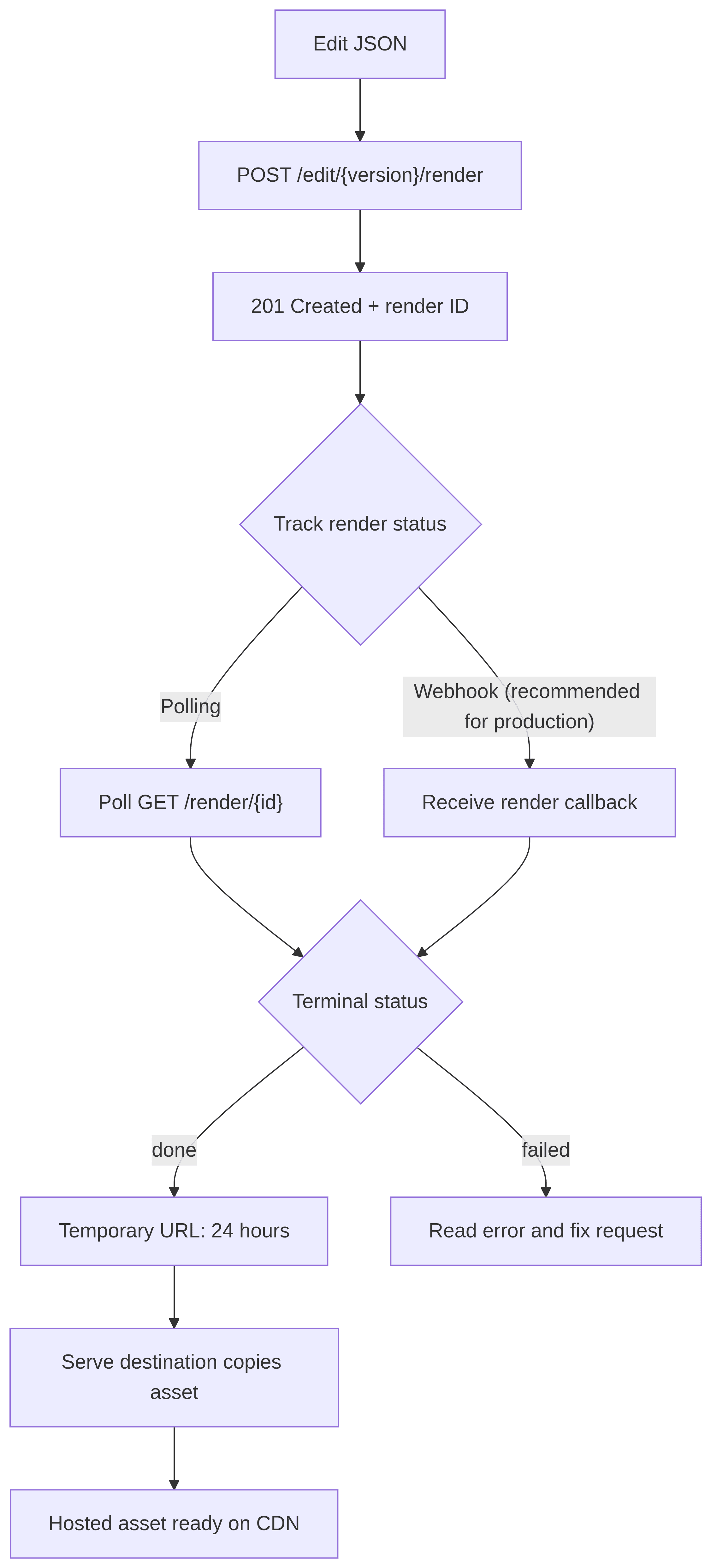
One important detail to keep in mind is that video rendering is asynchronous. Shotstack does not keep the initial request open until the MP4 is ready. It queues the job and immediately returns a render ID that you use to follow its progress.
The complete process is:
- Describe the video as an Edit JSON object.
- POST the Edit to
/edit/{version}/render. - Save the render ID from the
201 Createdresponse. - Poll
/edit/{version}/render/{id}, or wait for a webhook. - When the status is
done, use the temporary output URL or retrieve the hosted copy through the Serve API.
Before you start
To run the examples, you’ll need cURL, Node.js 18 or later, and Python 3 with pip. The shell commands assume a Bash-compatible terminal.
On Windows, run the shell commands in WSL or Git Bash. If you prefer PowerShell, set the environment variable with $env:SHOTSTACK_API_KEY = "your_sandbox_api_key", call curl.exe instead of the curl alias, and use py instead of python3.
Create a Shotstack account and get your API keys from the dashboard. They are in the menu under your account name in the top right corner, under API Keys. Shotstack provides separate keys for its sandbox and production environments.
We’ll use the sandbox environment so that we don’t spend rendering credits. Sandbox videos carry a watermark and are limited to 10 minutes. Even though ordinary sandbox renders don’t consume credits, your account must still have at least one credit available to use the environment. Also note that AI-generated assets are chargeable even when used in the sandbox.
| Environment | Edit API base URL | Key to use | Output |
|---|---|---|---|
| Sandbox | https://api.shotstack.io/edit/stage | Sandbox key | Watermarked test render |
| Production | https://api.shotstack.io/edit/v1 | Production key | Unwatermarked render that consumes credits |
Store your sandbox key in an environment variable (do not commit it to source control or expose it in browser-side JavaScript):
export SHOTSTACK_API_KEY="your_sandbox_api_key"
Create the smallest useful Edit JSON
Shotstack represents a video as an Edit, which is a JSON object that describes what should appear, when it should appear, and how the finished file should be rendered. An Edit has two main parts: a timeline and an output configuration.
- The timeline describes the video’s content and timing. It contains one or more tracks.
- A track is a layer containing one or more clips. For visual content, the first track in the array appears above the tracks that follow it, while the last forms the bottom layer.
- A clip places an asset on the timeline. Its
startandlengthvalues determine when the asset begins and how long it remains active. A clip can also control positioning, transitions, and other visual properties. - The asset is the content used by the clip, such as a video, image, audio file, or rich text.
- The output specifies how Shotstack should create the finished file, including its format, resolution, aspect ratio, frame rate, and quality.
Create a file named edit.json:
{
  "timeline": {
    "background": "#101827",
    "tracks": [
      {
        "clips": [
          {
            "asset": {
              "type": "rich-text",
              "text": "Hello World",
              "font": {
                "size": 64,
                "color": "#ffffff"
              },
              "align": {
                "horizontal": "center",
                "vertical": "middle"
              }
            },
            "start": 0,
            "length": 5
          }
        ]
      }
    ]
  },
  "output": {
    "format": "mp4",
    "resolution": "preview"
  }
}
This Edit creates a five-second MP4 containing centered white text on a dark background. The preview resolution produces a 512 by 288 video at 15 frames per second, which is sufficient for a first test.
We use a rich-text asset instead of the older title or text asset types. We also keep the render simple: no external media or custom fonts. When you add your own video, image, or audio assets, or custom font files, each src value must be a publicly accessible HTTPS URL.
You can optionally validate the Edit against Shotstack’s current schema before submitting it:
npm install -g @shotstack/cli
shotstack validate edit.json
The validation happens locally and does not consume credits.
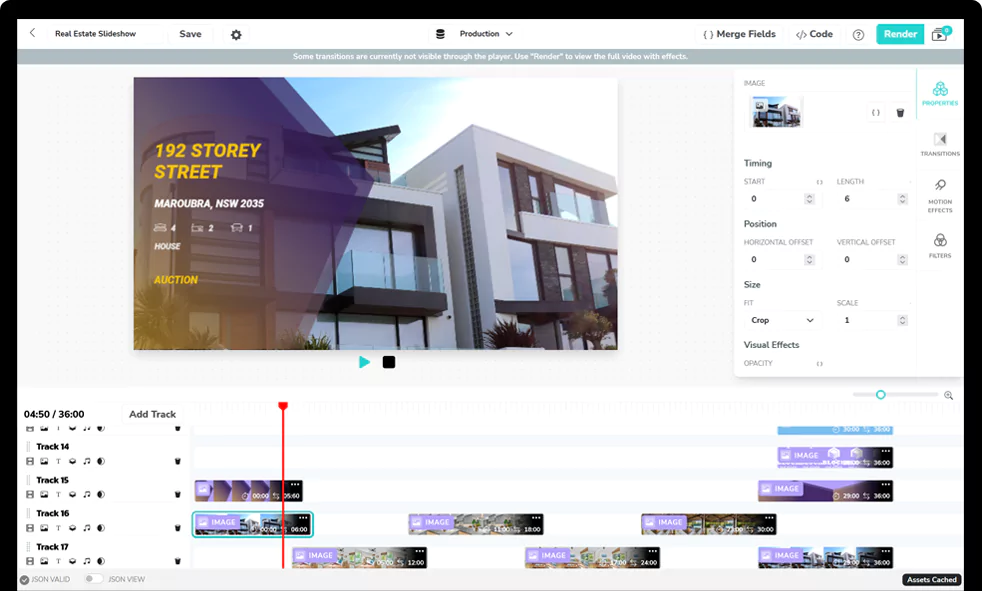
You do not have to write the Edit JSON by hand, either. You or your designers can create video templates visually in Shotstack Studio, then automate them the same way you will learn here: submit the template ID, with optional merge fields, to the template render endpoint instead of posting the full Edit JSON. Everything else in this guide, from status tracking to output URLs, works the same.
Submit the render with cURL
POST edit.json to the sandbox render endpoint:
curl --fail-with-body --silent --show-error \
  --request POST \
  --url https://api.shotstack.io/edit/stage/render \
  --header "Accept: application/json" \
  --header "Content-Type: application/json" \
  --header "x-api-key: ${SHOTSTACK_API_KEY}" \
  --data @edit.json
A successful request returns HTTP 201 Created with a response resembling this:
{
  "success": true,
  "message": "Created",
  "response": {
    "message": "Render Successfully Queued",
    "id": "727be714-8b0b-4ff5-bccd-17fa7ac1bfee"
  }
}
The important value is response.id. This is the render ID, not an asset ID or output URL. Save it as you’ll need it to check the progress of the render.
Check the render status
You could paste the render ID directly into the cURL command, or you could first place it in another environment variable:
export RENDER_ID="727be714-8b0b-4ff5-bccd-17fa7ac1bfee"
Then use the render ID in a GET request:
curl --fail-with-body --silent --show-error \
  --request GET \
  --url "https://api.shotstack.io/edit/stage/render/${RENDER_ID}" \
  --header "Accept: application/json" \
  --header "x-api-key: ${SHOTSTACK_API_KEY}"
The API returns the job’s current state. A render can move through the following statuses:
| Status | Meaning |
|---|---|
queued | The request is waiting for a render worker. |
fetching | Shotstack is downloading the assets referenced by the Edit. |
preprocessing | Video assets are being prepared for compatibility. |
rendering | The timeline is being rendered. |
saving | The finished file is being written to temporary storage. |
done | The output is ready and the response includes its temporary URL. |
failed | Rendering stopped. Read the response’s error field before correcting and resubmitting the Edit. |
For a simple test, run the GET request again after about five seconds until the status becomes done or failed. Do not continue polling after either terminal status.
A successful status response looks like the following:
{
  "success": true,
  "message": "OK",
  "response": {
    "id": "727be714-8b0b-4ff5-bccd-17fa7ac1bfee",
    "owner": "6dtsgjy5mr",
    "plan": "sandbox",
    "status": "done",
    "error": "",
    "duration": 5,
    "billable": 5,
    "renderTime": 687.71,
    "totalRenderTime": 2955,
    "url": "https://shotstack-api-stage-output.s3-ap-southeast-2.amazonaws.com/6dtsgjy5mr/727be714-8b0b-4ff5-bccd-17fa7ac1bfee.mp4",
    "poster": null,
    "thumbnail": null,
    "data": {
      "output": { "format": "mp4", "resolution": "preview" },
      "timeline": {
        "background": "#101827",
        "tracks": [
          {
            "clips": [
              {
                "start": 0,
                "length": 5,
                "fit": "cover",
                "asset": {
                  "type": "image",
                  "src": "https://shotstack-api-stage-cache.s3.ap-southeast-2.amazonaws.com/6dtsgjy5mr/a0b8551f47757fc4eb1bc7f9.canvas-1785676530598-827c9e07.png",
                  "metadata": {
                    "width": 1920,
                    "style": {
                      "letterSpacing": 0,
                      "lineHeight": 1.2,
                      "textDecoration": "none",
                      "wordSpacing": 0,
                      "textTransform": "none"
                    },
                    "text": "Hello World",
                    "type": "rich-text",
                    "align": { "horizontal": "center", "vertical": "middle" },
                    "height": 1080,
                    "font": {
                      "weight": "400",
                      "family": "Open Sans",
                      "size": 64,
                      "color": "#ffffff",
                      "opacity": 1
                    }
                  }
                }
              }
            ]
          }
        ]
      }
    },
    "created": "2026-08-02T13:15:28.931Z",
    "updated": "2026-08-02T13:15:31.886Z"
  }
}
You’ve now successfully rendered a video. You can open response.url in a browser or download the file, but know that the URL is temporary. We’ll cover the difference between this temporary URL and Shotstack’s CDN-hosted copy later.
This is the video the Edit produces, rendered in the sandbox with its watermark:
Automate the complete flow in Node.js
Manually running cURL requests is useful for learning the video render lifecycle, but it is not practical for automation. To automate the process, your application should submit the Edit, store the returned ID, wait between status requests, stop on failure, and enforce a timeout.
Create a render.mjs file in the same directory as edit.json, and add the following:
import { readFile } from 'node:fs/promises';
import { setTimeout as delay } from 'node:timers/promises';

const API_BASE_URL = 'https://api.shotstack.io/edit/stage';
const POLL_INTERVAL_MS = 5_000;
const MAX_WAIT_MS = 10 * 60 * 1_000;
const apiKey = process.env.SHOTSTACK_API_KEY;

if (!apiKey) {
  throw new Error('Set the SHOTSTACK_API_KEY environment variable first.');
}

async function shotstackRequest(path, options = {}) {
  const response = await fetch(`${API_BASE_URL}${path}`, {
    ...options,
    signal: options.signal ?? AbortSignal.timeout(30_000),
    headers: {
      Accept: 'application/json',
      'x-api-key': apiKey,
      ...options.headers,
    },
  });

  const responseText = await response.text();
  let body = null;

  try {
    body = JSON.parse(responseText);
  } catch {
    // The error below includes the raw body when Shotstack does not return JSON.
  }

  if (!response.ok) {
    const details = body ? JSON.stringify(body) : responseText;
    throw new Error(
      `Shotstack returned ${response.status} ${response.statusText}: ${details}`,
    );
  }

  if (!body) {
    throw new Error('Shotstack returned an unexpected non-JSON response.');
  }

  return body;
}

async function submitRender(edit) {
  const result = await shotstackRequest('/render', {
    method: 'POST',
    headers: { 'Content-Type': 'application/json' },
    body: JSON.stringify(edit),
  });

  const renderId = result?.response?.id;

  if (!renderId) {
    throw new Error(
      `The response did not contain a render ID: ${JSON.stringify(result)}`,
    );
  }

  return renderId;
}

async function waitForRender(renderId) {
  const startedAt = Date.now();

  while (Date.now() - startedAt < MAX_WAIT_MS) {
    const result = await shotstackRequest(`/render/${renderId}`);
    const render = result?.response;

    if (!render?.status) {
      throw new Error(`Unexpected status response: ${JSON.stringify(result)}`);
    }

    console.log(`Render status: ${render.status}`);

    if (render.status === 'done') {
      return render;
    }

    if (render.status === 'failed') {
      throw new Error(
        render.error || 'The render failed without an error message.',
      );
    }

    await delay(POLL_INTERVAL_MS);
  }

  throw new Error(`Render ${renderId} did not finish within 10 minutes.`);
}

try {
  const edit = JSON.parse(
    await readFile(new URL('./edit.json', import.meta.url), 'utf8'),
  );
  const renderId = await submitRender(edit);

  console.log(`Queued render: ${renderId}`);

  const render = await waitForRender(renderId);
  console.log(`Temporary output URL: ${render.url}`);
} catch (error) {
  console.error(error instanceof Error ? error.message : error);
  process.exitCode = 1;
}
Run it with:
node render.mjs
The script reads the same Edit, submits it once, and polls at five-second intervals. Each HTTP request is capped at 30 seconds. The loop exits immediately if Shotstack returns failed, and it stops after ten minutes rather than polling forever.
Below is the logged output:
Queued render: 6aed097a-8a8b-4c0d-a525-71b8885b2576
Render status: preprocessing
Render status: done
Temporary output URL: https://shotstack-api-stage-output.s3-ap-southeast-2.amazonaws.com/6dtsgjy5mr/6aed097a-8a8b-4c0d-a525-71b8885b2576.mp4
Automate the complete flow in Python
Let’s now see how to generate the same video render with Python.
Install requests:
python3 -m pip install requests
Add the following code to render.py, saved beside edit.json:
import json
import os
import sys
import time
from pathlib import Path

import requests

API_BASE_URL = "https://api.shotstack.io/edit/stage"
POLL_INTERVAL_SECONDS = 5
MAX_WAIT_SECONDS = 10 * 60


def shotstack_request(method, path, api_key, **kwargs):
    response = requests.request(
        method,
        f"{API_BASE_URL}{path}",
        headers={
            "Accept": "application/json",
            "x-api-key": api_key,
        },
        timeout=30,
        **kwargs,
    )

    try:
        body = response.json()
    except requests.exceptions.JSONDecodeError as error:
        raise RuntimeError(
            f"Shotstack returned a non-JSON response with status {response.status_code}."
        ) from error

    if not response.ok:
        raise RuntimeError(
            f"Shotstack returned {response.status_code}: {json.dumps(body)}"
        )

    return body


def submit_render(edit, api_key):
    result = shotstack_request("POST", "/render", api_key, json=edit)
    render_id = result.get("response", {}).get("id")

    if not render_id:
        raise RuntimeError(
            f"The response did not contain a render ID: {json.dumps(result)}"
        )

    return render_id


def wait_for_render(render_id, api_key):
    started_at = time.monotonic()

    while time.monotonic() - started_at < MAX_WAIT_SECONDS:
        result = shotstack_request("GET", f"/render/{render_id}", api_key)
        render = result.get("response", {})
        status = render.get("status")

        if not status:
            raise RuntimeError(f"Unexpected status response: {json.dumps(result)}")

        print(f"Render status: {status}")

        if status == "done":
            return render

        if status == "failed":
            raise RuntimeError(
                render.get("error") or "The render failed without an error message."
            )

        time.sleep(POLL_INTERVAL_SECONDS)

    raise TimeoutError(f"Render {render_id} did not finish within 10 minutes.")


def main():
    api_key = os.environ.get("SHOTSTACK_API_KEY")

    if not api_key:
        raise RuntimeError("Set the SHOTSTACK_API_KEY environment variable first.")

    edit_path = Path(__file__).with_name("edit.json")
    edit = json.loads(edit_path.read_text(encoding="utf-8"))
    render_id = submit_render(edit, api_key)

    print(f"Queued render: {render_id}")

    render = wait_for_render(render_id, api_key)
    print(f"Temporary output URL: {render['url']}")


if __name__ == "__main__":
    try:
        main()
    except (OSError, ValueError, RuntimeError, TimeoutError, requests.RequestException) as error:
        print(error, file=sys.stderr)
        raise SystemExit(1) from error
Run the Python script with:
python3 render.py
You should see output similar to this:
Queued render: 9d97601f-88ac-462c-b18f-d1a082b4fa5b
Render status: queued
Render status: done
Temporary output URL: https://shotstack-api-stage-output.s3-ap-southeast-2.amazonaws.com/6dtsgjy5mr/9d97601f-88ac-462c-b18f-d1a082b4fa5b.mp4
The Edit JSON and both scripts from this guide are available in the first-render example in the Shotstack cookbook.
Understand the two output URLs
As mentioned, the URL you get from response.url isn’t a permanent hosting location.
Shotstack handles a completed video in two stages:
| Location | How you find it | Ready status | What to know |
|---|---|---|---|
| Edit API temporary storage | response.url from the render status request | done | Available for 24 hours. Use it to inspect or download the result, but do not serve it to your application’s users. |
| Shotstack hosting destination | Serve API or a serve webhook | ready | Copied asynchronously to Shotstack’s CDN. Hosting is enabled by default and is managed separately from the temporary render URL. |
The CDN-hosted copy is not subject to the 24-hour temporary-file deletion; it remains available until you delete it from hosting.
The default hosted copy usually becomes ready a few seconds after rendering finishes. You can look it up by render ID using the Serve API:
curl --fail-with-body --silent --show-error \
  --request GET \
  --url "https://api.shotstack.io/serve/stage/assets/render/${RENDER_ID}" \
  --header "Accept: application/json" \
  --header "x-api-key: ${SHOTSTACK_API_KEY}"
The Serve API returns an array because one render can generate a video plus optional poster and thumbnail assets. A response containing one video resembles this:
{
  "data": [
    {
      "type": "assets",
      "attributes": {
        "id": "ed212b3f-06fd-46a4-bfa4-b4d340a1bc9d",
        "owner": "6dtsgjy5mr",
        "provider": "shotstack",
        "region": "au",
        "renderId": "727be714-8b0b-4ff5-bccd-17fa7ac1bfee",
        "providerId": "ed212b3f-06fd-46a4-bfa4-b4d340a1bc9d",
        "filename": "727be714-8b0b-4ff5-bccd-17fa7ac1bfee.mp4",
        "filesize": 28670,
        "url": "https://cdn.shotstack.io/au/stage/6dtsgjy5mr/727be714-8b0b-4ff5-bccd-17fa7ac1bfee.mp4",
        "status": "ready",
        "created": "2026-08-02T13:15:31.972Z",
        "updated": "2026-08-02T13:15:32.145Z"
      }
    }
  ]
}
If the Serve status is importing, wait a few seconds and make the request again. Use data[].attributes.url only after the status changes to ready. The full set of asset statuses is importing, ready, failed, and deleted.
If your application already uses Amazon S3, Google Cloud Storage, Azure Blob Storage, or another supported destination, you can configure Shotstack to transfer the output there instead. See the Shotstack Destinations documentation for setup instructions.
Do not serve the 24-hour temporary URL to your application’s users.
Replace polling with a webhook in production
Polling is the simplest way to understand and test an asynchronous API. It is less efficient when an application is processing many renders because every unfinished job creates more status requests.
Shotstack can POST a callback when a render completes or fails. Add a root-level callback property to the Edit:
{
  "timeline": {
    "background": "#101827",
    "tracks": [
      {
        "clips": [
          {
            "asset": {
              "type": "rich-text",
              "text": "Hello World",
              "font": {
                "size": 64,
                "color": "#ffffff"
              },
              "align": {
                "horizontal": "center",
                "vertical": "middle"
              }
            },
            "start": 0,
            "length": 5
          }
        ]
      }
    ]
  },
  "output": {
    "format": "mp4",
    "resolution": "preview"
  },
  "callback": "https://example.com/webhooks/shotstack"
}
The callback must be a publicly reachable URL. When the render finishes, Shotstack sends an Edit event:
{
  "type": "edit",
  "action": "render",
  "id": "b6460fcd-6c7c-4dc0-870e-e9e0a99cb21a",
  "owner": "6dtsgjy5mr",
  "status": "done",
  "url": "https://shotstack-api-stage-output.s3-ap-southeast-2.amazonaws.com/6dtsgjy5mr/b6460fcd-6c7c-4dc0-870e-e9e0a99cb21a.mp4",
  "error": null,
  "completed": "2026-08-02T23:36:00.781Z"
}
Because Shotstack hosting is enabled by default, the same callback URL can later receive a Serve event:
{
  "type": "serve",
  "action": "copy",
  "id": "e4433cbf-e501-76a2-ac8b-715d26997540",
  "render": "b6460fcd-6c7c-4dc0-870e-e9e0a99cb21a",
  "owner": "6dtsgjy5mr",
  "status": "ready",
  "url": "https://cdn.shotstack.io/au/stage/6dtsgjy5mr/b6460fcd-6c7c-4dc0-870e-e9e0a99cb21a.mp4",
  "error": null,
  "completed": "2026-08-02T23:36:01.010Z"
}
These are different events. An Edit event uses id for the render ID and reports done or failed. A Serve event uses id for the hosted asset ID, includes the render ID in render, and reports whether the destination copy is ready or failed.
The receiving endpoint can be implemented with any web framework or serverless platform. Its exact implementation is outside the scope of this guide, but a production callback handler should:
- Inspect
type,action, andstatusbefore processing the payload. - Return a successful response within 10 seconds and move longer work to a queue or background job.
- Be idempotent because a failed delivery is retried and one render can produce several asset events.
- Verify important callbacks by querying the Edit or Serve API with the ID received.
That last step matters because Shotstack does not currently sign callback payloads. Anyone who discovers your public endpoint could attempt to POST data to it.
For the full retry schedule and callback considerations, see the Shotstack webhook documentation.
Fix common render errors
Most render problems fall into a small number of categories.
| Symptom | Likely cause | Fix |
|---|---|---|
| Authentication error | Missing key, incorrect key, or a sandbox key sent to the production endpoint | Confirm that SHOTSTACK_API_KEY is set and pair the sandbox key with stage or the production key with v1. |
| The POST request rejects the body | Malformed JSON, a trailing comma, a comment, an invented property, or a value outside the allowed schema | Run shotstack validate edit.json and compare the rejected field with the current API schema. |
The API accepts the request but the render becomes failed | An asset could not be fetched, decoded, or processed | Read response.error. Confirm that every media URL points directly to a publicly accessible HTTPS file. |
| A local image or video cannot be found | Shotstack’s cloud workers cannot access paths on your computer | Upload the asset to public storage first, or use Shotstack’s Ingest API or CLI upload command. |
| Text fails or uses the wrong font | A system font such as Arial or Helvetica was assumed to exist | Use a supported font or add a publicly accessible font file under timeline.fonts. For a first render, omit the family as this guide does. |
| Polling never returns a URL | The render has not reached done, the code ignores failed, or it has no timeout | Log every status, stop on failed, wait about five seconds between requests, and enforce a maximum wait. |
| The video URL worked yesterday but fails today | The application saved the temporary Edit API URL | Use the hosted CDN URL from the Serve API or transfer the output to your own storage before the 24-hour temporary copy expires. |
| The CDN URL initially returns nothing | The render is done, but the asynchronous destination copy is not yet complete | Wait for a Serve status of ready or the corresponding serve callback. |
One more easy mistake is copying code from an outdated Shotstack example. Older tutorials may use legacy asset types such as title, text, or html, or the legacy timeline.soundtrack property — current Shotstack guidance replaces these with rich-text assets and a dedicated audio track. They may also call an endpoint that omits the /edit service path. When building a new integration, check your JSON and endpoints against the current Edit API reference, OpenAPI schema, and Edit JSON conventions.
Optional: let an AI agent perform the render
The direct API is the right foundation for an application because your code controls the Edit, error handling, storage, and completion logic. For a one-off render or an interactive experiment, you can put an AI agent in front of the same API.
Shotstack’s MCP server currently exposes tools including:
get_shotstack_guide, which returns current Edit JSON conventions.render_video, which submits an Edit and returns a render ID.get_render_status, which checks the job and returns the output URL when it is done.studio, which opens the Edit for human review before rendering.
For example, connect the remote MCP server to Codex CLI:
codex mcp add shotstack --url https://mcp.shotstack.io
Or connect it to Claude Code:
claude mcp add --transport http shotstack https://mcp.shotstack.io
After authenticating with your Shotstack account, use a specific prompt:
Use the Shotstack MCP server. First call
get_shotstack_guide. Create a five-second preview-resolution video with centered white rich text reading “Hello World” on a dark background. Callrender_videodirectly rather than opening Studio, then useget_render_statusuntil the render reachesdoneorfailed.
Calling out render_video is intentional. Shotstack recommends that agents default to Studio when a human is available to review the Edit, so an agent might open the visual editor unless you explicitly request a direct render.
The MCP server is currently in beta, and its tools can change. See the current MCP server documentation and the complete guide to connecting Shotstack to AI tools with MCP before relying on it in an automated pipeline.
The agent is still following the same lifecycle you used manually: compose an Edit, submit it, receive an ID, and check the status. MCP removes the need to write every request yourself; it does not make rendering synchronous.
Go from one video to many
You now have the complete path from zero to one rendered video:
- Build a valid Edit.
- Submit it with the correct environment and API key.
- Track the asynchronous job to
doneorfailed. - Distinguish the 24-hour temporary URL from the hosted CDN asset.
- Move to callbacks when polling no longer fits the application.
Once one render works reliably, a next step could be to turn the Edit into a reusable template, supply different data, and queue multiple videos.
Create a free Shotstack account and use the sandbox key to render the five-second Edit from this guide.
Frequently asked questions (FAQs)
How long does a Shotstack render take?
It depends on the video’s duration, resolution, and source assets. A short test like the five-second preview render in this guide typically completes within a few seconds of leaving the queue. Longer timelines, higher resolutions, and large remote assets increase the time, so track each job through the status endpoint or a webhook instead of assuming a fixed duration.
Do sandbox renders use credits?
Ordinary sandbox renders don’t consume credits, but your account must hold at least one credit to use the environment. Outputs are watermarked, and videos are limited to 10 minutes. The exception is AI-generated assets, which are chargeable even in the sandbox.
How do I render a video without the watermark?
Use the production environment: send the same Edit to https://api.shotstack.io/edit/v1/render with your production API key instead of the sandbox key. Production renders are unwatermarked and consume credits.
How long is my rendered video available?
The URL returned by the render status request is temporary and expires after 24 hours. Because hosting is enabled by default, Shotstack also copies the output to its CDN, and that hosted version remains available until you delete it from hosting. You can look it up by render ID through the Serve API, or configure a destination such as Amazon S3 to receive the file instead.
Should I poll for the render status or use a webhook?
Polling is fine while you’re learning the API or processing a handful of renders. For production workloads, add a callback URL to the Edit so Shotstack notifies your application when the render completes or fails, instead of sending repeated status requests. Your endpoint should respond within 10 seconds, and because callbacks aren’t currently signed, verify important events by querying the Edit or Serve API with the ID from the payload.
Get started with Shotstack's video editing API in two steps:
- Sign up for free to get your API key.
- Send an API request to create your video:
curl --request POST 'https://api.shotstack.io/v1/render' \
--header 'x-api-key: YOUR_API_KEY' \
--data-raw '{
  "timeline": {
    "tracks": [
      {
        "clips": [
          {
            "asset": {
              "type": "video",
              "src": "https://shotstack-assets.s3.amazonaws.com/footage/beach-overhead.mp4"
            },
            "start": 0,
            "length": "auto"
          }
        ]
      }
    ]
  },
  "output": {
    "format": "mp4",
    "size": {
      "width": 1280,
      "height": 720
    }
  }
}'

Experience Shotstack for yourself.
- Seamless integration
- Dependable high-volume scaling
- Blazing fast rendering
- Save thousands