Most teams hit the same wall with video: the first ten videos are fine, but the next thousand are not. Whether you are generating personalized sales outreach, producing social ads across dozens of formats, or building video rendering directly into your product, doing it manually doesn’t scale.
Video automation software solves this by letting you define a template or timeline once and then produce variations at scale, driven by data, APIs, or AI. But the category has gotten broad. A developer building a rendering pipeline has very different needs from a marketing team that wants to upload a spreadsheet and get 500 videos back.
In this guide, we take a look and break down 12 tools across four categories: API and developer tools, no-code template platforms, AI-powered generators, and workflow automation connectors. For each, you will get a clear picture of what it does, what it costs, and who it is actually built for, so you can skip the ones that do not fit and focus on the ones that do.
What Is Video Automation Software?
Video automation software is any tool that lets you produce, edit, or personalize video programmatically, without opening a timeline editor for every output. At its simplest, that means feeding data into a template and getting finished videos back. At its most advanced, it means defining an entire video pipeline in code, with rendering handled in the cloud.
This is different from AI text-to-video tools like Sora or Runway, which generate entirely new footage from a prompt. Video automation tools work with structured inputs: your templates, your brand assets, your data. The output is predictable and repeatable, which is the point. You control the creative once, then scale the production.
The tools in this guide span a wide range, from open-source rendering engines to no-code platforms to AI-assisted editors, but they all share that core idea: you should not be doing the same edit hundreds of times.
How We Selected These Tools
We work with video automation every day. Our customers use Shotstack to render everything from personalized real estate tours to bulk social ads to AI-generated explainer videos. That means we spend a lot of time understanding what else is out there, how teams actually use these tools, and where each one fits (or does not fit) in a video workflow.
Every tool in this list was evaluated against four criteria:
API support. Can you trigger video generation programmatically? For developer tools this is non-negotiable. For no-code platforms, an API is still a strong signal that the tool can fit into a larger workflow.
Scalability. Does the tool hold up when you go from ten videos to ten thousand? This includes rendering speed, queue management, and whether infrastructure is self-hosted or managed.
Template flexibility. How much control do you get over the output? Some tools offer thousands of pre-built templates. Others let you define every frame from scratch in JSON or After Effects.
Pricing transparency. We prioritized tools that publish their pricing or at least offer a free tier, so you can test before committing to a sales call.
The list covers four categories: API and developer tools, no-code and template automation, AI-powered automation, and workflow connectors. Tools are grouped by type, not ranked against each other, because the best choice depends entirely on your use case.
The Top Video Automation Software Picks For Each Use Case
| Tool | Type | API | Free Tier | Starting Price | Best For |
|---|---|---|---|---|---|
| Nexrender | API / After Effects | Yes | Yes (open-source) | Free / $119/mo (cloud) | AE rendering automation, open-source control |
| InVideo | AI / No-code | Limited | Yes | Free / $35/month | AI script-to-video, marketing content at speed |
| Shotstack | API | Yes | Yes | $0.30/min (PAYG) | Developers, pipelines, scalable rendering |
| Dataclay Templater | Plugin / After Effects | CLI + event scripts | No (30-day trial) | $80 (Rig, perpetual) | AE template libraries, studio production |
| Idomoo | Enterprise platform | Yes | No | Custom | Interactive personalized video at enterprise scale |
| Rocketium | No-code / Enterprise | Yes | No | Custom | High-volume ad creative, brand automation |
| Wideo | No-code | No | Yes | $59/month ($19/month annual) | Simple animated video, non-technical teams |
| HeyGen | AI avatars | Yes | Yes | $24/month (annual) | AI presenter video, personalized outreach |
| Synthesia | AI avatars | Yes (Creator+) | Yes (limited) | $18/month (annual) | Training, onboarding, corporate comms |
| Veed.io | AI-assisted editor | No | Yes | Free / $19/month | Social editing, subtitles, content repurposing |
| Zapier / Make | Workflow connector | N/A | Yes | Free / $29.99/month (Zapier) | Connecting video tools to business triggers |
| n8n | Workflow / open-source | N/A | Yes (self-hosted) | Free / €24/month (cloud) | Technical teams, AI agent workflows, self-hosted control |
The 12 Best Video Automation Tools in 2026
Here is a breakdown of the best tools across four categories, grouped by type rather than ranked, so you can jump straight to what fits your workflow.
API and Developer Tools
These tools are built for developers and technical teams that want to control video generation programmatically through APIs, CLIs, or code-based pipelines.
1. Nexrender
Best for:
Developers who want full control over After Effects rendering automation.
About:
Nexrender is an open-source engine built on Node.js that automates After Effects rendering. You define jobs in JSON, specify which template to use, and tell it which layers to swap out (text, images, footage). Rendering runs on your own machines or in the cloud.
Key details:
- Active since 2016 with a strong open-source community
- SaaS version (Nexrender Cloud) now available with a web interface, preview functionality, and Google Sheets integration
- The original CLI is still free and fully functional
- Requires comfort with JavaScript and managing your own render nodes
The setup is technical. Scaling means configuring distributed nodes yourself, and troubleshooting is on you. We have seen teams start with Nexrender’s open-source CLI and eventually look for managed alternatives once their rendering volume outgrows what they can maintain in-house. But if you’re already deep in After Effects who want no vendor lock-in, it gives more control than almost anything else here.
If you are pairing it with an FFmpeg-based pipeline, our guide to using FFmpeg covers post-processing steps like transcoding and format conversion.
Pricing:
Open-source (free). Nexrender Cloud pricing starts at $119/mo.
2. InVideo
Best for:
Teams that want AI-powered video creation with growing automation capabilities.
About:
InVideo runs a multi-agent AI system built on OpenAI models (GPT-4.1, Sora 2, Google VEO 3.1). You type a prompt. It generates a complete video with stock footage, music, voiceover, and editing. The whole thing takes minutes.
Key details:
- AI handles script generation, visual selection, voiceover, and final editing end to end
- Supports bulk creation from structured data inputs
- Template-based workflows available alongside prompt-based generation
- Growing API presence (listed on Postman), though not as developer-focused as dedicated rendering APIs
The strength is speed. Non-technical teams can go from a text brief to a polished marketing video without touching a timeline. The API story is still developing, so if deep programmatic control matters, look at the other tools in this section. Pricing:
Free tier (watermarked, limited exports, No gen AI). Plus plan at $35/month. Max plan at $60/month.
3. Shotstack
Best for:
Teams that need a scalable video rendering API, whether building it into a product, powering a content pipeline, or automating production with no code.
About:
Shotstack is a cloud video editing API and rendering platform. You describe a video as a JSON timeline covering clips, text, audio, transitions, and effects. Send it to the API, get a rendered file back. The infrastructure is fully managed and built for automated video creation at any scale, from a single render to tens of thousands. We built it because we kept running into the same problem our customers had: video rendering at scale is painful to build and expensive to maintain.
What makes it versatile:
- For developers: Embed video generation directly into applications and SaaS products using RESTful APIs and SDKs (Node.js, PHP, Python, Ruby)
- For content teams: Use it as the rendering layer in an AI pipeline. Feed in assets from HeyGen, ElevenLabs, or any generation API, and let Shotstack handle compositing, editing, and final render
- For marketing teams: Connect to Zapier or Make to trigger personalized video renders from spreadsheet rows, CRM events, or form submissions. No code required
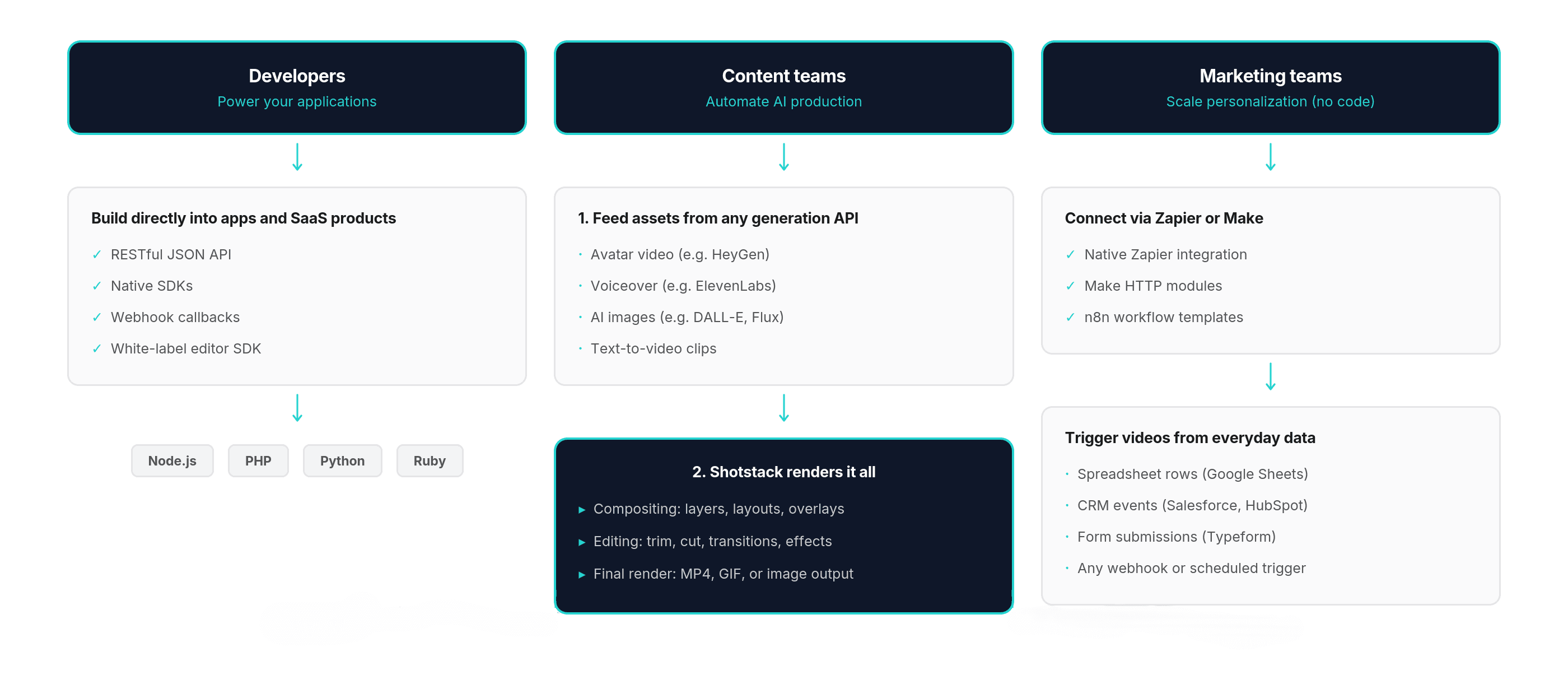
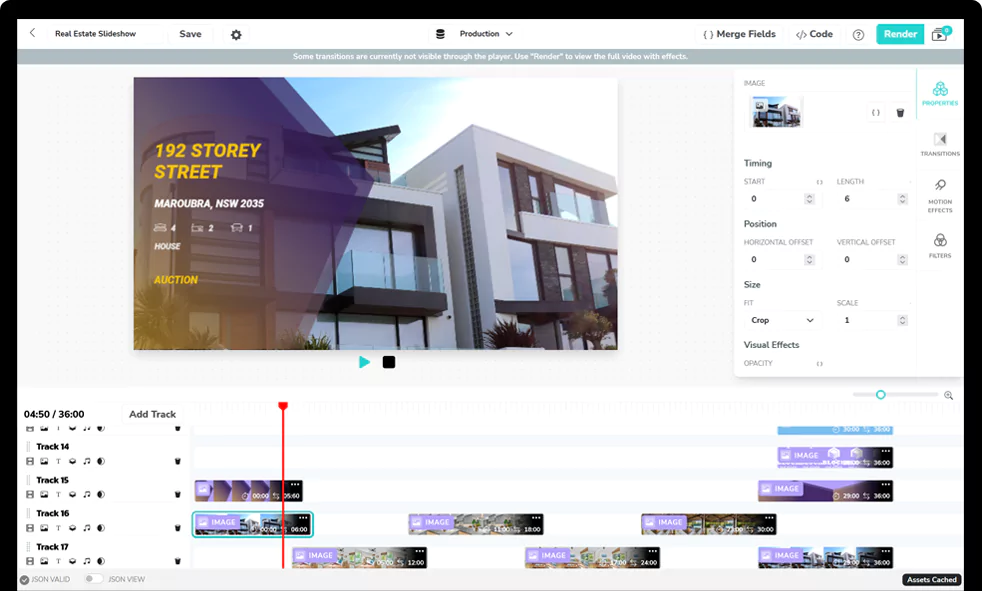
You do not need to be an experienced developer to get started. With AI code generation tools like Claude and ChatGPT, you can describe the video you want in plain language and get working JSON templates back in seconds. Shotstack also offers a white-label video editor SDK and an online editor for teams that prefer a visual interface.
Here is a basic render request:
{
  "timeline": {
    "tracks": [{
      "clips": [{
        "asset": {
          "type": "title",
          "text": "Hello World",
          "style": "minimal"
        },
        "start": 0,
        "length": 5
      }]
    }]
  },
  "output": {
    "format": "mp4",
    "resolution": "hd"
  }
}
That produces a five-second title card rendered in the cloud. From there you can add video clips, images, audio tracks, HTML overlays, and transitions, all in code or via a workflow connector. For a broader look at video editing automation methods and how to approach them depending on your stack, our guide covers the main options.
Pricing:
Pay-as-you-go from $0.30/min. Subscriptions from $0.20/min with volume discounts. Unlimited developer sandbox for testing.
Get a free API key or visit the Pricing page for more details.
No-Code and Template Automation
The tools in this section are built for teams that want to produce video from templates and data without writing code or managing infrastructure.
Worth noting: Shotstack also crosses into this category. With native Zapier and Make integrations, a visual online editor, and AI code generation making JSON templates accessible to non-developers, it serves no-code marketing teams just as well as developer ones. If you want a single platform that scales from no-code spreadsheet workflows to full API integration as your needs grow, it is worth evaluating alongside the tools below.
4. Dataclay Templater
Best for:
Motion designers and studios managing large After Effects template libraries.
About:
Dataclay Templater is an After Effects plugin (not a standalone platform). You “rig” your AE compositions by marking dynamic layers, then connect a data source. Templater processes the data and renders each variation inside After Effects.
Key details:
- Connects to Google Sheets, TSV files, JSON, or Dataclay’s own QUE data management system
- Three editions: Rig ($80 one-time, preview only), Pro (subscription, desktop batch rendering), Bot (subscription, unattended CLI automation)
- QUE Meter offers pay-per-output pricing across multiple licenses
- All rendering happens on your machine or server running AE, so scaling means scaling hardware
Templater keeps the entire workflow inside the AE interface. That is a big plus for teams where the motion designer runs production. Nexrender gives you a Node.js pipeline instead, so choose based on whether your team lives in AE or in code.
Pricing:
Rig from $80 (perpetual). Pro and Bot as monthly or annual subscriptions.
5. Idomoo
Best for:
Enterprises running personalized video campaigns at scale with interactivity.
About:
Idomoo is a full-service personalized video platform built for large CRM-driven campaigns. Every viewer gets a unique video populated with their name, account data, usage stats, or product recommendations.
Key details:
- Supports branching paths, in-video CTAs, and real-time data updates
- Renders in cinematic quality at 100x real time
- Integrates with Salesforce, HubSpot, and other enterprise CRMs
- Includes an After Effects plugin and a browser-based campaign builder
- Security: ISO 27001, SOC 2 Type 2, HIPAA compliant
This is not a self-serve startup tool. Think insurance policy summaries, bank year-in-review videos, and healthcare communications at millions of viewers. If that sounds like your use case, talk to their sales team. If not, look elsewhere.
Pricing:
Custom. Contact Idomoo.
6. Rocketium
Best for:
Marketing and growth teams producing high-volume ad creative across formats.
About:
Rocketium has evolved into an AI-powered creative automation platform. The core job: produce marketing creative (images and video) at scale while keeping everything on brand.
Key details:
- Upload a brief and a key visual. AI agents handle templating, versioning, resizing, and brand compliance
- Imports from Photoshop and After Effects
- Integrates with Meta, Google Ads, and other ad platforms
- Bulk production via spreadsheets or API
- Used by Amazon, Rappi, and major agencies to produce 200,000+ creative variations per year
Enterprise-focused with custom plans, dedicated implementation support, and AI model training on your brand guidelines.
Pricing:
Custom. No public pricing or free tier.
7. Wideo
Best for:
Non-technical teams that want simple animated video creation from templates.
About:
Wideo is a browser-based animated video maker. Pick a template, customize with your text, images, and audio, export. Done.
Key details:
- ~75 pre-built templates (explainers, social ads, real estate, product demos, internal comms)
- Drag-and-drop editor with stock media library and text-to-speech
- Video automation features for producing variations, though more limited than API tools
- No API available
If you need programmatic access or product integration, this is not the right fit. But for small teams that want branded animated videos without learning new software, it works.
Pricing:
Free (watermarked, 1 min). Basic from $59/month ($19/month annual). Pro from $99/month ($39/month annual).
AI-Powered Automation
These tools use AI to generate video content from scratch, whether through avatar presenters, text-to-video, or intelligent editing assistants. Many of them pair well with Shotstack: you can take AI-generated avatars, voiceovers, or images from any of these platforms and feed them into a Shotstack timeline via API to handle the compositing, branding, and final render automatically.
8. HeyGen
Best for:
Personalized video outreach and training content with AI avatars.
About:
HeyGen is one of the top AI avatar platforms. Write a script, pick an avatar (500+ stock or a custom digital twin), choose a voice. HeyGen renders a video with synced lip movements. Supports 30+ languages and lip-synced video translation.
Key details:
- Well-documented API with pay-as-you-go credit model
- MCP integration for AI assistants like Claude
- Open-source framework for custom video workflows
- Unlimited standard avatar video on all paid web plans
- Advanced features (Avatar IV, lip-synced translation) consume premium credits
Watch out: Web platform and API billing are separate. The API starts at $5 pay-as-you-go (~$1/credit per minute of video). Pro and Scale tiers lower the per-credit cost.
Pricing:
Free (1-min videos, watermarked). Creator from $24/month (annual) or $29/month. API from $5 PAYG.
9. Synthesia
Best for:
Internal business video at scale (training, onboarding, corporate comms).
About:
Synthesia is the go-to AI avatar platform for enterprise L&D. The pitch: replace studio-recorded training videos with AI ones you can update in minutes. 240+ avatars, 140+ languages, branded templates, quizzes, branching CTAs, and 1-click translation.
Key details:
- API access on Creator plan ($89/month or $64/month annual) and above
- Up to 360 minutes of video per year on Creator, deducted from plan limits
- Enterprise plan: unlimited minutes, SSO, SCORM export for LMS, dedicated CSM
- Custom “Studio” avatars cost $1,000/year extra
Watch out: Content moderation is strict. Healthcare, biotech, and regulated industries may get flagged by automated systems. Test with the free tier before committing.
Pricing:
Free (limited). Starter from $18/month (annual). Creator from $64/month (annual). Enterprise: custom.
10. Veed.io
Best for:
Marketers and content creators who want AI-assisted editing in the browser.
About:
Veed is not a rendering API or a traditional automation platform. It is a browser-based video editor with AI features layered on top. The focus: making repetitive editing tasks faster.
Standout features:
- Auto-subtitles in 125+ languages
- Filler word removal
- Background noise reduction
- Eye contact correction
- Batch resizing for different social platforms
Backed by Sequoia Capital. No API, so it will not fit into a programmatic pipeline. But for teams that currently edit every video by hand, it can cut production time dramatically.
Pricing:
Free (watermarked, 720p). Lite from $19/month. Pro from $49/month (4K, all AI tools).
Workflow Automation
These are not video tools themselves, but they connect the tools above to your data sources and business events, turning any of them into an automated pipeline.
11. Zapier / Make
Best for:
Connecting video tools to data sources and business events without writing integration code.
About:
Zapier and Make are workflow automation platforms that connect thousands of apps using triggers and actions. They belong on this list because they turn any of the tools above into an automated pipeline.
What this looks like in practice:
- A new row in Google Sheets triggers a Shotstack API call that renders a personalized product video
- A HubSpot form submission kicks off a HeyGen avatar video as part of a follow-up sequence
- A new property listing in your CRM triggers a real estate video with dynamic photos and text
Shotstack, HeyGen, and Synthesia all have native Zapier integrations. Make supports custom HTTP modules for connecting to any API. For teams that want video automation without building custom integrations, this is usually the fastest path.
Pricing:
Zapier: free plan available, paid from $29.99/month. Make: free plan available, paid from $10.59/month.
12. n8n
Best for:
Technical teams that want open-source workflow automation with full control over data and infrastructure.
About:
n8n sits between Zapier/Make and writing custom integrations from scratch. Visual drag-and-drop builder like Zapier, but you can drop in custom JavaScript or Python at any step. Self-host for free with unlimited executions, or use their managed cloud.
Why it matters for video:
- Community workflow templates orchestrate full video pipelines: LLM script generation, AI image/voiceover creation, rendering via Shotstack, and auto-publishing to TikTok/YouTube/Instagram
- Inline code gives you more control over data transformation and conditional logic than Zapier or Make
- Native AI agent capabilities with LangChain integration
- An AI agent can decide what video to create based on incoming data, then trigger the full production pipeline on its own
Good fit for teams that outgrow Zapier’s simplicity but do not want to build a custom backend.
Pricing:
Self-hosted Community Edition: free (unlimited executions). Cloud Starter from €24/month (2,500 executions). Pro from €60/month (10,000 executions).
How to Choose the Right Video Automation Tool
The right tool depends on where video fits in your workflow and who is building it. Here is a quick decision framework.
You need a video rendering API or pipeline. Shotstack gives you a JSON-based video editing API with fully managed cloud rendering. You can use it to build video into a product, power a content pipeline, assemble AI-generated assets (images, voiceovers, avatars) into finished videos, or render thousands of data-driven variations from templates. It also connects to Zapier and Make, so non-technical teams can trigger renders from spreadsheets, CRM events, or form submissions without writing code. If your use case involves producing video programmatically at any scale, Shotstack is the infrastructure layer that handles it.
Your team works in After Effects and wants to automate template rendering. Nexrender is the open-source option with full control over your infrastructure. Dataclay Templater keeps the workflow inside the AE interface and adds data-driven rendering with Google Sheets or JSON. Choose Nexrender if your team is developer-heavy. Choose Templater if your motion designers are driving production.
You want AI to generate video from a text prompt or script. InVideo is the strongest option for turning a brief into a finished marketing video with stock footage, music, and narration, all handled by AI. For talking-head video with AI presenters, HeyGen and Synthesia are the two leading platforms. HeyGen leans toward sales outreach and external-facing content. Synthesia is built for internal business video like training and onboarding. If you want to combine AI-generated assets into polished, branded output, you can feed the results from any of these tools into Shotstack’s API to handle the compositing, editing, and rendering step.
Your marketing team needs to produce creative at scale without code. Rocketium handles high-volume ad creative with AI-powered templating, brand governance, and direct integrations with ad platforms. If your needs are simpler, Wideo offers template-based animated video creation with no technical barrier.
You want AI to speed up manual video editing. Veed.io automates the tedious parts of editing: subtitles, resizing, audio cleanup, filler word removal. It is not a rendering API, but for teams that are still editing every video by hand, it can cut production time in half.
You want to connect video generation to business events without building integrations. Zapier and Make let you trigger video rendering from form submissions, CRM updates, spreadsheet changes, or any other event across thousands of apps. Pair them with Shotstack, HeyGen, or Synthesia for a no-code automation pipeline. If you need more control, custom code steps, or want to self-host for free, n8n gives you the flexibility of a visual workflow builder with the power of inline JavaScript and Python.
Start Building With Video Automation
Whether you are a developer integrating video into a product, a team automating content from spreadsheets, or an AI pipeline that needs a rendering layer, Shotstack’s video editing API handles the infrastructure so you do not have to. Define your video in JSON, connect it to any data source or AI tool, and get rendered files back at any scale. No FFmpeg, no render farms, no server management.
Get started with Shotstack today for free.
For more on building video workflows with code, check out our guides on using FFmpeg and data-driven personalization.
Frequently Asked Questions
What is the difference between video automation software and AI video generators like Sora or Runway?
AI video generators create entirely new footage from a text prompt or image. Video automation software works with your existing templates, brand assets, and structured data to produce finished videos at scale. The output is predictable, repeatable, and brand-consistent. Some tools, like Shotstack, can combine both by letting you feed AI-generated assets into an automated editing and rendering pipeline.
Do I need coding skills to use video automation tools?
Not necessarily. API-first platforms like Shotstack and Nexrender are built for developers, but tools like Wideo, Veed.io, and InVideo require zero technical skill. There is also a growing middle ground: workflow platforms like Zapier and Make let you trigger video rendering from spreadsheets or CRM events without writing code. And with AI code generation tools now widely available, even non-developers can generate the JSON templates and API calls needed to use a platform like Shotstack by describing what they want in plain language.
How much does automated video creation cost at scale?
It depends on the tool. Open-source options like Nexrender are free but require you to run your own infrastructure. API tools like Shotstack charge per rendered minute (from $0.20/min on subscriptions). AI avatar platforms like HeyGen and Synthesia use credit-based models where one credit roughly equals one minute of video. Enterprise platforms like Idomoo and Rocketium use custom pricing. The real comparison is not just the tool cost but the production time it replaces.
Can I use video automation software to create personalized videos from a spreadsheet?
Yes, this is one of the core use cases. With Shotstack, you can map spreadsheet rows to template variables and render a unique video per row via the API, or trigger renders from Google Sheets through Zapier. Dataclay Templater connects directly to Google Sheets or JSON feeds inside After Effects. HeyGen and Synthesia both support bulk avatar video creation from uploaded CSV data.
Get started with Shotstack's video editing API in two steps:
- Sign up for free to get your API key.
- Send an API request to create your video:
curl --request POST 'https://api.shotstack.io/v1/render' \
--header 'x-api-key: YOUR_API_KEY' \
--data-raw '{
  "timeline": {
    "tracks": [
      {
        "clips": [
          {
            "asset": {
              "type": "video",
              "src": "https://shotstack-assets.s3.amazonaws.com/footage/beach-overhead.mp4"
            },
            "start": 0,
            "length": "auto"
          }
        ]
      }
    ]
  },
  "output": {
    "format": "mp4",
    "size": {
      "width": 1280,
      "height": 720
    }
  }
}'

Experience Shotstack for yourself.
- Seamless integration
- Dependable high-volume scaling
- Blazing fast rendering
- Save thousands