Short clips, or a video platform

The JSON2Video API works well for short clips. But its plans cap each video at 1, 10 or 30 minutes, unused subscription credits expire every month, and there is no editor to embed in your app.

Shotstack is video infrastructure for products and automated workflows. Videos up to 3 hours on any plan, an editor your customers use inside your app, delivery to your own storage and a hosted MCP server for AI agents.

Short video fragments flowing into long continuous streams of light

At a glance: JSON2Video vs Shotstack

Note: Shotstack vs JSON2Video features, pricing and render speed checked on 28 September 2026 and may be subject to change. Allowances are shown in minutes, not seconds. Sources: Shotstack pricing and JSON2Video pricing.

FeatureShotstackJSON2Video
Free start✓ 10 minutes on the production API, no watermark10 minutes, watermarked (max 1 min per video)
200 minutes a month$39$49.95 (max 10 min per video)
Pay as you go$0.20 per minute$0.38 to $0.42 per minute
Unused subscription credits✓ Roll over, up to 3× your monthly allowance✕ Expire each month
Longest video3 hours on every plan1, 10 or 30 minutes, by plan
Render speed✓ Almost twice as fast in our lab testsSlower in the same test
Concurrent renders✓ Thousands, on every planNot published
Uptime SLA✓ 99.9% on every planNot published
Going over your allowance✓ Subscriptions keep rendering (+30% overage)Buy a prepaid top-up
Resolution and frame rate✓ No extra charge: 1080p at 60 fps on every plan, 4K on High Volume4K at 4× the credits
Embeddable video editor✓ White-label Video Editor SDK✕
AI agents (MCP)✓ Hosted MCP server, no local setupLocal MCP server through the CLI
No-code automation✓ Official n8n node, Make and Zapiern8n, Make and Zapier
Delivery to your storage✓ S3, Google Cloud Storage, Azure and Google Drive✕ No native S3 export (FTP, SFTP, email)
HTML, CSS and JavaScript✓ HTML5, CSS and JavaScript (html5 asset)✓
Automatic timing✓ Smart Clips, plus exact timing control✓ Automatic or explicit timing
AI image, video and voice generation✓ Images, video, voice and music generation✕ “Does not support natively AI image generation, AI video generation, avatar generation or face-swap.”
As millions of users interact with these types campaigns we were going to have to render thousands videos every minute. It quickly became apparent that this type of volume was no issue for Shotstack at all. Raúl Uranga, Grupo W for Ikea

Built for demanding campaigns.

1.1M+

Videos rendered per month

50,000+

Developers

99.9%

Uptime SLA on every plan

Why teams choose Shotstack as their JSON2Video alternative

Each row in the table matters once video becomes part of your product. A 10-minute limit breaks a webinar recap. Credits that expire punish a quiet month. A missing editor means you build one yourself.

Shotstack removes those limits, so you build video around your product, not around your plan.

Is JSON2Video the right fit for your project?

JSON2Video works if...

  • Your videos are short clips, a few minutes at most
  • You render a small number of videos each month
  • Your users don't need to edit videos themselves

Consider Shotstack if...

  • Videos run past 30 minutes
  • You render thousands at once and need 99.9% uptime
  • You want credits that roll over
  • Users edit videos inside your app
  • AI agents build your templates and pipelines
  • Videos go to your own S3, Google Cloud or Azure

Video length

No 1, 10 or 30-minute limit

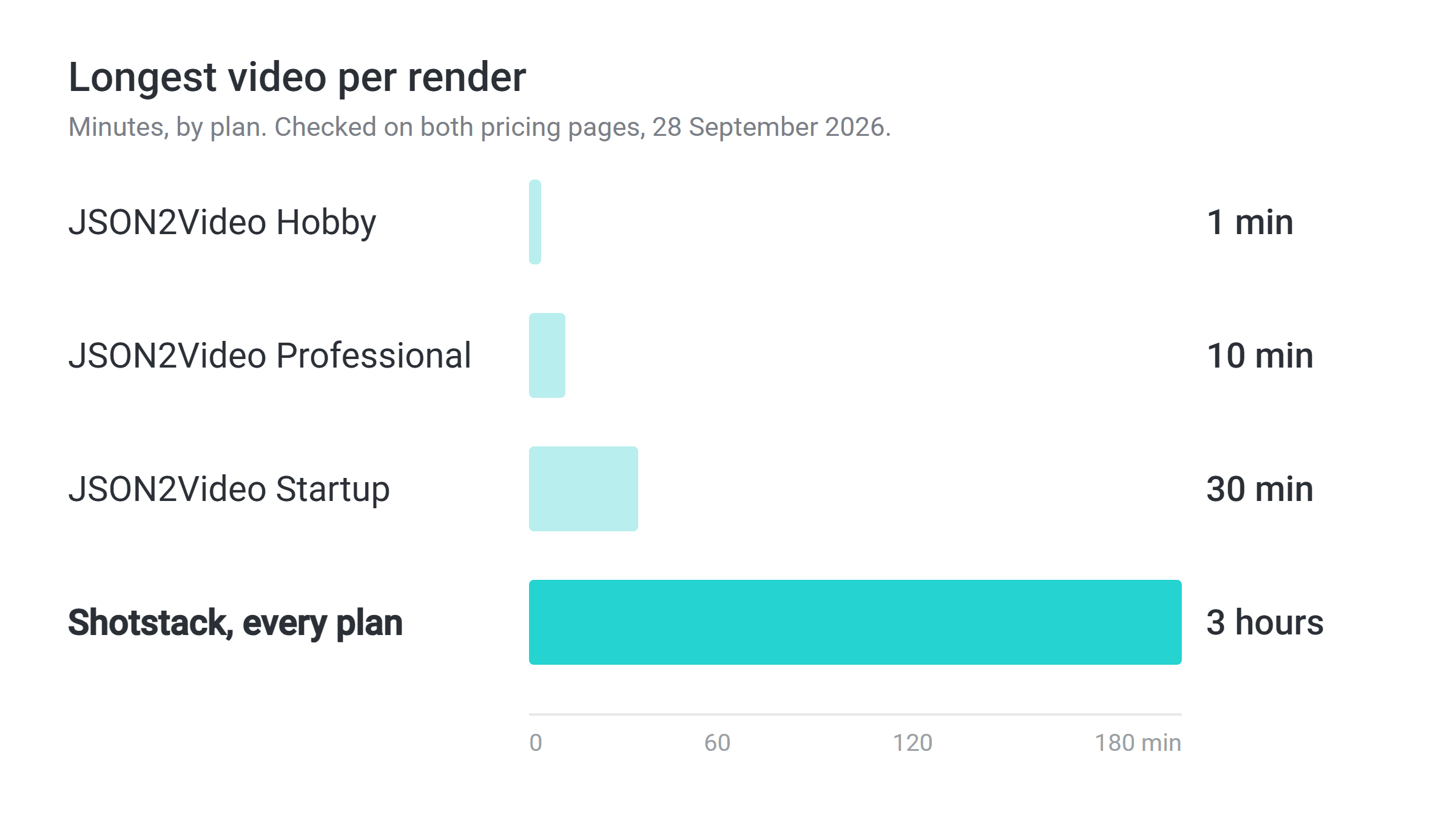
JSON2Video caps each video at 1 minute on Hobby, 10 minutes on Professional and 30 minutes on Startup. Webinar recaps, course lessons and full match highlights need the top plan, or don't fit at all.

Every Shotstack plan renders videos up to 3 hours long, billed to the second: a 30-second clip uses half a credit.

Longest video per render: JSON2Video 1, 10 or 30 minutes, Shotstack 3 hours

Embedded editing

Put a video editor inside your app

With JSON2Video, if your users need to change a video, you build the editing interface yourself.

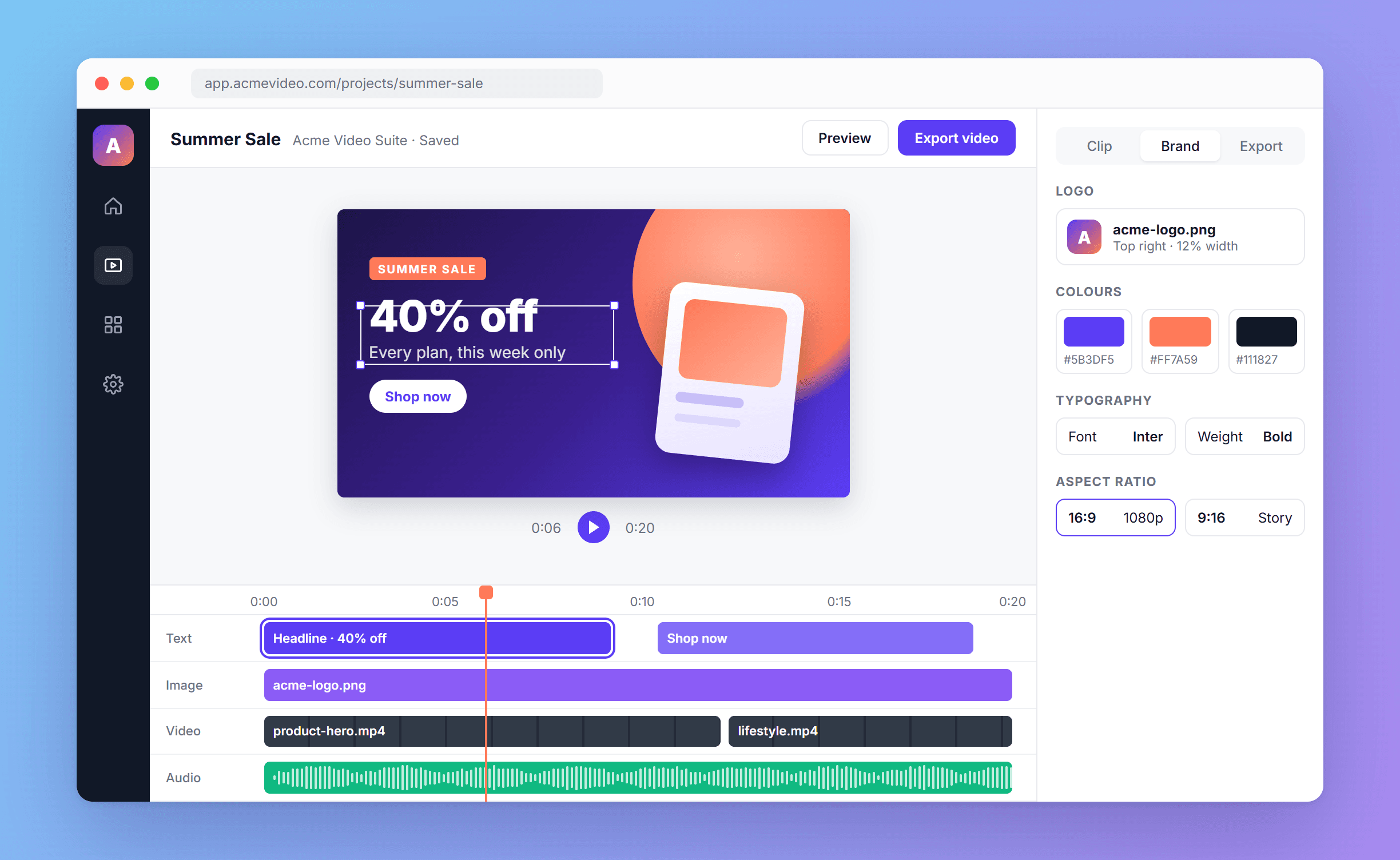
Shotstack's white-label Video Editor SDK puts a working editor inside your product. Users trim clips, change text and adjust the layout, then render through the same API. Explore the editor.

White-label video editor embedded in a customer app, styled in their brand

AI agents

Hosted MCP. Works in Claude and ChatGPT.

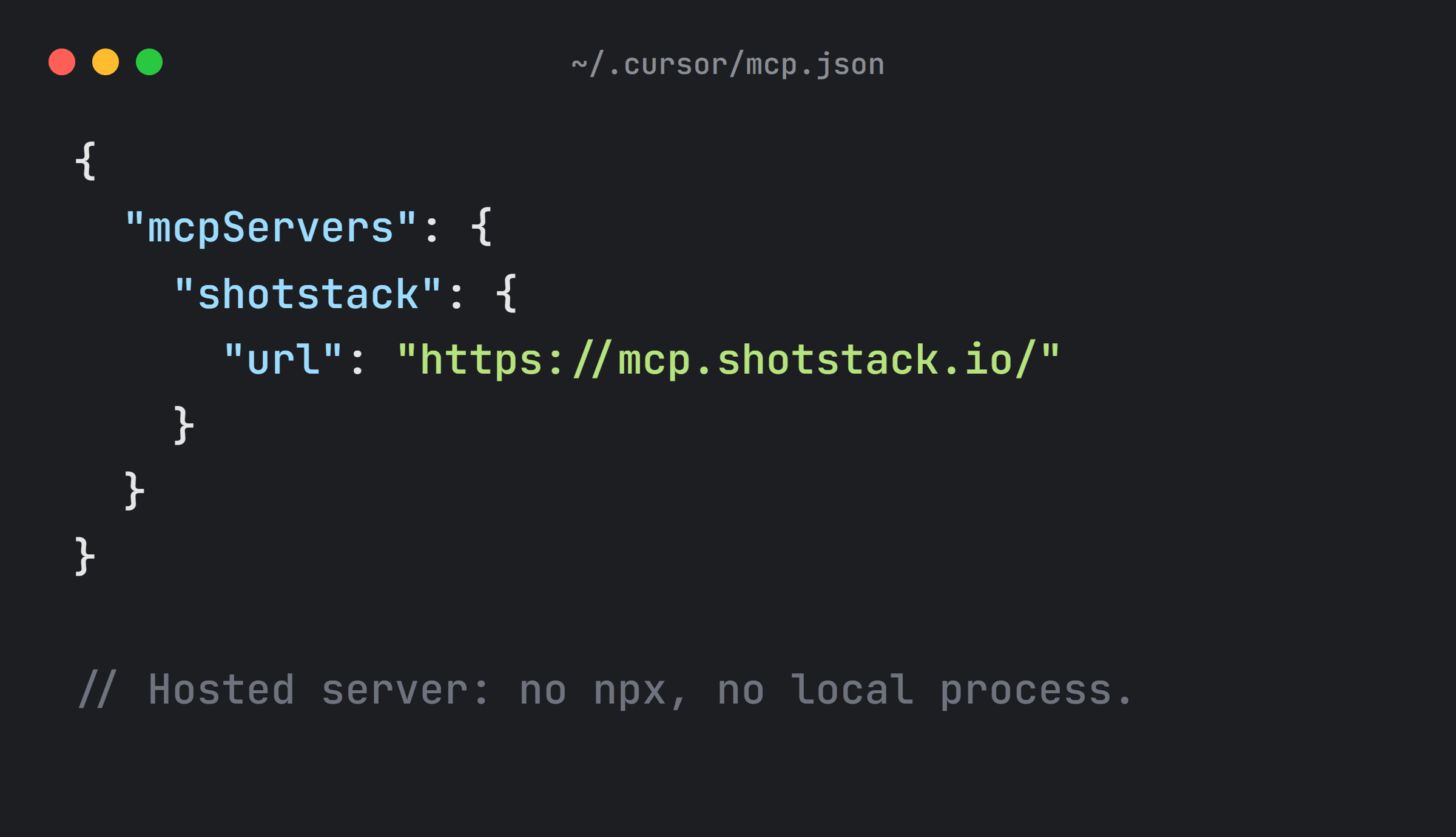
Shotstack's MCP server is hosted. Add one URL to Claude, ChatGPT, Cursor or any MCP client and sign in: nothing to install and no API key in a config file. Your agent can build a video from a prompt, show it in an editable Studio preview inside the chat, and render it when you're happy.

Cursor config connecting to the hosted Shotstack MCP server

Credits and billing

Credits that roll over. Renders that keep going.

JSON2Video subscription credits expire each month. Run out early, and you buy a prepaid top-up to keep rendering.

Shotstack subscription credits roll over while you are subscribed, up to 3× your monthly allowance. Go over, and your videos keep rendering; the extra is billed. Pay-as-you-go credits last a year.

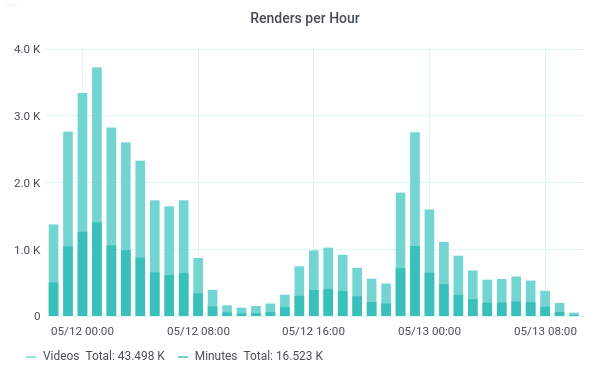
Shotstack renders per hour chart

Automation and delivery

From your workflow to your storage

The official Shotstack n8n node renders templates, waits for the result and returns the video URL. It also works as a tool in n8n's AI Agent. See how the n8n node works.

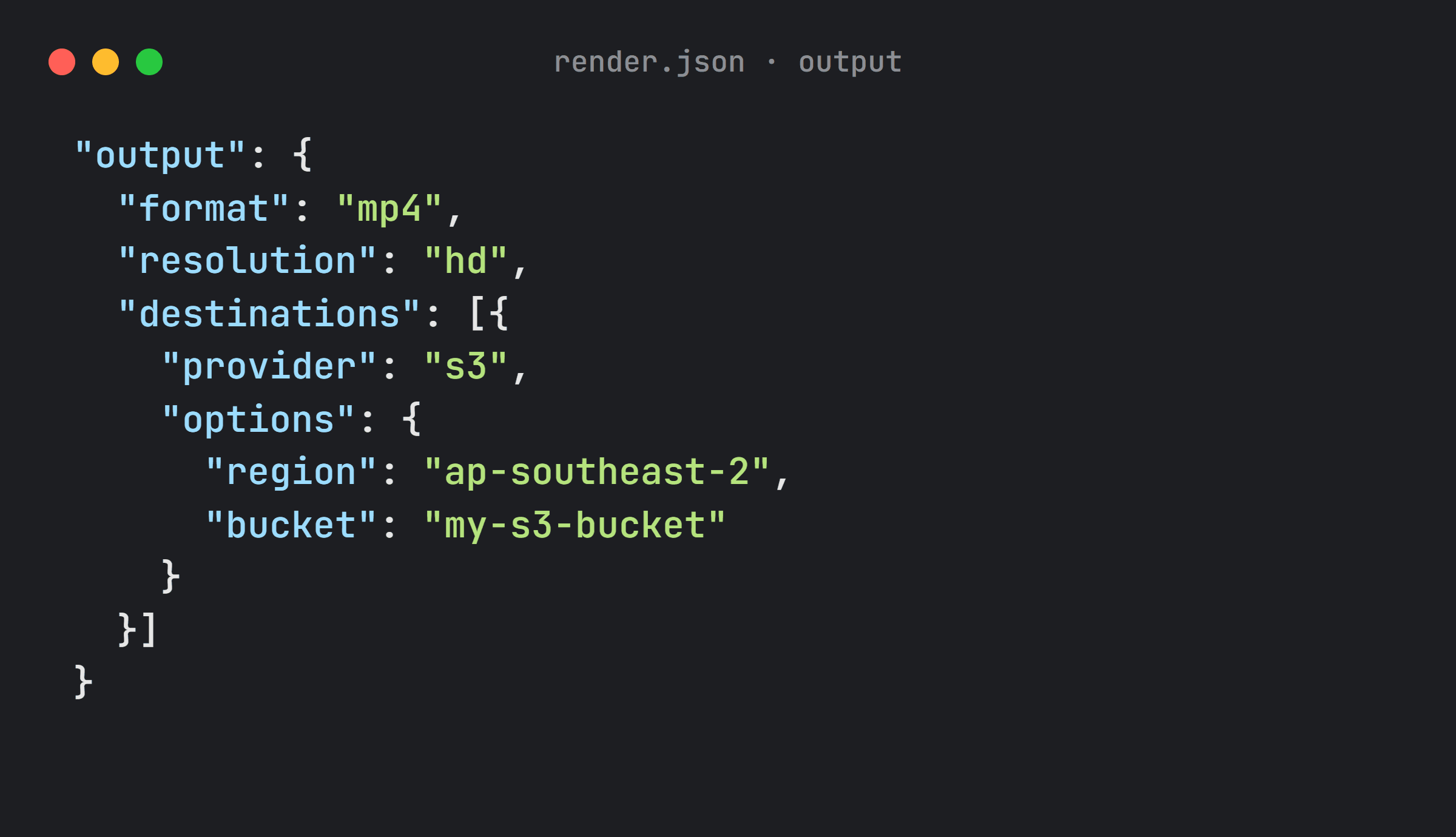
JSON2Video has no native S3 export. Shotstack sends finished videos to Amazon S3, Google Cloud Storage, Azure Blob Storage, Google Drive and more, or hosts them for you. See delivery options.

Render output sending the finished video to an Amazon S3 bucket

What if you already use JSON2Video?

Both tools build videos from JSON, so moving is a translation job. Your data sources and automations stay the same.

  1. Convert your templates. Ask your AI assistant to convert your JSON2Video templates to Shotstack. To give it the Shotstack format, connect the hosted MCP server, add the agent skill or point it at the docs. Or rebuild them yourself in Studio.
  2. Change the render call. Point your app, or your n8n, Make or Zapier workflow, at the Shotstack API.
  3. Test one real video. Check fonts, captions and timing, then move the rest.

Talk to our team if you need any help planning it.

Frequently asked questions

Is Shotstack free?

Yes, to start: 10 free credits, valid for 30 days. That is 10 minutes of video on the production API, with no watermark and no credit card, enough to test Shotstack as a free JSON2Video alternative. After that, pay as you go from $0.20 a minute or subscribe from $39 a month for 200 minutes.

Is JSON2Video free?

Yes, with a watermark: the free plan gives 600 credits, or 10 minutes of video, with a 1-minute limit per video. JSON2Video pricing for paid plans starts at $49.95 for a 120-minute prepaid pack, or $16.95 a month (billed yearly) for 50 minutes with a 1-minute limit per video.

JSON2Video pricing vs Shotstack: which is cheaper?

At 200 minutes a month, Shotstack costs $39 and JSON2Video Professional costs $49.95. Pay as you go, Shotstack is $0.20 a minute and JSON2Video's prepaid packs work out at $0.38 to $0.42. At other volumes, compare the plans for the minutes you expect. Shotstack subscription credits also roll over; JSON2Video's expire each month.

How much does a 2-minute video cost on each?

Shotstack: 2 credits, so about $0.40 either way, pay as you go or on the $39 subscription. JSON2Video: 120 credits, so about $0.83 from the 120-minute pack, $0.77 from the 260-minute pack or $0.50 on Professional. The free and Hobby plans can't render it, because videos are capped at 1 minute.

Is Shotstack faster than JSON2Video?

In our lab tests, yes. Shotstack rendered a 60-second 1080p video almost twice as fast as JSON2Video, and the gap grew with video length. We rendered the same video on both services, several times each, on 28 September 2026.

Can I move my JSON2Video templates to Shotstack?

Yes. Ask your AI assistant, such as Claude, ChatGPT or Cursor, to convert them. Give it the Shotstack format through the hosted MCP server, the agent skill or the docs. There is no one-click import because the JSON formats differ, but JSON2Video scenes and elements map to Shotstack tracks and clips. Your data sources and automations stay the same; only the render request changes.

Does Shotstack have an n8n node like JSON2Video?

Yes. The official Shotstack n8n node renders templates, waits for the result and returns the video URL. It also works as a tool in n8n's AI Agent. Read the n8n guide.

Can AI agents like Claude or Cursor use Shotstack?

Yes. Shotstack's hosted MCP server lets Claude, Cursor, ChatGPT and other MCP clients render video without a local server.

Does Shotstack render 4K?

Yes, on High Volume plans, at no extra charge: 1 credit is 1 minute of video at any resolution or frame rate. Pay-as-you-go and subscription plans render up to 1080p at 60 fps. JSON2Video renders 4K but deducts 4× the credits.