
 Claude
 ChatGPT
 Perplexity
 Google AI
Contents
Wan 3.0 is Alibaba’s video model. Alibaba announced it on August 7, 2026 as “an advanced video generation model that supports 30-second video length and multimodal reference inputs”.
This guide is a set of tests, not a list of prompts. I made a set of clips for a made-up homeware store, with sunglasses, jackets, a toaster, a kettle and a blender, and changed one setting at a time. Each test below shows the prompt, the clip and the cost.
All of them were made through the Shotstack API, where the model is called Wan 3.0 Prime and is one of the AI models you can use with a single API key.
TL;DR
- Wan 3.0 rewrites your prompt before it generates, unless you turn that off. With rewriting on, my toaster clip opened on a dark set that the prompt never asked for.
- A seed gives you a different take of the same prompt. Three seeds gave three different toasters.
- With sound on, a line in quotes was spoken word for word. Both of my sound clips also came back with music I had asked the model to leave out.
- Shots written with timestamps came out as real cuts, within 0.3 seconds of the times in the prompt.
- From a product photo, the clip takes the photo’s shape. A vertical photo gives a vertical clip with no extra setting.
- A clip costs 0.425 credits a second at 480p, 0.875 at 720p and 1.75 at 1080p. The default is 1080p, so set the resolution yourself while you test.
- One script makes two takes of every product photo in a list, and a second puts the chosen take in a finished product video.
What you need
A Shotstack API key, from the dashboard. There’s no Alibaba account to open. Generation is paid in credits from the same balance as rendering, and the Wan 3.0 Prime model page lists every option.
The model comes in two modes:
| Mode | Model name | Input |
|---|---|---|
| Text to video | wan-3.0-prime-text-to-video | A prompt |
| Image to video | wan-3.0-prime-image-to-video | A prompt and a start image, with an optional end image |
Both make clips of 2 to 30 seconds at 480p, 720p or 1080p, with or without sound.
Your first clip
A generation is one request: an asset with a prompt, a model and its options, plus a length in seconds.
{
  "asset": {
    "type": "video",
    "prompt": "A cream enamel toaster on a mustard-yellow paper backdrop. The lever springs up, two slices of golden toast pop out and a wisp of steam rises. Medium shot, slow push-in. Soft window light from the side. Generate single shot.",
    "model": "wan-3.0-prime-text-to-video",
    "options": {
      "aspectRatio": "16:9",
      "resolution": "720p",
      "generateAudio": false,
      "seed": 7
    }
  },
  "length": 5
}
Send it with POST https://api.shotstack.io/edit/v1/generate. The response carries an id and a status of queued. Ask GET /generate/{id} until the status reads done, and the response gives you the URL of an MP4.
This clip cost 4.375 credits. The file is 1280 x 720 at 30 frames a second.
The toast pops and the steam rises, as asked. But the clip opens on a dark set and brightens to mustard, which isn’t in the prompt. The next section explains where that came from.
Prompt rewriting: on or off
Wan 3.0 doesn’t generate from your prompt as you wrote it. A language model rewrites it first. On Shotstack the switch is the enhancePrompt option, and it is on unless you set it to false.
Alibaba’s API reference describes its own version of the switch like this: “When enabled, a large language model rewrites the input prompt. This significantly improves generation quality for shorter prompts, but increases latency.”
To see what the rewrite does, I sent the same seven-word prompt twice with the same seed, once with rewriting on and once with it off.
“A pair of sunglasses in a studio”, rewriting on:
The same prompt, rewriting off:
With rewriting on, the model built an advert: black sunglasses on a clear stand, a dark set and a camera that circles them. With it off, a tortoiseshell pair turns slowly on a white floor. Neither is wrong, because seven words leave everything open. The rewrite filled the gaps with a style of its own.
Then I did the same with the full toaster prompt. The clip above is the one with rewriting on. This is the same prompt and seed with rewriting off:
The backdrop is mustard from the first frame, and the clip is only what the prompt describes.
So the choice depends on the prompt. Leave rewriting on while you explore with short prompts. Turn it off when the prompt already says everything and the look has to hold, such as a brand color that must be there from the first frame.
The parts of a prompt
Alibaba’s prompt guide, last updated on October 11, 2026, gives the basic formula as “Prompt = Entity + Scene + Motion”. The toaster prompt follows it and adds the camera:
| Part | In the toaster prompt |
|---|---|
| Entity | A cream enamel toaster |
| Scene | A mustard-yellow paper backdrop, soft window light from the side |
| Motion | The lever springs up, two slices of toast pop out, steam rises |
| Camera | Medium shot, slow push-in |
One more line is worth knowing. Wan 3.0 decides on its own whether a clip needs cuts.
The guide’s fix is a sentence at the end of the prompt: “To generate a single-shot video, write ‘Generate single shot.’” The toaster prompt above ends with it, and so do the speech and 30-second prompts below. None of those clips has a cut.
The seed: more takes of one prompt
The seed option is a whole number. Change it, and the same prompt gives a different take. These are seeds 7, 8 and 9 of the toaster prompt at 480p:
Three seeds gave three toasters, with different dials, feet and trim. Two of the takes open dark and one doesn’t.
Two things about seeds are easy to get wrong:
- A seed belongs to one resolution. Seed 7 at 480p and seed 7 at 720p are different clips. You can test a prompt at 480p, but you can’t pick a take there and then render the same take larger. Make your takes at the resolution you’ll publish.
- The same request gives the same file. Shotstack stores every generated clip. A request with the same model, prompt, options and length returns the stored clip at no charge. So a seed is also the name of a take you can come back to.
Sound and a spoken line
Sound is on unless you set generateAudio to false, and it doesn’t change the price. Alibaba’s prompt guide has a formula for it, “Prompt = Entity + Scene + Motion + Sound description (voice/sound effect/background music)”, and it says of lines you write in the prompt that “the model preserves them exactly”.
I asked for a man who zips up a quilted jacket and says “Warm when it’s cold, light when it’s not.” The prompt also asked for the sound of the zip and ended with “No background music.”
The line is spoken word for word, and the zip is there. The music is there too. The guide says that the sentence “No background music.” suppresses it, but this clip and the next one both came back with soft music under them.
If you need clean speech, plan for that in the edit. Our guide to muting a video or replacing its audio shows how to drop a clip’s sound and put your own under it.
Shots with timestamps
For more than one shot, the guide’s formula is “Prompt = Overall description + Shot number + Timestamp + Shot content”. I wrote a 12-second advert for a blender as three shots of 4 seconds:
- Shot 1 [0-4 s]: fruit drops into the jug in slow motion.
- Shot 2 [4-8 s]: the blender runs and the fruit spins into a pink swirl.
- Shot 3 [8-12 s]: the smoothie pours into a glass.
The clip has three shots in the order I wrote them. The cuts are at 3.7 and 7.7 seconds, where the prompt asked for 4 and 8. The sound follows the shots: the blender runs during the second shot and the pour is in the third.
The 30-second take
Alibaba’s announcement says the longer length “allows creators to execute complex camera movements and continuous, unbroken shots”. So I asked for the whole store in one shot: the camera moves sideways past five paper sets, a woman walks beside it, puts on the sunglasses as she passes them and switches on the kettle near the end.
It is one take of 900 frames with no cut. The five sets are in the order I listed them, she puts the sunglasses on, and she reaches the kettle in the last seconds. She also stops to touch the jacket, which I didn’t ask for. At 480p the 30 seconds cost 12.75 credits.
Animate a product photo
If you already have a photo of the product, start from it. A photo is the product exactly, so the model has nothing to invent. Image to video takes the photo as startSrc, and the prompt only has to describe the movement. Alibaba’s formula for it is short: “Prompt = Motion + Camera movement”.
This is the photo:
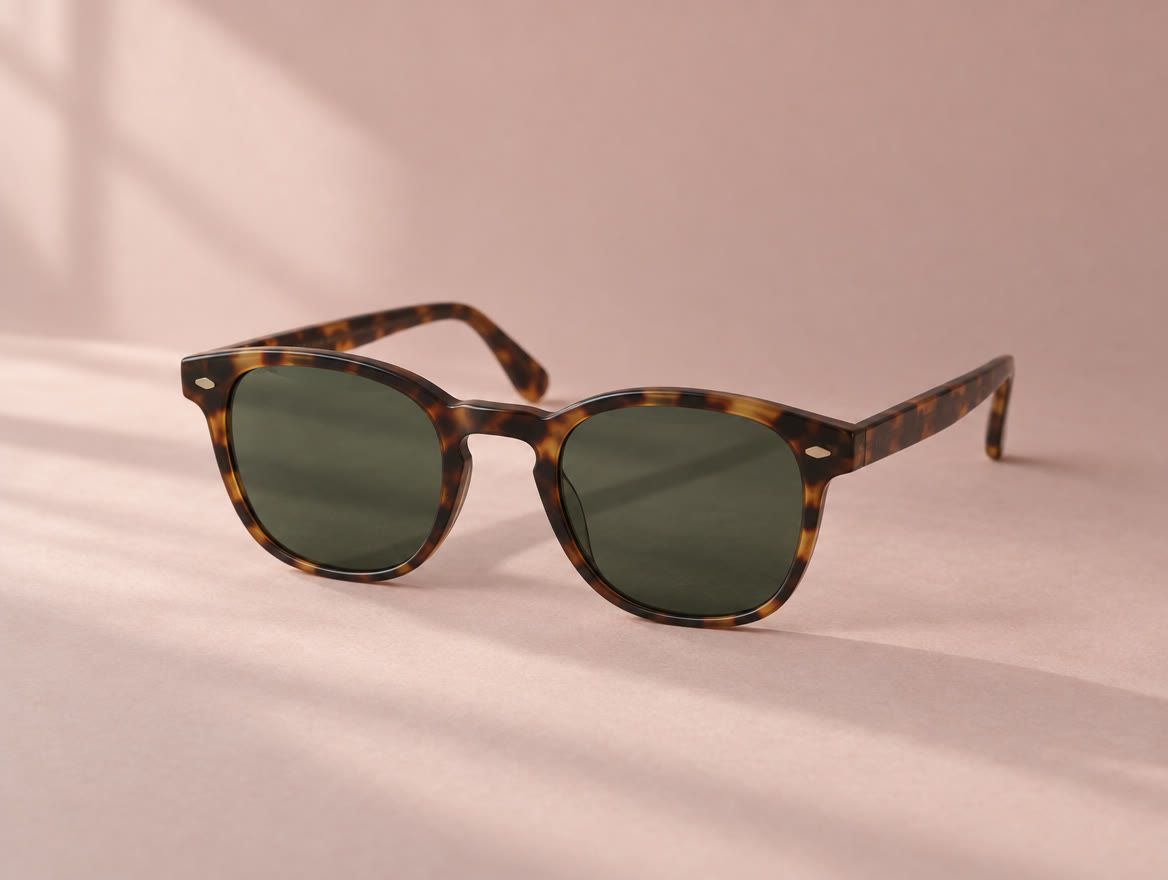
And this is the request:
{
  "asset": {
    "type": "video",
    "prompt": "Light glides slowly across the lenses. The camera pushes in slowly. The sunglasses stay still.",
    "model": "wan-3.0-prime-image-to-video",
    "options": {
      "startSrc": "https://example.com/photos/sunglasses.png",
      "aspectRatio": "4:3",
      "resolution": "720p",
      "generateAudio": false,
      "seed": 7
    }
  },
  "length": 5
}
The sunglasses, the backdrop and the shadows are the ones in the photo. Only the light and the camera move.
Let the clip take the photo’s shape
The aspectRatio option has a default of adaptive. With a photo, that means the clip takes the shape of the photo. I sent a vertical 880 x 1168 photo of a jacket with no aspect ratio, and the clip came back vertical, at 554 x 736:
For a list of photos in different shapes, this is the setting to leave alone. Each clip fits its own photo.
A start image and an end image
Add endSrc, and the clip ends on a second image. Here the start is a photo of a kettle and the end is the same photo with steam coming from the spout:
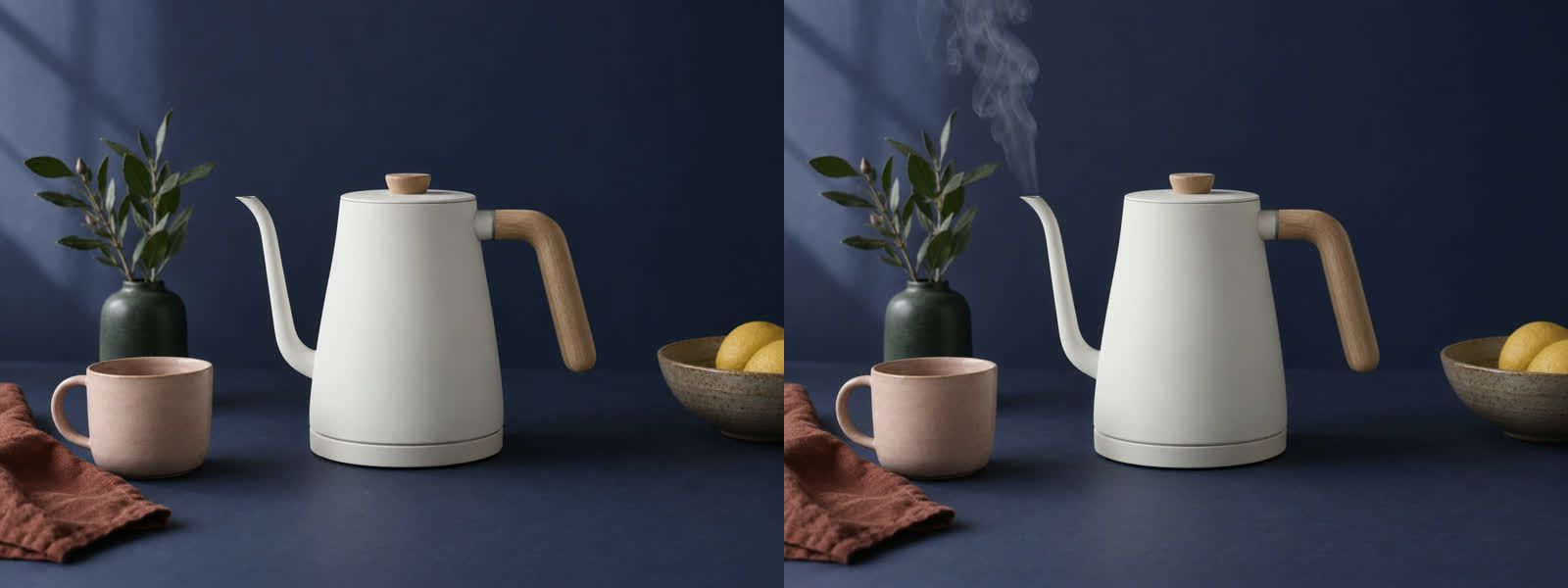
The steam builds from nothing to the plume in the end image. An end image is the way to fix where a clip lands, which a prompt alone can’t promise.
Settings and what they cost
Wan 3.0 Prime is charged by the second, and the rate depends on one setting, the resolution. These are the prices I was quoted on November 26, 2026:
| Resolution | Per second | 5 seconds | 10 seconds | 30 seconds |
|---|---|---|---|---|
| 480p | 0.425 | 2.125 | 4.25 | 12.75 |
| 720p | 0.875 | 4.375 | 8.75 | 26.25 |
| 1080p | 1.75 | 8.75 | 17.50 | 52.50 |
Prices are in credits, and the pricing page shows what a credit costs on each plan. A few rules sit behind the table:
- The default is 1080p. Leave
resolutionout and you pay the highest rate. Set it to480pwhile you test. - The length rounds up. A 3.5-second clip is charged as 4 seconds.
- Text to video and image to video cost the same.
- Sound, the seed, prompt rewriting and the frame shape are free. A 9:16 clip with sound costs the same as a silent 16:9 one.
You don’t have to work the price out. POST /generate/quote takes the same body as the generate request and returns the cost. Nothing is generated or charged. Prices follow the model’s provider, so ask again when it matters. The docs page on AI generation pricing explains the rest.
Generate a list of clips with one script
One request at a time is fine for a test. For the ten text-to-video clips in this guide I used a script. It reads the clips from a file, quotes each one, prints the total, generates them all and saves the files.
The list is a JSON file, clips.json, with a name, a prompt, the options and a length for each clip:
[
  {
    "name": "toaster",
    "prompt": "A cream enamel toaster on a mustard-yellow paper backdrop. The lever springs up, two slices of golden toast pop out and a wisp of steam rises. Medium shot, slow push-in. Soft window light from the side. Generate single shot.",
    "options": {"aspectRatio": "16:9", "resolution": "720p", "generateAudio": false, "seed": 7},
    "length": 5
  },
  {
    "name": "toaster-off",
    "prompt": "A cream enamel toaster on a mustard-yellow paper backdrop. The lever springs up, two slices of golden toast pop out and a wisp of steam rises. Medium shot, slow push-in. Soft window light from the side. Generate single shot.",
    "options": {"aspectRatio": "16:9", "resolution": "720p", "generateAudio": false, "seed": 7, "enhancePrompt": false},
    "length": 5
  }
]
Save the script as generate_clips.py, next to clips.json:
"""Generate a list of AI video clips with Wan 3.0 Prime through the Shotstack API.

Reads clips.json, asks for a free quote for every clip, prints the total, then generates the clips
and saves them to the clips folder. Run with --quote to stop after the quotes.
"""

import json
import os
import sys
import time
import urllib.error
import urllib.request
from pathlib import Path

API = "https://api.shotstack.io/edit/v1"
KEY = os.environ.get("SHOTSTACK_API_KEY")
HERE = Path(__file__).parent
OUT = HERE / "clips"
TEXT_TO_VIDEO = "wan-3.0-prime-text-to-video"
IMAGE_TO_VIDEO = "wan-3.0-prime-image-to-video"


def call(method, path, body=None):
    request = urllib.request.Request(
        API + path,
        method=method,
        data=json.dumps(body).encode() if body else None,
        headers={"x-api-key": KEY, "Content-Type": "application/json"},
    )
    try:
        with urllib.request.urlopen(request, timeout=120) as response:
            return json.load(response)
    except urllib.error.HTTPError as error:
        sys.exit(
            f"{method} {path} failed: HTTP {error.code} {error.read().decode()[:300]}"
        )


def request_body(clip):
    options = clip["options"]
    model = IMAGE_TO_VIDEO if "startSrc" in options else TEXT_TO_VIDEO
    asset = {
        "type": "video",
        "prompt": clip["prompt"],
        "model": model,
        "options": options,
    }
    return {"asset": asset, "length": clip["length"]}


def generate(clips, quote_only=False):
    total = 0
    for clip in clips:
        clip["credits"] = call("POST", "/generate/quote", request_body(clip))["credits"]
        total += clip["credits"]
        options = clip["options"]
        sound = "sound" if options.get("generateAudio", True) else "silent"
        seed = options.get("seed", "any")
        print(
            f"{clip['name']:<16} {clip['length']:>2} s  {options['resolution']:<5} {sound:<6}"
            f" seed {seed!s:<4} {clip['credits']:>6.2f} credits"
        )
    print(f"Quote for {len(clips)} clips: {total:.2f} credits")
    if quote_only:
        return clips

    jobs = {}
    for clip in clips:
        job = call("POST", "/generate", request_body(clip))
        if job["status"] == "done":
            clip["url"] = job["url"]
            print(f"{clip['name']:<16} already generated, reused at no charge")
        else:
            jobs[job["id"]] = clip
    while jobs:
        time.sleep(10)
        for job_id, clip in list(jobs.items()):
            job = call("GET", f"/generate/{job_id}")
            if job["status"] == "failed":
                print(f"{clip['name']:<16} failed: {job.get('error')}")
                del jobs[job_id]
            elif job["status"] == "done":
                clip["url"] = job["url"]
                print(f"{clip['name']:<16} done")
                del jobs[job_id]

    OUT.mkdir(exist_ok=True)
    for clip in clips:
        if "url" in clip:
            urllib.request.urlretrieve(clip["url"], OUT / f"{clip['name']}.mp4")
            print(f"{clip['name']:<16} {clip['url']}")
    return clips


if __name__ == "__main__":
    if not KEY:
        sys.exit("Set SHOTSTACK_API_KEY first.")
    listed = json.loads((HERE / "clips.json").read_text(encoding="utf-8"))
    generate(listed, quote_only="--quote" in sys.argv)
Set your key and run it:
export SHOTSTACK_API_KEY="your_production_key"
python generate_clips.py
This is the output for the ten clips:
short-on          5 s  480p  silent seed 7      2.12 credits
short-off         5 s  480p  silent seed 7      2.12 credits
toaster           5 s  720p  silent seed 7      4.38 credits
toaster-off       5 s  720p  silent seed 7      4.38 credits
toaster-seed-7    5 s  480p  silent seed 7      2.12 credits
toaster-seed-8    5 s  480p  silent seed 8      2.12 credits
toaster-seed-9    5 s  480p  silent seed 9      2.12 credits
spoken-line       8 s  480p  sound  seed 7      3.40 credits
three-shots      12 s  480p  sound  seed 7      5.10 credits
long-take        30 s  480p  silent seed 7     12.75 credits
Quote for 10 clips: 40.62 credits
short-on         done
short-off        done
toaster-off      done
toaster          done
toaster-seed-7   done
toaster-seed-8   done
toaster-seed-9   done
spoken-line      done
three-shots      done
long-take        done
short-on         https://cdn.shotstack.io/au/v1/generations/m4x7q2k9tz/c0b4978d-577b-487b-af23-c11b4c8b0f09.mp4
short-off        https://cdn.shotstack.io/au/v1/generations/m4x7q2k9tz/3dae6274-41d2-411a-aa0f-0d5c3c86c271.mp4
toaster          https://cdn.shotstack.io/au/v1/generations/m4x7q2k9tz/29c20b3c-0133-47ef-a79a-7d127fc463f4.mp4
toaster-off      https://cdn.shotstack.io/au/v1/generations/m4x7q2k9tz/a044c573-db37-4d6e-a279-03559a82b5ba.mp4
toaster-seed-7   https://cdn.shotstack.io/au/v1/generations/m4x7q2k9tz/359abe31-149a-4534-ac98-79fe58c667c5.mp4
toaster-seed-8   https://cdn.shotstack.io/au/v1/generations/m4x7q2k9tz/27f5203c-778c-4049-a575-02a2f247b0de.mp4
toaster-seed-9   https://cdn.shotstack.io/au/v1/generations/m4x7q2k9tz/a384c2d6-4daf-4c9f-aaa4-3e27241e9fd7.mp4
spoken-line      https://cdn.shotstack.io/au/v1/generations/m4x7q2k9tz/2776339e-116e-44bb-a1ed-95da3a451608.mp4
three-shots      https://cdn.shotstack.io/au/v1/generations/m4x7q2k9tz/c95fd657-c04a-4626-a22d-6a317d72d6a0.mp4
long-take        https://cdn.shotstack.io/au/v1/generations/m4x7q2k9tz/fd0b8d93-6f1b-455e-a28c-9ce4eb034e41.mp4
The quote comes first, so you see the total before anything is charged. Run the script with --quote to stop there.
Make two takes of every product photo
A store doesn’t have one product. It has a list, and a model doesn’t get every clip right the first time. So the useful batch is not one clip for each product. It is a few takes of each, so that you can keep the best one.
This script reads a list of products and makes one clip for each product and seed. The list is products.json. Each product has a name, a photo, a line of motion, and the text and colors for the finished video in the next section:
[
  {
    "name": "sunglasses",
    "photo": "https://example.com/photos/sunglasses.png",
    "motion": "Light glides slowly across the lenses. The camera holds still.",
    "label": "New in",
    "title": "Sunglasses",
    "detail": "$120 · Acetate",
    "background": "#ecccc6",
    "text": "#111111",
    "mark": "#9b3b2c"
  }
]
Save the script as generate_takes.py, next to generate_clips.py:
"""Generate several takes of every product photo with Wan 3.0 Prime through the Shotstack API.

Reads products.json (a name, a photo URL and a motion line for each product) and makes one clip
per product and seed. Run with --quote to stop after the quotes.
"""

import json
import sys
from pathlib import Path

import generate_clips

SEEDS = [7, 8]  # one take per seed
LENGTH = 4  # seconds
RESOLUTION = "480p"


def takes(products):
    clips = []
    for product in products:
        for seed in SEEDS:
            options = {
                "startSrc": product["photo"],
                "resolution": RESOLUTION,
                "generateAudio": False,
                "seed": seed,
            }
            clips.append(
                {
                    "name": f"{product['name']}-{seed}",
                    "prompt": product["motion"],
                    "options": options,
                    "length": LENGTH,
                }
            )
    return clips


if __name__ == "__main__":
    if not generate_clips.KEY:
        sys.exit("Set SHOTSTACK_API_KEY first.")
    path = Path(__file__).parent / "products.json"
    listed = json.loads(path.read_text(encoding="utf-8"))
    generate_clips.generate(takes(listed), quote_only="--quote" in sys.argv)
With three products and two seeds, it makes six clips:
sunglasses-7      4 s  480p  silent seed 7      1.70 credits
sunglasses-8      4 s  480p  silent seed 8      1.70 credits
jacket-7          4 s  480p  silent seed 7      1.70 credits
jacket-8          4 s  480p  silent seed 8      1.70 credits
kettle-7          4 s  480p  silent seed 7      1.70 credits
kettle-8          4 s  480p  silent seed 8      1.70 credits
Quote for 6 clips: 10.20 credits
sunglasses-7     done
sunglasses-8     done
jacket-8         done
kettle-8         done
jacket-7         done
kettle-7         done
sunglasses-7     https://cdn.shotstack.io/au/v1/generations/m4x7q2k9tz/a9d2b19b-f1e6-4704-a2fa-5e006c62dede.mp4
sunglasses-8     https://cdn.shotstack.io/au/v1/generations/m4x7q2k9tz/414ec9f9-4557-4979-a57c-c37c93abbc8d.mp4
jacket-7         https://cdn.shotstack.io/au/v1/generations/m4x7q2k9tz/58cb9f85-cce4-49c0-aca4-efa36a05d8d9.mp4
jacket-8         https://cdn.shotstack.io/au/v1/generations/m4x7q2k9tz/3ad2d250-1f12-4235-adf4-ab3f2c7de882.mp4
kettle-7         https://cdn.shotstack.io/au/v1/generations/m4x7q2k9tz/cfbe99f4-02c9-480b-a8ec-6508711e2ce3.mp4
kettle-8         https://cdn.shotstack.io/au/v1/generations/m4x7q2k9tz/f5a5e4d8-a684-4232-a6c5-b3c77ddc1149.mp4
Each pair is seed 7 on the left and seed 8 on the right. The script sets no aspect ratio, so the jacket clips are vertical like their photo.
The takes are not the same. Every prompt says “The camera holds still”, and it does in the seed 7 takes. In two of the seed 8 takes the camera moves anyway. That is what the second take is for.
Run the script again and nothing is charged, because every clip is already stored:
sunglasses-7      4 s  480p  silent seed 7      1.70 credits
sunglasses-8      4 s  480p  silent seed 8      1.70 credits
jacket-7          4 s  480p  silent seed 7      1.70 credits
jacket-8          4 s  480p  silent seed 8      1.70 credits
kettle-7          4 s  480p  silent seed 7      1.70 credits
kettle-8          4 s  480p  silent seed 8      1.70 credits
Quote for 6 clips: 10.20 credits
sunglasses-7     already generated, reused at no charge
sunglasses-8     already generated, reused at no charge
jacket-7         already generated, reused at no charge
jacket-8         already generated, reused at no charge
kettle-7         already generated, reused at no charge
kettle-8         already generated, reused at no charge
sunglasses-7     https://cdn.shotstack.io/au/v1/generations/m4x7q2k9tz/a9d2b19b-f1e6-4704-a2fa-5e006c62dede.mp4
sunglasses-8     https://cdn.shotstack.io/au/v1/generations/m4x7q2k9tz/414ec9f9-4557-4979-a57c-c37c93abbc8d.mp4
jacket-7         https://cdn.shotstack.io/au/v1/generations/m4x7q2k9tz/58cb9f85-cce4-49c0-aca4-efa36a05d8d9.mp4
jacket-8         https://cdn.shotstack.io/au/v1/generations/m4x7q2k9tz/3ad2d250-1f12-4235-adf4-ab3f2c7de882.mp4
kettle-7         https://cdn.shotstack.io/au/v1/generations/m4x7q2k9tz/cfbe99f4-02c9-480b-a8ec-6508711e2ce3.mp4
kettle-8         https://cdn.shotstack.io/au/v1/generations/m4x7q2k9tz/f5a5e4d8-a684-4232-a6c5-b3c77ddc1149.mp4
To add a third take of every product, add a seed to SEEDS. Only the new clips are generated.
Put the chosen take in a finished product video
A generated clip is footage. A product video also needs the name, the price and the brand’s colors. The last script puts the chosen take of each product in a vertical video with three lines of text and music.
It doesn’t download the clip and upload it again. Each edit carries the same generation request as the take, so Shotstack finds the stored clip and uses it. Save the script as make_videos.py, next to the other two:
"""Put the chosen take of every product into a finished vertical product video.

Reads products.json. Each video has the Wan 3.0 clip in the top of the frame and three lines of text
under it. The clip request is the same one generate_takes.py sent, so the stored clip is reused.
"""

import json
import sys
import time
from pathlib import Path

import generate_clips
import generate_takes

TAKE = 7  # the seed of the take to keep
FONT = "https://fonts.gstatic.com/s/inter/v20/UcCo3FwrK3iLTfvlaQc78lA2.ttf"
FAMILY = "UcCo3FwrK3iLTfvlaQc78lA2"
MUSIC = (
    "https://shotstack-assets.s3.ap-southeast-2.amazonaws.com/music/unminus/berlin.mp3"
)


def line(text, size, weight, color, y, height, start, **style):
    font = {"family": FAMILY, "size": size, "weight": weight, "color": color}
    asset = {
        "type": "rich-text",
        "text": text,
        "font": font,
        "align": {"horizontal": "left", "vertical": "top"},
    }
    if style:
        asset["style"] = style
    return {
        "asset": asset,
        "start": start,
        "length": "end",
        "width": 864,
        "height": height,
        "offset": {"x": 0, "y": y},
        "transition": {"in": "reveal"},
    }


def mark(color):
    circle = (
        '<svg xmlns="http://www.w3.org/2000/svg" viewBox="0 0 173 173" width="173" height="173">'
        f'<circle cx="86.5" cy="86.5" r="86.5" fill="{color}"/></svg>'
    )
    return {
        "asset": {"type": "svg", "src": circle},
        "start": 0,
        "length": "end",
        "width": 173,
        "height": 173,
        "offset": {"x": -0.31991, "y": 0.3987},
    }


def build_edit(product):
    take = next(
        t for t in generate_takes.takes([product]) if t["options"]["seed"] == TAKE
    )
    clip = {
        "asset": generate_clips.request_body(take)["asset"],
        "start": 0,
        "length": take["length"],
        "fit": "crop",
        "width": 1080,
        "height": 1190,
        "offset": {"x": 0, "y": 0.1901},
    }
    text = product["text"]
    tracks = [
        {"clips": [mark(product["mark"])]},
        {
            "clips": [
                line(
                    product["label"].upper(),
                    70,
                    "400",
                    text,
                    -0.27083,
                    100,
                    0.3,
                    letterSpacing=3,
                )
            ]
        },
        {
            "clips": [
                line(
                    product["title"],
                    135,
                    "600",
                    text,
                    -0.33464,
                    175,
                    0.43,
                    letterSpacing=-5,
                )
            ]
        },
        {"clips": [line(product["detail"], 86, "400", text, -0.41667, 130, 0.56)]},
        {"clips": [clip]},
    ]
    return {
        "timeline": {
            "background": product["background"],
            "fonts": [{"src": FONT}],
            "soundtrack": {"src": MUSIC, "effect": "fadeOut", "volume": 0.4},
            "tracks": tracks,
        },
        "output": {
            "format": "mp4",
            "resolution": "1080",
            "aspectRatio": "9:16",
            "fps": 30,
        },
    }


if __name__ == "__main__":
    if not generate_clips.KEY:
        sys.exit("Set SHOTSTACK_API_KEY first.")
    path = Path(__file__).parent / "products.json"
    renders = {}
    for product in json.loads(path.read_text(encoding="utf-8")):
        response = generate_clips.call("POST", "/render", build_edit(product))
        renders[response["response"]["id"]] = product["name"]
    print(f"Queued {len(renders)} renders")
    seen = {}
    while renders:
        time.sleep(4)
        for render_id in list(renders):
            status = generate_clips.call("GET", f"/render/{render_id}")["response"]
            name = renders[render_id]
            if status["status"] != seen.get(render_id):
                seen[render_id] = status["status"]
                print(f"{name}: {status['status']}")
            if status["status"] in ("done", "failed"):
                del renders[render_id]
print(f" {status.get('url') or status.get('error')}")Queued 3 renders
sunglasses: rendering
jacket: rendering
kettle: rendering
sunglasses: done
https://shotstack-api-v1-output.s3-ap-southeast-2.amazonaws.com/m4x7q2k9tz/2d3e5ce2-de92-494f-adad-a38753a0eb4d.mp4
jacket: done
https://shotstack-api-v1-output.s3-ap-southeast-2.amazonaws.com/m4x7q2k9tz/9df52736-b0f9-4726-ad1e-f11ee44f4420.mp4
kettle: done
https://shotstack-api-v1-output.s3-ap-southeast-2.amazonaws.com/m4x7q2k9tz/4775abd6-4487-4118-ac8f-f6ac52e0f656.mp4Each video is 1080 x 1920 and 4 seconds long. TAKE is the seed of the take to keep.
The layout is ordinary Shotstack: a rich-text clip for each line, an svg clip for the circle and a soundtrack. For a larger catalog, our guide to creating videos in bulk from a CSV shows how to save an edit like this as a template and render one video for each row.
Start with a cheap clip
Wan 3.0 is cheap enough to test properly. A 5-second clip at 480p costs 2.125 credits, so you can try a prompt with rewriting on and off, and with two more seeds, for less than the price of one 1080p clip. Decide on the prompt there, then make your takes at the size you’ll publish.
Sign up for a free Shotstack API key and generate your first clip.
Frequently asked questions (FAQs)
Is Wan 3.0 Prime a different model from Wan 3.0?
Alibaba’s API lists two model names, wan3.0-video and wan3.0-video-prime. Its API reference calls the first the “Standard version” and says of Prime: “Its capabilities are aligned with the standard version.” The model on Shotstack carries the Prime name.
Does Wan 3.0 make vertical video?
Yes. Set aspectRatio to 9:16 or 3:4. The other shapes are 16:9, 4:3 and 1:1. With image to video you can leave the option out, and the clip takes the shape of your photo.
What frame rate are the clips?
Every clip I made is 30 frames a second, and the frame count is exactly the length times 30. A 5-second clip has 150 frames. When you put a clip in an edit, set output.fps to 30 so that no frames are dropped or repeated.
Can I use the same seed to get the same clip from Alibaba’s own API?
Don’t count on it. Alibaba’s API reference says of the seed: “Even with the same seed value, generation results may not be perfectly identical.” Through Shotstack, the way to get the same clip again is to send the same request, which returns the stored file.

Written by
Derk Zomer is the founder and CEO of Shotstack. He writes about video automation, AI-generated media and building on the Shotstack API.
Published November 26, 2026