
Studio templates · News
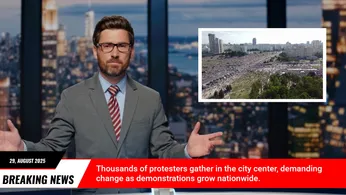
Breaking News - Road Reconstruction Template
A professionally designed news template.
No account needed until you render.
What you can change
- HEADLINE
- Government begins major road reconstruction across key cities.
- CTA
- MORE INFO.
- WEB
- www.newssurveymat.com
- NEWS_SLUG
- BREAKING NEWS
- TEXT_FONT_COLOR
- #000000
- TEXT_FONT_COLOR_2
- #ffffff
- TEXT_BACKGROUND_COLOR
- #0000a8
- TEXT_BACKGROUND_COLOR_2
- #ce0000
Output
- Format
- MP4
- Size
- 1080 × 1920
- Length
- 30 s
- Frame rate
- 25 fps
Make one for every story
Trigger a render from your CMS or RSS feed and each story ships with its own video. Give your AI agent the prompt, or run the script against a CSV.
This "Breaking News - Road Reconstruction Update" template is engineered for businesses and organizations that need to deliver urgent and important information effectively. Whether you're a local government body announcing infrastructure projects, a news outlet reporting on community developments, or a business communicating a major operational update, this template provides a clear, impactful, and professional platform. Designed for maximum readability and visual engagement, the template features a prominent "BREAKING NEWS" banner that instantly captures attention. The layout prioritizes the main message, ensuring your audience grasps the core information at a glance. The template is fully customizable, allowing you to easily update the text, images, and branding to match your specific needs. Its clean and modern design ensures your message is delivered with authority and clarity, making it an indispensable tool for impactful communication during critical moments. Utilize this template to keep your audience informed, engaged, and aware of the latest developments.

Common questions
How do I change the text and media without editing the JSON?
Use the 8 merge fields listed above. Send a merge array with your own values for each field and the API swaps them in at render time, so one template can produce thousands of unique videos.
Is this template made for TikTok, Reels and Shorts?
Yes. It renders vertical 1080×1920 (9:16), the format those platforms expect. Change output.size or output.aspectRatio in the JSON if you also need a square or landscape cut.
Can I swap the footage for my own video?
Yes. Replace the video asset's src with a public URL of your file (MP4 works best). Use trim and length on the clip to pick the part you want, and the template's effects apply to your footage.
How do I change the text and fonts?
Edit the text on each rich-text asset in the JSON. Fonts come from the timeline fonts list or the asset's font family; add your own font file URL to timeline.fonts to use a brand typeface.