
Studio templates · News
Tech Unveiling: Breaking News Template for Product Launches
A professionally designed news template.
No account needed until you render.
What you can change
- HEADLINE
- New Smartphone Model Released
- NEWS_SLUG
- NEWS UPDATE
- STATUS
- LIVE
- VIDEO_BANNER
- https://templates.shotstack.io/tech-unveiling-breaking-news-template-new-product-launch/1c08ca8e-bee0-46d9-8c31-8b9c2f07d135/source.mp4
- VIDEO
- https://templates.shotstack.io/tech-unveiling-breaking-news-template-new-product-launch/768b2405-05ee-46cc-b35c-735529c6487c/source.mp4
- FONT_COLOR_1
- #ffffff
- FONT_COLOR_2
- #0000ce
- SHAPE_COLOR
- #ce0000
- CHANNEL
- NNN NEWS
Output
- Format
- MP4
- Size
- 1920 × 1080
- Length
- 14.9 s
- Frame rate
- 25 fps
Make one for every story
Trigger a render from your CMS or RSS feed and each story ships with its own video. Give your AI agent the prompt, or run the script against a CSV.
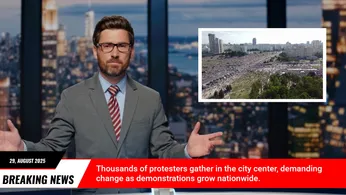
Elevate your next product launch or major announcement with our "Tech Unveiling: Breaking News Template." Designed for businesses in the technology sector, or any brand looking to create a high-impact reveal, this template captures the urgency and excitement of a live news broadcast. It’s perfect for promoting new services, special events, or significant company updates engagingly and memorably. This template helps you craft a compelling narrative around your news, making your audience feel like they're witnessing a groundbreaking event. Its intuitive design allows for effortless customisation of text, logos, and visual elements to match your brand's aesthetic. Highlight key features, benefits, or event details with the dynamic "NEWS UPDATE" banner and the prominent main title section. The clean, professional layout ensures your message is delivered with clarity and authority, designed to capture attention and drive engagement. From product reveals to exclusive offers, this template is your go-to solution for creating professional, eye-catching promotional content that resonates with your target audience and generates significant buzz.


Common questions
How do I change the text and media without editing the JSON?
Use the 9 merge fields listed above. Send a merge array with your own values for each field and the API swaps them in at render time, so one template can produce thousands of unique videos.
Can I render this in full HD or 4K for YouTube?
Yes. This template renders 1920×1080 by default. Set output.resolution to "1080" or output.size to a larger 16:9 size in the JSON; the layout scales with it.
Can I swap the footage for my own video?
Yes. Replace the video asset's src with a public URL of your file (MP4 works best). Use trim and length on the clip to pick the part you want, and the template's effects apply to your footage.
How do I change the text and fonts?
Edit the text on each rich-text asset in the JSON. Fonts come from the timeline fonts list or the asset's font family; add your own font file URL to timeline.fonts to use a brand typeface.