Contents
 Claude
  ChatGPT
  Perplexity
  Google AI
 Contents
If you have long recordings coming in, like talks, interviews, podcasts or stream recordings, sooner or later someone asks for short clips of the best parts. This guide is for developers building that into their own product or pipeline, whether it’s an AI clipping feature, a content workflow or a clipping API of your own. It isn’t a finished clipping tool. It shows how the pieces fit together, with code you can take apart and reuse.
By the end, you’ll have clips.py, a Python script that takes the URL of a long recording and produces five short, vertical clips with captions. Shotstack’s APIs handle the video work: they transcribe the recording, cut each clip, reframe it for a vertical screen and add the captions, so there are no FFmpeg jobs or GPU servers for you to run. The one part you supply is the moment picker, which decides what’s worth clipping. This guide uses Claude, but your own model, a set of rules or a person could take its place.
TL;DR
- To automatically clip long videos, import each recording with Shotstack’s Ingest API to get a transcript.
- Let a picker you own choose the moments.
- Render each moment twice: once to cut it out and fit it into a vertical frame, and once to add captions.
- This guide builds that pipeline as one Python script and runs it on a 51-minute conference talk.
We ran it on a talk from FOSDEM 2025. Here’s one of the five clips it made:
Source footage: “Beyond the README: Crafting a Better Developer Experience for Open Source Projects” by Lorna Mitchell, FOSDEM 2025. Licensed CC BY 2.0 BE.
For a wider look at what you can automate with video, see How to automate video editing.
How the pipeline fits together
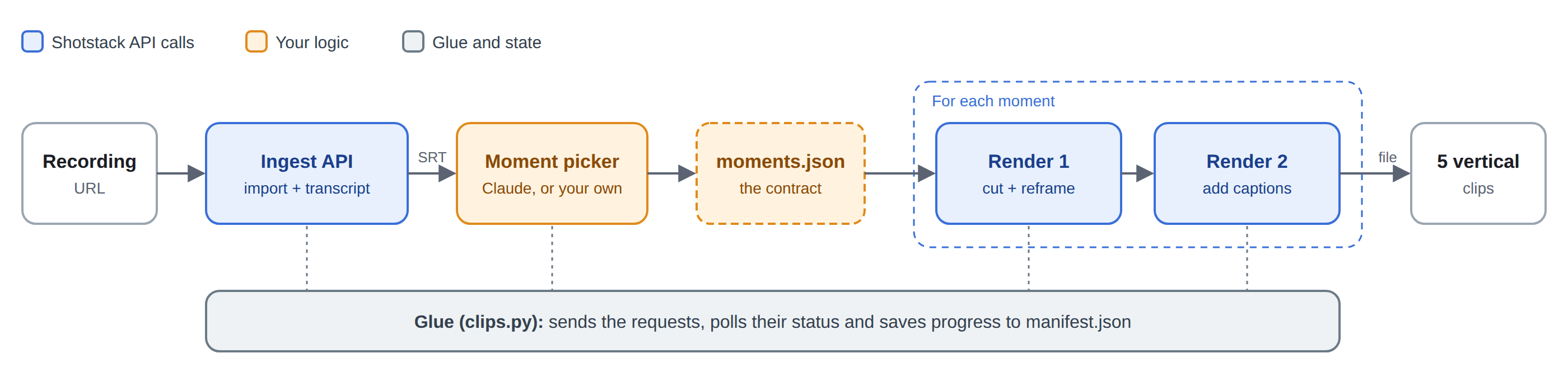
The pipeline has three kinds of parts:
- Shotstack API calls. The Ingest API imports the recording and transcribes it. The Edit API renders the clips. Webhooks tell your app when a render is done.
- Your own logic. The moment picker reads the transcript and decides where the clips are.
- Glue. A loop that submits renders and keeps track of them, and a manifest file that remembers what’s been done, so a run can stop and pick up again later.
The picker’s output is the contract between your logic and everything else: a list of moments, each with a start time, an end time and a title. Everything before that list is your component. After it, your code turns each moment into render requests and tracks the jobs, and Shotstack does the cutting, reframing and captioning. Because the handoff is just a list, you can start with a general-purpose model like Claude and later swap in one trained on your own data, editorial rules or a person reviewing the picks, and nothing downstream has to change.
For each recording, that adds up to one import request, which also produces the transcript, a request to the model (two, if it has to fix its answer), and two render requests per clip. The first render cuts the moment out of the recording and fits it into a vertical frame. The second adds a title and captions. Step 3 explains why it takes two.
In a real product, the picker would be a function or a service you can replace, and the render steps are stateless, so they can run anywhere. Webhooks are how your app learns that a clip is ready: the webhook for a clip’s first render can trigger its second. The script in this guide polls instead, because it has no server to receive webhooks.
One limit to know up front: a picker that reads a transcript can only find moments where someone is talking. A great moment that happens in silence won’t be in the transcript.
Before you start
You’ll need:
- Python 3.10 or later.
- A Shotstack account and API key. The script uses the production API, and production renders use credits, so check Shotstack’s pricing. You can also run it against the sandbox, where renders are watermarked, by setting
SHOTSTACK_ENV=stageand using your sandbox key. - An Anthropic API key, for the picker.
- A recording at a URL that returns the video file itself.
That last point matters because Shotstack fetches the file from its own servers. The URL has to be public, or a presigned URL that stays valid long enough for the download, and it has to return the video itself, not a web page or a list of download mirrors. The demo talk’s link on video.fosdem.org goes through a download redirector, and when Shotstack fetched it, it got back a 4.9 KB list of mirrors instead of the video. So the demo points straight at the file on one of FOSDEM’s mirrors.
Set up a project and install the two packages the script needs:
mkdir clipping-pipeline && cd clipping-pipeline
python3 -m venv venv
source venv/bin/activate
python -m pip install requests "anthropic>=1.9"
export SHOTSTACK_API_KEY=your-shotstack-key
export ANTHROPIC_API_KEY=your-anthropic-key
Create clips.py and start it with the imports and settings. The script talks to Shotstack with plain HTTP requests, so every request body in this guide is exactly the JSON the API receives.
import argparse
import hashlib
import json
import os
import re
import sys
import time
from collections import namedtuple
from pathlib import Path
from urllib.parse import urlparse

import anthropic
import requests

SHOTSTACK_ENV = os.environ.get("SHOTSTACK_ENV", "v1")
INGEST = f"https://api.shotstack.io/ingest/{SHOTSTACK_ENV}"
EDIT = f"https://api.shotstack.io/edit/{SHOTSTACK_ENV}"
HEADERS = {"x-api-key": os.environ.get("SHOTSTACK_API_KEY", ""), "Accept": "application/json"}

CLIP_COUNT = 5
MIN_SECONDS, MAX_SECONDS = 15, 60

POLL_SECONDS = 10
IMPORT_TIMEOUT = 60 * 60   # stop waiting for the import and transcript after an hour
RENDER_TIMEOUT = 60 * 60   # and for the renders
Next come a few small helpers, mostly for talking to Shotstack:
def fail(message):
    sys.exit(f"\nStopped: {message}")


def clock(seconds):
    """1234.5 -> '20:34'"""
    minutes, seconds = divmod(int(seconds), 60)
    return f"{minutes}:{seconds:02d}"


class ApiError(Exception):
    """Shotstack answered with an error."""


class Unresolved(Exception):
    """A submit request that may or may not have reached Shotstack."""


def check(response):
    if response.status_code in (401, 403):
        kind = "production" if SHOTSTACK_ENV == "v1" else "sandbox"
        fail(f"Shotstack refused the API key ({response.status_code}). "
             f"SHOTSTACK_API_KEY must be your {kind} key.")
    if response.status_code >= 400:
        raise ApiError(f"{response.status_code} from {response.url}: {response.text[:300]}")
    return response.json()


def post_json(url, body):
    """POST once. Sending the same submit twice could start a duplicate job."""
    try:
        response = requests.post(url, headers=HEADERS, json=body, timeout=60)
    except requests.RequestException as error:
        raise Unresolved(str(error)) from error
    return check(response)


def get_json(url):
    """GET a status, retrying network errors, rate limits and server errors."""
    for attempt in range(1, 6):
        try:
            response = requests.get(url, headers=HEADERS, timeout=30)
            if response.status_code != 429 and response.status_code < 500:
                return check(response)
        except requests.RequestException:
            pass
        time.sleep(5 * attempt)
    fail(f"GET {url} kept failing. Run the same command again to carry on.")


def download(url, path):
    """Save a file Shotstack hosts. No API key: these are plain file URLs."""
    with requests.get(url, stream=True, timeout=120) as response:
        response.raise_for_status()
        with open(path, "wb") as file:
            for chunk in response.iter_content(chunk_size=1 << 20):
                file.write(chunk)
post_json sends a request once and never retries it. A submit request that times out may still have started a render, and sending it again could start a second one. get_json only checks a status, which is safe to repeat, so it retries network errors, rate limits and server errors. download fetches finished files without the API key, because Shotstack serves them from plain file URLs.
Step 1: Import the recording and get a transcript
The Ingest API fetches the recording, stores a copy and, if you ask, transcribes it. One request to POST https://api.shotstack.io/ingest/v1/sources does both, with a body like this:
{
  "url": "https://ftp.fau.de/fosdem/2025/k1105/fosdem-2025-5235-beyond-the-readme-crafting-a-better-developer-experience-for-open-source-projects.mp4",
  "outputs": { "transcription": { "format": "srt" } }
}
The response contains a source ID. Poll GET https://api.shotstack.io/ingest/v1/sources/{id} and watch two statuses: the file’s own status, and the transcript’s, at data.attributes.outputs.transcription.status. The file can be ready before the transcript is, so wait until both say ready, and stop if either says failed.
Once they’re ready, the response has three things to keep:
data.attributes.sourceis Shotstack’s hosted copy of the recording. The renders use it instead of your original URL, so Shotstack only downloads the file from your URL once.data.attributes.durationis the length in seconds. Check that it’s there before you render, so the script stops early if the URL didn’t point to a video.data.attributes.outputs.transcription.urlis the SRT file.
Before the import itself, the script needs somewhere to save progress. The manifest is a dictionary that writes itself to manifest.json whenever you call save():
class Manifest(dict):
    """What's been done for one recording, saved to manifest.json after every change."""

    def __init__(self, path, url):
        super().__init__(json.loads(path.read_text()) if path.exists() else {"url": url})
        self.path = path
        if self["url"] != url:
            if set(self) == {"url"}:  # nothing was done for the old URL, like after a failed import
                self["url"] = url
            else:
                fail(f"{path.parent} belongs to a different recording: {self['url']}. "
                     "Delete or rename that folder to start over with this URL.")

    def save(self):
        self.path.write_text(json.dumps(self, indent=2))
Saving the source ID as soon as the import request returns means that if the script stops while Shotstack is still transcribing, the next run waits for the same import instead of starting a new one. Each folder belongs to one URL. If you change the URL before anything was done for the old one, for example after a failed import, the script carries on with the new URL. Otherwise it stops, so two recordings never share a manifest. Here’s the import:
def import_recording(url, manifest, folder):
    """Import the recording with the Ingest API and wait for its SRT transcript."""
    if "source_id" not in manifest:
        body = {"url": url, "outputs": {"transcription": {"format": "srt"}}}
        manifest["source_id"] = post_json(f"{INGEST}/sources", body)["data"]["id"]
        manifest.save()
    print(f"Importing the recording (source {manifest['source_id']})")

    started, seen = time.time(), None
    while True:
        source = get_json(f"{INGEST}/sources/{manifest['source_id']}")["data"]["attributes"]
        transcript = (source.get("outputs") or {}).get("transcription") or {}
        status = (source.get("status"), transcript.get("status"))
        if status != seen:
            print(f"  {clock(time.time() - started)}  file: {status[0]}, transcript: {status[1] or 'waiting'}")
            seen = status
        if "failed" in status:
            del manifest["source_id"]  # so the next run starts a new import
            manifest.save()
            reason = source.get("error") or "no reason given"
            if not source.get("duration"):
                reason += ". Shotstack didn't get a video from that URL: it must return the file itself"
            fail(f"the import failed ({reason}).")
        if status == ("ready", "ready"):
            break
        if time.time() - started > IMPORT_TIMEOUT:
            fail("the import is taking over an hour. Run the same command again to keep waiting.")
        time.sleep(POLL_SECONDS)

    # Every render below needs the recording's length, so check it's there first.
    if not source.get("duration"):
        fail("the import has no duration, so the URL may not point to a video. "
             "Check that the URL returns the file itself.")
    srt = requests.get(transcript["url"], timeout=60)
    srt.raise_for_status()
    (folder / "transcript.srt").write_text(srt.content.decode("utf-8"), encoding="utf-8")
    manifest.update(source_url=source["source"], duration=source["duration"])
    manifest.save()
    print(f"Imported {clock(source['duration'])} of video and saved {folder / 'transcript.srt'}")
For the 51-minute, 1.2 GB demo recording, the file and its transcript were ready in about four minutes:
Importing the recording (source zzz01m3r-6atjt-v152e-b92gb-01fym1)
  0:01  file: queued, transcript: queued
  0:12  file: importing, transcript: waiting
  4:10  file: ready, transcript: ready
Imported 51:36 of video and saved clips/fosdem-2025-5235-beyond-the-readme-craft/transcript.srt
The SRT file is plain text. This reads it into a list of cues, with times in seconds:
Cue = namedtuple("Cue", "start end text")


def parse_srt(text):
    """Read an SRT file into a list of cues, with times in seconds."""
    def seconds(timestamp):
        hours, minutes, secs = timestamp.strip().replace(",", ".").split(":")
        return int(hours) * 3600 + int(minutes) * 60 + float(secs)

    cues = []
    for block in text.replace("\r\n", "\n").strip().split("\n\n"):
        lines = block.strip().split("\n")
        for i, line in enumerate(lines):
            if "-->" in line:
                start, end = line.split("-->")
                cues.append(Cue(seconds(start), seconds(end.split()[0]), " ".join(lines[i + 1:])))
                break
    return cues
For more on getting transcripts from Shotstack and working with SRT files, see the video summarizer guide.
Step 2: Pick the moments with an LLM
This step is your component. Its only job is to turn the transcript into the contract, a list like this one, which the script saves as moments.json:
[
  {
    "start": 955.55,
    "end": 990.92,
    "title": "The help output that gatekeeps users"
  }
]
This version asks Claude Sonnet 5.5, through the Anthropic API, to pick the five best moments. Swapping in another provider only touches the code that calls Claude.
Give the model whole sentences
Shotstack’s SRT splits speech into short subtitle lines: 1,369 of them for this talk, most under two seconds long. Cutting clips at those boundaries would start and end them mid-sentence, so the script first joins the lines into whole sentences:
def sentences(cues):
    """Join the transcript's short subtitle lines into whole sentences, so every
    moment starts and ends on a sentence boundary."""
    result, parts, start = [], [], None
    for cue in cues:
        if start is None:
            start = cue.start
        parts.append(cue.text.strip())
        if cue.text.rstrip().endswith((".", "?", "!")):
            result.append(Cue(start, cue.end, " ".join(parts)))
            parts, start = [], None
    if parts:
        result.append(Cue(start, cues[-1].end, " ".join(parts)))
    return result
Then it formats the transcript for the prompt, one sentence per line, each with its start time:
def transcript_text(lines):
    """The transcript for the prompt: one sentence per line, with its start time."""
    return "\n".join(f"[{int(line.start // 60)}:{int(line.start % 60):02d}] {line.text}"
                     for line in lines)
The talk becomes 523 lines like these, about 44,000 characters in all:
[15:55] I recently tried to patch the help file for a, I'm not gonna name the tool because it isn't there, for a CLI project.
[16:03] So they're a dash dash help output.
[16:05] I didn't find it very helpful, and I sent them a patch.
Ask for quotes, not numbers
Here’s the prompt:
PROMPT = f"""\
You pick moments from a talk transcript to turn into short vertical video clips.

The transcript has one sentence per line. Each line starts with the time the
sentence begins, in minutes and seconds.

Pick the {CLIP_COUNT} best moments. A moment is a run of whole, consecutive sentences.
Every moment must:
- last {MIN_SECONDS} to {MAX_SECONDS} seconds (aim for 25 to 45)
- make sense on its own, without anything said earlier or anything shown on a slide
- not overlap any other moment

Prefer moments with a clear point, a strong opinion or a practical tip, and skip
introductions and housekeeping.

For each moment, copy the first six to ten words of its first sentence and the last
six to ten words of its last sentence exactly as they appear in the transcript, and
give it a short title of at most eight words. List the moments from best to worst."""
It asks Claude to point at each moment by copying its first and last words, rather than giving times or line numbers. An earlier version of this script numbered the lines and asked for line numbers, and Claude seems to have mixed them up with the times printed next to them: four of its five moments pointed at the wrong part of the talk. Copying text is something language models do reliably, and finding copied text is easy in code.
Structured outputs make Claude’s reply JSON that matches a schema you provide. The schema puts the moments in a list inside an object:
MODEL = "claude-sonnet-5-5"
MAX_TOKENS = 1000
# Sonnet 5.5 can't turn thinking off. "between_tools" is its lowest setting: no
# thinking before it answers, and this request has no tools to think between.
THINKING = {"type": "between_tools"}

MOMENTS_SCHEMA = {
    "type": "object",
    "properties": {
        "moments": {
            "type": "array",
            "items": {
                "type": "object",
                "properties": {
                    "first_words": {"type": "string"},
                    "last_words": {"type": "string"},
                    "title": {"type": "string"},
                },
                "required": ["first_words", "last_words", "title"],
                "additionalProperties": False,
            },
        },
    },
    "required": ["moments"],
    "additionalProperties": False,
}
def ask_claude(client, messages):
    """One request to Claude. Structured outputs make the reply JSON that matches the schema."""
    response = client.messages.create(
        model=MODEL,
        max_tokens=MAX_TOKENS,
        thinking=THINKING,
        system=PROMPT,
        messages=messages,
        output_config={"format": {"type": "json_schema", "schema": MOMENTS_SCHEMA}},
    )
    if response.stop_reason != "end_turn":
        fail(f"Claude stopped early ({response.stop_reason}), so its reply isn't complete.")
    text = next(block.text for block in response.content if block.type == "text")
    return json.loads(text)["moments"]
A few things to know when calling Claude Sonnet 5.5:
- It thinks before it answers by default, and thinking counts toward
max_tokens. It can’t turn thinking off completely, and{"type": "disabled"}returns a 400 error.between_toolsis its lowest setting: it turns off thinking before the answer and only thinks between tool calls, and this request has no tools. If you use a different Claude model, check its thinking settings. - It rejects any
temperature,top_portop_kvalue other than the default, and a prefilled assistant reply, with a 400 error, so the request sets none of them. - If the reply stops early, with a
stop_reasonofmax_tokensorrefusal, the JSON may be cut off or may not match the schema, so the script stops instead of guessing.
Check every moment in code
The prompt states the rules, but the code enforces them. locate finds a quote in the transcript, ignoring case and punctuation:
def words(text):
    """Lowercase words without punctuation, so a quote matches however it's punctuated."""
    return re.findall(r"[a-z0-9]+", text.lower().replace("'", "").replace("\u2019", ""))


def locate(quote, lines, after=0):
    """Find a quote in the transcript, from line `after` on. Returns the indexes of
    the lines where it starts and ends, or None if it isn't there."""
    target = words(quote)
    stream = [(word, i) for i, line in enumerate(lines) for word in words(line.text)]
    for k in range(len(stream) - len(target) + 1):
        if target and stream[k][1] >= after and [w for w, _ in stream[k:k + len(target)]] == target:
            return stream[k][1], stream[k + len(target) - 1][1]
    return None
check_picks turns each pair of quotes into start and end times, then checks the rest of the rules: each moment has to last 15 to 60 seconds, fit inside the recording and stay clear of the others.
def check_picks(picks, lines, duration):
    """Find each moment's quotes in the transcript, turn them into start and end
    times, and check the rules. Returns the moments that pass, best first, and a
    list of problems."""
    moments, problems = [], []
    if len(picks) < CLIP_COUNT:
        problems.append(f"there are {len(picks)} moments, not {CLIP_COUNT}")
    for n, pick in enumerate(picks, 1):
        where = f"moment {n} (\"{pick['title']}\")"
        found = locate(pick["first_words"], lines)
        if not found:
            problems.append(f"{where}: the transcript doesn't contain \"{pick['first_words']}\"")
            continue
        first = found[0]
        found = locate(pick["last_words"], lines, after=first)
        if not found:
            problems.append(f"{where}: the transcript doesn't contain \"{pick['last_words']}\" "
                            "after its first words")
            continue
        last = found[1]
        start, end = lines[first].start, lines[last].end
        if not MIN_SECONDS <= end - start <= MAX_SECONDS:
            problems.append(f"{where}: lasts {end - start:.1f} seconds, "
                            f"not {MIN_SECONDS} to {MAX_SECONDS}")
            continue
        if not 0 <= start < end <= duration:
            problems.append(f"{where}: runs past the end of the recording")
            continue
        overlap = next((m for m in moments if start < m["end"] and m["start"] < end), None)
        if overlap:
            problems.append(f"{where}: overlaps \"{overlap['title']}\"")
            continue
        moments.append({"start": start, "end": end, "title": pick["title"].strip()})
    return moments[:CLIP_COUNT], problems
If fewer than five moments pass, the script sends the problems back to Claude once and asks for a corrected list. If that still falls short, it keeps the moments that passed and says how many it found. It never makes up replacements.
def pick_moments(lines, duration):
    """Ask Claude for moments, and ask once more if too few of them pass the checks."""
    client = anthropic.Anthropic()  # reads ANTHROPIC_API_KEY
    messages = [{"role": "user", "content": transcript_text(lines)}]
    picks = ask_claude(client, messages)
    moments, problems = check_picks(picks, lines, duration)
    if len(moments) < CLIP_COUNT:
        print("Asking Claude to fix these:" + "".join(f"\n  - {p}" for p in problems))
        messages += [
            {"role": "assistant", "content": json.dumps({"moments": picks})},
            {"role": "user", "content": "Some of those moments break the rules:\n"
                + "\n".join(f"- {p}" for p in problems)
                + f"\nSend the full list of {CLIP_COUNT} moments again, with these fixed."},
        ]
        picks = ask_claude(client, messages)
        moments, problems = check_picks(picks, lines, duration)
    return moments, problems
In our run, Claude’s first answer had two moments that ran over 60 seconds and one that overlapped another, and the retry fixed all three:
Asking claude-sonnet-5-5 for 5 moments from 523 sentences
Asking Claude to fix these:
  - moment 3 ("Bad documentation beats no documentation"): lasts 72.5 seconds, not 15 to 60
  - moment 4 ("Three review comments, then you're nitpicking"): overlaps "Maximum three nitpicks per pull request review"
  - moment 5 ("Define 'done' for your open source project"): lasts 86.0 seconds, not 15 to 60
  1. The help output that gatekeeps users (16:36 to 16:57)
  2. Maximum three nitpicks per pull request review (34:52 to 35:44)
  3. Bad documentation beats no documentation (11:48 to 12:20)
  4. Don't drip-feed requirements to new contributors (29:55 to 30:26)
  5. Close issues you don't want, right away (28:03 to 28:56)
Save the moments, and let people edit them
Each pick costs a model call, so the script saves the moments to moments.json and reuses them on the next run:
def get_moments(lines, manifest, folder, repick):
    """Reuse moments.json while nothing that shapes the pick has changed; otherwise pick again.

    moments.json is the contract between the picker and the renders: a list of
    {"start", "end", "title"} with times in seconds. Edit it by hand, or write it
    with a different picker, and the renders use it as it is."""
    path = folder / "moments.json"
    picked_with = hashlib.sha256(json.dumps(
        [transcript_text(lines), MODEL, MAX_TOKENS, THINKING, PROMPT, MOMENTS_SCHEMA]
    ).encode()).hexdigest()[:16]
    if path.exists() and not repick and manifest.get("picked_with") in (None, picked_with):
        print(f"Using the moments in {path}")
        moments = json.loads(path.read_text())
        for moment in moments:
            if not 0 <= moment["start"] < moment["end"] <= manifest["duration"]:
                fail(f"{path} has a moment that doesn't fit the recording: {moment}")
        return moments

    if not os.environ.get("ANTHROPIC_API_KEY"):
        fail("set ANTHROPIC_API_KEY so Claude can pick the moments.")
    print(f"Asking {MODEL} for {CLIP_COUNT} moments from {len(lines)} sentences")
    moments, problems = pick_moments(lines, manifest["duration"])
    for problem in problems:
        print(f"  left out: {problem}")
    path.write_text(json.dumps(moments, indent=2))
    manifest["picked_with"] = picked_with
    manifest.save()
    for n, moment in enumerate(moments, 1):
        print(f"  {n}. {moment['title']} ({clock(moment['start'])} to {clock(moment['end'])})")
    if not moments:
        fail(f"none of the moments passed the checks. Change the prompt, or write {path} by hand.")
    if len(moments) < CLIP_COUNT:
        print(f"Only {len(moments)} moments passed the checks. Run with --repick to try "
              f"again, or edit {path} by hand.")
    return moments
The fingerprint covers everything that shapes the pick: the transcript, the model, the prompt, the schema and the settings. Change any of them and the next run picks again, and --repick forces a new pick either way. If you edit moments.json by hand, or write it yourself, the script uses it as it is. A new pick overwrites moments.json, hand edits included, so keep a copy of any edits you want to reuse.
That’s the contract doing its job. One of Claude’s five picks started just after the story it was about, so we moved it back to cover the story itself, 15:55 to 16:30, by editing moments.json. The renders used the edited file without asking Claude again.
You don’t need a model to fill this file at all. A picker could apply rules to the transcript, like a list of keywords, or a person could choose the moments in a review screen. As long as it writes the same list, nothing after it changes.
Step 3: Cut, reframe and caption one clip
Each clip takes two render requests to the Edit API, both sent to POST https://api.shotstack.io/edit/v1/render.
Why two? The first render gives each moment its own short file, and the second captions that file. Because the cut contains only the moment, the rich-caption asset, linked to the video through an alias, transcribes exactly what’s on screen and nothing else. You also end up with two files per moment: a clean vertical cut with no text, and the finished clip with its title and captions. You can reuse the clean cut for other platforms or other caption styles without cutting it again.
Render 1: Cut and reframe
def cut_edit(source_url, moment):
    """Render 1: cut the moment out of the recording and fit it into a vertical frame."""
    return {
        "timeline": {
            "background": "#000000",
            "tracks": [
                {"clips": [{
                    "asset": {"type": "video", "src": source_url, "trim": moment["start"]},
                    "start": 0,
                    "length": round(moment["end"] - moment["start"], 3),
                    "fit": "contain",
                }]},
            ],
        },
        "output": {"format": "mp4", "size": {"width": 1080, "height": 1920}},
    }
The video’s src is Shotstack’s hosted copy from step 1, trim skips to the moment’s start, and length is how long to play. (The sports highlights guide covers trimming in more detail.) The output size is 1080x1920. When you set size, leave out resolution and aspectRatio.
"fit": "contain" fits the whole 16:9 frame inside the vertical one, with black bands above and below. Shotstack reframes by fitting, scaling, offsetting and cropping the frame. The default fit, crop, scales the video to fill the frame and cuts off the sides. For this recording, which shows the slides large with a small camera view of the speaker in the bottom-right corner, that would crop the speaker out. For a single-camera recording with the speaker in the middle of the frame, the default crop may be all you need. And unlike in CSS, "fit": "cover" stretches the image to fill the frame.
Render 2: Add a title and captions
# Roboto, loaded so the bold weights below apply. A loaded font can be referred
# to by its name or by its file name, and this uses the file name. Copy font URLs
# verbatim from Google Fonts: the version and file name change over time.
ROBOTO_URL = "https://fonts.gstatic.com/s/roboto/v50/KFOmCnqEu92Fr1Me5WZLCzYlKw.ttf"
ROBOTO = "KFOmCnqEu92Fr1Me5WZLCzYlKw"


def caption_edit(cut_url, title):
    """Render 2: add a title and captions generated from the cut's own audio.

    The title sits in the black band above the video. The captions come from the
    clip named "clip" through an alias. They sit in the band under the video, with
    the word being spoken in yellow."""
    return {
        "timeline": {
            "background": "#000000",
            "fonts": [{"src": ROBOTO_URL}],
            "tracks": [
                {"clips": [{
                    "asset": {
                        "type": "rich-text",
                        "text": title,
                        "font": {"family": ROBOTO, "size": 76, "weight": 800, "color": "#ffffff"},
                        "align": {"horizontal": "center", "vertical": "middle"},
                    },
                    "start": 0,
                    "length": "end",
                    "position": "top",
                    "offset": {"y": -0.12},
                    "width": 960,
                    "height": 360,
                }]},
                {"clips": [{
                    "asset": {
                        "type": "rich-caption",
                        "src": "alias://clip",
                        "font": {"family": ROBOTO, "size": 64, "weight": 700, "color": "#ffffff"},
                        "active": {"font": {"color": "#ffd84d"}},
                    },
                    "start": 0,
                    "length": "end",
                    "position": "bottom",
                    "offset": {"y": 0.08},
                    "width": 960,
                    "height": 400,
                }]},
                {"clips": [{
                    "alias": "clip",
                    "asset": {"type": "video", "src": cut_url},
                    "start": 0,
                    "length": "auto",
                }]},
            ],
        },
        "output": {"format": "mp4", "size": {"width": 1080, "height": 1920}},
    }
The first track is the title. Tracks are layered in order, with the first one on top. The rich-text clip sits in a 960x360 box at the top of the frame, lowered by 12% of the frame’s height, with the text centered in that box, just above the video. advance passes in the moment’s title from moments.json, so a title you edit by hand shows up in the clip.
The last track plays render 1’s output, and "length": "auto" plays it for its full duration. Its alias names it clip, so the rich-caption asset, with a src of alias://clip, generates captions from that clip’s audio. "length": "end" keeps the captions going until the end of the timeline.
The captions sit in a 960x400 box at the bottom of the frame, raised by 8% of the frame’s height (the offset) so that they land in the black band under the video. They’re set in bold Roboto at 64 pixels, and the word being spoken turns yellow. The fonts entry loads Roboto from Google Fonts, and both assets refer to it by the file’s name, ROBOTO. We checked the result on a phone, and the captions were readable at that size.
Submit a render and wait for it
def submit(edit, label):
    """Queue one render and return a record to track it by."""
    render_id = post_json(f"{EDIT}/render", edit)["response"]["id"]
    print(f"  {label}: queued ({render_id})")
    return {"id": render_id, "status": "queued", "submitted": time.time()}


def finished(render, label):
    """Check a render that isn't finished yet. True once it's done."""
    if render["status"] not in ("done", "failed"):
        info = get_json(f"{EDIT}/render/{render['id']}")["response"]
        if info["status"] != render["status"]:
            print(f"  {label}: {info['status']} after {clock(time.time() - render['submitted'])}")
        render["status"] = info["status"]
        if info["status"] == "done":
            render["url"] = info["url"]
        elif info["status"] == "failed":
            render["error"] = info.get("error") or "no reason given"
    return render["status"] == "done"
A render reports several statuses on its way to done or failed. The script only acts on those two, and treats any other status as still in progress. In our final run, each cut took under a minute, and each captions render took under three minutes (1:41 to 2:43).
The url of a finished render expires after 24 hours. That’s why the script submits each clip’s captions render as soon as its cut is done, and downloads each finished clip straight away. In production, you’d keep the files with Shotstack hosting or send them to your own storage with destinations.
Step 4: Render all five clips
Five clips means ten render requests, each tracked by its ID. advance takes one clip a step further each time it’s called: submit the cut, wait for it, submit the captions render, wait for that, then download the clip.
def advance(job, moment, source_url, path, label):
    """Take one clip a step further: cut and reframe, then captions, then download."""
    if "cut" not in job:
        job["cut"] = submit(cut_edit(source_url, moment), f"{label} cut")
        return
    if not finished(job["cut"], f"{label} cut"):
        return
    if "captions" not in job:
        # Render URLs expire after 24 hours, so caption each cut as soon as it's ready.
        job["captions"] = submit(caption_edit(job["cut"]["url"], moment["title"]), f"{label} captions")
        return
    if not finished(job["captions"], f"{label} captions"):
        return
    download(job["captions"]["url"], path)  # this URL expires after 24 hours too
    job["file"] = str(path)
    print(f"  {label}: saved {path}")
render_clips calls advance for every clip, over and over, until each one is done, has failed or is unresolved. All five cuts go out on the first pass, and each clip moves on as soon as its own render finishes. The manifest is saved after every step.
def clip_state(job):
    if "file" in job:
        return "done"
    if "unresolved" in job:
        return "unresolved"
    if "error" in job or "failed" in (job.get("cut", {}).get("status"),
                                      job.get("captions", {}).get("status")):
        return "failed"
    return "working"


def render_clips(moments, manifest, folder):
    """Submit every clip's renders and poll until each clip is done or has failed.

    Each clip is two render requests, tracked by ID."""
    jobs = manifest.setdefault("renders", {})
    todo = []
    for n, moment in enumerate(moments, 1):
        job = jobs.setdefault(f"{moment['start']:.3f}-{moment['end']:.3f}", {})
        if clip_state(job) == "failed":  # a new run tries failed clips again
            job.pop("error", None)
            if job.get("cut", {}).get("status") == "failed":
                job.pop("cut")
                job.pop("captions", None)
            if job.get("captions", {}).get("status") == "failed":
                job.pop("captions")
        minutes, seconds = divmod(int(moment["start"]), 60)
        todo.append((n, moment, job, folder / f"clip-{minutes:02d}m{seconds:02d}s.mp4"))
    manifest.save()

    print(f"Rendering {len(todo)} clip{'' if len(todo) == 1 else 's'}")
    started = time.time()
    while True:
        for n, moment, job, path in todo:
            if clip_state(job) != "working":
                continue
            try:
                advance(job, moment, manifest["source_url"], path, f"clip {n}")
            except Unresolved as error:
                # Don't resubmit: the render may have started, and a retry could duplicate it.
                job["unresolved"] = f"the submit request didn't complete ({error})"
            except (ApiError, requests.RequestException) as error:
                job["error"] = str(error)
            manifest.save()
        if all(clip_state(job) != "working" for _, _, job, _ in todo):
            return todo
        if time.time() - started > RENDER_TIMEOUT:
            fail("renders are still going after an hour. Run the same command again to keep "
                 "waiting; nothing that's already been submitted will be submitted again.")
        time.sleep(POLL_SECONDS)
Two kinds of failure need different handling:
- A render that fails can safely be tried again, so the next run of the script resubmits it.
- A submit request that times out is different. The request may have reached Shotstack and started a render. Sending it again could create a duplicate, so the script marks the clip as unresolved and leaves it for you to check in the Shotstack dashboard: if nothing started, delete the clip’s entry under
"renders"inmanifest.jsonand run the script again. Checking a render’s status, on the other hand, is always safe to repeat.
In production, you’d replace the polling with webhooks: add a callback URL to each render request, and Shotstack calls it when the render finishes. Treat a callback as a signal, and fetch the render by its ID to confirm its status before acting on it. Shotstack also retries a callback that doesn’t get a success response within 10 seconds, so the same one can arrive more than once. Record that a clip’s second render was submitted before submitting it, so a repeat can’t start it twice.
Run it
The last piece reads the command line, sets up a folder for the recording, runs the steps in order and prints a summary.
def report(todo):
    print("\nClips:")
    for n, moment, job, path in todo:
        where = f"{clock(moment['start'])} to {clock(moment['end'])}"
        if clip_state(job) == "done":
            print(f"  {n}. {moment['title']} ({where}): {path}")
        elif clip_state(job) == "unresolved":
            print(f"  {n}. {moment['title']} ({where}): not sure a render started, because "
                  f"{job['unresolved']}. Check your Shotstack dashboard. If nothing started, "
                  f"delete this clip's entry under \"renders\" in manifest.json and run again.")
        else:
            reasons = [job.get("error")] + [job.get(stage, {}).get("error") for stage in ("cut", "captions")]
            reason = "; ".join(r for r in reasons if r)
            print(f"  {n}. {moment['title']} ({where}): failed ({reason}). "
                  "Run the same command again to retry it.")


def main():
    parser = argparse.ArgumentParser(description="Turn a long recording into short, captioned, vertical clips.")
    parser.add_argument("url", help="a URL that returns the recording file itself")
    parser.add_argument("--limit", type=int, default=CLIP_COUNT, metavar="N",
                        help="render only the first N moments this run")
    parser.add_argument("--repick", action="store_true",
                        help="ask Claude for new moments even if moments.json is up to date")
    args = parser.parse_args()

    if args.limit < 1:
        fail("--limit must be at least 1.")
    if SHOTSTACK_ENV not in ("v1", "stage"):
        fail('SHOTSTACK_ENV must be "v1" (production) or "stage" (sandbox).')
    if not HEADERS["x-api-key"]:
        fail("set SHOTSTACK_API_KEY first.")

    name = re.sub(r"[^A-Za-z0-9_-]+", "-", Path(urlparse(args.url).path).stem)[:40].strip("-")
    folder = Path("clips") / f"{name or 'recording'}{'' if SHOTSTACK_ENV == 'v1' else '-sandbox'}"
    folder.mkdir(parents=True, exist_ok=True)
    manifest = Manifest(folder / "manifest.json", args.url)

    try:
        if "source_url" not in manifest:
            import_recording(args.url, manifest, folder)
        lines = sentences(parse_srt((folder / "transcript.srt").read_text(encoding="utf-8")))
        moments = get_moments(lines, manifest, folder, args.repick)
        todo = render_clips(moments[: args.limit], manifest, folder)
    except Unresolved as error:
        fail(f"a request didn't complete ({error}). It may still have reached Shotstack, "
             "so check your dashboard before running this again.")
    except ApiError as error:
        fail(str(error))
    except anthropic.APIError as error:
        fail(f"the Claude API returned an error: {error}")
    report(todo)


if __name__ == "__main__":
    main()
Run it with the recording’s URL:
python clips.py "https://ftp.fau.de/fosdem/2025/k1105/fosdem-2025-5235-beyond-the-readme-crafting-a-better-developer-experience-for-open-source-projects.mp4"
To check the layout before rendering everything, add --limit 1 to render only the first clip, then run the same command again without it. Thanks to the manifest, nothing that’s already done is repeated.
Here’s the output from our final run. It reused the import and the edited moments from earlier runs, so it went straight to rendering, and all five clips were ready about three and a half minutes after the first request:
Using the moments in clips/fosdem-2025-5235-beyond-the-readme-craft/moments.json
Rendering 5 clips
  clip 1 cut: queued (157eba60-28b9-4b8f-a687-7b429713d706)
  clip 2 cut: queued (fcc9072d-f98b-454a-a2b8-8858ac6e5f83)
  clip 3 cut: queued (a4bf4d70-54d2-47ca-9d8c-27cd679ce4e2)
  clip 4 cut: queued (9fe8bb86-4d6f-48bd-80ad-9cfc4c1d673c)
  clip 5 cut: queued (6a665885-eab5-4e9d-aaed-4ca923748938)
  clip 2 cut: rendering after 0:19
  clip 3 cut: rendering after 0:19
  clip 4 cut: rendering after 0:20
  clip 5 cut: rendering after 0:20
  clip 1 cut: done after 0:46
  clip 1 captions: queued (a564e137-7052-45e1-8ddb-773bc830de41)
  clip 2 cut: done after 0:48
  clip 2 captions: queued (ffce7940-f6ba-418a-b233-0e1c410d3e08)
  clip 3 cut: done after 0:50
  clip 3 captions: queued (7e9ba2ea-09fa-4123-950d-3279d1b153a1)
  clip 4 cut: done after 0:51
  clip 4 captions: queued (131c75d9-3f2f-4a3a-b9d0-8e61ddb8d6bc)
  clip 5 cut: done after 0:53
  clip 5 captions: queued (1f9d3b3f-28ac-49fd-a245-82b7779dd874)
  clip 1 captions: generating after 0:31
  clip 2 captions: generating after 0:36
  clip 3 captions: generating after 0:34
  clip 4 captions: generating after 0:41
  clip 5 captions: generating after 0:39
  clip 4 captions: preprocessing after 1:20
  clip 5 captions: preprocessing after 1:18
  clip 1 captions: rendering after 1:45
  clip 2 captions: preprocessing after 1:43
  clip 3 captions: preprocessing after 1:42
  clip 4 captions: done after 1:41
  clip 4: saved clips/fosdem-2025-5235-beyond-the-readme-craft/clip-29m55s.mp4
  clip 5 captions: rendering after 1:43
  clip 1 captions: done after 2:09
  clip 1: saved clips/fosdem-2025-5235-beyond-the-readme-craft/clip-15m55s.mp4
  clip 2 captions: rendering after 2:14
  clip 3 captions: done after 2:13
  clip 3: saved clips/fosdem-2025-5235-beyond-the-readme-craft/clip-11m48s.mp4
  clip 5 captions: done after 2:13
  clip 5: saved clips/fosdem-2025-5235-beyond-the-readme-craft/clip-28m03s.mp4
  clip 2 captions: done after 2:43
  clip 2: saved clips/fosdem-2025-5235-beyond-the-readme-craft/clip-34m52s.mp4

Clips:
  1. The help output that gatekeeps users (15:55 to 16:30): clips/fosdem-2025-5235-beyond-the-readme-craft/clip-15m55s.mp4
  2. Maximum three nitpicks per pull request review (34:52 to 35:44): clips/fosdem-2025-5235-beyond-the-readme-craft/clip-34m52s.mp4
  3. Bad documentation beats no documentation (11:48 to 12:20): clips/fosdem-2025-5235-beyond-the-readme-craft/clip-11m48s.mp4
  4. Don't drip-feed requirements to new contributors (29:55 to 30:26): clips/fosdem-2025-5235-beyond-the-readme-craft/clip-29m55s.mp4
  5. Close issues you don't want, right away (28:03 to 28:56): clips/fosdem-2025-5235-beyond-the-readme-craft/clip-28m03s.mp4
Everything for the recording ends up in one folder:
clips/fosdem-2025-5235-beyond-the-readme-craft/
  manifest.json
  moments.json
  transcript.srt
  clip-11m48s.mp4
  clip-15m55s.mp4
  clip-28m03s.mp4
  clip-29m55s.mp4
  clip-34m52s.mp4
And here are the five clips. Claude’s picks vary from run to run, so yours may differ.
1. The help output that gatekeeps users (15:55 to 16:30)
2. Maximum three nitpicks per pull request review (34:52 to 35:44)
3. Bad documentation beats no documentation (11:48 to 12:20)
4. Don’t drip-feed requirements to new contributors (29:55 to 30:26)
5. Close issues you don’t want, right away (28:03 to 28:56)
Adapting it for stream recordings
The script starts from a recording at a URL, so the first job in a real system is getting each recording into storage you control. Most streaming and meeting platforms let you export or archive recordings, and once a file is in your own bucket, a presigned URL is all the import needs. Only clip recordings you have the rights to.
A commentated stream recording works the same way, as long as someone is talking through most of it. Two limits to plan for: Shotstack accepts source files up to 5 GB, so a long stream recording may need to be split or re-encoded first, and a transcript several hours long may need to go to the model in chunks, depending on the model. A quiet stretch of gameplay with a great moment in it won’t show up in a transcript at all, so a picker for that kind of footage needs other signals, like chat activity or the video itself.
Taking it to production
The script keeps its state in files and polls for results, which is fine for a demo. In a product, the same design stretches in a few directions:
- Webhooks instead of polling. Give each render a
callbackURL and move each clip on when its webhook arrives, confirming the render’s status by its ID. - A database instead of the manifest. What the script keeps in files (the source and each clip’s two render IDs in
manifest.json, the moments inmoments.json) becomes a row per recording and a row per clip. - Storage. Send finished clips to your own storage with destinations rather than downloading them within 24 hours. To post a clip to YouTube, upload it with the YouTube Data API.
- Many recordings at once. Each clip’s renders are independent, so clips from many recordings can render at the same time. Every render request and every status check counts toward the Edit API’s rate limit of 300 requests a minute in production, so at volume, webhooks also save you the status checks.
- A review step. Because the moments are a plain list, you can show them to a person to approve or adjust before any rendering starts.
- More formats. The same moments can feed other renders, like a 16:9 highlight reel of the best moments, as in the sports highlights guide, or branded shorts built from a template, as in the YouTube Shorts guide.
Build clipping into your own product
You now have a pipeline that turns a long recording into short, captioned, vertical clips. The Ingest API gives you the transcript, your picker writes the moments list, and two Edit API renders turn each moment into a finished clip.
Because the moments list is the only handoff, you can swap the picker, add a review step or move to webhooks without touching the rest.
Sign up for a free Shotstack API key and point clips.py at one of your own recordings.
Frequently asked questions (FAQs)
Why does each clip take two renders?
The first render cuts the moment out of the recording into its own vertical file. The second adds the title and captions to that file. Captioning the short cut means the transcript covers only the moment, and you keep a clean, uncaptioned version of every clip to reuse.
Can I use a different model, or my own rules, to pick the moments?
Yes. The renders only read moments.json, so anything that writes that list will do. To use another provider, replace the code that calls Claude: ask_claude and the client that pick_moments creates. To use another Claude model, change MODEL and check its thinking settings: Claude Sonnet 5, for example, turns thinking off with {"type": "disabled"}, which Sonnet 5.5 rejects. And to skip the model entirely, write the moments with rules of your own, or let a person pick them.
How do I automatically clip long videos as soon as they arrive?
Start the pipeline from whatever tells you a recording has landed, like an upload event from your storage, a webhook from your video platform or a scheduled job that checks for new files. Run the import and the picker, submit the renders with callback URLs, and let each webhook move its clip to the next step. The manifest in this script becomes a row in your database, and the whole thing runs without anyone waiting on it.
Can I make square or horizontal clips too?
Yes, though we only tested the vertical layout. For square clips, change the output size in both renders to 1080x1080, then shrink the caption box and lower its offset to fit the bands above and below the video, which are only about 236 pixels tall. For horizontal clips, drop render 1’s reframing entirely: cut the moment at 1920x1080 and put the captions over the bottom of the picture. The picker and the moments stay the same.
Get started with Shotstack's video editing API in two steps:
- Sign up for free to get your API key.
- Send an API request to create your video:
curl --request POST 'https://api.shotstack.io/v1/render' \
--header 'x-api-key: YOUR_API_KEY' \
--data-raw '{
  "timeline": {
    "tracks": [
      {
        "clips": [
          {
            "asset": {
              "type": "video",
              "src": "https://shotstack-assets.s3.amazonaws.com/footage/beach-overhead.mp4"
            },
            "start": 0,
            "length": "auto"
          }
        ]
      }
    ]
  },
  "output": {
    "format": "mp4",
    "size": {
      "width": 1280,
      "height": 720
    }
  }
}'

Published September 30, 2026
Joyce Echessa is a full-stack web developer specializing in JavaScript, currently expanding into AI engineering through hands-on learning and projects. She writes developer tutorials for Shotstack. More from Joyce
Experience Shotstack for yourself.
- Seamless integration
- Dependable high-volume scaling
- Blazing fast rendering
- Save thousands