Contents
 Claude
  ChatGPT
  Perplexity
  Google AI
 Contents
Creating a product video from a description takes more than generating a clip. You need visuals, perhaps a voice-over and background music, then a way to bring them together with your product details and branding. If you’re using separate tools for generation and editing, your application has to coordinate those steps.
Shotstack’s Edit API now brings those steps into the same request. You can turn a product description into a promo, a news feed into a daily brief, or translated scripts into versions of the same ad, all using the JSON timeline you already use to edit videos.
TL;DR
- Add a
promptto animage,videooraudioasset and the Shotstack Edit API generates the media as part of your render. - Choose a model and its options, then combine the result with your clips, text and transitions.
- You can also generate an asset ahead of time with
POST /edit/v1/generateand reuse its URL. - Below: every example with the media it produced, and the complete request that rendered them into one 9-second video.
What’s new
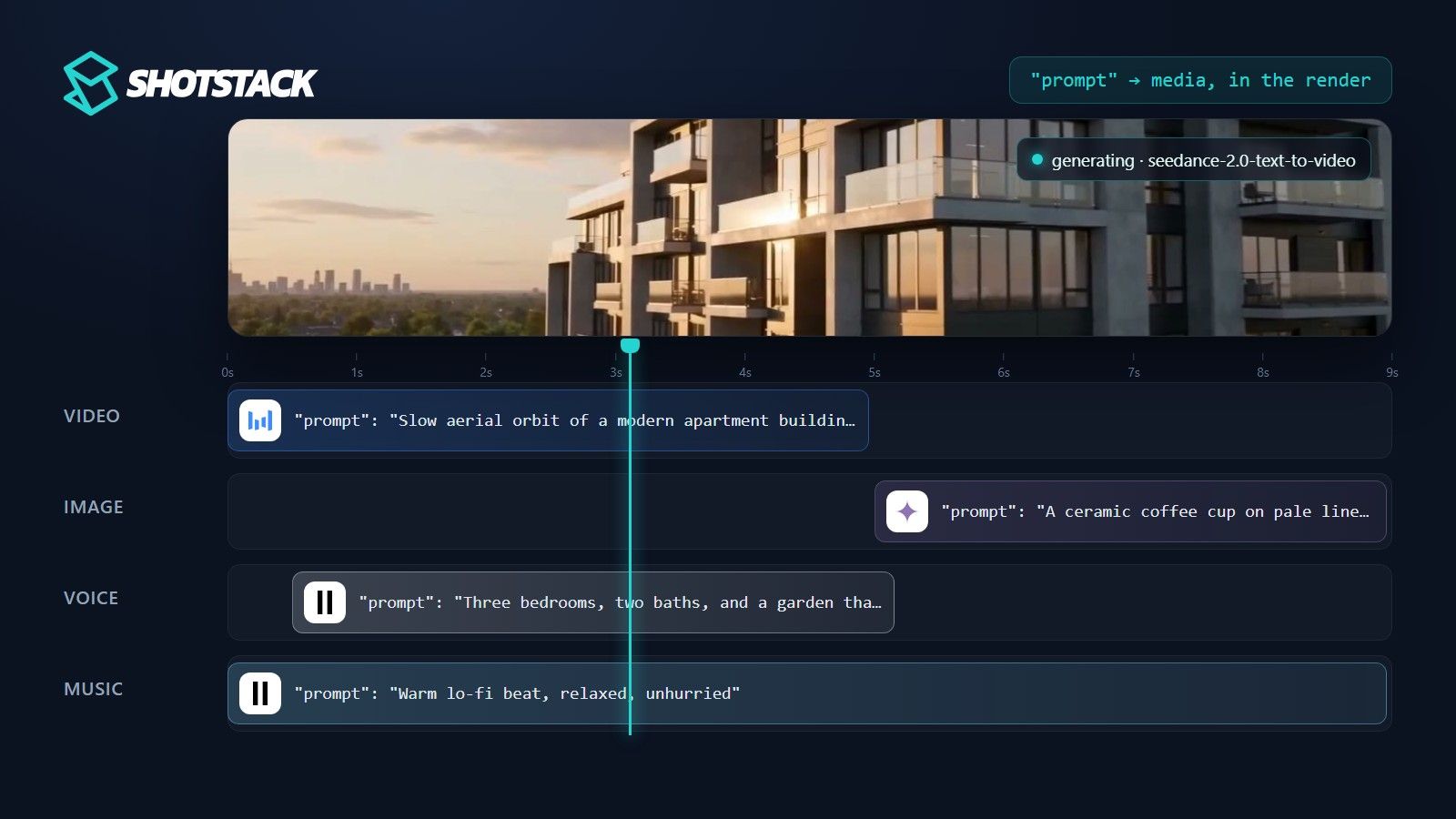
The image, video and audio asset types now accept a prompt. Set it instead of src, optionally with a model and model-specific options, and the engine generates the media while the edit renders. The generated file takes the asset’s place in the clip. The same edit can generate footage, images, speech and music, then arrange them into a finished video.
The four things you can generate
Each example below is one clip. Add it to a track’s clips array alongside the footage, text and transitions you already use.
A video clip. Describe the motion and setting you want.
{
  "asset": {
    "type": "video",
    "prompt": "Slow aerial orbit of a modern apartment building at golden hour",
    "model": "seedance-2.0-text-to-video",
    "options": { "resolution": "720p", "generateAudio": false }
  },
  "start": 0,
  "length": 5
}
The clip that came back, 5 seconds at 720p:
An image. Same idea, on the image asset.
{
  "asset": {
    "type": "image",
    "prompt": "A ceramic coffee cup on pale linen, soft morning light, shallow focus",
    "model": "nano-banana-2",
    "options": { "aspectRatio": "16:9", "resolution": "2K" }
  },
  "start": 0,
  "length": 4
}
The image that came back, 2752 by 1536:

A voice-over. On a speech model, the prompt is the script. Set length to "auto" and the clip sizes itself to the generated audio.
{
  "asset": {
    "type": "audio",
    "prompt": "Three bedrooms, two baths, and a garden that gets sun all afternoon.",
    "model": "elevenlabs-multilingual-v2",
    "options": { "voice": "Charlotte" }
  },
  "start": 0,
  "length": "auto"
}
The voice-over that came back, 4.7 seconds for that script:
Background music. On a music model, the prompt describes the sound. forceInstrumental requests music without vocals.
{
  "asset": {
    "type": "audio",
    "prompt": "Warm lo-fi beat, relaxed, unhurried",
    "model": "elevenlabs-music",
    "options": { "forceInstrumental": true }
  },
  "start": 0,
  "length": 30
}
The music that came back (this one was generated as a 9-second track for the video below):
Put background music on its own track so it can play underneath the other clips. Generated media fits into the same timeline as the footage, text and transitions you already use.
Put them together in one render
This is the whole point. One request, four generated assets, one finished video. We submitted the edit below to the production API and it came back done in about two minutes: the video and image generate first, then the render runs with the voice-over and music underneath.
The complete request. Copy it, add your API key, and submit it to POST https://api.shotstack.io/edit/v1/render (or /edit/stage/render for the sandbox):
{
  "timeline": {
    "tracks": [
      { "clips": [
        { "asset": { "type": "audio", "prompt": "Three bedrooms, two baths, and a garden that gets sun all afternoon.", "model": "elevenlabs-multilingual-v2", "options": { "voice": "Charlotte" } },
          "start": 0.5, "length": "auto" }
      ]},
      { "clips": [
        { "asset": { "type": "audio", "prompt": "Warm lo-fi beat, relaxed, unhurried", "model": "elevenlabs-music", "options": { "forceInstrumental": true }, "volume": 0.35, "effect": "fadeOut" },
          "start": 0, "length": 9 }
      ]},
      { "clips": [
        { "asset": { "type": "video", "prompt": "Slow aerial orbit of a modern apartment building at golden hour", "model": "seedance-2.0-text-to-video", "options": { "resolution": "720p", "generateAudio": false } },
          "start": 0, "length": 5, "transition": { "out": "fade" } },
        { "asset": { "type": "image", "prompt": "A ceramic coffee cup on pale linen, soft morning light, shallow focus", "model": "nano-banana-2", "options": { "aspectRatio": "16:9", "resolution": "2K" } },
          "start": 5, "length": 4, "effect": "zoomInSlow", "transition": { "in": "fade" } }
      ]}
    ]
  },
  "output": { "format": "mp4", "resolution": "hd" }
}
Three things to notice. The aerial clip fades into the generated image because the transition and zoomInSlow effect are ordinary clip properties, so generated media takes every effect a normal asset takes. The voice-over uses length: "auto" and starts half a second in.
The music clip is 9 seconds long, so the model generated a 9-second track instead of its 30-second default. For time-based models, clip length drives generated length.
How the AI generation works
Generate at render time when you want Shotstack to handle the whole sequence. Generate ahead of time when you want to inspect an asset or have its URL ready before composing the edit. The AI generation guide covers both in detail.
Generate at render time
Leave the prompt in the edit. This is convenient when it comes from your data: a script per customer, an image description per product, or a headline per day.
Generate once and reuse
Send the prompt-bearing asset to POST /edit/v1/generate, poll GET /edit/v1/generate/{id} until it’s done, and take the returned public URL. Use it as an ordinary src in subsequent renders. For B-roll, that lets you review the footage first and then layer changing text over the chosen asset.
The four outputs shown above were fetched this way, by sending each asset object from the examples to the generate endpoint. Because the same prompts had already been generated for the video, each one came back within seconds.
Reusing earlier generations
Both paths draw on the same stored generations. Every generated file is stored against your account. When an asset asks for exactly what was generated before, the stored file is used and nothing is charged.
An asset counts as the same when its type, model, prompt and options match. For video and music, the clip length must match too, and for video, the start and end images. To get a different result, change the prompt, or set a different seed on a model that accepts one.
Generating ahead of time gives you a URL you control. It isn’t cheaper than an identical asset generated inside the render.
Discover the models
Discover models through GET /edit/v1/models, which lists every model, its type and whether your plan can use it. Add ?expand=options to retrieve each model’s option schema. An application offering model selection can build its picker from this endpoint as the catalogue changes.
Which models can you use?
The registry at the time of writing. Omit model and the API picks a default for the asset type. Check GET /edit/v1/models for the current list; it changes without a release.
| Type | Model id | Use it for | Key options |
|---|---|---|---|
| Video | seedance-2.0-text-to-video | The default video model. Clips of 4 to 15 seconds from a text prompt | resolution (480p, 720p, 1080p), aspectRatio, generateAudio |
seedance-2.0-image-to-video | Animate a still image (options.startSrc, optional endSrc) | as above, plus startSrc, endSrc | |
seedance-2.5-text-to-video, seedance-2.5-image-to-video | Longer takes, up to 30 seconds | as above | |
wan-3.0-prime-text-to-video, wan-3.0-prime-image-to-video | Clips of 2 to 30 seconds, 1080p with sound by default | resolution, aspectRatio, generateAudio, enhancePrompt, seed | |
gemini-omni-flash-1.1-text-to-video, gemini-omni-flash-1.1-image-to-video | Clips of 3 to 10 seconds with sound, up to 4K | resolution (360p to 4k), aspectRatio (16:9, 9:16) | |
| Image | nano-banana-2 | The default image model. Images from 0.5K to 4K, 15 aspect ratios including 9:16 and 1:1 | aspectRatio, resolution, seed, systemPrompt |
nano-banana-2-edit | Edit or combine up to 14 existing images (options.imageUrls) | as above, plus imageUrls | |
nano-banana-pro | Dense compositions with many instructions, at 1K, 2K or 4K | aspectRatio, resolution, seed, systemPrompt | |
gpt-image-2.5-sunburst, gpt-image-2.5-sunburst-edit | Detailed images that follow complex prompts closely. The edit model takes up to 16 reference images | aspectRatio, resolution, imageUrls (edit model) | |
flux-schnell | Quick illustrations and drafts | none | |
| Speech | elevenlabs-multilingual-v2, elevenlabs-turbo-v2.5 | Voice-over; the prompt is the script. Multilingual v2 is the default audio model | voice (21 named voices), language, stability, similarityBoost, style |
minimax-speech-2.8-hd | Voice-over with 17 voices across 38 languages | voice, language | |
polly-neural | Plain narration and news-style reads | voice (required), language, newscaster | |
| Music | elevenlabs-music | Instrumental or vocal tracks from a description or a section-by-section plan | forceInstrumental, compositionPlan |
Each kind of media has its own guide with every option and advice on writing prompts: video, images, speech and music.
What it costs
Generation is paid for in credits, from the same balance as rendering. Each generation is priced at what the model’s provider charges, plus a small margin. You don’t need an account with each provider.
To check a price before you generate, send the asset to POST /edit/v1/generate/quote. It takes the same body as the generate endpoint and returns the credits that generation would cost. Nothing is generated or charged.
curl -X POST \
     -H "Content-Type: application/json" \
     -H "x-api-key: $SHOTSTACK_API_KEY" \
     -d '{"asset": {"type": "video", "prompt": "Slow aerial orbit of a modern apartment building at golden hour", "model": "seedance-2.0-text-to-video", "options": {"resolution": "720p", "generateAudio": false}}, "length": 5}' \
     https://api.shotstack.io/edit/stage/generate/quote
Each model is priced by its own unit. Images are priced per image, by resolution. Video is priced per second, rounded up, by resolution. Speech is priced per character of the script. Music is priced per started minute, so a 9-second track costs the same as a 60-second one. AI generation pricing lists the rule for each model, and the pricing page explains credit pricing.
An identical asset costs nothing to generate again, but the render is still charged. A thousand unique prompts mean a thousand generations, so decide which parts genuinely need to change. Generation costs credits in the sandbox too.
What you can build
A product or listing video with generated B-roll
Start with a product description or listing record. Use seedance-2.0-text-to-video through /edit/v1/generate to create atmospheric footage, review it, and save the URL against the record.
Each render then combines that footage with the current price, real product or property photos, and a call to action. A price change updates the overlay without requiring new footage. For a property listing, use generated footage as illustrative B-roll rather than presenting an invented building as the actual property.
A daily brief assembled from your feed
A scheduled job reads the day’s items and prepares a short script and an image prompt for each. Put those prompts into the edit using nano-banana-2 for visuals and elevenlabs-multilingual-v2 for narration. The media generates during the render, alongside titles drawn from the feed.
Generate a background track once with elevenlabs-music and reuse its URL across episodes. Each edition gets new narration and imagery while keeping a consistent sound and layout.
One ad, five languages, five renders
Generate the shared visual assets once with nano-banana-2 or a video model, then keep their URLs in the template.
Your application supplies five translated scripts and selects a suitable supported voice for each; elevenlabs-multilingual-v2 generates the narration during each render. Translate any on-screen copy too, and allow for differences in speech duration. The visuals stay consistent while the words change, and the same workflow can run again when the offer is updated.
Put a prompt where the URL used to go
Get a sandbox API key and call GET https://api.shotstack.io/edit/stage/models?expand=options to see the catalogue. Copy the complete edit above, or drop one example into timeline.tracks[].clips of an edit you already have, and submit it to POST https://api.shotstack.io/edit/stage/render. Poll the render status until it reads done; while the media is being generated it reads generating.
Use the AI generation guide and the API reference alongside the model catalogue for the edit structure and supported options.
Create a free API key and put a prompt where the URL used to go.
Frequently asked questions (FAQs)
Does AI generation work in the sandbox?
Yes. Sandbox renders are free and watermarked as usual, but generated media is charged in credits from your production balance. Keep some credits on the account before you test. The sandbox and production store generations separately, so an asset made in the sandbox is charged again the first time production generates it.
Does the prompt regenerate on every render?
No. An identical asset resolves to the file it produced last time and isn’t charged again, so re-rendering an unchanged edit does not generate again. Change the prompt, model or options, or the clip length for video and music, and a new generation runs.
Can I generate an asset once and reuse it?
Yes. Send the asset object to POST /edit/v1/generate, poll GET /edit/v1/generate/{id} until it is done, and use the returned URL as a normal src. That is how you review B-roll before committing to it.
How do I know which models and options exist?
Call GET /edit/v1/models. Add ?expand=options to get each model’s option schema as JSON Schema. The list changes without a release, so build your picker from the endpoint rather than a hard-coded list.
Do I need a separate API key or SDK for generation?
No. Generation uses the same API key, the same render endpoint and the same Edit JSON. The only new fields are prompt, model and options on the asset.
What happens if I set both src and prompt?
The prompt wins. The src is treated as a preview placeholder and replaced by the generated file. An unchanged prompt reuses the stored file, so it never costs twice. To lock an asset so it can’t change, delete the prompt and keep the src.
Get started with Shotstack's video editing API in two steps:
- Sign up for free to get your API key.
- Send an API request to create your video:
curl --request POST 'https://api.shotstack.io/v1/render' \
--header 'x-api-key: YOUR_API_KEY' \
--data-raw '{
  "timeline": {
    "tracks": [
      {
        "clips": [
          {
            "asset": {
              "type": "video",
              "src": "https://shotstack-assets.s3.amazonaws.com/footage/beach-overhead.mp4"
            },
            "start": 0,
            "length": "auto"
          }
        ]
      }
    ]
  },
  "output": {
    "format": "mp4",
    "size": {
      "width": 1280,
      "height": 720
    }
  }
}'

Published October 5, 2026
Derk Zomer is the founder and CEO of Shotstack. He writes about video automation, AI-generated media and building on the Shotstack API. More from Derk
Experience Shotstack for yourself.
- Seamless integration
- Dependable high-volume scaling
- Blazing fast rendering
- Save thousands