Contents
 Claude
  ChatGPT
  Perplexity
  Google AI
 Contents
Can Claude make videos? Yes. Claude doesn’t output a video file itself. It writes the video as code, and a renderer turns that code into an MP4. This guide is for developers and technical teams who use Claude or Claude Code.
There are two ways to do that: Claude Motion, which builds and exports the animation inside Claude, and Claude with Shotstack, where Claude writes an edit as JSON (which can include an HTML and GSAP animation) and Shotstack renders it through an API. (Claude can also write code for renderers you run yourself; those aren’t covered here.)
TL;DR: Claude can make videos, but not on its own. It writes the video as code, and a renderer turns that code into an MP4. Claude Motion does both inside Claude; with Shotstack, Claude designs a video once and an API renders it as often as you need, one video per row of data.
Three things get lumped together as “Claude video”:
- Animation written as code, such as text, charts and shapes moving on screen. Claude writes this well.
- Editing existing footage, such as cutting a clip and adding captions. Claude describes the edit, and a renderer does the cutting.
- Generating new footage with an AI video model. Claude has no video model, but it can call one through Shotstack.
Where Claude fits in your system
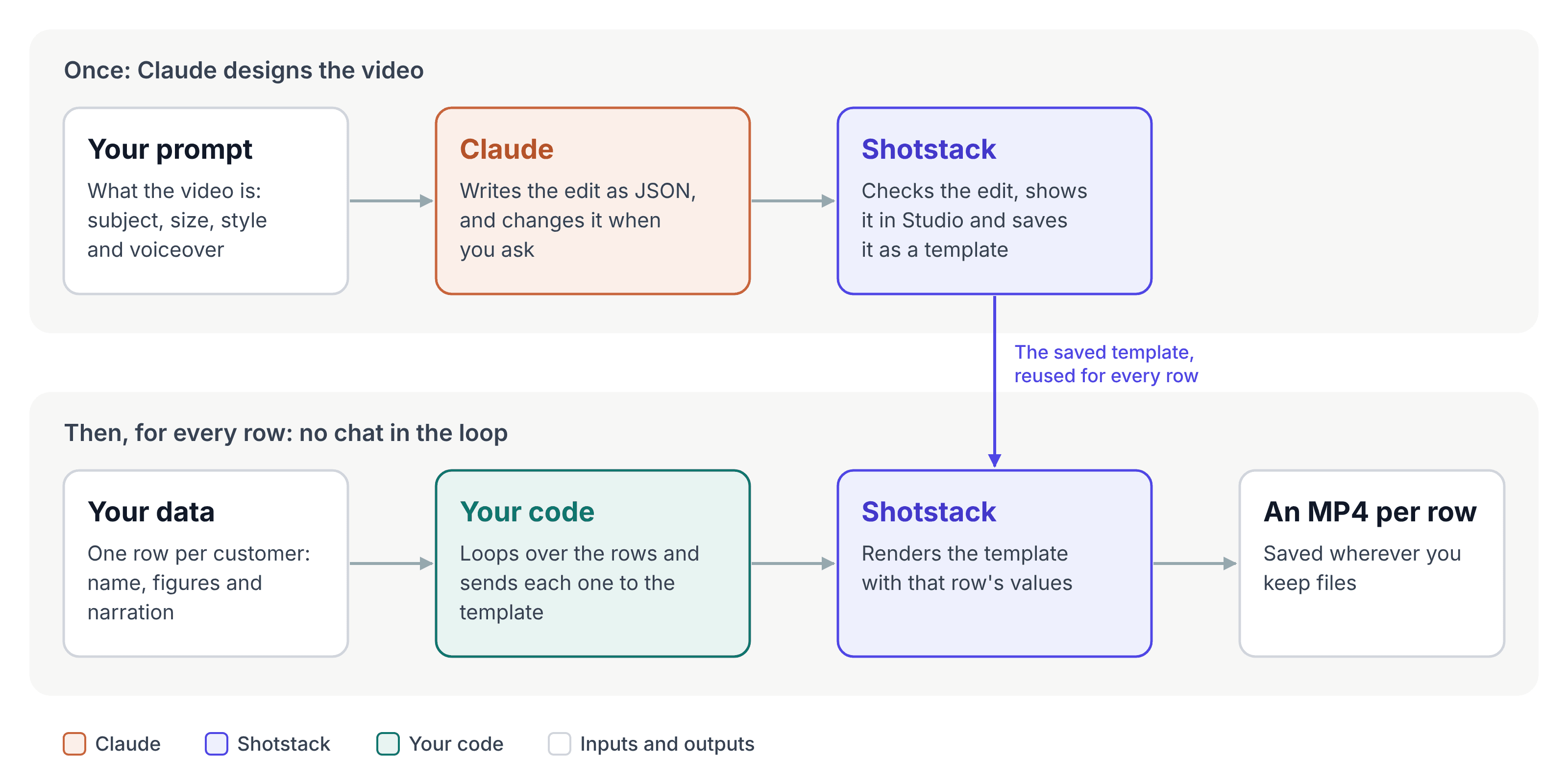
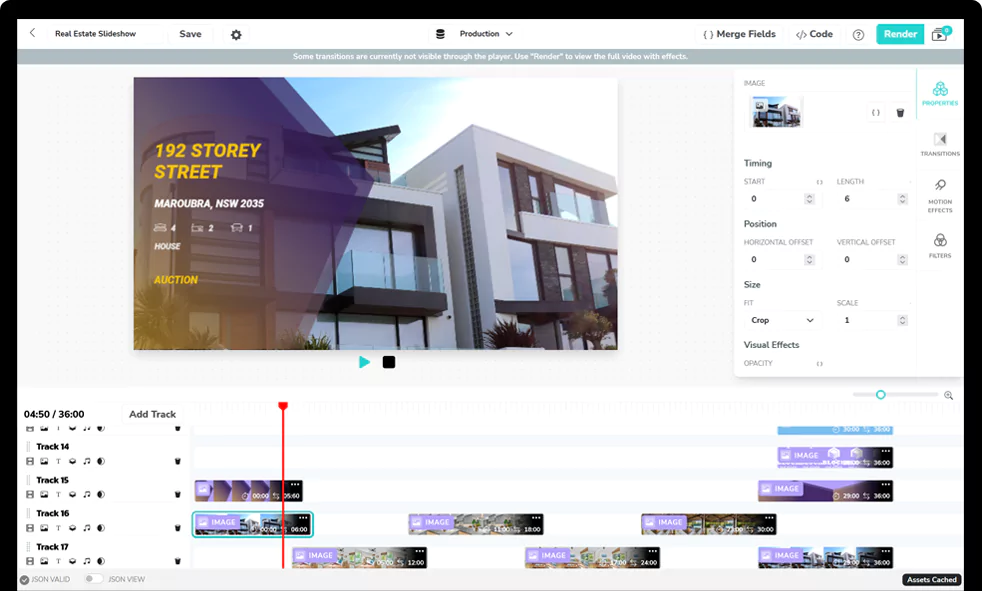
With Shotstack, Claude’s part comes at the start. You describe the video, Claude writes the edit, and Shotstack saves it as a template. After that, your code sends each row of your data, such as one row per customer, to the template and gets back one MP4 per row. Claude isn’t part of that loop.
Three parts share the work:
- Claude writes the edit and changes it when you ask.
- Shotstack checks the edit, previews it in Studio, saves it as a template and renders it for each row.
- Your code reads your data, sends each row to the template and saves each video.
Claude Motion
Claude Motion is Anthropic’s built-in way to make animations in Claude. Claude builds a short animation as code from your prompt, moving your text, charts, shapes and images, and you can attach a report or data for it to work from. You refine it by chat or in an editor, then download an MP4.
From Anthropic’s Claude Motion help page and its launch announcement, as of October 30, 2026:
- It’s in beta on Team and Enterprise plans. It’s on by default for Team; on Enterprise, an owner has to turn it on.
- It counts toward your plan’s usage limits, and longer or more complex animations use more.
- It has no video generation model, so there’s no generated footage and there are no AI-generated people.
- You can open an animation in other video editors to keep working on it.
- Animations start private to you, and you share them from Claude. The MP4 you download can go anywhere.
If the job is one explainer made from your own report, and your team already works in Claude, Claude Motion is the quickest way to get it done.
Claude with Shotstack
With Shotstack, Claude still writes the video. What changes is what happens to it next. Shotstack adds:
- An API, so your code or an agent renders the video without a chat.
- Templates, so one design becomes one video per row of data.
- Your own media with sound: footage, AI voiceover and captions transcribed from the audio, on a multi-track timeline.
- Any shape of MP4 up to 4K (above 1080p needs a plan that includes 4K).
- A hosted link for every render.
It’s available on every plan, and new accounts start with free credits.
The edit Claude writes is JSON: a timeline of tracks holding clips. For Claude motion graphics, one clip can hold an html5 asset, a small web page with its own HTML, CSS and JavaScript.
GSAP is preloaded, so Claude writes a GSAP animation as it would for a website, and Shotstack captures it frame by frame. The HTML5 asset docs cover what the page can do.
Can Claude generate videos?
Not by itself. Claude has no video model, and Claude Motion doesn’t generate footage either. But Claude can ask a model that does. Through Shotstack’s MCP server or CLI, Claude can request AI-generated clips, images, voiceovers and music, see the cost first, and place the results on the timeline with your own footage and animations.
So “Claude generated this video” usually means Claude wrote the prompts and the edit, and a video model made the footage. Generation is billed per asset, and an identical request reuses the earlier result for free. See AI video, image, voice and music generation for models and prompts.
Any AI agent works
Nothing in this setup is specific to Claude. Any agent that can connect to a remote MCP server or run terminal commands can drive Shotstack the same way, including Claude Code, ChatGPT, Cursor and GitHub Copilot in VS Code.
So it fits whichever assistant your team already uses. In the 2025 Stack Overflow Developer Survey, 84% of respondents were using or planning to use AI tools in their development process. The agents docs list every way to connect, and the FAQ below covers ChatGPT’s plan limits.
Build it: a narrated recap for every customer
This example makes a short recap video for each customer of a fictional online ordering app: their name, three figures from their month, a voiceover and word-by-word captions. Claude designs the first video and turns it into a template, and a short script renders the rest.
It uses Claude Code with the Shotstack CLI and skill. The CLI checks an edit offline, opens it in Studio (Shotstack’s web editor), shows Claude still frames and uploads files.
The Claude app with Shotstack’s MCP connector works too, with the Studio preview right in the chat; connect Shotstack to AI tools with MCP covers the setup. A Free Claude plan allows one custom connector. On Team and Enterprise, an owner adds it, and on Enterprise, so can a role with that permission.
For a head start, the showcase has designs Claude can adapt.
Set up
With Claude Code installed, run these in an empty project folder:
npm install -g @shotstack/cli@latest
npx skills add shotstack/shotstack-cli -a claude-code
shotstack login
claude
The second command installs the skill for Claude Code. When it asks for the installation scope, choose Project to keep the skill in this folder.
shotstack login asks for your production API key and saves it; if you don’t have one yet, sign up for a free account first.
Checking an edit, drawing its frames and previewing it in Studio are free; production renders and AI generation use credits (see pricing). Drawing frames (shotstack inspect) needs Google Chrome, or Edge or Brave on macOS and Linux.
Ask Claude for the first video
Starting the message with /shotstack loads the skill. The prompt also has to say what the video is: given something vague like “make me a video”, the skill has Claude ask questions before it writes anything.
/shotstack Make a short recap video for Juniper Bakery, a customer of a fictional online ordering app. It’s their October recap. Output a 1920x1080 MP4. Show the customer name, then three figures with labels: 1,240 orders, $18,600 in sales, and 38% repeat customers. Build the visuals as one html5 asset with a single GSAP timeline: the name and the three figures animate in over about two seconds, then the finished layout holds. Clean, warm style: cream background, dark green text, one accent color. Add a voiceover that says: “Juniper Bakery, here’s your October. One thousand two hundred forty orders, eighteen thousand six hundred dollars in sales, and thirty-eight percent of your customers came back.” The voiceover sets the video’s length, the visuals stay on screen until it ends, and there are word-by-word captions from the voiceover. Show it to me in Studio before you render anything.
The script spells out the figures, because voice models can misread digits and currency. The screen still shows them as numbers.
Claude Code read the skill’s guides, looked up the speech models and voices on the account, and quoted the voiceover’s cost in credits before asking to generate it. It generated the voiceover once, so Studio could play it and the video could take its length from it.
It also copied the two fonts into the Shotstack account, because an html5 page can’t load fonts from other websites.
Then it wrote the edit, ran shotstack validate and drew frames with shotstack inspect. The frames caught a real bug: the visuals disappeared at 5 seconds, well before the voiceover ended. Claude set the html5 clip to run until the end of the timeline, checked the frames again and opened the edit in Studio.
The edit has three tracks: captions on top, the html5 page in the middle and the voiceover at the bottom. Here’s the GSAP timeline from the html5 clip’s js field, formatted for reading:
const tl = gsap.timeline();
tl.to('.kicker', { opacity: 1, y: 0, duration: 0.5, ease: 'power2.out' }, 0)
  .to('.name', { opacity: 1, y: 0, duration: 0.8, ease: 'power3.out' }, 0.15)
  .to('.rule', { scaleX: 1, duration: 0.5, ease: 'power3.inOut' }, 0.65)
  .to(
    '.stat',
    { opacity: 1, y: 0, duration: 0.6, ease: 'power3.out', stagger: 0.22 },
    0.95,
  );
Each element starts hidden in the CSS, and the timeline brings them in one after another, so everything is in place by about two seconds. The skill teaches Claude the rules that shape the page:
- The renderer seeks the animation to each frame rather than playing it, so it has to be seekable: a GSAP timeline, not timers.
- The page can’t fetch anything itself, so its fonts and images have to be embedded in it or be files in your Shotstack account, which the renderer builds into the page before capture.
The voiceover and captions clips look like this (some of the captions’ styling is left out):
{
  "alias": "vo",
  "asset": {
    "type": "audio",
    "src": "https://cdn.shotstack.io/au/v1/generations/.../838d5015-82b7-51b5-be8a-56ffb0cb901b.mp3"
  },
  "start": 0,
  "length": "auto"
}
{
  "asset": {
    "type": "rich-caption",
    "src": "alias://vo",
    "animation": { "style": "highlight" },
    "active": { "font": { "color": "#C8643B" } }
  },
  "start": 0,
  "length": "end",
  "width": 1400,
  "height": 130,
  "offset": { "x": 0, "y": -0.39 }
}
The voiceover’s "length": "auto" takes the audio’s length, 9.04 seconds here. The captions and the html5 clip use "length": "end", so they run until the timeline ends, when the voice does.
That sets how long everything stays on screen, but it doesn’t sync moments to words, which is why the entrance finishes early and the layout holds. The caption clip’s src points at the voiceover’s alias, and Shotstack transcribes that audio during the render.
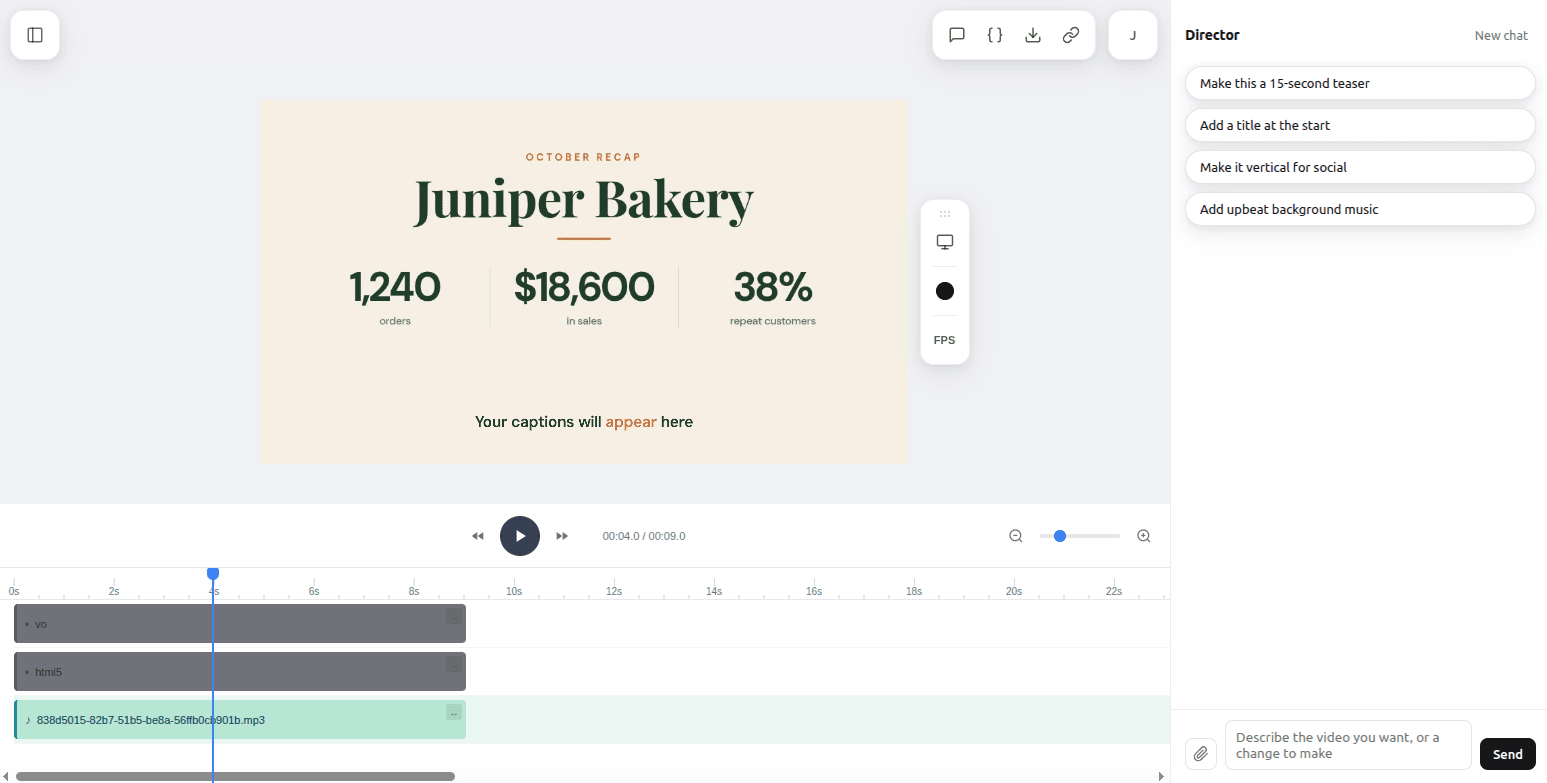
In Studio, the captions are a placeholder, because the words come from the render. The first version also set “$18,600” too close to the divider lines, so a second message asked for more room; Claude widened the columns, checked the frames and opened a new Studio link.
Then one more message rendered it:
Render it, and save the MP4 in this folder as juniper-bakery.mp4.
Turn it into a template
Turn this into a reusable template. Replace the customer name and the three figures with merge fields named CUSTOMER, ORDERS, REVENUE and REPEAT_RATE. The voiceover is a fixed MP3 right now, so switch it to a generated voiceover whose script is a merge field named NARRATION, with the same model and the Sarah voice, and keep the current MP3 as the preview. Keep the current values as defaults, and keep the merge fields out of the JavaScript. Save it as a template called “Customer recap” and give me the template ID.
The merge fields went into the page’s HTML, such as <h1 class="name">{{CUSTOMER}}</h1> and <div class="num">{{ORDERS}}</div>, so the JavaScript only animates elements by class. The voiceover changed the most:
{
  "alias": "vo",
  "asset": {
    "type": "audio",
    "src": "https://cdn.shotstack.io/au/v1/generations/.../838d5015-82b7-51b5-be8a-56ffb0cb901b.mp3",
    "prompt": "{{NARRATION}}",
    "model": "elevenlabs-multilingual-v2",
    "options": { "voice": "Sarah" }
  },
  "start": 0,
  "length": "auto"
}
When an asset has both a prompt and a src, the prompt wins: each render gets a voiceover generated from that row’s narration, and the MP3 only gives Studio something to play.
Claude validated the template, checked frames with the default values, saved it with shotstack template create, read it back and printed its ID. See templates for how merge fields work.
Render one video per customer
Save this as render.js in the project folder. It sends one render request per customer to the template, waits for each render to finish, then downloads the MP4 and prints its hosted link:
// render.js
// Renders one narrated recap video per customer from a saved Shotstack
// template, downloads each MP4 and prints its hosted (CDN) URL.
//
// Usage:
// export SHOTSTACK_API_KEY=your_production_key
// export TEMPLATE_ID=your_template_id
// node render.js
//
// Needs Node.js 20 or later.
const { mkdir, writeFile } = require('node:fs/promises');
const API = 'https://api.shotstack.io/edit/v1';
const API_KEY = process.env.SHOTSTACK_API_KEY;
const TEMPLATE_ID = process.env.TEMPLATE_ID;
const POLL_EVERY_MS = 5_000;
const GIVE_UP_AFTER_MS = 10 * 60_000;
// Shotstack allows each key 300 Edit API requests a minute, and checking a
// render's status is one of them, so only this many renders run at once.
const RENDERS_AT_ONCE = 5;
// Longer names can wrap onto a second line in this design.
const MAX_NAME_LENGTH = 24;
const MAX_NARRATION_WORDS = 40;
// Fictional customers. On-screen values are written the way they should be
// shown. NARRATION is written the way it should be spoken, with numbers and
// amounts in words, because speech models often misread figures.
const customers = [
{
CUSTOMER: 'Juniper Bakery',
ORDERS: '1,240',
REVENUE: '$18,600',
REPEAT_RATE: '38%',
NARRATION:
"Juniper Bakery, here's your October. One thousand two hundred forty orders, eighteen thousand six hundred dollars in sales, and thirty-eight percent of your customers came back.",
},
{
CUSTOMER: 'Blue Fern Florist',
ORDERS: '865',
REVENUE: '$24,310',
REPEAT_RATE: '52%',
NARRATION:
'Blue Fern Florist, your October: eight hundred sixty-five orders and your best month yet.',
},
{
CUSTOMER: 'Maple Street Coffee',
ORDERS: '2,075',
REVENUE: '$31,980',
REPEAT_RATE: '47%',
NARRATION:
"Maple Street Coffee, here's your October. Over two thousand orders, almost thirty-two thousand dollars in sales, and nearly half your customers came back.",
},
];
// These values end up inside the html5 asset's HTML, so characters that HTML
// treats specially are escaped. NARRATION is spoken, not shown, so it is sent
// as written.
const HTML_FIELDS = ['CUSTOMER', 'ORDERS', 'REVENUE', 'REPEAT_RATE'];
function escapeHtml(text) {
return text
.replace(/&/g, '&')
.replace(/</g, '<')
.replace(/>/g, '>');
}
function checkRow(row) {
const problems = [];
for (const field of [...HTML_FIELDS, 'NARRATION']) {
if (typeof row[field] !== 'string' || !row[field].trim()) {
problems.push(`${field} is missing or isn't text`);
}
}
if (problems.length) return problems;
if (row.CUSTOMER.length > MAX_NAME_LENGTH) {
problems.push(`CUSTOMER is longer than ${MAX_NAME_LENGTH} characters`);
}
if (row.NARRATION.trim().split(/\s+/).length > MAX_NARRATION_WORDS) {
problems.push(`NARRATION is longer than ${MAX_NARRATION_WORDS} words`);
}
return problems;
}
async function shotstack(path, options = {}) {
const res = await fetch(`${API}${path}`, {
...options,
headers: { 'x-api-key': API_KEY, 'content-type': 'application/json' },
});
const body = await res.json().catch(() => ({}));
if (!res.ok || body.success === false) {
let detail = body.message;
if (typeof body.response === 'string') detail = body.response;
else if (body.response) detail = JSON.stringify(body.response);
const error = new Error(
`${options.method || 'GET'} ${path} returned ${res.status}: ${detail || 'no details'}`,
);
error.status = res.status;
throw error;
}
return body.response;
}
const sleep = (ms) => new Promise((resolve) => setTimeout(resolve, ms));
async function waitForRender(id) {
const deadline = Date.now() + GIVE_UP_AFTER_MS;
while (Date.now() < deadline) {
await sleep(POLL_EVERY_MS);
let render;
try {
render = await shotstack(`/render/${id}`);
} catch (error) {
// A failed status check doesn't mean the render failed, so after a rate
// limit (429), a server error (5xx) or a network error, check again.
const retry =
error.status === undefined ||
error.status === 429 ||
error.status >= 500;
if (retry) continue;
throw error;
}
if (render.status === 'done') return render;
if (render.status === 'failed') {
throw new Error(
`render ${id} failed: ${render.error || 'no error message'}`,
);
}
}
throw new Error(
`render ${id} wasn't done after ${GIVE_UP_AFTER_MS / 60_000} minutes`,
);
}
async function download(url, file) {
const res = await fetch(url);
if (!res.ok) throw new Error(`download returned ${res.status} for ${url}`);
await writeFile(file, Buffer.from(await res.arrayBuffer()));
}
const slugify = (name) =>
name
.toLowerCase()
.replace(/[^a-z0-9]+/g, '-')
.replace(/^-|-$/g, '');
async function renderCustomer(row) {
const merge = Object.entries(row).map(([find, value]) => ({
find,
replace: HTML_FIELDS.includes(find) ? escapeHtml(value) : value,
}));
const { id } = await shotstack('/templates/render', {
method: 'POST',
body: JSON.stringify({ id: TEMPLATE_ID, merge }),
});
console.log(`${row.CUSTOMER}: queued render ${id}`);
const render = await waitForRender(id);
// The url in the render status is a temporary link that expires after
// 24 hours, so download the file now. The hosted copy on Shotstack's CDN
// stays, but can take a few seconds to appear after the render is done.
const file = `videos/${slugify(row.CUSTOMER) || id}.mp4`;
await download(render.url, file);
const cdnUrl = `https://cdn.shotstack.io/au/v1/${render.owner}/${render.id}.mp4`;
return { customer: row.CUSTOMER, file, cdnUrl };
}
async function main() {
if (!API_KEY || !TEMPLATE_ID) {
console.error(
'Set SHOTSTACK_API_KEY and TEMPLATE_ID before running this script.',
);
process.exit(1);
}
await mkdir('videos', { recursive: true });
const ready = customers.filter((row) => {
const problems = checkRow(row);
if (problems.length)
console.warn(
`Skipping ${row.CUSTOMER || 'a row'}: ${problems.join('; ')}`,
);
return problems.length === 0;
});
// Render a few customers at a time and wait for each batch to finish.
const results = [];
for (let i = 0; i < ready.length; i += RENDERS_AT_ONCE) {
const batch = ready.slice(i, i + RENDERS_AT_ONCE);
results.push(...(await Promise.allSettled(batch.map(renderCustomer))));
}
results.forEach((result, i) => {
if (result.status === 'fulfilled') {
const { customer, file, cdnUrl } = result.value;
console.log(`${customer}: saved ${file}`);
console.log(` ${cdnUrl}`);
} else {
console.error(`${ready[i].CUSTOMER}: ${result.reason.message}`);
process.exitCode = 1;
}
});
}
main();
Run it with your key and the template ID:
export SHOTSTACK_API_KEY=your_production_key
export TEMPLATE_ID=your_template_id
node render.js
Maple Street Coffee: queued render c69e78c3-b217-44e1-a31d-933f675299d5
Juniper Bakery: queued render 07b27f36-eab2-4475-857c-e65568c9f274
Blue Fern Florist: queued render 6d47baa2-bab2-4f0b-b046-6ce7d51aba52
Juniper Bakery: saved videos/juniper-bakery.mp4
  https://cdn.shotstack.io/au/v1/35tqpmb0ya/07b27f36-eab2-4475-857c-e65568c9f274.mp4
Blue Fern Florist: saved videos/blue-fern-florist.mp4
  https://cdn.shotstack.io/au/v1/35tqpmb0ya/6d47baa2-bab2-4f0b-b046-6ce7d51aba52.mp4
Maple Street Coffee: saved videos/maple-street-coffee.mp4
  https://cdn.shotstack.io/au/v1/35tqpmb0ya/c69e78c3-b217-44e1-a31d-933f675299d5.mp4
Each video runs as long as its own narration, and even the shortest, Blue Fern’s at under 5 seconds, holds the finished layout for about three seconds.
Juniper’s narration matched the voiceover Claude generated earlier exactly, with the same model and voice, so Shotstack reused it at no charge.
Every new narration is a paid generation, so before you run a long list, price one with shotstack generate and its --quote flag, which shows the cost without generating anything.
A few details in the script:
- Every request sends all five merge fields, so each video uses only that row’s values.
- The four on-screen values are escaped, because Shotstack puts merge values into the HTML as they are. In a separate test, a customer called
Rosa's "Best" Bakes & <Co>rendered exactly when escaped; sent raw, the browser treated<Co>as a tag and dropped it. - It downloads each file straight away. The link in the render status expires after 24 hours, while the CDN copy stays (it can take a few seconds to appear).
- It renders five customers at a time, because Shotstack allows each key 300 Edit API requests a minute, and checking a render’s status is one of them. If a status check hits the rate limit, a server error or a network error, the script checks again instead of giving up, because the render carries on either way.
For long lists, swap polling for a webhook by adding a callback URL to the template, so Shotstack tells you when each render finishes. A destination such as an S3 bucket can also deliver each file to your own storage: add your credentials on the dashboard’s integrations page, and add the destination to the template’s output.
Can Claude edit videos?
Yes, the same way: you tell Claude what to keep and what to add, Claude writes the edit, and Shotstack does the cutting. This example uses a three-minute excerpt (03:30 to 06:30) of a FOSDEM talk and keeps 30 seconds of it, 04:20.5 to 04:51.0 in the full recording:
Edit this clip: fosdem-readme-excerpt.mp4 in this folder. Keep only 0:50.5 to 1:21.0. Add the title “Your README should grow with your project” at the top for the first four seconds, and word-by-word captions for the speech. Don’t cover the speaker in the bottom-right corner. Output a 1920x1080 MP4. Show it to me in Studio before you render anything.
Claude Code checked the clip’s format and looked at a still frame from it to find where the speaker’s camera sits. To use the local file, Claude uploaded the clip with shotstack ingest upload and used the hosted URL in the edit.
When Claude drew frames of the edit, the slide’s own heading showed faintly through the title bar, so it made the bar solid before opening Studio.
The trim is two properties on the video clip:
{
  "alias": "talk",
  "asset": {
    "type": "video",
    "src": "https://shotstack-ingest-api-v1-sources.s3.ap-southeast-2.amazonaws.com/.../source.mp4",
    "trim": 50.5
  },
  "start": 0,
  "length": 30.5
}
trim skips the first 50.5 seconds of the source, and length keeps the next 30.5. The title is a rich-text clip that stays for four seconds, and the captions are another rich-caption clip with "src": "alias://talk", placed to the left of the speaker.
In the first render, the slide’s own heading peeked out beside the title bar and showed through it as it faded, so two follow-up messages made the bar span the full width and slide up out of the frame instead.
The captions line up with the speech from the first word, so trimming and captioning work in one render.
Claude doesn’t watch or hear your clip: chat uploads to Claude are documents and images. It works from the timestamps you give it and from still frames, such as the ones shotstack inspect draws from an edit or a finished render. The captions come from Shotstack transcribing the audio.
Clip: Lorna Mitchell, “Beyond the README: Crafting a Better Developer Experience for Open Source Projects”, FOSDEM 2025, CC BY 2.0 BE. Trimmed, with a title and captions added.
Claude Motion vs Claude with Shotstack
As of October 30, 2026:
| Claude Motion | Claude with Shotstack | |
|---|---|---|
| Where it runs | Inside Claude | Shotstack’s cloud, driven from Claude Code, the Claude app or your own code |
| Setup | Nothing extra on Team; on Enterprise, an owner turns it on | A Shotstack account, plus the CLI or the MCP connector |
| API | Not documented | Yes |
| Other AI agents | Not documented (it’s part of Claude) | Any agent with MCP support or a terminal |
| Your own footage with sound | Not documented (Anthropic mentions reports, data and images) | Yes |
| Voiceover and captions | Not documented | AI voiceover, and captions transcribed from the audio |
| One video per row | Not documented | Yes, with templates |
| Continuing in another editor | Yes: several video editors can open an animation | The edit stays editable as JSON and in Studio |
| Sharing | Animations start private; the downloaded MP4 can go anywhere | A hosted link for each render, or delivery to your own storage |
| Plans and cost | Beta on Team and Enterprise; uses your Claude usage allowance | Every Shotstack plan, with free credits to start; credits for rendering and generation (pricing) |
For a deeper look at the two, see Claude Motion vs Shotstack.
Which one to use: Claude Motion or Claude with Shotstack
If you need one explainer made from your own material, and your team already works in Claude Team or Enterprise, use Claude Motion. It’s the shortest path, and there’s nothing else to set up.
If video is something a product, an agent or a workflow makes again and again, with different data each time, use Claude with Shotstack. Claude designs the video once, and the API makes the rest.
New Shotstack accounts start with free credits. Get a free API key and render your first Claude video.
Frequently asked questions (FAQs)
Does Claude Motion have an API?
Anthropic doesn’t document one, as of October 30, 2026. Claude Motion animations are made and exported inside Claude. To render video from code, have Claude write an edit and render it through an API such as Shotstack’s.
Can I do this with ChatGPT or another AI agent?
Yes. Any agent that supports MCP or can run terminal commands can use Shotstack. ChatGPT can write the edit JSON on any plan, but calling Shotstack’s tools from ChatGPT depends on your plan; see OpenAI’s help page.
Is Claude Motion available on Pro or Max?
Not as of October 30, 2026. Anthropic lists Claude Motion in beta on Team and Enterprise plans.
Can I try Claude with Shotstack for free?
Yes. At the time of writing, new Shotstack accounts get 10 free credits, valid for 30 days, and no credit card is needed to sign up. Renders and AI generations, such as voiceovers, are paid for in credits; see pricing for how they’re counted.
Can Claude make vertical videos or GIFs?
Yes. The edit’s output sets the shape and the file type: aspectRatio takes 16:9, 9:16, 1:1, 4:5 or 4:3, and format can be mp4 or gif. Ask Claude for a vertical version, and it sets those fields and lays the page out for the new shape. The API reference lists every output option.
Get started with Shotstack's video editing API in two steps:
- Sign up for free to get your API key.
- Send an API request to create your video:
curl --request POST 'https://api.shotstack.io/v1/render' \
--header 'x-api-key: YOUR_API_KEY' \
--data-raw '{
  "timeline": {
    "tracks": [
      {
        "clips": [
          {
            "asset": {
              "type": "video",
              "src": "https://shotstack-assets.s3.amazonaws.com/footage/beach-overhead.mp4"
            },
            "start": 0,
            "length": "auto"
          }
        ]
      }
    ]
  },
  "output": {
    "format": "mp4",
    "size": {
      "width": 1280,
      "height": 720
    }
  }
}'

Published October 30, 2026
Joyce Echessa is a full-stack web developer specializing in JavaScript, currently expanding into AI engineering through hands-on learning and projects. She writes developer tutorials for Shotstack. More from Joyce
Experience Shotstack for yourself.
- Seamless integration
- Dependable high-volume scaling
- Blazing fast rendering
- Save thousands