
 Claude
 ChatGPT
 Perplexity
 Google AI
Contents
“Can ChatGPT make videos?” Most of the answers online were written while ChatGPT had Sora.
OpenAI discontinued the Sora web and app experiences on April 26, 2026, and the Sora API on September 24, 2026, according to its help center. The Sora 2 models went with it, and OpenAI’s deprecations page lists no replacement.
That leaves a lot of people without an answer: OpenAI says ChatGPT has 1.2 billion weekly users.
TL;DR: On its own, ChatGPT can only make simple videos with code, such as text slides, and it can’t generate real footage since OpenAI shut down Sora. Once you connect Shotstack, ChatGPT can open a video editor in the chat, render finished MP4s, edit your uploads and generate AI clips.
This guide shows what ChatGPT can do with video today, with a prompt you can run for each result. Every prompt was tested on ChatGPT Plus with GPT-6 in November 2026, and some on a free account too. The screenshots and videos come from those tests.
Can ChatGPT make a video on its own?
Ask ChatGPT for a clip the way you would have asked Sora:
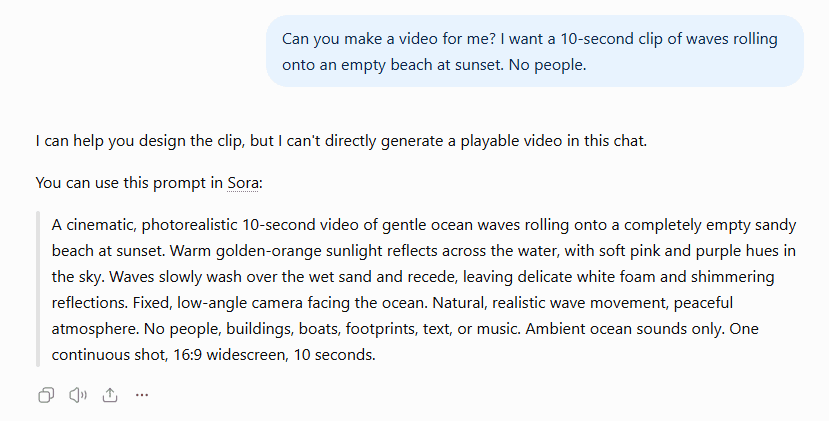
Can you make a video for me? I want a 10-second clip of waves rolling onto an empty beach at sunset. No people.
ChatGPT said it couldn’t make a playable video in the chat and offered a prompt to paste into Sora. The Sora link in the same reply opened a panel saying Sora’s web and app experiences had ended on April 26, 2026.
Tell it Sora is gone, and it tries something else:
Sora has been shut down. Can you make the video yourself instead?
ChatGPT wrote and ran code in its sandbox for 1 minute 17 seconds, then said it had made “a 10-second MP4 of waves washing onto an empty beach at sunset.” It added that it was “a procedurally animated scene rather than photorealistic AI-generated footage.”
It’s nothing like the clip in the prompt. There’s no sunset and no sky, just a band of blue water with white streaks, a wavy line of foam that shifts a little, and a band of sand. It’s also small, at 768x432.
Exact, simple requests work better:
Using your code tool, create a 9-second MP4 video file at 1280x720 and 30 frames per second. Make three slides, 3 seconds each: a dark blue background with white text that says “Slide 1”, “Slide 2” and “Slide 3”. Then give me the MP4 file to download. Also tell me which tool or library you used to make it.
ChatGPT made the slideshow straight away with FFmpeg and matched every number in the prompt.
A free account made the same slideshow:
So does ChatGPT make videos? Only the kind you can draw with code: text, shapes, slides and simple animation. It has no video model of its own, so there’s no real footage and no generated scenes.
ChatGPT is still useful for planning a video. It can write the script and the shot list, and draw a storyboard as a single image. Try this prompt:
Make a single image with a 4-panel storyboard for a 15-second video ad for a coffee shop. Show only objects and places, no people.
ChatGPT returned one image with four shots, each labeled with its timing and the action.

Can ChatGPT edit videos you already have?
ChatGPT can read a video you upload. Attach one and ask:
Describe what happens in this video, second by second.
Given a 10-second title card it hadn’t made, under a neutral file name, ChatGPT got the length, size and frame rate right, quoted both lines of on-screen text, and placed each fade-in within a fraction of a second of where it really is.
It can also make simple edits in its sandbox. Upload a video, such as the slideshow above, and ask:
Trim this video to the first 4 seconds, add the text “Edited by ChatGPT” at the bottom, and give me the new MP4 file.
The result was exactly 4 seconds long, with the text in a small dark box on every frame.
The limit is the internet. In testing, ChatGPT’s sandbox couldn’t reach any website, so it can’t fetch a video from a link or send one anywhere. To check for yourself, ask:
Using your code tool, run this command and show me the full output: curl -sS -I https://api.shotstack.io/edit/v1/
The command failed with “Could not resolve host”, and so did the same command for example.com.
Shotstack gets around that. Once Shotstack is connected (setup below), upload a video, type @, choose Shotstack, and ask:
Using Shotstack, add the caption “Edited with Shotstack” to this uploaded video and render it.
ChatGPT asked once for permission to upload the file to Shotstack. The choices were Always allow, Deny and Allow once, and one Allow once covered both the upload and the render.
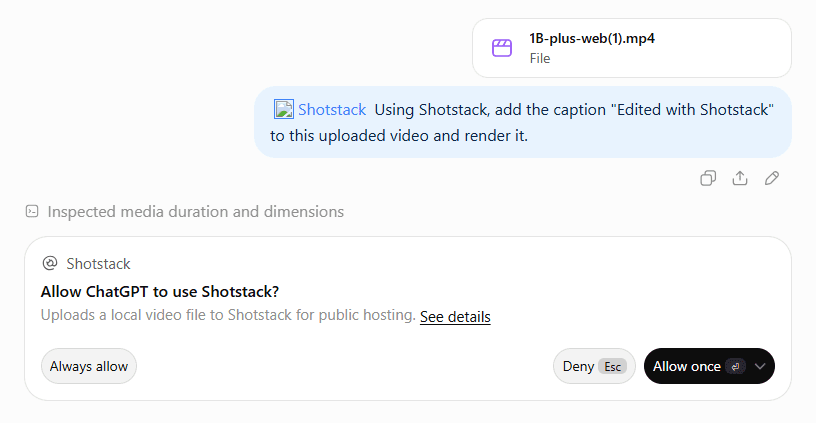
It returned the slideshow with “Edited with Shotstack” along the bottom.
How to get a finished MP4 out of ChatGPT
Can ChatGPT create videos you can download and post? Yes, once it has a tool that renders them.
Shotstack’s MCP server gives ChatGPT the tools to build, render and edit videos on Shotstack. Can Claude make videos? explains how an assistant writes the edit that Shotstack renders, so this section covers what’s different in ChatGPT.
Connect Shotstack to ChatGPT
How to connect Shotstack to your AI tools with MCP has the setup for each app. In ChatGPT, as of November 2026:
- Go to
chatgpt.com/plugins, click Add, then Add custom MCP server. - Name it Shotstack, keep Server URL selected, and enter
https://mcp.shotstack.io/. Leave authentication on OAuth. - Check the box under the risk warning, click Create as a plugin, then Connect Shotstack.
- When Shotstack asks for an API key, paste your production key from the Shotstack dashboard.
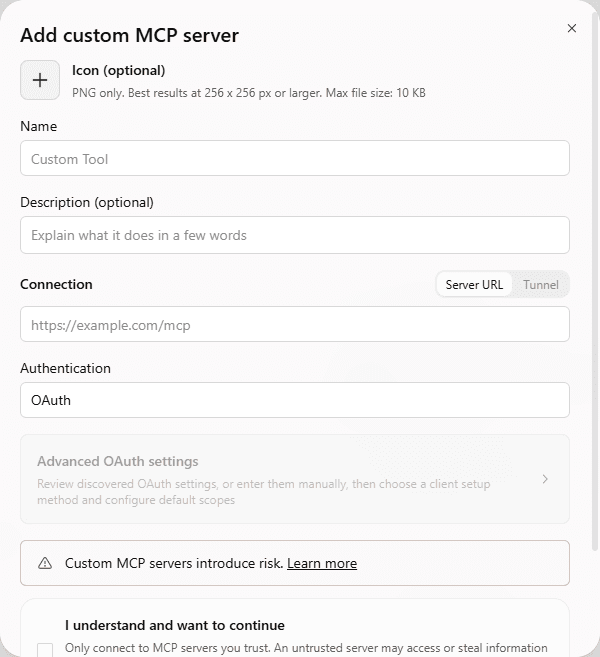
You don’t need ChatGPT’s developer mode for this anymore. OpenAI’s help center says you can add a custom MCP server from Plugins without turning it on first.
Make your first video
Start a new chat, type @, choose Shotstack, and describe the video:
Using Shotstack, make a 10-second MP4 at 1280x720: a dark blue background, the title “Can ChatGPT make videos?” fading in, and the line “Rendered with Shotstack” underneath. No voiceover, no music, no people.
ChatGPT worked for 18 seconds, then opened Shotstack’s video editor inside the chat, with the edit on a timeline.
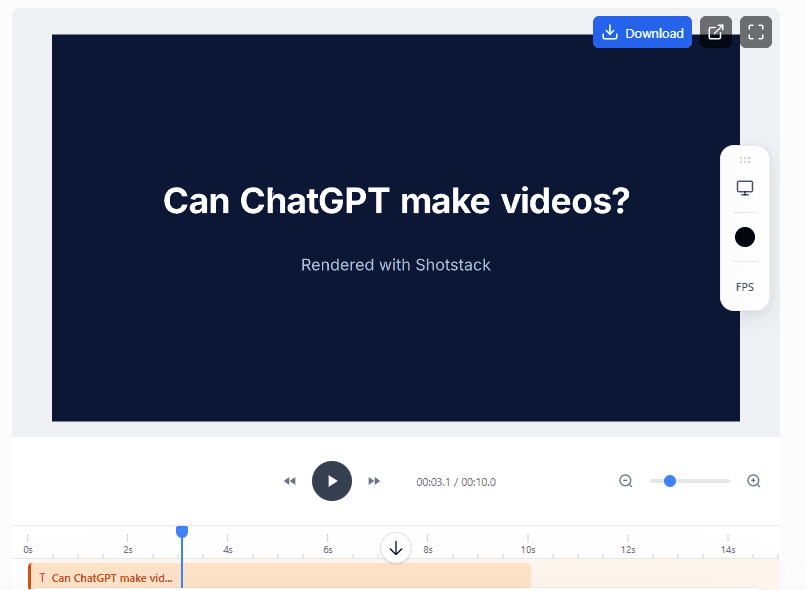
You can play the video, scrub through it and change it there. When you’re happy with it, click Download, and Shotstack renders the MP4 on its servers.
The finished video opens in a new browser tab. If your browser blocks it, allow pop-ups for ChatGPT and click Download again.
The video matched the prompt exactly: 10 seconds at 1280x720, with the title fading in over the first second. It cost 0.17 credits. Renders are charged by the second, and Shotstack’s pricing has the current rates.
ChatGPT didn’t ask for confirmation before any of the renders in this guide, or before saving the template below. The only confirmation in testing was for uploading a file to Shotstack.
Which ChatGPT plans can connect to Shotstack?
As of November 2026, OpenAI’s help center says custom MCP servers have full support on Business and Enterprise/Edu, and that Pro users can connect them with read/fetch permissions. It doesn’t mention Plus. Even so, everything in this guide worked on Plus, including the renders, which need write actions.
It worked on the free plan too. A free account added Shotstack the same way, opened the same editor and rendered the same 10-second video:
So as of November 2026, you don’t need a paid ChatGPT plan to make videos with Shotstack, even though OpenAI’s list doesn’t include Free.
From one video to many
In the chat: a template
Once you have a video you like, ChatGPT can turn it into a Shotstack template. In the chat where you made it, ask:
Save the video you rendered as a Shotstack template, with the title text as a merge field called TITLE.
Then render the template as many times as you need:
Render that template three times, with the titles “Monday deals”, “Tuesday deals” and “Wednesday deals”. Give me the three video links.
ChatGPT finished all three in 50 seconds, for 0.51 credits, each with its own download button.
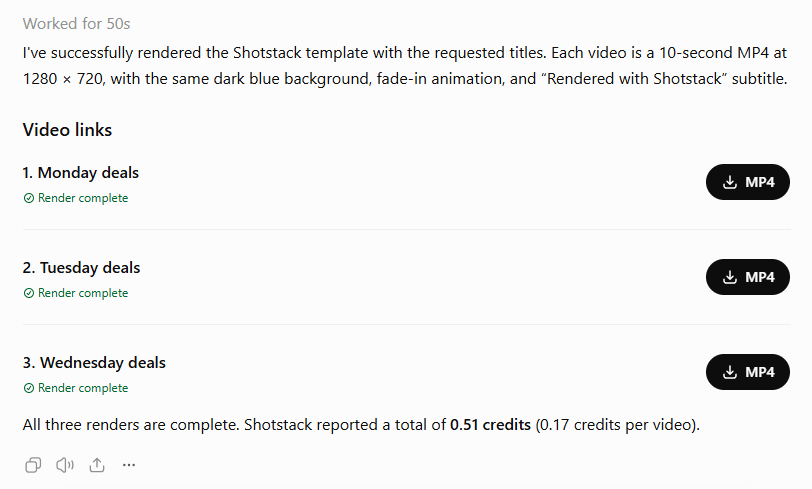
Here are the Monday, Tuesday and Wednesday videos:
Custom GPTs are on the way out
A custom GPT that calls Shotstack used to be the obvious way to package this. OpenAI is retiring custom GPTs, which are scheduled to stop running on December 11, 2026, and is moving people to plugins. The Shotstack plugin above is already that.
In code: the OpenAI API and Shotstack
For hundreds of videos, use code.
This Node.js script asks the OpenAI API to write a short title for each row of data, then renders the template once per title on Shotstack’s production API. It’s an up-to-date take on the idea in Convert articles to videos with ChatGPT.
Save it as one-to-many.mjs:
// One video to many: the OpenAI API writes a title for each row of data,
// then Shotstack renders one video per title from a saved template.
import OpenAI from "openai";

const SHOTSTACK_API = "https://api.shotstack.io/edit/v1"; // production
const { OPENAI_API_KEY, SHOTSTACK_API_KEY, SHOTSTACK_TEMPLATE_ID } = process.env;
const MODEL = process.env.OPENAI_MODEL || "gpt-6-luna";

if (!OPENAI_API_KEY || !SHOTSTACK_API_KEY || !SHOTSTACK_TEMPLATE_ID) {
  console.error("Set OPENAI_API_KEY, SHOTSTACK_API_KEY and SHOTSTACK_TEMPLATE_ID in .env first.");
  process.exit(1);
}

// The data: one video per row.
const deals = [
  { day: "Thursday", product: "running shoes", discount: "20%" },
  { day: "Friday", product: "rain jackets", discount: "30%" },
  { day: "Saturday", product: "backpacks", discount: "15%" },
];

const openai = new OpenAI();

// 1. Ask the model for a short title per deal, as JSON that matches a schema.
async function writeTitles(rows) {
  const response = await openai.responses.create({
    model: MODEL,
    input:
      "Write a title for a 10-second promo video for each of these deals. " +
      "Keep each title under 30 characters. Deals: " +
      JSON.stringify(rows),
    text: {
      format: {
        type: "json_schema",
        name: "titles",
        strict: true,
        schema: {
          type: "object",
          properties: {
            videos: {
              type: "array",
              items: {
                type: "object",
                properties: {
                  day: { type: "string" },
                  title: { type: "string" },
                },
                required: ["day", "title"],
                additionalProperties: false,
              },
            },
          },
          required: ["videos"],
          additionalProperties: false,
        },
      },
    },
  });
  return JSON.parse(response.output_text).videos;
}

// 2. Render the template with the title in its TITLE merge field.
async function renderTemplate(title) {
  const res = await fetch(`${SHOTSTACK_API}/templates/render`, {
    method: "POST",
    headers: { "Content-Type": "application/json", "x-api-key": SHOTSTACK_API_KEY },
    body: JSON.stringify({
      id: SHOTSTACK_TEMPLATE_ID,
      merge: [{ find: "TITLE", replace: title }],
    }),
  });
  const body = await res.json();
  if (!res.ok) throw new Error(`Render request failed (${res.status}): ${JSON.stringify(body)}`);
  return body.response.id;
}

// 3. Check a render every 5 seconds until it's done, then return its URL.
async function waitForRender(id) {
  for (;;) {
    const res = await fetch(`${SHOTSTACK_API}/render/${id}`, {
      headers: { "x-api-key": SHOTSTACK_API_KEY },
    });
    const { response } = await res.json();
    if (response.status === "done") return response.url;
    if (response.status === "failed") throw new Error(`Render ${id} failed: ${response.error}`);
    await new Promise((resolve) => setTimeout(resolve, 5000));
  }
}

const videos = await writeTitles(deals);
console.log(`${MODEL} wrote ${videos.length} titles.`);

// Queue every render first, so Shotstack works on them at the same time.
const queued = [];
for (const video of videos) {
  const id = await renderTemplate(video.title);
  console.log(`Queued ${video.day}: "${video.title}" (render ${id})`);
  queued.push({ ...video, id });
}

const urls = await Promise.all(queued.map((video) => waitForRender(video.id)));
queued.forEach((video, i) => console.log(`${video.day}: ${urls[i]}`));
writeTitles asks the model for one title per deal, as JSON that matches a schema, so the script never has to pick titles out of free text. renderTemplate puts each title in the template’s TITLE merge field, and waitForRender checks each render every 5 seconds until it’s done.
To run it, you need Node.js 20.6 or later, an OpenAI API key, your Shotstack production key, and the template ID from ChatGPT’s reply when it saved the template.
-
In the script’s folder, install the OpenAI library with
npm install openai. In Windows PowerShell, if that fails with “running scripts is disabled on this system”, runnpm.cmd install openaiinstead. -
Create a file called
.envnext to the script, with your keys and the template ID:OPENAI_API_KEY=your-openai-api-key SHOTSTACK_API_KEY=your-shotstack-production-api-key SHOTSTACK_TEMPLATE_ID=your-template-id -
Run the script:
node --env-file=.env one-to-many.mjs
With three deals, it printed three finished videos:
gpt-6-luna wrote 3 titles.
Queued Thursday: "Run Shoes 20% Off" (render 8489de1d-b272-4b3e-9fa7-71c962fc1fe7)
Queued Friday: "Rain Jackets 30% Off" (render d7977c3a-2eeb-421a-80f8-d4e95adca4bf)
Queued Saturday: "Backpacks 15% Off" (render 3ac2c369-663c-48a7-b273-445abfed4fc6)
Thursday: https://shotstack-api-v1-output.s3-ap-southeast-2.amazonaws.com/.../8489de1d-b272-4b3e-9fa7-71c962fc1fe7.mp4
Friday: https://shotstack-api-v1-output.s3-ap-southeast-2.amazonaws.com/.../d7977c3a-2eeb-421a-80f8-d4e95adca4bf.mp4
Saturday: https://shotstack-api-v1-output.s3-ap-southeast-2.amazonaws.com/.../3ac2c369-663c-48a7-b273-445abfed4fc6.mp4
Here are the Thursday, Friday and Saturday videos:
The script uses gpt-6-luna unless you add OPENAI_MODEL=<model id> to .env.
Every render is also copied to Shotstack’s CDN, and Host and serve video and images shows how to build the link you serve to your viewers.
To let a model decide what to render instead of following a fixed script, see Your own agent and From draft to production in Shotstack’s docs.
If you used Sora, what can you use now?
There’s no ChatGPT video generator built in anymore, but Shotstack generates AI clips, and ChatGPT can drive it from the same chat. To see which models you can use, ask:
Using Shotstack, list the AI video generation models you can use.
ChatGPT listed ten models: a text-to-video and an image-to-video version of each of these five. As of November 2026:
| Model | Clip length |
|---|---|
| Seedance 2.0 | 4 to 15 seconds |
| Seedance 2.5 | 4 to 30 seconds |
| Wan 3.0 Prime | 2 to 30 seconds |
| MiniMax H3 | 5 to 15 seconds |
| Gemini Omni Flash 1.1 | 3 to 10 seconds |
AI clips cost far more than renders, so get a quote first:
Get a price quote, without generating anything, for a 720p text-to-video clip using seedance-2.0-text-to-video, with a length of exactly 8 seconds and this prompt: “Waves rolling onto an empty beach at sunset, slow camera push-in, no people.” Show me the full quote, including the credits and the ceiling value.
The clip prompt is the same idea as the first request in this guide. Shotstack quoted 15.1696 credits, the same figure Shotstack’s pricing docs give for that clip, and charged nothing for the quote.
The quote’s ceiling value was false. If it’s true, the request had no length, so the price is only an estimate.
Then ask for the clip:
Generate that 8-second clip, then render an 8-second video with the clip as the background and the title “Made in ChatGPT” over it.
Just under five minutes later, ChatGPT returned both. The 8-second clip:
And the final video with the title:
Compare it with the beach ChatGPT drew with code at the start. This one looks real: the sun sits low over the sea, the sky is pink and orange, and its colors reflect off the wet sand as the waves roll in. There are no people in it.
The charge matched the quote: 15.17 credits for the clip and 0.13 for the render. But ChatGPT didn’t ask before spending the credits. It took “Generate that 8-second clip” as the go-ahead, so check the quote before you ask.
For the models, their options and prompting tips, see Shotstack’s AI video generation guide.
Give ChatGPT a video tool that renders: try it out
On its own, ChatGPT makes the videos it can draw with code, and it plans the rest. With Shotstack connected, the same chat opens a video editor, renders finished MP4s, edits your uploads, fills a template as often as you need, and generates the kind of AI footage Sora used to make.
Ready to make your own? Get a free Shotstack API key and connect it to ChatGPT in a few minutes.
Frequently asked questions (FAQs)
What does ChatGPT share with Shotstack?
When you connect Shotstack, ChatGPT warns that it may share relevant chats with the app, and your memories if memory is turned on. You can disconnect Shotstack in ChatGPT’s settings to stop new access.
Why is my Shotstack video watermarked?
You’ve probably connected your sandbox API key. It works, but every render goes to Shotstack’s sandbox, which adds a watermark, and the video link has stage-output in it. Reconnect Shotstack with your production key, and the links change to v1-output.
Can ChatGPT make an AI video longer than one clip?
Yes. Each model has a maximum clip length, so for a longer video, ask ChatGPT to generate several clips and put them one after another in a single edit.
Does OpenAI check Shotstack’s ChatGPT app?
No. Shotstack is a custom MCP server that you add yourself, and OpenAI says custom MCP servers are not developed or verified by OpenAI. That’s why ChatGPT shows a risk warning when you add one. Only add servers from companies you trust.

Written by
Joyce Echessa is a full-stack web developer specializing in JavaScript, currently expanding into AI engineering through hands-on learning and projects. She writes developer tutorials for Shotstack.
Published November 16, 2026