
 Claude
 ChatGPT
 Perplexity
 Google AI
Contents
Motion designers build templates in After Effects so a brand can reuse one design many times: a product card, a lower third, a sale banner. The design stays the same, but the words change in every version. Rendering each version by hand stops working once there are dozens of products, prices that change every week, and stores that need Spanish.
Customers expect that kind of tailoring. McKinsey research from 2021 found that 71% of consumers expect companies to deliver personalized interactions, and 76% get frustrated when that doesn’t happen. For a motion team, that means more versions of every design.
So can you automate After Effects templates without running After Effects for every video? For designs built from shapes and text, yes. Shotstack never opens your .aep file. You export the design with Bodymovin, the free extension that saves a composition as Lottie JSON. Shotstack plays that JSON in an html5 clip and puts in new text before each render.
Our earlier guides to lower thirds, overlays and luma mattes take a different route. They render the graphic in After Effects as a video and layer it over the footage. In the lower thirds guide, the words sit on a separate Shotstack layer on top.
Here, the text is part of the After Effects animation itself, so the designer decides how it moves, fades and wraps.
TL;DR: Export your After Effects design with Bodymovin, with Glyphs turned off. Play the Lottie JSON in a Shotstack html5 clip, and swap its text with merge fields. Embed the font, escape every value, and let long text shrink to fit. One saved template then renders a video for every row of a CSV file.
What you’ll build
You’ll build a product card for Harbor Lane Coffee, a made-up brand. A green panel slides in at the bottom left, a product name and a price fade in, and the card slides out. Shotstack places the card over coffee footage with a logo and music, and renders one 1080p video per row of a CSV file.
Everything here was tested with After Effects 2027, Bodymovin 5.12.2 and Shotstack’s production API. To follow along, you need After Effects, Node.js 22 or newer, and a Shotstack API key. If you haven’t used the API before, render your first video first.
All six scripts are printed in full near the end of this guide. They use only built-in Node.js modules, so there’s nothing to install.
How the pieces fit together
The work splits between a designer and a developer, and the Bodymovin export is the only file that passes between them:
- The designer builds the card in After Effects and names the text layers that change.
- The designer exports the composition to JSON with Bodymovin.
- The developer wraps the JSON in an html5 clip and saves it as a Shotstack template, with footage, a logo and music.
- A script sends one render request per row of data, each with its own text.
The template depends only on the names of those text layers. So the designer can keep changing the design after launch, as the last section shows.
Design a card that exports cleanly
Going from After Effects to Lottie keeps only what Lottie can describe, and Shotstack plays the export with lottie-web, the web player for Lottie. A design that looks right in After Effects can lose parts on the way out, so build with Lottie’s limits in mind from the first layer.
What survives the export
Shapes, solid layers, text, masks, parenting, and keyframed position, scale, rotation and opacity all export. Most effects from the Effect menu don’t, and neither do video layers. lottie-web draws 3D layers only with its HTML renderer, and Shotstack’s Lottie example uses the SVG renderer. The Lottie supported features table has the details.
A few habits make the export work with Shotstack:
- Size the composition to the card, not the video. Ours is 1000 × 260. The html5 docs recommend sizing the clip to its content, and Shotstack supplies everything behind it.
- Use paragraph text. Drag a box with the Type tool instead of clicking once. Paragraph text wraps inside its box, and the fix for long text later needs that box.
- Name each text layer that changes in capitals, such as
PRODUCTandPRICE. Those names become the template’s merge fields, and Shotstack’s merge docs recommend uppercase names like these. Other layers can have any name. - Pick a font you’re allowed to embed. The font file goes inside the template. This card uses Montserrat Bold, which is under the SIL Open Font License.
- Use solid colors. After Effects 2026 users reported that gradients exported through Bodymovin came out black and white, so this card has no gradients.
- Turn expressions into keyframes with Animation > Keyframe Assistant > Convert Expression to Keyframes. lottie-web supports only some expressions.
Build the product card
If you already know After Effects, skim these steps for the settings.
-
Click Composition > New Composition. Set Composition Name to
product-card, Width to1000and Height to260(untick Lock Aspect Ratio first), Pixel Aspect Ratio to Square Pixels, Frame Rate to25and Duration to0:00:05:00. Click OK.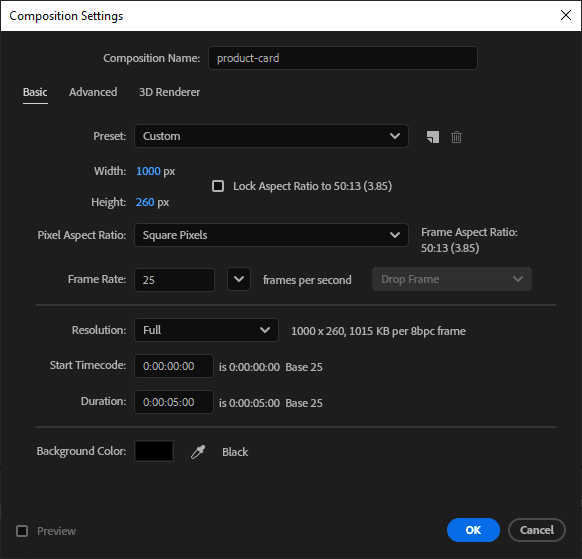
-
Click Layer > New > Solid. Name it
Panel, click Make Comp Size, set the color to0B5D3B(a dark green), and click OK. -
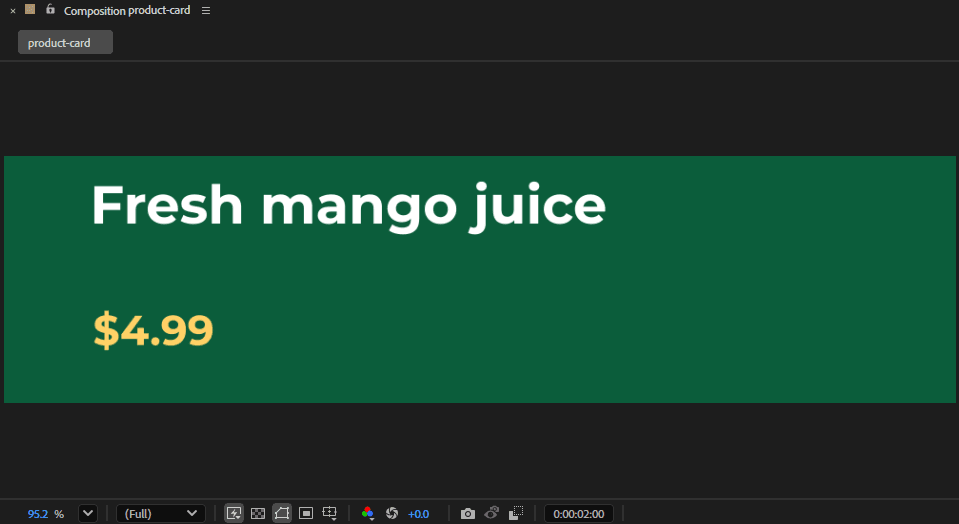
Click an empty part of the Timeline panel so nothing is selected. Choose the Type tool, and drag a text box across the top half of the panel. Type
Fresh mango juice, press Ctrl+A (Cmd+A on macOS), and in the Character panel choose Montserrat Bold, 56 px, white. -
Click the Selection tool to finish typing. In the Timeline, click the new layer’s name, press Enter, type
PRODUCTand press Enter. -
Drag a second, smaller text box below the first. Type
$4.99, set it to Montserrat Bold, 44 px, colorFFD166, and rename the layerPRICEthe same way. -
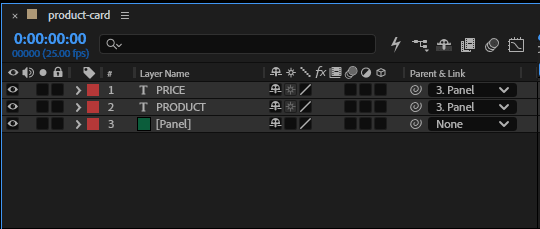
In the Timeline’s Parent & Link column, set both text layers to Panel, so they move with it. If you can’t see the column, right-click a column heading and choose Columns > Parent & Link.
-
Select the Panel layer and press P to show Position. Add keyframes with these x values:
-500at 0:00:00:00,500at 0:00:00:15,500at 0:00:04:10, and1500at 0:00:04:24. Then click the word Position to select all four and press F9 for Easy Ease. -
Select PRODUCT and press T to show Opacity. Keyframe it from 0% at 0:00:00:10 to 100% at 0:00:01:00. Give PRICE the same fade from 0:00:01:00 to 0:00:01:15.
-
Save the project as
product-card.aep.
To set the time for a keyframe, click the time display at the top left of the Timeline, type the time, and press Enter. The stopwatch next to a property adds its first keyframe. After that, changing the value at a new time adds another. For the hold at 0:00:04:10, click the diamond at the left of the Position row.
Export the card with Bodymovin
Install Bodymovin
Bodymovin lives in the lottie-web repository, whose README lists several ways to install it. We used Adobe’s own installer with bodymovin.zxp from the repository’s build/extension folder. On Windows, close After Effects, open Command Prompt, and run these two lines, with your own path to the file:
cd "C:\Program Files\Common Files\Adobe\Adobe Desktop Common\RemoteComponents\UPI\UnifiedPluginInstallerAgent"
UnifiedPluginInstallerAgent.exe /install "C:\path\to\bodymovin.zxp"
Open After Effects, click Edit > Preferences > Scripting & Expressions (After Effects > Settings on macOS), and tick Allow Scripts to Write Files and Access Network. Bodymovin can’t save its export without it.
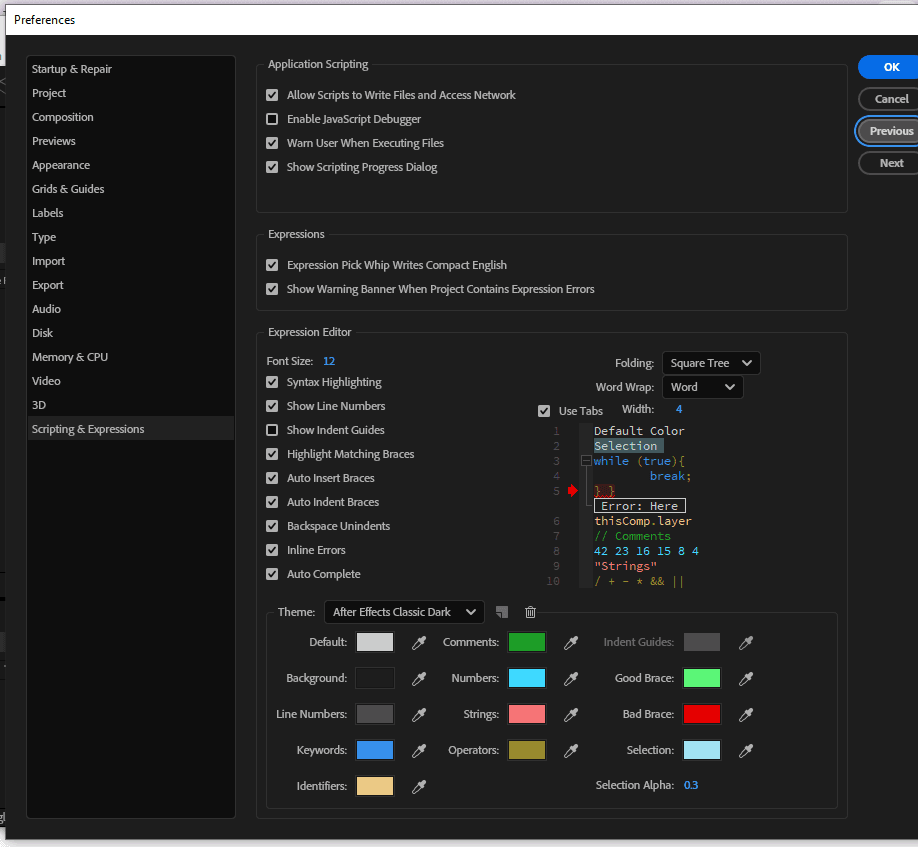
Now click Window > Extensions > Bodymovin. In After Effects 2027 on Windows, the panel didn’t open at all for us. Adobe’s extension log, CEP12-AEFT.log in the Windows temp folder, said signature verification failed for Bodymovin.
Adobe’s CEP documentation describes a PlayerDebugMode setting that loads extensions without that check. We closed After Effects, ran this command, and the panel opened on the next start:
reg add HKCU\Software\Adobe\CSXS.12 /v PlayerDebugMode /t REG_SZ /d 1 /fThe setting applies to every extension, so turn it off when you’ve finished exporting:
reg delete HKCU\Software\Adobe\CSXS.12 /v PlayerDebugMode /fWe tested on Windows. Adobe’s documentation gives the macOS equivalent as defaults write com.adobe.CSXS.12 PlayerDebugMode 1.
Export with Glyphs turned off
-
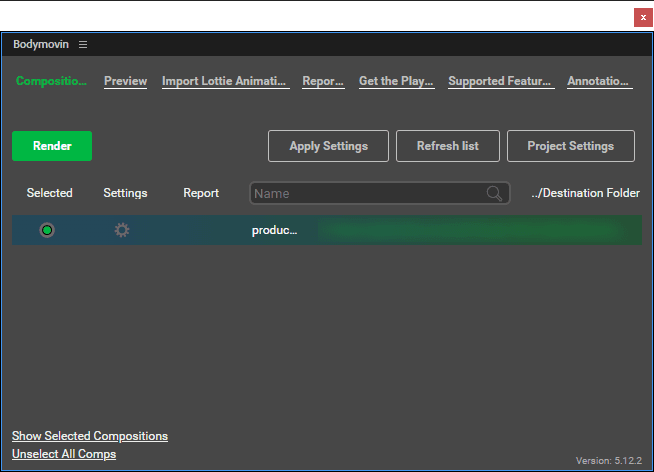
In the Bodymovin panel, click Refresh list, then click the circle under Selected in the product-card row.
-
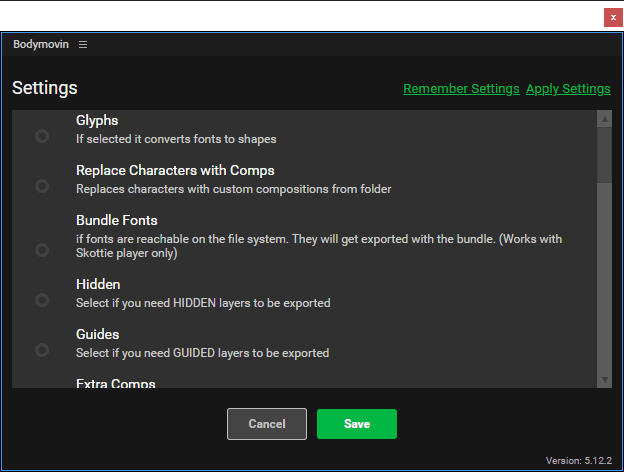
Click the gear under Settings. Untick Glyphs, described as “If selected it converts fonts to shapes”. It’s ticked for every new composition. Click Save.
-
Click the three dots under Destination Folder and save the file as
product-card.json. -
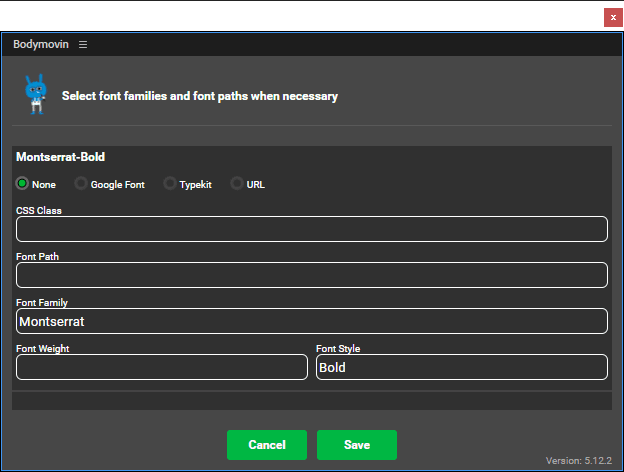
Click Render. On the fonts screen, leave None selected and Font Path empty, check that Font Family says Montserrat and Font Style says Bold, and click Save.
-
When the panel says Render finished, click Done.
Glyphs is the setting that matters most. With it on, Bodymovin turns every letter into a shape, and no text is left to change. If the export goes wrong in other ways, check the panel’s Report column, which lists features Bodymovin can’t export.
Play the export in an html5 clip
This is the Lottie to MP4 step. Shotstack’s html5 asset takes three strings, html, css and js, and renders the page as a clip. lottie-web is already loaded on that page (version 5.12.2 in November 2026), so you don’t add it yourself. If html5 clips are new to you, convert an HTML animation to MP4 covers the basics.
Follow the Lottie example in the docs: put the JSON inline, use the SVG renderer, and turn off looping and autoplay. As Shotstack captures the clip, its renderer seeks every animation registered with lottie.loadAnimation(), so the animation doesn’t need to play by itself.
const animationData = { /* the contents of product-card.json */ };

lottie.loadAnimation({
  container: document.getElementById('card'),
  renderer: 'svg',
  loop: false,
  autoplay: false,
  animationData,
});
Shotstack doesn’t read the length from the JSON, so set the clip’s length yourself. Bodymovin stores the frame rate as fr and the first and last frames as ip and op, so the length in seconds is (op - ip) / fr. For the card, that’s (125 - 0) / 25, or 5 seconds.
Give the clip the composition’s size, then place it with position and offset. Offsets are fractions of the video’s width and height (see positioning), so x: 0.04 moves the card in from the left edge by 4% of the width:
{
  "asset": { "type": "html5", "html": "...", "css": "...", "js": "..." },
  "start": 0.5,
  "length": 5,
  "width": 1000,
  "height": 260,
  "position": "bottomLeft",
  "offset": { "x": 0.04, "y": 0.08 }
}
The edges of the composition act like a mask, just as they do in After Effects. This card starts off the left edge of its composition, so in the video it appears at the clip’s left edge, 4% in from the side. To slide it in from the edge of the frame, set offset.x to 0.
The project’s build-template.js builds this clip from the export, so nobody pastes JSON by hand.
Change the text in each video
Shotstack templates use merge fields: placeholders like {{ PRODUCT }} that Shotstack replaces with your values before it renders. The html5 docs show placeholders in the html, so add one hidden element per field there, named after its layer:
<div id="card"></div>
<div hidden data-field="PRICE">{{ PRICE }}</div>
<div hidden data-field="PRODUCT">{{ PRODUCT }}</div>
Before the animation starts, the js copies each value into the text layer with the same name. In a Bodymovin export, text layers have ty: 5, and the text itself sits in t.d.k[].s.t:
const values = {};
document.querySelectorAll('[data-field]').forEach((el) => {
  values[el.dataset.field] = el.textContent;
});

animationData.layers.forEach((layer) => {
  if (layer.ty === 5 && values[layer.nm] !== undefined) {
    layer.t.d.k.forEach((keyframe) => { keyframe.s.t = values[layer.nm]; });
  }
});
The designer’s export goes into the template unchanged. build-template.js finds the fields itself by looking for text layers named in capitals, so a new capitalized layer becomes a new merge field when you rebuild the template. Add a matching column to the data, and the render script picks it up from the template.
Escape every value
Shotstack puts merge values in exactly as you send them, with nothing escaped. A value with a double quote, placed straight into the js, breaks the script. The render still finishes with the status done, but the video is completely black.
Values in the html only need HTML escaping, and the render script escapes every value before it sends it:
function escapeHtml(value) {
return value.replace(/&/g, '&').replace(/</g, '<').replace(/>/g, '>');
}With that in place, a value like Joe's "Best" Café & Co. <Austin> renders exactly as typed.
Embed the brand’s font
An html5 clip can’t download a font, and the template’s timeline.fonts setting only loads fonts for rich-text and rich-caption assets. So embed the font file in the css as base64, using the family name Bodymovin wrote in the export’s fonts list (Montserrat here):
@font-face {
  font-family: 'Montserrat';
  font-weight: 700;
  src: url(data:font/woff2;base64,d09GMgABAAAAAOWQ...) format('woff2');
}
build-template.js writes one rule like this for every font the export lists. It reads each font from a file named after the font in lower case, so Montserrat-Bold comes from montserrat-bold.woff2.
Then wait for the font before you load the animation, because lottie-web measures each letter as it builds the text. If the animation starts straight away, lottie-web measures a fallback font, and the letters come out squashed. Waiting for document.fonts.load() fixes it:
document.fonts.load('700 40px "Montserrat"').then(start, start);Here start is the function that calls lottie.loadAnimation(). Passing it twice means the card still renders, in a fallback font, if the font fails to load.
Keep the font small, because the css string has a limit of 500,000 characters. The js string, which holds the whole export, has the same limit, so a large animation needs room too. The free fontTools package (pip install fonttools brotli) cuts Montserrat Bold down to Latin, Latin Extended, punctuation and currency symbols, a 58,832-byte WOFF2 file:
pyftsubset Montserrat-Bold.ttf --unicodes="U+0000-024F,U+2000-206F,U+20A0-20CF,U+2122" --layout-features="*" --flavor=woff2 --output-file=montserrat-bold.woff2Keep the accented letters. The US Census Bureau counts 44.9 million people age 5 and older in the US who speak Spanish at home, so a US brand’s data may well include names like Agua fresca de sandía.
Make long text fit its box
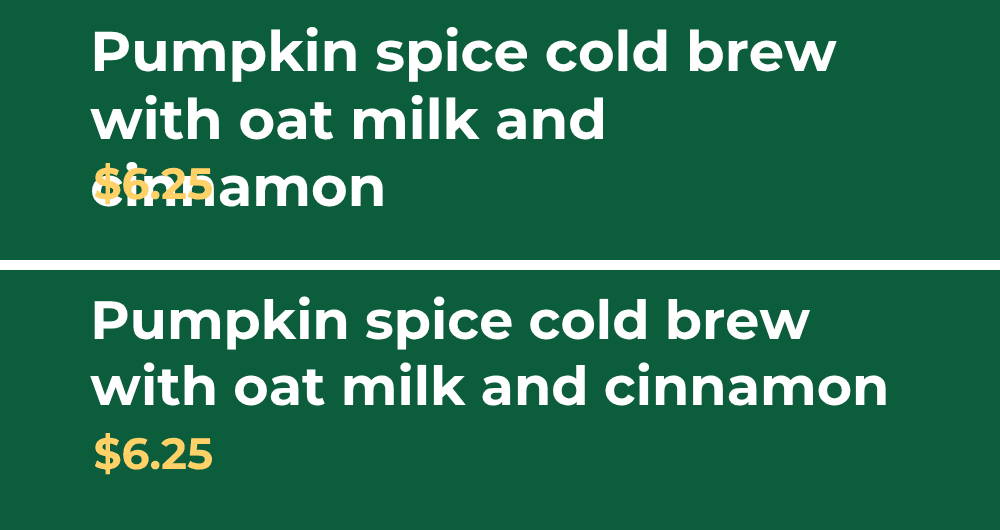
Paragraph text wraps at the edge of its box, but lottie-web doesn’t stop it at the bottom. At 56 px, Pumpkin spice cold brew with oat milk and cinnamon wraps onto three lines, and the last one lands on top of the price.
lottie-web can shrink text to fit instead. Call canResizeFont(true) and setMinimumFontSize() on each text element once the animation has loaded:
function shrinkToFit(elements) {
  (elements || []).forEach((el) => {
    if (!el) return;
    if (el.data && el.data.ty === 5 && el.canResizeFont) {
      el.canResizeFont(true);
      el.setMinimumFontSize(24);
    }
    if (el.elements) shrinkToFit(el.elements);
  });
}

function start() {
  const anim = lottie.loadAnimation({
    container: document.getElementById('card'),
    renderer: 'svg',
    loop: false,
    autoplay: false,
    animationData,
  });
  if (anim.isLoaded) shrinkToFit(anim.renderer.elements);
  else anim.addEventListener('DOMLoaded', () => shrinkToFit(anim.renderer.elements));
}
For the pumpkin spice row, lottie-web stepped the size down from 56 px to 54 px, where the name fits on two lines. The production video matches the bottom half of this browser preview, made with lottie-web 5.12.2:
Shrinking stops at the minimum size, 24 px here, so a very long value can still overflow. The render script also skips any row whose PRODUCT is longer than 60 characters or whose PRICE is longer than 10, and reports it. Treat that limit as a safety net, and test your longest real values.
Add footage, a logo and music
The card is one clip, and the footage, logo and music go around it in the same template. Each file needs a public URL. Shotstack’s Ingest API can host them: ask it for a signed upload URL, PUT the file there, then check until it’s ready.
async function upload(file) {
  // 1. Ask Ingest for a signed upload URL.
  const { data } = await api('POST', `${INGEST_API}/upload`);
  // 2. PUT the file to that URL.
  const res = await fetch(data.attributes.url, { method: 'PUT', body: fs.readFileSync(file) });
  if (!res.ok) throw new Error(`Uploading ${file} failed: HTTP ${res.status}`);
  // 3. Wait until Ingest has stored it, then return its URL.
  for (let attempt = 0; attempt < 60; attempt++) {
    const source = await api('GET', `${INGEST_API}/sources/${data.id}`);
    const { status, source: url } = source.data.attributes;
    if (status === 'ready') return url;
    if (status === 'failed') throw new Error(`Ingest couldn't process ${file}.`);
    await sleep(5000);
  }
  throw new Error(`${file} wasn't ready after 5 minutes.`);
}
Leave your API key off the PUT, because the signed URL carries its own permission. Video, image and audio files don’t need a Content-Type header either, as Shotstack detects the type. The project’s setup-assets.js uploads footage.mp4, music.mp3 and logo.png this way and saves their URLs in assets.json.
In a Shotstack timeline, the first track sits on top. The card goes first, the logo second, then the footage with its own sound muted. The music goes on a track of its own, as an audio clip that fades in and out:
{
  "timeline": {
    "tracks": [
      { "clips": [ { "asset": { "type": "html5", "html": "...", "css": "...", "js": "..." },
        "start": 0.5, "length": 5, "width": 1000, "height": 260,
        "position": "bottomLeft", "offset": { "x": 0.04, "y": 0.08 } } ] },
      { "clips": [ { "asset": { "type": "image", "src": "https://.../logo.png" },
        "start": 0, "length": 6, "fit": "none",
        "position": "topRight", "offset": { "x": -0.03, "y": -0.04 } } ] },
      { "clips": [ { "asset": { "type": "video", "src": "https://.../footage.mp4", "volume": 0 },
        "start": 0, "length": 6 } ] },
      { "clips": [ { "asset": { "type": "audio", "src": "https://.../music.mp3", "effect": "fadeInFadeOut", "volume": 0.6 },
        "start": 0, "length": 6 } ] }
    ]
  },
  "output": { "format": "mp4", "size": { "width": 1920, "height": 1080 }, "fps": 25 },
  "merge": [
    { "find": "PRICE", "replace": "$4.99" },
    { "find": "PRODUCT", "replace": "Fresh mango juice" }
  ]
}
The card starts at 0.5 seconds and the video lasts 6, so the footage shows on its own briefly before and after the card. "fit": "none" keeps the logo at its own size, 424 × 120 pixels.
Save the template and render one video per row
This is where the design becomes data-driven video. Saving the edit as a template means each render request only carries the new values. create-template.js builds the template from the export and the asset URLs, then saves it:
const template = buildTemplate({ lottie, assets });
const { response } = await api('POST', `${EDIT_API}/templates`, { name: 'Product card', template });
fs.writeFileSync('template-id.txt', response.id);
The template’s merge list holds the designer’s sample text, so the template also renders on its own. The data is a plain CSV file, and each row tests something different: a short name, a long one, quotes with an apostrophe, and an accented letter.
PRODUCT,PRICE
Iced vanilla latte,$5.49
Pumpkin spice cold brew with oat milk and cinnamon,$6.25
"Joe's ""Famous"" mocha",$4.75
Agua fresca de sandía,$4.25
render-videos.js takes the field names from the saved template, reads the CSV, checks and escapes each value, and sends one request per row to the template render endpoint, a second apart:
const merge = fields.map((field) => ({ find: field, replace: escapeHtml(row[field]) }));
const { response } = await api('POST', `${EDIT_API}/templates/render`, { id, merge });
Each response has a render id. The script checks GET /render/{id} every five seconds until the status is done, then downloads the MP4. For bigger batches, the bulk CSV guide covers pacing in more depth, and Shotstack’s limitations page lists the request limits.
If the script stops partway, run it again. Rows it already downloaded are skipped, and renders it sent but never downloaded are picked up again instead of rendered twice. After a design update, every row renders again.
To run the whole thing on Windows:
set SHOTSTACK_API_KEY=your_api_key
node setup-assets.js
node create-template.js
node render-videos.js
On macOS or Linux, use export instead of set. The scripts call the production API, https://api.shotstack.io/edit/v1, and each render uses credits from your plan, as listed on the pricing page.
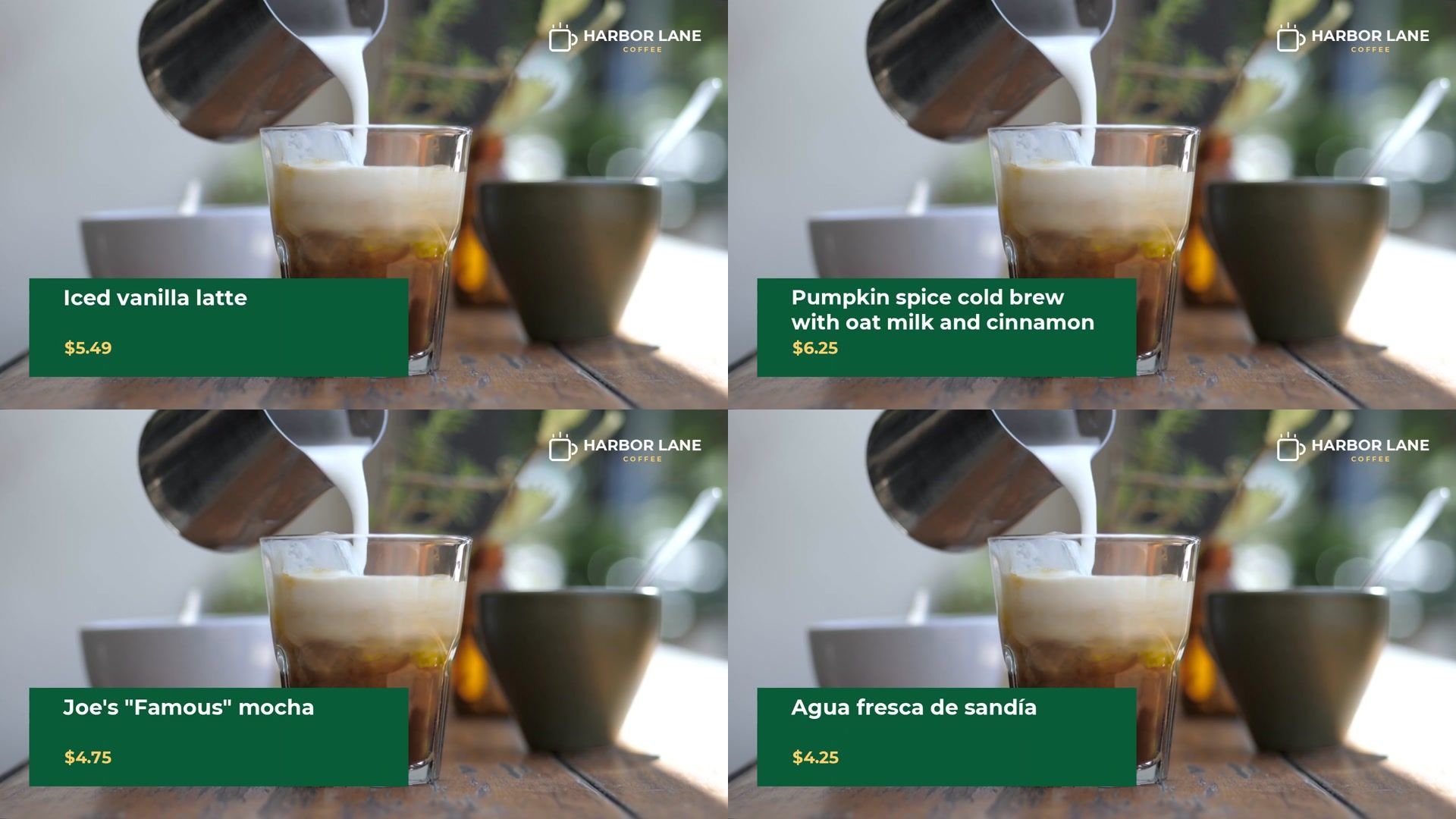
All four renders finished on production, each a 6-second, 1920 × 1080 MP4 of about 2 MB. The quotes, the apostrophe and the accent came through exactly as typed:
Update the design after launch
Templates rarely stay finished. The designer and the developer only need to agree on the text layer names. As long as PRODUCT and PRICE keep their names, the designer can change colors, timing and layout, and the data and render script keep working.
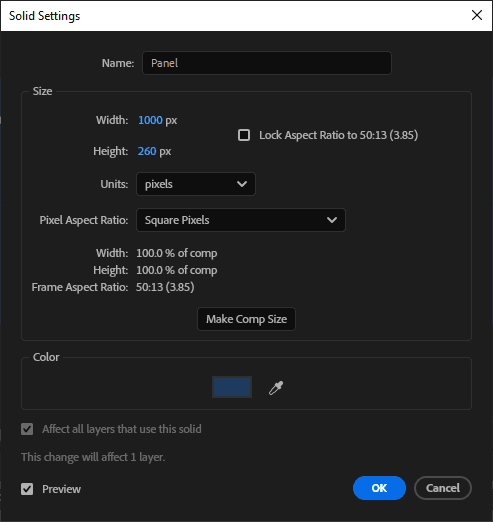
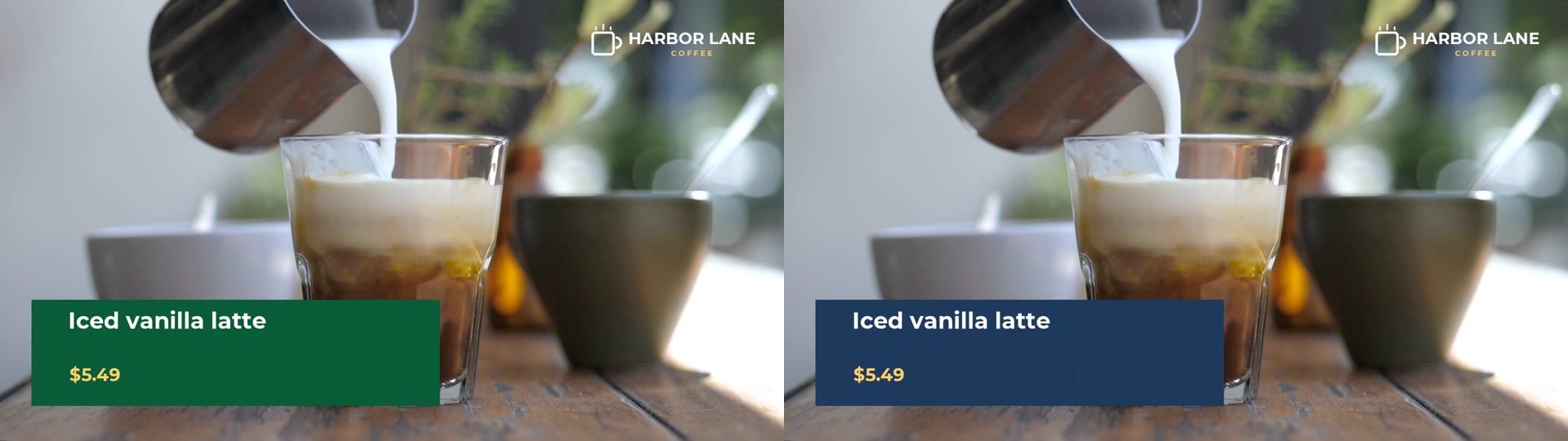
To try it, save the project as product-card-v2.aep, select the Panel layer, and change its color to navy (1F3A5F) with Layer > Panel Solid Settings. Then export product-card-v2.json with Glyphs still off. The only difference between the two exports is the panel’s color.
update-template.js checks that the new export still has every field, then rebuilds the template and replaces it:
const { response: current } = await api('GET', `${EDIT_API}/templates/${id}`);
const oldFields = (current.template.merge || []).map((m) => m.find);
const missing = oldFields.filter((name) => !fieldNames(lottie).includes(name));
if (missing.length) {
  throw new Error(`The new export is missing ${missing.join(', ')}. Ask the designer to keep those layer names.`);
}
const template = buildTemplate({ lottie, assets });
await api('PUT', `${EDIT_API}/templates/${id}`, { name: 'Product card', template });
Then render one row to check the result:
node update-template.js product-card-v2.json
node render-videos.js one-row.csv
The new video is the same as the first, apart from the color:
The template id stays the same, so anything that already renders the template gets the new design with its next request. If the designer changes the font, the developer adds the new font file next to the scripts, named the same way. The font is the one part of the design that doesn’t travel inside the export.
When this is the wrong route
Lottie covers a lot of motion design, but not all of it. Choose another route when the design depends on:
- Effects and plugins, such as glows, blurs and particles. Render them in After Effects and layer the video, either with an alpha channel, as in the overlay guide, or as a matte, as in the luma matte guide.
- 3D layers and cameras. lottie-web renders 3D only with its HTML renderer, not the SVG renderer this pattern uses.
- Expressions that react to the text, such as a box that grows with its word. lottie-web runs only some expressions, and keyframes baked from an expression don’t adapt to new text.
- Video inside the design. Lottie has no video layers. Put footage on its own Shotstack track instead, as this template does.
- Arabic and other right-to-left or joined scripts. We didn’t test them in this project, so render a sample before you commit to this route.
- Words that don’t need animating. If the text can simply sit on top of the graphic, render the graphic once in After Effects and add the words as a separate Shotstack layer, as the lower thirds guide does.
The complete scripts
Save these six files in one folder. Next to them, put your Bodymovin export as product-card.json, the subset font as montserrat-bold.woff2, and logo.png, footage.mp4, music.mp3 and data.csv. For the design update check, one-row.csv is the header line plus one row of data.csv.
shotstack.js
The helpers every script uses: the API key check, API calls with timeouts and retries, waiting for a render, and downloading a file.
// Small helpers for the Shotstack Edit and Ingest APIs (Node.js 22 or newer, no packages).
const fs = require('fs');
const path = require('path');

const KEY = process.env.SHOTSTACK_API_KEY;
if (!KEY) {
  console.error('Set SHOTSTACK_API_KEY to your Shotstack API key first.');
  process.exit(1);
}

// v1 is the production API.
const ENV = process.env.SHOTSTACK_ENV || 'v1';
if (!['v1', 'stage'].includes(ENV)) {
  console.error('SHOTSTACK_ENV must be v1 or stage.');
  process.exit(1);
}
const EDIT_API = `https://api.shotstack.io/edit/${ENV}`;
const INGEST_API = `https://api.shotstack.io/ingest/${ENV}`;

const REQUEST_TIMEOUT_MS = 30 * 1000;
const DOWNLOAD_TIMEOUT_MS = 2 * 60 * 1000;
const POLL_INTERVAL_MS = 5 * 1000;
const RENDER_TIMEOUT_MS = 10 * 60 * 1000;

const sleep = ms => new Promise(resolve => setTimeout(resolve, ms));

// Calls the API and returns the parsed JSON.
// Retries after a 429 (too many requests). Reads and updates also retry after a dropped
// connection or a server error. Create and render requests (POST) don't, so one run never sends them twice.
async function api(method, url, body) {
  for (let attempt = 1; ; attempt++) {
    let res;
    try {
      res = await fetch(url, {
        method,
        headers: {
          'x-api-key': KEY,
          'content-type': 'application/json',
          accept: 'application/json'
        },
        body: body ? JSON.stringify(body) : undefined,
        signal: AbortSignal.timeout(REQUEST_TIMEOUT_MS)
      });
    } catch {
      if (method === 'POST' || attempt >= 4) {
        throw new Error(
          "Can't reach the Shotstack API. Check your network connection and run the script again."
        );
      }
      await sleep(2000 * attempt);
      continue;
    }
    const text = await res.text();
    if (res.status === 401 || res.status === 403) {
      throw new Error(
        `The API rejected the key (HTTP ${res.status}). Check SHOTSTACK_API_KEY and SHOTSTACK_ENV.`
      );
    }
    if (res.ok) {
      try {
        return JSON.parse(text);
      } catch {
        throw new Error(
          `${method} ${url} returned a response that isn't JSON.`
        );
      }
    }
    const retry =
      res.status === 429 || (method !== 'POST' && res.status >= 500);
    if (retry && attempt < 4) {
      await sleep(
        Number(res.headers.get('retry-after')) * 1000 || 2000 * attempt
      );
      continue;
    }
    let detail = text;
    try {
      const err = JSON.parse(text);
      detail = err.errors?.[0]?.detail || err.response?.error || err.message;
    } catch {}
    throw Object.assign(
      new Error(
        `${method} ${url} returned ${res.status}: ${String(detail || text).slice(0, 300)}`
      ),
      { status: res.status }
    );
  }
}

// Polls a render until it's done or failed.
async function waitForRender(id) {
  for (let waited = 0; waited < RENDER_TIMEOUT_MS; waited += POLL_INTERVAL_MS) {
    const { response } = await api('GET', `${EDIT_API}/render/${id}`);
    if (response?.status === 'done' || response?.status === 'failed') {
      return response;
    }
    await sleep(POLL_INTERVAL_MS);
  }
  throw new Error(
    `Render ${id} didn't finish within ${RENDER_TIMEOUT_MS / 60000} minutes.`
  );
}

// Saves a file from a URL. If it fails, the next run of render-videos.js tries again.
async function download(url, file) {
  const res = await fetch(url, {
    signal: AbortSignal.timeout(DOWNLOAD_TIMEOUT_MS)
  }).catch(() => null);
  if (!res?.ok) {
    throw Object.assign(
      new Error('The download failed. Run the script again.'),
      {
        status: res?.status
      }
    );
  }
  fs.writeFileSync(file, Buffer.from(await res.arrayBuffer()));
}

// Reads a file an earlier step wrote next to the scripts, or says which step to run first.
function readStep(file, step) {
  const full = path.join(__dirname, file);
  if (!fs.existsSync(full)) {
    throw new Error(`Can't find ${file}. Run node ${step} first.`);
  }
  return fs.readFileSync(full, 'utf8');
}

module.exports = {
  EDIT_API,
  INGEST_API,
  api,
  waitForRender,
  download,
  readStep,
  sleep
};
build-template.js
Builds the template from the export: the card in an html5 clip with the font embedded, then the logo, the footage and the music. It also checks the export before you use it.
// Builds the Shotstack template: the After Effects card (a Bodymovin export) in an html5 clip,
// over a footage clip, with a logo and music.
const fs = require('fs');
const path = require('path');

const MIN_FONT_SIZE = 24; // auto-shrink never goes below this size (px)

// Every text layer in the export, including the ones inside precompositions.
const textLayers = lottie =>
  [lottie.layers, ...(lottie.assets || []).map(asset => asset.layers)]
    .flat()
    .filter(layer => layer?.ty === 5);

// Text layers named in capitals (PRODUCT, PRICE) are the fields that change in each video.
function fieldNames(lottie) {
  const names = textLayers(lottie)
    .map(layer => layer.nm)
    .filter(name => /^[A-Z][A-Z0-9_]*$/.test(name));
  return [...new Set(names)];
}

// The sample text the designer typed in each field, used as the template's default merge values.
function sampleText(lottie) {
  const text = {};
  for (const layer of textLayers(lottie)) text[layer.nm] ??= layer.t.d.k[0].s.t;
  return text;
}

// The html5 clip that plays the card. Merge placeholders sit in hidden divs in the html;
// the script copies their text into the matching text layers before the animation starts.
function cardClip(lottie, fontDir) {
  const fields = fieldNames(lottie);
  const fonts = lottie.fonts?.list || [];
  if (!fonts.length) {
    throw new Error(
      'The export lists no font. Export it again from Bodymovin with Glyphs off.'
    );
  }
  // Each font comes from a file named after it in the export: Montserrat-Bold -> montserrat-bold.woff2.
  const faces = fonts.map(font => {
    const file = path.join(fontDir, `${font.fName.toLowerCase()}.woff2`);
    if (!fs.existsSync(file)) {
      throw new Error(
        `Can't find ${path.basename(file)}, the font file for ${font.fName}, next to the scripts.`
      );
    }
    return {
      family: font.fFamily,
      weight: /bold/i.test(font.fStyle) ? 700 : 400,
      data: fs.readFileSync(file).toString('base64')
    };
  });

  const html = ['<div id="card"></div>']
    .concat(
      fields.map(name => `<div hidden data-field="${name}">{{ ${name} }}</div>`)
    )
    .join('\n');

  const css = [
    ...faces.map(
      face =>
        `@font-face { font-family: '${face.family}'; font-weight: ${face.weight}; src: url(data:font/woff2;base64,${face.data}) format('woff2'); }`
    ),
    `html, body { margin: 0; width: ${lottie.w}px; height: ${lottie.h}px; overflow: hidden; background: transparent; }`,
    `#card { width: ${lottie.w}px; height: ${lottie.h}px; }`
  ].join('\n');

  const js = `
const animationData = ${JSON.stringify(lottie)};

// Put each field's value into the text layer with the same name.
const values = {};
document.querySelectorAll('[data-field]').forEach((el) => {
  values[el.dataset.field] = el.textContent.replace(/\\r?\\n/g, '\\r');
});
const layerLists = [animationData.layers].concat((animationData.assets || []).filter((a) => a.layers).map((a) => a.layers));
layerLists.forEach((layers) => layers.forEach((layer) => {
  if (layer.ty === 5 && values[layer.nm] !== undefined) {
    layer.t.d.k.forEach((keyframe) => { keyframe.s.t = values[layer.nm]; });
  }
}));

// Shrink text that doesn't fit its text box, down to ${MIN_FONT_SIZE}px.
function shrinkToFit(elements) {
  (elements || []).forEach((el) => {
    if (!el) return;
    if (el.data && el.data.ty === 5 && el.canResizeFont) {
      el.canResizeFont(true);
      el.setMinimumFontSize(${MIN_FONT_SIZE});
    }
    if (el.elements) shrinkToFit(el.elements);
  });
}

function start() {
  const anim = lottie.loadAnimation({
    container: document.getElementById('card'),
    renderer: 'svg',
    loop: false,
    autoplay: false,
    animationData: animationData,
  });
  if (anim.isLoaded) shrinkToFit(anim.renderer.elements);
  else anim.addEventListener('DOMLoaded', () => shrinkToFit(anim.renderer.elements));
}

// lottie-web lays text out from the font's measurements, so start once the fonts have loaded.
const fonts = ${JSON.stringify(faces.map(face => `${face.weight} 40px "${face.family}"`))};
Promise.all(fonts.map((font) => document.fonts.load(font))).then(start, start);`;

  for (const [field, value] of Object.entries({ css, js })) {
    if (value.length > 500000) {
      throw new Error(
        `The html5 ${field} is ${value.length} characters, over the limit of 500,000. Use a smaller font file or a simpler animation.`
      );
    }
  }

  return {
    asset: { type: 'html5', html, css, js },
    length: Math.round(((lottie.op - lottie.ip) / lottie.fr) * 1000) / 1000,
    width: lottie.w,
    height: lottie.h,
    position: 'bottomLeft',
    offset: { x: 0.04, y: 0.08 }
  };
}

// The full template: card on top, logo in the top-right corner, footage underneath, music on its own track.
function buildTemplate({ lottie, assets, fontDir = __dirname }) {
  const card = cardClip(lottie, fontDir);
  const cardStart = 0.5;
  const total = cardStart + card.length + 0.5;
  const defaults = sampleText(lottie);

  return {
    timeline: {
      tracks: [
        { clips: [{ ...card, start: cardStart }] },
        {
          clips: [
            {
              asset: { type: 'image', src: assets.logo },
              start: 0,
              length: total,
              fit: 'none',
              position: 'topRight',
              offset: { x: -0.03, y: -0.04 }
            }
          ]
        },
        {
          clips: [
            {
              asset: { type: 'video', src: assets.footage, volume: 0 },
              start: 0,
              length: total
            }
          ]
        },
        {
          clips: [
            {
              asset: {
                type: 'audio',
                src: assets.music,
                effect: 'fadeInFadeOut',
                volume: 0.6
              },
              start: 0,
              length: total
            }
          ]
        }
      ]
    },
    output: { format: 'mp4', size: { width: 1920, height: 1080 }, fps: 25 },
    merge: fieldNames(lottie).map(name => ({
      find: name,
      replace: defaults[name] || ''
    }))
  };
}

// Reads a Bodymovin export and checks it can become a template.
function readExport(file) {
  if (!fs.existsSync(file))
    throw new Error(`Can't find ${path.basename(file)}.`);
  let lottie;
  try {
    lottie = JSON.parse(fs.readFileSync(file, 'utf8'));
  } catch {
    throw new Error(
      `${path.basename(file)} isn't valid JSON. Export it again from Bodymovin.`
    );
  }
  if (lottie.chars) {
    throw new Error(
      'This export has Glyphs on. Turn Glyphs off in Bodymovin and export again.'
    );
  }
  if (!fieldNames(lottie).length) {
    throw new Error(
      'No text layer is named in capitals (like PRODUCT), so nothing could change between videos. Rename the layers in After Effects and export again.'
    );
  }
  return lottie;
}

module.exports = { buildTemplate, fieldNames, readExport };
setup-assets.js
Uploads the footage, music and logo with the Ingest API and saves their URLs in assets.json.
// Uploads the footage, music and logo to Shotstack's Ingest API, which hosts them at public URLs
// the template can use. Saves the URLs in assets.json.
// Usage: node setup-assets.js
const fs = require('fs');
const path = require('path');
const { INGEST_API, api, sleep } = require('./shotstack');

const FILES = { footage: 'footage.mp4', music: 'music.mp3', logo: 'logo.png' };
const UPLOAD_TIMEOUT_MS = 10 * 60 * 1000;

async function upload(file) {
  // 1. Ask Ingest for a signed upload URL.
  const { data } = await api('POST', `${INGEST_API}/upload`);
  // 2. PUT the file to that URL.
  let res;
  try {
    res = await fetch(data.attributes.url, {
      method: 'PUT',
      body: fs.readFileSync(file),
      signal: AbortSignal.timeout(UPLOAD_TIMEOUT_MS)
    });
  } catch {
    throw new Error(
      `Uploading ${path.basename(file)} failed. Check your network connection and run the script again.`
    );
  }
  if (!res.ok)
    throw new Error(
      `Uploading ${path.basename(file)} failed: HTTP ${res.status}`
    );
  // 3. Wait until Ingest has stored it, then return its URL.
  for (let attempt = 0; attempt < 60; attempt++) {
    const source = await api('GET', `${INGEST_API}/sources/${data.id}`);
    const { status, source: url } = source.data.attributes;
    if (status === 'ready') return url;
    if (status === 'failed')
      throw new Error(`Ingest couldn't process ${path.basename(file)}.`);
    await sleep(5000);
  }
  throw new Error(`${path.basename(file)} wasn't ready after 5 minutes.`);
}

async function main() {
  for (const file of Object.values(FILES)) {
    if (!fs.existsSync(path.join(__dirname, file))) {
      throw new Error(`Can't find ${file} next to this script.`);
    }
  }
  const assets = {};
  for (const [name, file] of Object.entries(FILES)) {
    console.log(`Uploading ${file}...`);
    assets[name] = await upload(path.join(__dirname, file));
    console.log(`  ${assets[name]}`);
  }
  fs.writeFileSync(
    path.join(__dirname, 'assets.json'),
    JSON.stringify(assets, null, 2)
  );
  console.log('Saved the URLs to assets.json');
}

main().catch(err => {
  console.error(err.message);
  process.exit(1);
});
create-template.js
Saves the template and writes its id to template-id.txt. To use another export, pass its file name: node create-template.js my-card.json.
// Saves the card, footage, logo and music as a Shotstack template.
// Usage: node create-template.js [export.json]   (defaults to product-card.json)
const fs = require('fs');
const path = require('path');
const { EDIT_API, api, readStep } = require('./shotstack');
const { buildTemplate, fieldNames, readExport } = require('./build-template');

async function main() {
  const lottie = readExport(
    path.join(__dirname, process.argv[2] || 'product-card.json')
  );
  const assets = JSON.parse(readStep('assets.json', 'setup-assets.js'));

  const template = buildTemplate({ lottie, assets });
  const { response } = await api('POST', `${EDIT_API}/templates`, {
    name: 'Product card',
    template
  });
  if (!response?.id)
    throw new Error('The API saved the template but returned no id.');
  // Written only after the API has the template, because render-videos.js resumes from it.
  fs.writeFileSync(
    path.join(__dirname, 'template.json'),
    JSON.stringify(template, null, 2)
  );
  fs.writeFileSync(path.join(__dirname, 'template-id.txt'), response.id);
  console.log(`Fields: ${fieldNames(lottie).join(', ')}`);
  console.log(
    `Template saved: ${response.id} (also in template-id.txt and template.json)`
  );
}

main().catch(err => {
  console.error(err.message);
  process.exit(1);
});
render-videos.js
Renders one video per CSV row, skips rows that are too long, and downloads each MP4 to the videos folder. Run it again and it carries on where it stopped.
// Renders one video per row of data.csv from the saved template, and downloads each one.
// Run it again after a failure: rows already downloaded are skipped, and renders that were
// sent but not downloaded are picked up again instead of being rendered twice. A render
// request that got no answer is sent again, so it can render twice if Shotstack did get it.
// Usage: node render-videos.js [data.csv]
const crypto = require('crypto');
const fs = require('fs');
const path = require('path');
const {
EDIT_API,
api,
waitForRender,
download,
readStep,
sleep
} = require('./shotstack');
// The fields come from the saved template, so a new text layer only needs a new CSV column.
// These limits are a safety net, not a guarantee: the card shrinks long text, but very long values still won't fit.
const MAX_LENGTH = { PRODUCT: 60, PRICE: 10 };
// Reads a CSV file with a header row. Handles quoted values with commas and "" quotes.
function readCsv(file, fields) {
const name = path.basename(file);
if (!fs.existsSync(file)) throw new Error(`Can't find ${name}.`);
const rows = [];
let row = [];
let value = '';
let quoted = false;
const text = fs.readFileSync(file, 'utf8').replace(/^\uFEFF/, '');
for (let i = 0; i < text.length; i++) {
const char = text[i];
if (quoted) {
if (char === '"' && text[i + 1] === '"') {
value += '"';
i++;
} else if (char === '"') quoted = false;
else value += char;
} else if (char === '"' && value === '') quoted = true;
else if (char === ',') {
row.push(value);
value = '';
} else if (char === '\n' || char === '\r') {
if (char === '\r' && text[i + 1] === '\n') i++;
row.push(value);
rows.push(row);
row = [];
value = '';
} else value += char;
}
if (quoted) throw new Error(`${name} has a quote that is never closed.`);
if (value || row.length) {
row.push(value);
rows.push(row);
}
const [header, ...data] = rows.filter(r =>
r.some(cell => cell.trim() !== '')
);
const columns = (header || []).map(cell => cell.trim());
if (fields.some(field => !columns.includes(field)))
throw new Error(
`${name} needs a header row with the columns ${fields.join(', ')}.`
);
return data.map(cells =>
Object.fromEntries(columns.map((col, i) => [col, (cells[i] || '').trim()]))
);
}
// Merge values go into HTML, so escape the characters HTML treats as markup.
function escapeHtml(value) {
return value
.replace(/&/g, '&')
.replace(/</g, '<')
.replace(/>/g, '>');
}
function problemsWith(row, fields) {
const problems = [];
for (const field of fields) {
const max = MAX_LENGTH[field] ?? Infinity;
if (!row[field]) problems.push(`${field} is empty`);
else if (row[field].length > max)
problems.push(
`${field} is ${row[field].length} characters (limit ${max})`
);
}
return problems;
}
function slug(text) {
return text
.normalize('NFD')
.replace(/[\u0300-\u036f]/g, '')
.toLowerCase()
.replace(/[^a-z0-9]+/g, '-')
.replace(/^-|-$/g, '')
.slice(0, 40);
}
async function main() {
const id = readStep('template-id.txt', 'create-template.js').trim();
// The key below includes the API, the template id and the design, so a design update renders every row again.
const templateJson = readStep('template.json', 'create-template.js');
const fields = JSON.parse(templateJson).merge.map(m => m.find);
const rows = readCsv(
path.join(__dirname, process.argv[2] || 'data.csv'),
fields
);
fs.mkdirSync(path.join(__dirname, 'videos'), { recursive: true });
// Results of earlier runs, keyed by template + values, so a new run can resume them.
const resultsFile = path.join(__dirname, 'render-results.json');
let earlier = [];
if (fs.existsSync(resultsFile)) {
try {
earlier = JSON.parse(fs.readFileSync(resultsFile, 'utf8'));
} catch {
throw new Error(
'render-results.json is not valid JSON. Delete it to start again.'
);
}
}
const results = new Map(earlier.map(r => [r.key, r]));
const save = () =>
fs.writeFileSync(
resultsFile,
JSON.stringify([...results.values()], null, 2)
);
const current = [];
// Send one render request per row, about one per second.
for (const [index, row] of rows.entries()) {
const name = `${String(index + 1).padStart(2, '0')}-${slug(row.PRODUCT || 'row')}`;
const merge = fields.map(field => ({
find: field,
replace: escapeHtml(row[field] || '')
}));
const key = crypto
.createHash('sha1')
.update(EDIT_API + id + templateJson + JSON.stringify(merge))
.digest('hex');
const before = results.get(key);
if (
before?.status === 'done' &&
before.video &&
fs.existsSync(path.join(__dirname, before.video))
) {
console.log(` ${name}: already rendered (${before.video})`);
continue;
}
if (before?.id && before.status !== 'failed') {
console.log(` ${name}: picking up render ${before.id}`);
current.push(before);
continue;
}
const result = { key, name, row };
results.set(key, result);
current.push(result);
const problems = problemsWith(row, fields);
if (problems.length) {
result.status = 'skipped';
result.error = problems.join('; ');
console.log(` ${name}: skipped (${result.error})`);
save();
continue;
}
try {
const { response } = await api('POST', `${EDIT_API}/templates/render`, {
id,
merge
});
if (!response?.id) throw new Error('The API returned no render id.');
result.id = response.id;
result.status = 'queued';
console.log(` ${name}: queued (${response.id})`);
} catch (err) {
result.status = 'not sent';
result.error = err.message;
console.log(` ${name}: not sent. ${err.message}`);
}
save();
await sleep(1000);
}
// Wait for each render, then download the video.
const pending = current.filter(r => r.id);
if (pending.length) console.log('Waiting for renders to finish...');
for (const result of pending) {
try {
const render = await waitForRender(result.id);
result.status = render.status;
result.url = render.url || null;
result.error = render.error || null;
if (render.status === 'done' && !render.url) {
result.status = 'unknown';
result.error =
'The render finished without a video URL. Run the script again to check it.';
}
if (result.status === 'done') {
result.video = path.join(
'videos',
`${result.name}-${result.key.slice(0, 6)}.mp4`
);
await download(render.url, path.join(__dirname, result.video));
}
} catch (err) {
// 403 or 404: the render or its video is gone (another environment, or a deleted file),
// so the next run renders it again. A timeout or a dropped connection keeps the render id
// for the next run to check.
result.status = [403, 404].includes(err.status) ? 'failed' : 'unknown';
result.video = null;
result.error = err.message;
}
save();
console.log(
` ${result.name}: ${result.status}${result.video ? ` saved ${result.video}` : ''}${result.error ? ` ${result.error}` : ''}`
);
}
console.log(`Saved results to ${path.basename(resultsFile)}`);
}
main().catch(err => {
console.error(err.message);
process.exit(1);
});update-template.js
Checks that a new export still has every field, then replaces the template.
// Updates the saved template after the designer re-exports the card from After Effects.
// The new export must keep the same field layer names, so the render script and data still match.
// Usage: node update-template.js [export.json]   (defaults to product-card-v2.json)
const fs = require('fs');
const path = require('path');
const { EDIT_API, api, readStep } = require('./shotstack');
const { buildTemplate, fieldNames, readExport } = require('./build-template');

async function main() {
  const exportFile = path.join(
    __dirname,
    process.argv[2] || 'product-card-v2.json'
  );
  const lottie = readExport(exportFile);
  const assets = JSON.parse(readStep('assets.json', 'setup-assets.js'));
  const id = readStep('template-id.txt', 'create-template.js').trim();

  // Check the new export still has every field the current template uses.
  const { response: current } = await api('GET', `${EDIT_API}/templates/${id}`);
  const oldFields = (current?.template?.merge || []).map(m => m.find);
  const missing = oldFields.filter(name => !fieldNames(lottie).includes(name));
  if (missing.length) {
    throw new Error(
      `The new export is missing ${missing.join(', ')}. Ask the designer to keep those layer names.`
    );
  }

  const template = buildTemplate({ lottie, assets });
  await api('PUT', `${EDIT_API}/templates/${id}`, {
    name: 'Product card',
    template
  });
  // Written only after the API has the new design, because render-videos.js resumes from it.
  fs.writeFileSync(
    path.join(__dirname, 'template.json'),
    JSON.stringify(template, null, 2)
  );
  console.log(`Template ${id} updated from ${path.basename(exportFile)}.`);
}

main().catch(err => {
  console.error(err.message);
  process.exit(1);
});
Footage and music: Mixkit, used under the Mixkit free licenses. Font: Montserrat, SIL Open Font License.
Render every version of your After Effects template with Shotstack
You now have a template that a designer keeps in After Effects and a developer renders from data. The designer names the text layers that change and exports with Glyphs off. The template plays that export in an html5 clip, and one render request per row turns a spreadsheet into finished videos.
When the design changes, a new export updates the same template, and every request after that gets the new look. Get a free Shotstack API key and render your first template from an After Effects export.
Frequently asked questions (FAQs)
Do I need After Effects to render the videos?
No. You need After Effects only to change the design. Shotstack renders from the JSON export stored in the template, so videos keep rendering whether or not anyone on the team has After Effects installed.
Which version of lottie-web plays the animation?
Shotstack loaded lottie-web 5.12.2 in November 2026, and the card in this guide was exported with Bodymovin 5.12.2 to match. To check the current version, write lottie.version into the page’s text in a test render, and keep Bodymovin on the same version where you can.
Why is my video black when the render says done?
The page’s JavaScript probably failed, and Shotstack captured an empty page. Open the same html, css and js in a browser, with lottie-web 5.12.2 and the same values, and check the console.
Can I use my brand’s own font?
Yes, if its license allows embedding it in a web page or app. Fonts under the SIL Open Font License allow it, while many commercial fonts need a separate web license. The project’s code embeds every font the export lists, one .woff2 file each. Subset each file to the characters your data needs.
Can I run this on a schedule or from another app?
Yes. Rendering only needs the template id and the values for each video, so anything that can send an HTTP request can start it. See automate video creation on a schedule for a scheduled job, or the n8n guide for a no-code workflow.

Written by
Joyce Echessa is a full-stack web developer specializing in JavaScript, currently expanding into AI engineering through hands-on learning and projects. She writes developer tutorials for Shotstack.
Published November 18, 2026