Contents
 Claude
  ChatGPT
  Perplexity
  Google AI
 Contents
“Do you have a Zapier, Make or n8n integration?” is one of the most common questions people ask us before they sign up. Only pricing comes up more often.
For n8n, the answer used to be an HTTP Request node, a Wait node and an IF node looping until the render finished. It worked. It was also the part of every workflow that broke first.
Now the answer is: search for Shotstack in the nodes panel. The official node is live and verified on n8n Cloud and self-hosted n8n.
This guide covers what the node does, then builds one complete n8n video automation with it: a customer fills in a review form, a testimonial video renders, the link lands in a Google Sheet, and the customer sees their video. Every step is one we ran ourselves, in this order. If you want the same result without n8n, our form to video page shows the pattern with any form tool.
TL;DR
- Official, verified Shotstack node for n8n. Works on Cloud and self-hosted. MIT license.
- Four operations: Render Asset, Render Template, Get Render Status, Get Asset by Render ID. One to one with the API.
- The node waits for the render and returns a permanent URL. No Wait node, no polling loop.
- One credential holds the key and the environment. Set it to Production for real, watermark-free renders.
- Works as a tool inside n8n’s AI Agent node.
- You build: a review form that turns customer quotes into 12-second animated testimonial videos, filed in a Google Sheet. Template and workflow JSON are in the guide, with download links.
What’s new: an official Shotstack node for n8n
| Resource | Operation | Use it when |
|---|---|---|
| Render | Render Asset | You have a full Shotstack edit as JSON |
| Render | Render Template | You saved a template and want to fill its merge fields from workflow data |
| Render | Get Render Status | You want to wait for a render, or check one you started earlier |
| Asset | Get Asset by Render ID | You want the permanent CDN URL for a finished render |
Every operation maps to an endpoint in the Shotstack API reference, so what you learn here carries over to the SDKs, the CLI and the MCP server.
Two details replace the old Wait-and-IF loop:
- Get Render Status has a Wait for the Render To Finish toggle. It polls until the render is done and stops the step with Shotstack’s own error message if it fails.
- Get Asset by Render ID waits for the file to be published on the CDN before it returns.
Most renders finish in under two minutes. The testimonial below took 45 to 70 seconds from form submit to finished file in our runs.
The credential is one API key plus an environment switch. Production renders spend your account’s credits and carry no watermark. Sandbox renders are free and watermarked; if you use both, make two credentials so they never mix.
The node is verified by n8n, maintained alongside the API, and its renders show up as n8n renders in your Shotstack account. Source: shotstack-n8n on GitHub.
What you will build: a review form that turns customer quotes into testimonial videos
A customer opens a form hosted by n8n and types a quote, their name, role, company and a rating out of 5. On submit, the workflow:
- Tidies the fields.
- Fills a Shotstack template and waits for the render.
- Fetches the permanent URL.
- Appends a row to a Google Sheet: quote, name, rating, video link.
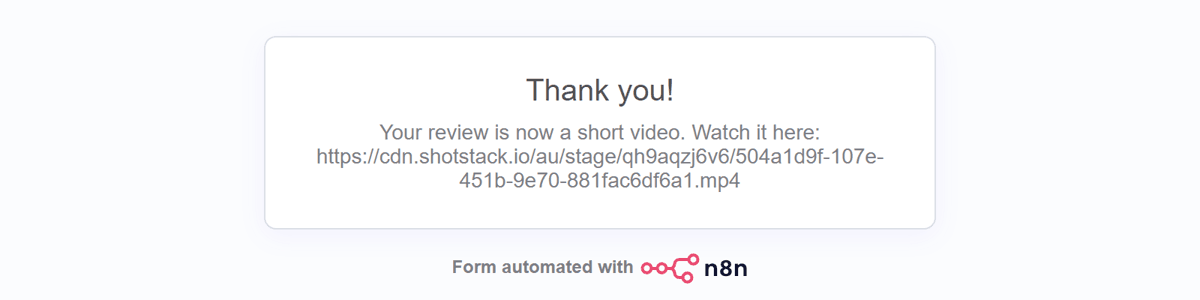
- Shows the customer a thank-you page with their video.
Seven nodes, three of them Shotstack. Two credentials: Shotstack and Google.
The video is a 12-second vertical clip: animated dark background, teal quote mark, the quote in a serif face, stars popping in one at a time, then name and role. This is the output from one of our test submissions, exactly as the workflow produced it:
Where these videos get used
A text quote gets skimmed. A 12-second clip autoplays wherever video autoplays.
- Landing and pricing pages. Swap static quote cards for muted autoplaying clips.
- Paid social. Review-style creative is a staple of Meta and TikTok rotations, and teams need a steady supply of variants.
- Product pages. Review apps show video next to the product, without asking the customer to film anything.
- Everything else. LinkedIn posts, sales follow-ups, event screens.
The same shape, other sources
Swap the trigger and the template, keep the three Shotstack nodes, and the same video automation pattern covers:
- Product rows to video ads, the pattern from our bulk video generation guide.
- A Drive folder of clips to subtitled copies.
- A daily script to a vertical short.
- Reviews from Typeform, Trustpilot or a Shopify review app, mapped to the same five fields.
Before you start
- An n8n instance where you are owner or admin. Only they can install community nodes. Cloud or self-hosted, n8n 2.x.
- A Shotstack account and its production API key. Create a free account; new accounts include credits. Copy the Production key from API Keys in the dashboard. Rates are on the pricing page.
- A Google account for the sheet.
Step 1: install the node
Open the nodes panel with the plus button or the N key. Type “Shotstack”. The node appears under More from the community. Select it and click Install. It should look like this:
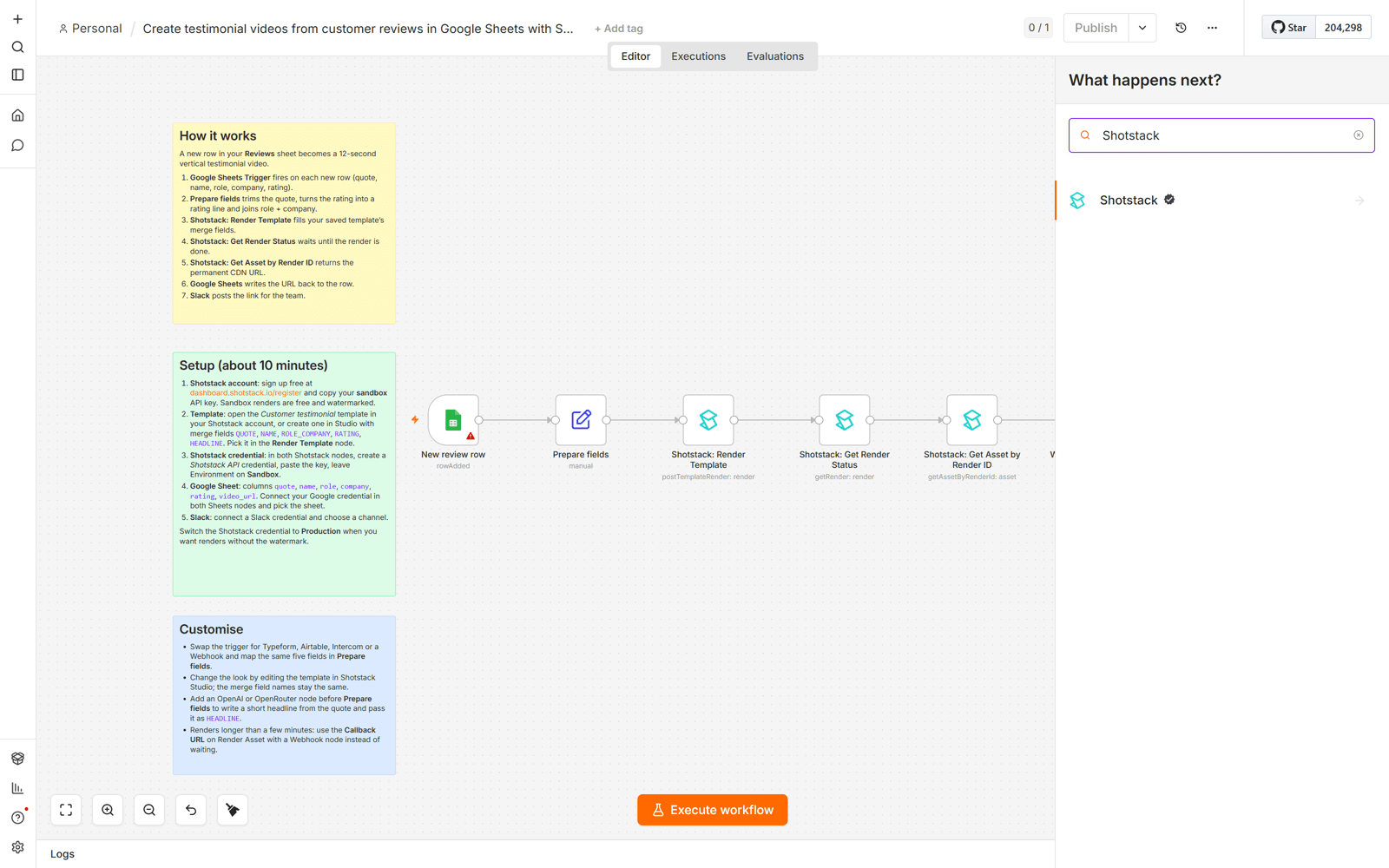
Same on Cloud and self-hosted. If the community section is missing, your instance owner needs to enable verified community nodes in the admin panel.
Step 2: add your Shotstack credential
Drag a Shotstack node onto the canvas and open it. In the credential dropdown choose Create new credential, paste the production key, set Environment to Production, click Test. A green banner means the key and environment match:
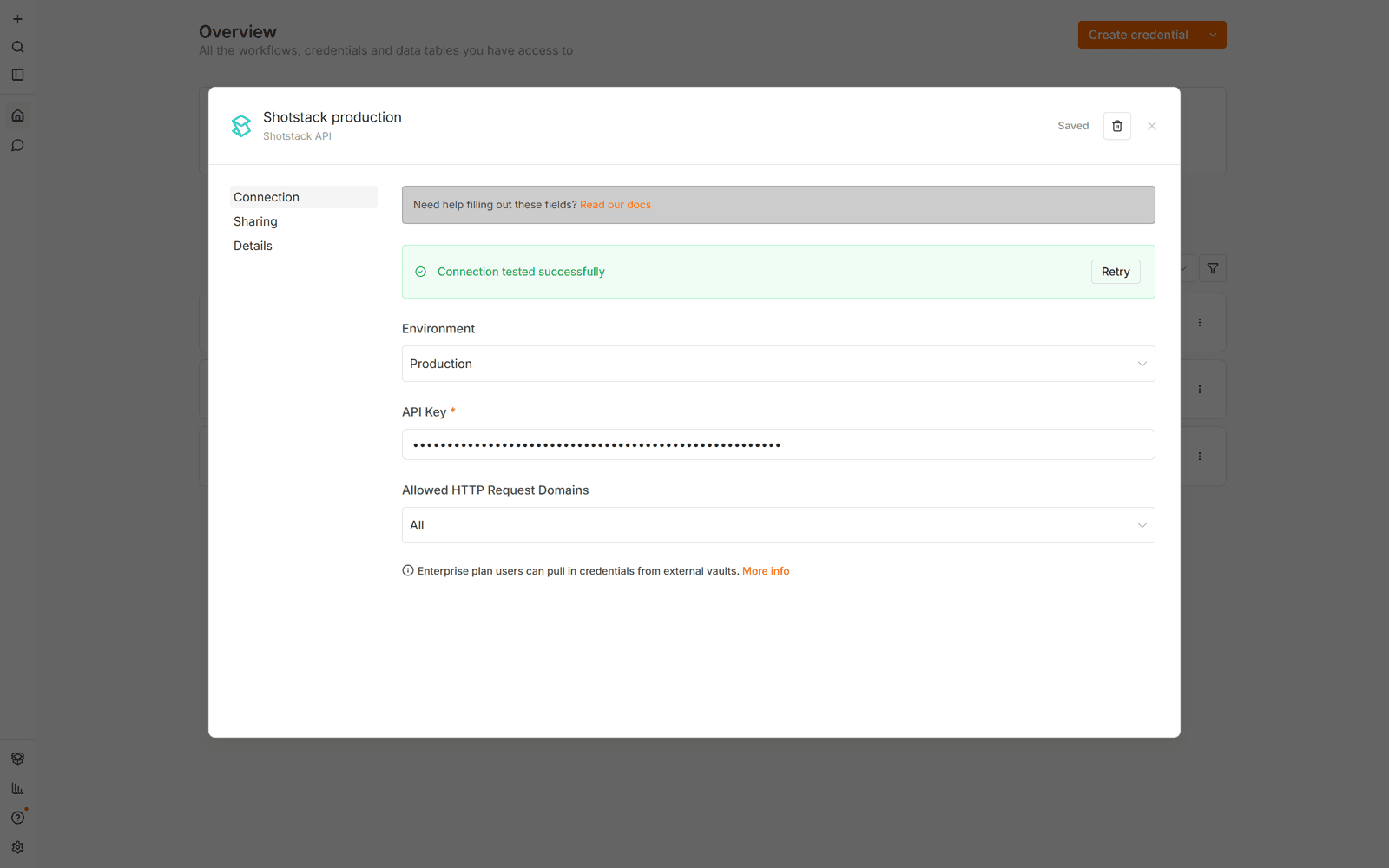
The environment lives on the credential, not the node. “My key works in the Playground but not in my app” is one of our most common support questions, and it is almost always a sandbox key hitting the production endpoint. Here the two travel together.
For free watermarked test renders, add a second credential with a sandbox key set to Sandbox.
Step 3: add the testimonial template to your Shotstack account
Save the JSON below as customer-testimonial-template.json, or download the file. It is a normal Shotstack edit wrapped in a template object: five text and graphic layers, six merge fields, 12 seconds, 1080 by 1920.
{
  "name": "Customer testimonial (vertical, animated)",
  "template": {
    "merge": [
      {"find": "HEADLINE", "replace": "What our customers say"},
      {
        "find": "QUOTE",
        "replace": "We went from a two-day turnaround on every product video to a workflow that runs itself. It just works."
      },
      {"find": "NAME", "replace": "Priya Raman"},
      {"find": "ROLE_COMPANY", "replace": "Head of Marketing, Northwind Outdoors"},
      {"find": "RATING_NUM", "replace": "5"},
      {"find": "ACCENT", "replace": "#22D3EE"}
    ],
    "timeline": {
      "background": "#060A14",
      "fonts": [
        {"src": "https://fonts.gstatic.com/s/inter/v20/UcCo3FwrK3iLTfvlaQc78lA2.ttf"},
        {
          "src": "https://fonts.gstatic.com/s/playfairdisplay/v40/nuFiD-vYSZviVYUb_rj3ij__anPXPTvSgWE_-xU.ttf"
        }
      ],
      "tracks": [
        {
          "clips": [
            {
              "asset": {
                "type": "rich-text",
                "text": "{{HEADLINE}}",
                "font": {"family": "UcCo3FwrK3iLTfvlaQc78lA2", "size": 32, "weight": "600", "color": "{{ACCENT}}"},
                "align": {"horizontal": "left", "vertical": "top"},
                "style": {"letterSpacing": 5, "textTransform": "uppercase"},
                "animation": {"preset": "fadeIn", "duration": 0.6}
              },
              "start": 1,
              "length": 10.5,
              "width": 880,
              "height": 60,
              "position": "top",
              "offset": {"x": 0, "y": -0.215},
              "transition": {"out": "fade"}
            }
          ]
        },
        {
          "clips": [
            {
              "asset": {
                "type": "rich-text",
                "text": "{{QUOTE}}",
                "font": {
                  "family": "nuFiD-vYSZviVYUb_rj3ij__anPXPTvSgWE_-xU",
                  "size": 68,
                  "weight": "500",
                  "color": "#F8FAFC"
                },
                "align": {"horizontal": "left", "vertical": "middle"},
                "style": {"lineHeight": 1.22},
                "animation": {"preset": "ascend", "duration": 0.8, "direction": "up"}
              },
              "start": 1.3,
              "length": 10.2,
              "width": 880,
              "height": 640,
              "position": "center",
              "offset": {"x": 0, "y": -0.02},
              "transition": {"out": "fade"}
            }
          ]
        },
        {
          "clips": [
            {
              "asset": {
                "type": "rich-text",
                "text": "{{NAME}}",
                "font": {"family": "UcCo3FwrK3iLTfvlaQc78lA2", "size": 44, "weight": "700", "color": "#F8FAFC"},
                "align": {"horizontal": "left", "vertical": "middle"},
                "animation": {"preset": "fadeIn", "duration": 0.6}
              },
              "start": 3.2,
              "length": 8.3,
              "width": 880,
              "height": 60,
              "position": "bottom",
              "offset": {"x": 0, "y": 0.235},
              "transition": {"out": "fade"}
            }
          ]
        },
        {
          "clips": [
            {
              "asset": {
                "type": "rich-text",
                "text": "{{ROLE_COMPANY}}",
                "font": {"family": "UcCo3FwrK3iLTfvlaQc78lA2", "size": 32, "weight": "400", "color": "#A5B4C4"},
                "align": {"horizontal": "left", "vertical": "middle"},
                "animation": {"preset": "fadeIn", "duration": 0.6}
              },
              "start": 3.5,
              "length": 8,
              "width": 880,
              "height": 50,
              "position": "bottom",
              "offset": {"x": 0, "y": 0.2},
              "transition": {"out": "fade"}
            }
          ]
        },
        {
          "clips": [
            {
              "asset": {
                "type": "html5",
                "html": "<div id=\"wrap\">\n  <div class=\"blob\" id=\"b1\"></div><div class=\"blob\" id=\"b2\"></div><div class=\"blob\" id=\"b3\"></div>\n  <div id=\"grid\"></div>\n  <div id=\"bar\"></div>\n  <svg id=\"qmark\" viewBox=\"0 0 100 100\"><path d=\"M18 62c0-18 11-32 30-40l4 7c-11 5-17 12-18 21 6-1 12 1 16 6 4 5 4 12-1 17-5 6-14 7-21 2-7-4-10-8-10-13zm42 0c0-18 11-32 30-40l4 7c-11 5-17 12-18 21 6-1 12 1 16 6 4 5 4 12-1 17-5 6-14 7-21 2-7-4-10-8-10-13z\"/></svg>\n  <div id=\"stars\"></div>\n</div>",
                "css": "html,body{margin:0;width:1080px;height:1920px;overflow:hidden;background:#060A14}\n#wrap{position:relative;width:1080px;height:1920px;overflow:hidden;background:radial-gradient(120% 80% at 50% 0%,#0E1B33 0%,#060A14 60%)}\n.blob{position:absolute;width:900px;height:900px;border-radius:50%;filter:blur(90px);opacity:.55;mix-blend-mode:screen}\n#b1{left:-300px;top:-200px;background:{{ACCENT}};opacity:.28}\n#b2{left:420px;top:300px;background:#4C6FFF;opacity:.30}\n#b3{left:-100px;top:1150px;background:#0EA5A0;opacity:.26}\n#grid{position:absolute;inset:0;background-image:linear-gradient(rgba(255,255,255,.045) 1px,transparent 1px),linear-gradient(90deg,rgba(255,255,255,.045) 1px,transparent 1px);background-size:120px 120px;mask-image:radial-gradient(80% 70% at 50% 45%,#000 40%,transparent 100%);-webkit-mask-image:radial-gradient(80% 70% at 50% 45%,#000 40%,transparent 100%)}\n#bar{position:absolute;left:100px;top:378px;width:0;height:10px;border-radius:5px;background:{{ACCENT}}}\n#qmark{position:absolute;left:88px;top:560px;width:220px;height:220px;fill:{{ACCENT}};opacity:0;transform:translateY(24px)}\n#stars{position:absolute;left:100px;top:1330px;display:flex;gap:14px}\n#stars svg{width:52px;height:52px;opacity:0;transform:scale(.6)}",
                "js": "const n=Math.max(1,Math.min(5,parseInt(\"{{RATING_NUM}}\",10)||5));\nconst box=document.getElementById('stars');\nfor(let i=0;i<5;i++){const s=document.createElementNS('http://www.w3.org/2000/svg','svg');s.setAttribute('viewBox','0 0 24 24');\nconst p=document.createElementNS('http://www.w3.org/2000/svg','path');p.setAttribute('d','M12 2.5l2.9 6.1 6.6.8-4.9 4.6 1.3 6.6L12 17.4 6.1 20.6l1.3-6.6L2.5 9.4l6.6-.8z');\np.setAttribute('fill',i<n?'#FBBF24':'rgba(255,255,255,.22)');s.appendChild(p);box.appendChild(s);}\ngsap.to('#b1',{x:160,y:120,duration:12,ease:'sine.inOut'});\ngsap.to('#b2',{x:-220,y:-140,scale:1.15,duration:12,ease:'sine.inOut'});\ngsap.to('#b3',{x:140,y:-180,duration:12,ease:'sine.inOut'});\nconst tl=gsap.timeline({defaults:{ease:'power3.out'}});\ntl.to('#bar',{width:120,duration:0.6},0.5)\n  .to('#qmark',{opacity:1,y:0,duration:0.6},0.7)\n  .to('#stars svg',{opacity:1,scale:1,duration:0.33,stagger:0.13,ease:'back.out(1.4)'},2.6)\n  .to('#wrap',{opacity:0,duration:0.5},11.5);"
              },
              "start": 0,
              "length": 12,
              "width": 1080,
              "height": 1920,
              "fit": "none",
              "position": "center",
              "transition": {"in": "fade"}
            }
          ]
        }
      ]
    },
    "output": {"format": "mp4", "fps": 25, "size": {"width": 1080, "height": 1920}}
  }
}
Post it to the Templates endpoint with your production key:
curl -X POST https://api.shotstack.io/edit/v1/templates \
  -H "x-api-key: YOUR_PRODUCTION_KEY" \
  -H "Content-Type: application/json" \
  -d @customer-testimonial-template.json
The template now appears under Templates in your dashboard and in the picker inside the n8n node. It has six merge fields, and every one must be sent on each render (the workflow does this).
| Merge field | Fills | Example |
|---|---|---|
HEADLINE | Kicker line at the top | What our customers say |
QUOTE | The testimonial, up to about 220 characters | We went from a two-day turnaround to a workflow that runs itself. |
NAME | Who said it | Priya Raman |
ROLE_COMPANY | Role and company on one line | Head of Marketing, Northwind Outdoors |
RATING_NUM | Whole number 1 to 5, drawn as stars | 5 |
ACCENT | Hex color for bar, quote mark and kicker | #22D3EE |
To restyle, open the template in Shotstack Studio, change fonts, colors or timing, save. Keep the field names and the workflow keeps working.
Step 4: your first render in three nodes
Worth doing once by hand before importing the workflow.
Manual Trigger. So you can click Execute.
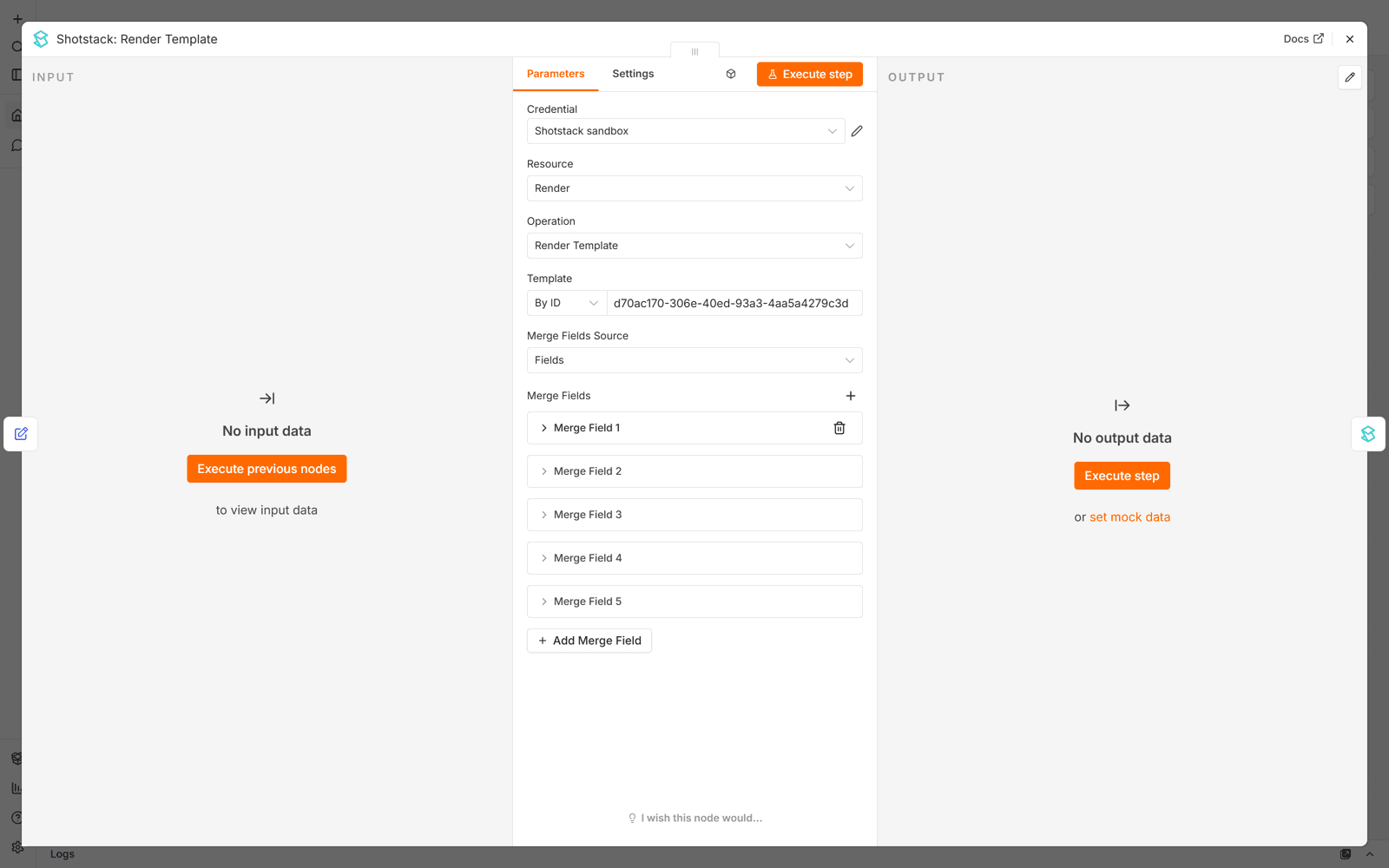
Shotstack: Render Template. Resource Render, Operation Render Template. Pick Customer testimonial (vertical, animated) in the Template field. Under Merge Fields choose Fields and add the six placeholders from the table above, with each Find value written without braces:
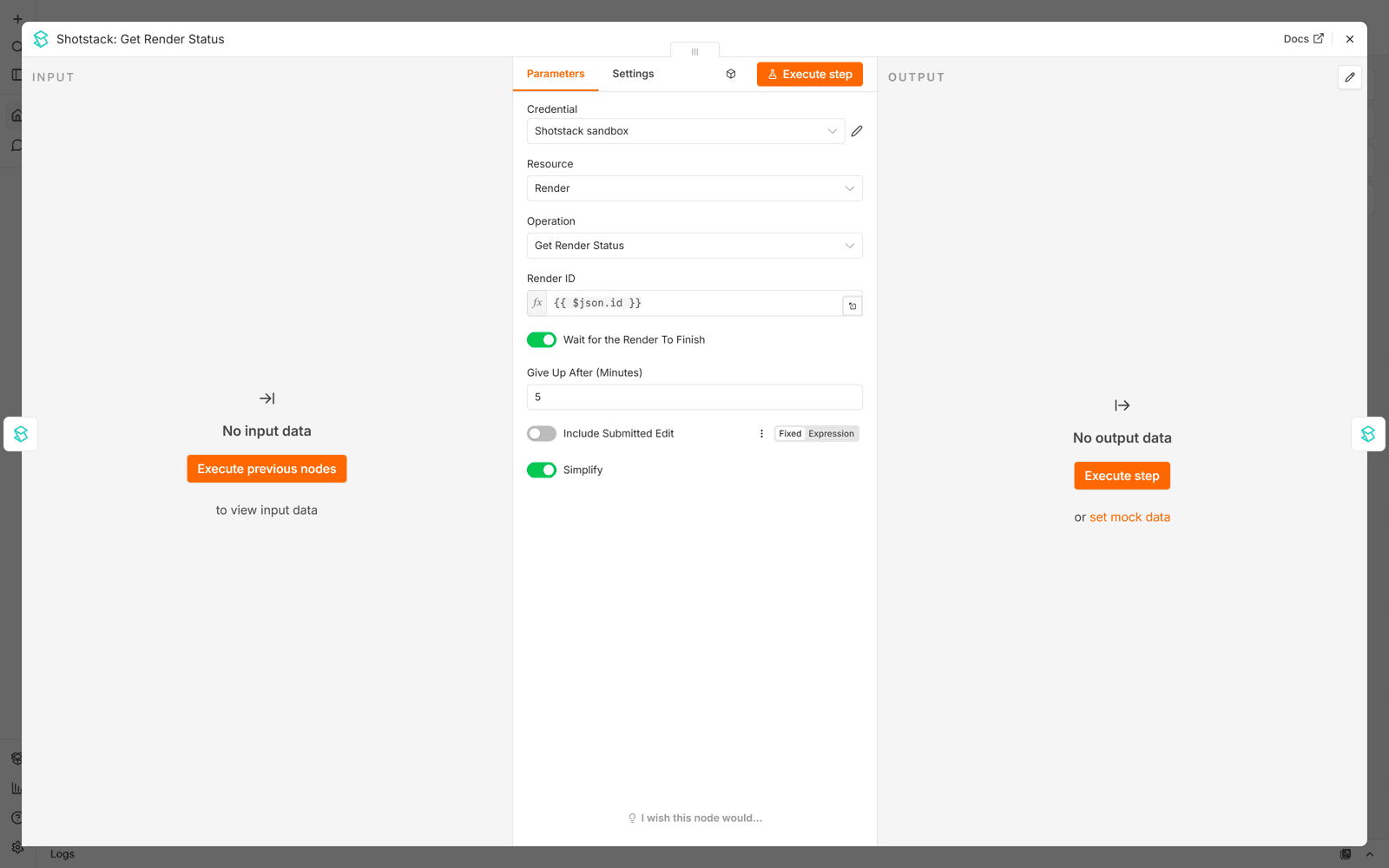
Shotstack: Get Render Status. Drag the id from the previous node into Render ID. Turn on Wait for the Render To Finish and leave Give Up After at 5 minutes:
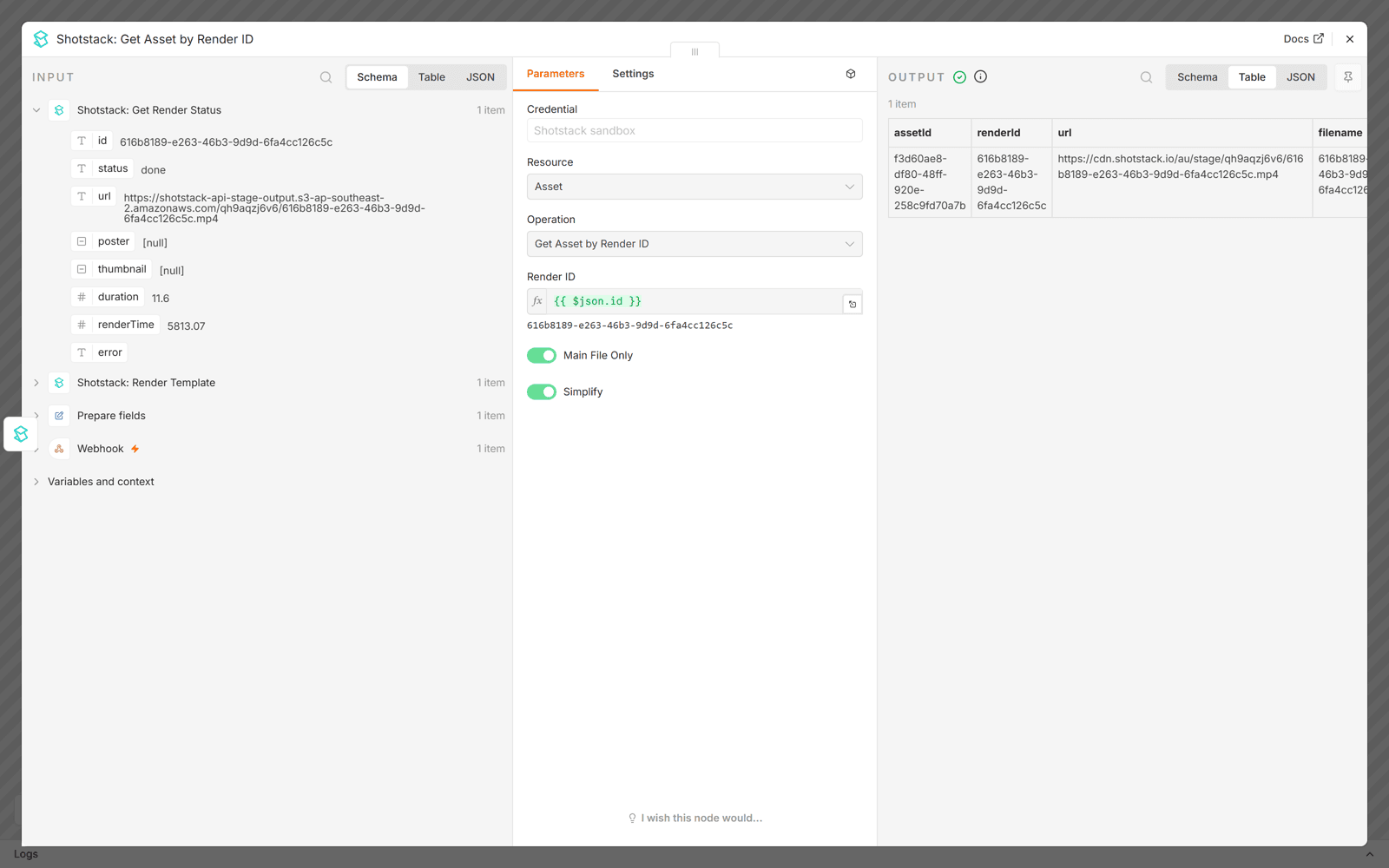
Shotstack: Get Asset by Render ID. Resource Asset. Drag the same id into Render ID.
Execute. About a minute later the last node returns a permanent url on the Shotstack CDN:
To submit renders and collect them later, stop after Render Template and store the id. To start from raw JSON, swap Render Template for Render Asset.
Step 5: import the finished workflow
Copy the workflow JSON below and paste it onto an empty n8n canvas with Ctrl+V (Cmd+V on a Mac). n8n creates all the nodes and connections. Or download the file and use Import from File in the top-right menu.
{
  "name": "Turn customer reviews into testimonial videos with Shotstack",
  "nodes": [
    {
      "parameters": {
        "content": "## How it works\nA customer fills in a short review form. The workflow turns the answers into a 12-second vertical testimonial video and files it in a Google Sheet.\n\n1. **Review form** is hosted by n8n. Share the link with customers.\n2. **Prepare fields** trims the quote, turns the rating into a number from 1 to 5 and joins role + company.\n3. **Shotstack: Render Template** fills your saved template's merge fields.\n4. **Shotstack: Get Render Status** waits until the render is done.\n5. **Shotstack: Get Asset by Render ID** returns the permanent CDN URL.\n6. **Google Sheets** appends a row: who said it, the quote, the rating and the video URL.\n7. **Thank the customer** shows a thank-you page with the video link.",
        "height": 440,
        "width": 420
      },
      "id": "a1b2c3d4-0001-4000-8000-000000000001",
      "name": "How it works",
      "type": "n8n-nodes-base.stickyNote",
      "typeVersion": 1,
      "position": [-1180,-300]
    },
    {
      "parameters": {
        "content": "## Setup (about 5 minutes)\n1. **Shotstack account**: [sign up free](https://shotstack.io/?utm_source=n8n&utm_medium=template&utm_campaign=customer-review-video) and copy your **production** API key.\n2. **Template**: add the customer testimonial template from the guide to your Shotstack account (POST it to `/edit/v1/templates`), or design your own in Shotstack Studio with merge fields `QUOTE`, `NAME`, `ROLE_COMPANY`, `RATING_NUM`, `HEADLINE`, `ACCENT`. Pick it in the **Render Template** node.\n3. **Shotstack credential**: in any Shotstack node, create a *Shotstack API* credential, paste the key, set Environment to **Production**.\n4. **Google Sheets**: create a sheet with the columns `submitted_at`, `name`, `role`, `company`, `rating`, `quote`, `video_url`. Connect your Google credential and pick the sheet.\n5. Activate the workflow and share the form URL shown on the **Review form** node.\n\nRenders use credits. To try the workflow without spending any, use a sandbox key and set Environment to **Sandbox**; those renders carry a watermark.",
        "height": 460,
        "width": 420,
        "color": 4
      },
      "id": "a1b2c3d4-0002-4000-8000-000000000002",
      "name": "Setup",
      "type": "n8n-nodes-base.stickyNote",
      "typeVersion": 1,
      "position": [-1180,180]
    },
    {
      "parameters": {
        "content": "## Customise\n- Swap the form for a Typeform, Tally, Trustpilot or Judge.me trigger and map the same five fields in **Prepare fields**.\n- Change the accent colour in the **Render Template** node (ACCENT), or edit the template itself; the merge field names stay the same.\n- Add an OpenAI or OpenRouter node before **Prepare fields** to write a short headline from the quote and pass it as `HEADLINE`.\n- Add a Slack or email node after the sheet to tell your team, or replace the sheet with Airtable, Notion or your CMS.",
        "height": 300,
        "width": 420,
        "color": 5
      },
      "id": "a1b2c3d4-0003-4000-8000-000000000003",
      "name": "Customise",
      "type": "n8n-nodes-base.stickyNote",
      "typeVersion": 1,
      "position": [-1180,680]
    },
    {
      "parameters": {
        "formTitle": "Share a quick review",
        "formDescription": "Two minutes. We turn your words into a short video to say thanks.",
        "formFields": {
          "values": [
            {
              "fieldLabel": "Your review",
              "fieldType": "textarea",
              "placeholder": "What changed for you since you started using the product?",
              "requiredField": true
            },
            {"fieldLabel": "Your name", "placeholder": "Priya Raman", "requiredField": true},
            {"fieldLabel": "Your role", "placeholder": "Head of Marketing"},
            {"fieldLabel": "Company", "placeholder": "Northwind Outdoors"},
            {
              "fieldLabel": "Rating out of 5",
              "fieldType": "number",
              "placeholder": "5",
              "requiredField": true
            }
          ]
        },
        "options": {"buttonLabel": "Send review"}
      },
      "id": "a1b2c3d4-0004-4000-8000-000000000004",
      "name": "Review form",
      "type": "n8n-nodes-base.formTrigger",
      "typeVersion": 2.5,
      "position": [-700,200],
      "webhookId": "customer-review-video"
    },
    {
      "parameters": {
        "assignments": {
          "assignments": [
            {
              "id": "f1",
              "name": "quote",
              "type": "string",
              "value": "={{ ($json['Your review'] || '').toString().trim().slice(0, 220) }}"
            },
            {
              "id": "f2",
              "name": "name",
              "type": "string",
              "value": "={{ ($json['Your name'] || '').toString().trim() }}"
            },
            {
              "id": "f3",
              "name": "role_company",
              "type": "string",
              "value": "={{ [$json['Your role'], $json['Company']].filter(Boolean).join(', ') }}"
            },
            {
              "id": "f4",
              "name": "rating_num",
              "type": "string",
              "value": "={{ String(Math.min(5, Math.max(1, Math.round(Number($json['Rating out of 5']) || 5)))) }}"
            },
            {"id": "f5", "name": "headline", "type": "string", "value": "What our customers say"}
          ]
        },
        "options": {}
      },
      "id": "a1b2c3d4-0005-4000-8000-000000000005",
      "name": "Prepare fields",
      "type": "n8n-nodes-base.set",
      "typeVersion": 3.4,
      "position": [-460,200]
    },
    {
      "parameters": {
        "resource": "render",
        "operation": "postTemplateRender",
        "templateId": {"__rl": true, "mode": "list", "value": ""},
        "mergeSource": "fields",
        "merge": {
          "mergeFields": [
            {"find": "QUOTE", "replace": "={{ $json.quote }}"},
            {"find": "NAME", "replace": "={{ $json.name }}"},
            {"find": "ROLE_COMPANY", "replace": "={{ $json.role_company }}"},
            {"find": "RATING_NUM", "replace": "={{ $json.rating_num }}"},
            {"find": "HEADLINE", "replace": "={{ $json.headline }}"},
            {"find": "ACCENT", "replace": "#22D3EE"}
          ]
        }
      },
      "id": "a1b2c3d4-0006-4000-8000-000000000006",
      "name": "Shotstack: Render Template",
      "type": "@shotstack/n8n-nodes-shotstack.shotstack",
      "typeVersion": 1,
      "position": [-220,200]
    },
    {
      "parameters": {
        "resource": "render",
        "operation": "getRender",
        "renderId": "={{ $json.id }}",
        "waitForCompletion": true,
        "giveUpAfter": 5
      },
      "id": "a1b2c3d4-0007-4000-8000-000000000007",
      "name": "Shotstack: Get Render Status",
      "type": "@shotstack/n8n-nodes-shotstack.shotstack",
      "typeVersion": 1,
      "position": [20,200]
    },
    {
      "parameters": {"resource": "asset", "operation": "getAssetByRenderId", "renderId": "={{ $json.id }}"},
      "id": "a1b2c3d4-0008-4000-8000-000000000008",
      "name": "Shotstack: Get Asset by Render ID",
      "type": "@shotstack/n8n-nodes-shotstack.shotstack",
      "typeVersion": 1,
      "position": [260,200]
    },
    {
      "parameters": {
        "operation": "append",
        "documentId": {"__rl": true, "mode": "list", "value": ""},
        "sheetName": {"__rl": true, "mode": "list", "value": ""},
        "columns": {
          "mappingMode": "defineBelow",
          "value": {
            "submitted_at": "={{ $now.toISO() }}",
            "name": "={{ $('Prepare fields').item.json.name }}",
            "role": "={{ $('Review form').item.json['Your role'] || '' }}",
            "company": "={{ $('Review form').item.json['Company'] || '' }}",
            "rating": "={{ $('Review form').item.json['Rating out of 5'] }}",
            "quote": "={{ $('Prepare fields').item.json.quote }}",
            "video_url": "={{ $json.url }}"
          },
          "matchingColumns": [],
          "schema": []
        },
        "options": {}
      },
      "id": "a1b2c3d4-0009-4000-8000-000000000009",
      "name": "File the video in Google Sheets",
      "type": "n8n-nodes-base.googleSheets",
      "typeVersion": 4.5,
      "position": [500,200]
    },
    {
      "parameters": {
        "operation": "completion",
        "respondWith": "text",
        "completionTitle": "Thank you!",
        "completionMessage": "=Your review is now a short video. Watch it here: {{ $('Shotstack: Get Asset by Render ID').item.json.url }}",
        "options": {}
      },
      "id": "a1b2c3d4-0010-4000-8000-000000000010",
      "name": "Thank the customer",
      "type": "n8n-nodes-base.form",
      "typeVersion": 2.5,
      "position": [740,200]
    }
  ],
  "connections": {
    "Review form": {"main": [[{"node": "Prepare fields", "type": "main", "index": 0}]]},
    "Prepare fields": {"main": [[{"node": "Shotstack: Render Template", "type": "main", "index": 0}]]},
    "Shotstack: Render Template": {"main": [[{"node": "Shotstack: Get Render Status", "type": "main", "index": 0}]]},
    "Shotstack: Get Render Status": {"main": [[{"node": "Shotstack: Get Asset by Render ID", "type": "main", "index": 0}]]},
    "Shotstack: Get Asset by Render ID": {"main": [[{"node": "File the video in Google Sheets", "type": "main", "index": 0}]]},
    "File the video in Google Sheets": {"main": [[{"node": "Thank the customer", "type": "main", "index": 0}]]}
  },
  "settings": {"executionOrder": "v1"}
}
Either way you get this canvas:
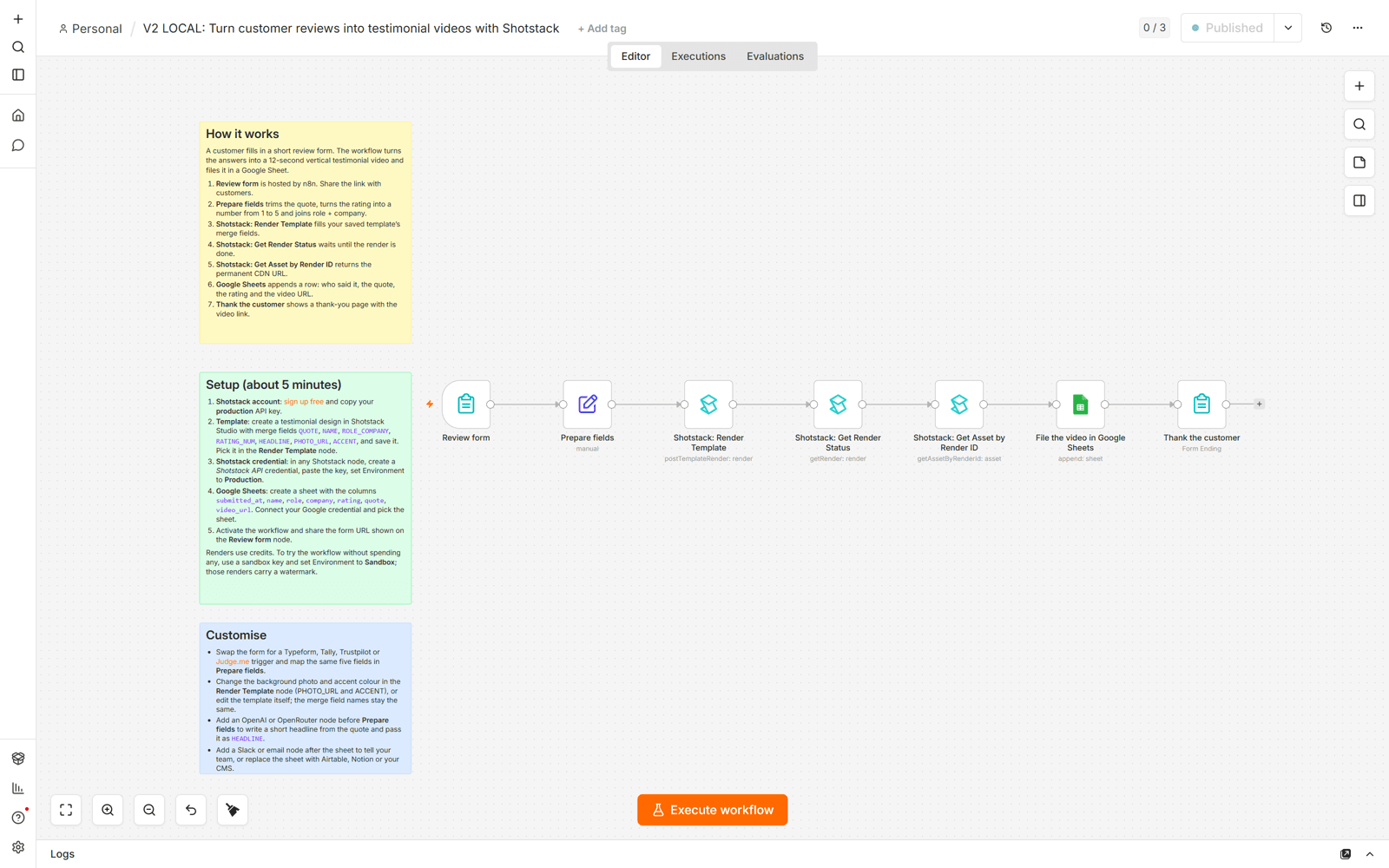
The three sticky notes on the left repeat the setup steps, so the workflow explains itself to whoever opens it later. The nodes, left to right:
Review form. An n8n Form Trigger with five fields: review, name, role, company, rating. n8n hosts the page.
Prepare fields. Trims the quote to 220 characters, rounds the rating to a whole number from 1 to 5, joins role and company, sets the headline.
Shotstack: Render Template. Fills the six merge fields.
Shotstack: Get Render Status. Waits for the render.
Shotstack: Get Asset by Render ID. Fetches the permanent URL.
File the video in Google Sheets. Appends when, who, role, company, rating, quote, video URL.
Thank the customer. Ends the form with a page that shows the video link.
Two of those nodes are pages your customer sees. The form:
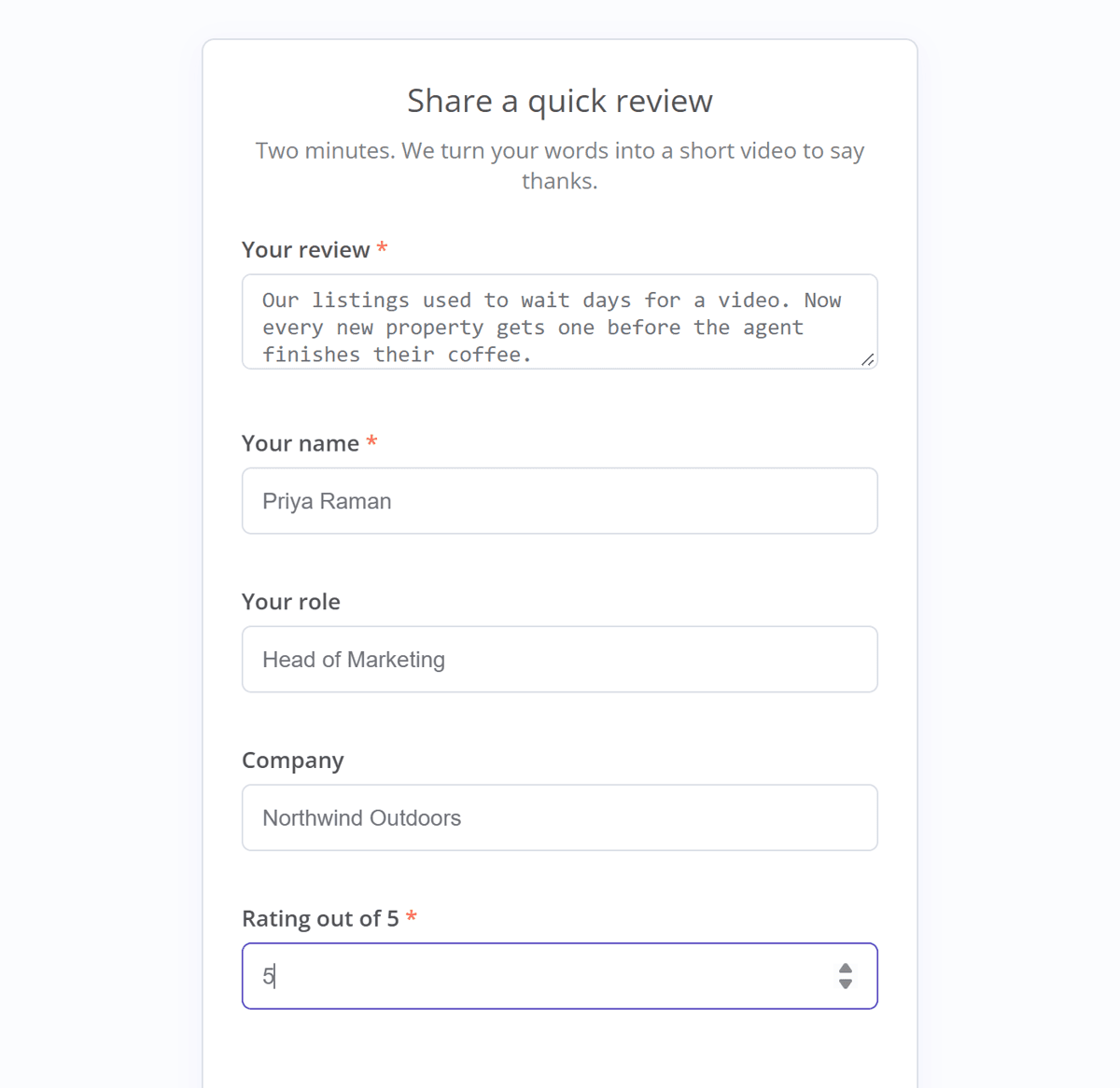
And the page they land on about a minute after submitting:
Step 6: connect it and run a test review
- Credential. Open any Shotstack node and pick the credential from step 2. The other two pick it up.
- Template. In Shotstack: Render Template, pick Customer testimonial (vertical, animated). The merge fields are already mapped.
- Sheet. Create a Google Sheet with a tab named Reviews and these headers in row 1:
submitted_at,name,role,company,rating,quote,video_url. In File the video in Google Sheets, connect Google (n8n Cloud: Sign in with Google; self-hosted: create an OAuth client first), then pick the spreadsheet and the Reviews tab from the lists. Pick, do not type: a mistyped tab name fails with “Sheet not found”. - Activate. Save, then switch the workflow to Active. The form only accepts submissions while active.
- Test. Open Review form, copy the Production URL, submit a review in a new tab. About a minute later: thank-you page with the link, a new row in the sheet, the video under Renders in your Shotstack dashboard.
Share the form URL with customers, or drop it into a post-purchase email.
Two easy changes:
- Swap the form for a Typeform, Tally, Trustpilot or Judge.me trigger and map the same five fields in Prepare fields.
- Add an OpenAI or OpenRouter node before Prepare fields to write the headline from the quote.
Tips that save a support ticket
- Send every merge field on every render. Passed merge fields replace the template’s saved defaults as a set. A missing one stays in the video as raw text, and in a color or URL field it fails the render. That is why the workflow sends
ACCENTevery time. - Keep the Edit field in fixed mode. In expression mode n8n evaluates Shotstack’s own
{{ HEADLINE }}placeholders and removes them. The node refuses an edit that still holds an unevaluated n8n expression, so you get a clear error instead of a failed render. - Long renders belong on a callback. Give Up After maxes at 10 minutes. Beyond that, or for bulk jobs, use a Webhook node and pass its URL into Render Asset’s Callback URL.
- Store the permanent URL. The URL from Get Render Status is temporary. Run Get Asset by Render ID before you save or share a link.
- Do not leave a loop running against dead source files. Workflows that keep submitting renders after their source URLs expire fail with asset fetch errors for days. The node stops the run with the reason; fix the source and re-run.
- Rate limits are handled. On a 429 the node backs off and honors Retry-After.
- Renders use credits. A 12-second 1080p vertical clip is a small spend; rates are on the pricing page. A sandbox credential renders free with a watermark.
Use the node from an AI Agent
The node is registered as a tool, so an n8n AI Agent can call it. The agent reads a request in plain language, writes the fields, and calls Shotstack itself. An HTTP Request workflow cannot do that.
We ran this example. Three nodes plus the tools:
- Chat Trigger. A chat box on the canvas.
- AI Agent with a chat model attached. We used Anthropic’s Claude; any supported model works. System message: “You write short customer testimonials from notes. When asked for a video, call the Shotstack Render Template tool with a quote of at most 220 characters, the customer’s name, their role and company on one line, and a rating from 1 to 5. Then call Get Render Status with the render id, then Get Asset by Render ID with the same id, and reply with the final video url.”
- Three Shotstack nodes connected to the agent’s Tool input. Render Template with
{{ $fromAI('quote', 'The testimonial, 220 characters or fewer', 'string') }}in theQUOTEmerge field and the same pattern forNAME,ROLE_COMPANYandRATING_NUM, withHEADLINEandACCENTfixed. Get Render Status with{{ $fromAI('renderId') }}in Render ID and Wait for the Render To Finish on. Get Asset by Render ID with the same$fromAI('renderId').
We typed “Priya at Northwind said the turnaround went from two days to nothing, five stars”. The agent wrote the quote, called the three tools in order, and replied 41 seconds later with the finished CDN URL and a summary of what it had put in the video.
Three notes:
- In tool mode, field defaults that reference
$jsondo not apply. Use$fromAIfor anything the agent should fill in. - On self-hosted n8n, community nodes only appear as tools when the instance sets
N8N_COMMUNITY_PACKAGES_ALLOW_TOOL_USAGE=true. n8n Cloud allows verified nodes as tools. - Templates are safer than raw edits here: the agent chooses words, not timeline structure. For an agent that writes full edits, point it at the Shotstack documentation in its system message, or read how to build an AI video agent.
Give every workflow a video output
Install the node, add your production credential, save the template, and the permanent URL comes back in the same run. That is n8n video automation in seven nodes; swap the trigger for wherever your reviews already arrive.
Create a free Shotstack account to get your API key and starter credits, then search for Shotstack in your n8n nodes panel.
Frequently asked questions (FAQs)
Does the Shotstack node work on n8n Cloud?
Yes. It is a verified community node, installable by the instance owner or an admin. Self-hosted installs the same way.
Do I still need a Wait node?
No. Turn on Wait for the Render To Finish in Get Render Status. For renders over 10 minutes, use a Callback URL and a Webhook node.
Do renders cost credits?
Production renders use your account’s credits; new accounts start with some. A credential set to Sandbox renders free with a watermark.
Do I need separate credentials for sandbox and production?
Only if you use both. One credential holds one key and one environment.
Can I use my own template design?
Yes. Design it in Shotstack Studio, save it, pick it in Render Template. Keep the six merge field names and nothing else changes; rename them and update the Find values to match.
Can I render from raw Edit JSON instead of a template?
Yes. Use Render Asset with a full Shotstack edit in the Edit field, in fixed mode. Every asset type is supported, including the generative AI assets.
Where do I get the workflow and template files?
Both are printed in full in this guide, with download links next to them: the template JSON in step 3, the workflow JSON in step 5. Paste the workflow onto your n8n canvas or import the file; post the template to your Shotstack account with the curl command in step 3.
Get started with Shotstack's video editing API in two steps:
- Sign up for free to get your API key.
- Send an API request to create your video:
curl --request POST 'https://api.shotstack.io/v1/render' \
--header 'x-api-key: YOUR_API_KEY' \
--data-raw '{
  "timeline": {
    "tracks": [
      {
        "clips": [
          {
            "asset": {
              "type": "video",
              "src": "https://shotstack-assets.s3.amazonaws.com/footage/beach-overhead.mp4"
            },
            "start": 0,
            "length": "auto"
          }
        ]
      }
    ]
  },
  "output": {
    "format": "mp4",
    "size": {
      "width": 1280,
      "height": 720
    }
  }
}'

Published September 15, 2026
Jesus Rojas is a Growth Engineer at Shotstack, combining engineering and experimentation to help developers adopt video APIs. He builds onboarding experiences, lifecycle automation and analytics. Outside work, he enjoys making music and plays several instruments. More from Jesus
Experience Shotstack for yourself.
- Seamless integration
- Dependable high-volume scaling
- Blazing fast rendering
- Save thousands