Contents
 Claude
  ChatGPT
  Perplexity
  Google AI
 Contents
You can get AI content pipeline automation that includes video creation in two ways: buy a creative automation tool, or build it on a video API. This guide builds it with Node.js and the Shotstack API, which handles the templates, rendering and AI generation of images, video clips, voice-overs and music in one place.
Either way, making AI-generated brand videos at scale and keeping every one on brand takes five parts: a brand guide, a template built from it, the brand’s own data, guardrails that keep the AI on brand, and a way to render at scale.
It’s written for developers and technical marketers who build content systems for a brand or for agency clients.
The script turns a product export into one 9:16 video per product. The AI writes a short voice-over script, puts the real product on a brand backdrop and animates it. Code and a vision model check its work, and Shotstack renders each on-brand video from a saved template.
It’s automated content creation with the brand’s rules written down where code can enforce them, and nothing gets posted until a person approves it.
TL;DR
- An on-brand AI content pipeline needs five parts: a brand guide stored as data, a template built from it, the brand’s own product data, guardrails that check the AI’s work, and rendering at scale.
- This guide builds all five in one Node.js script with the Shotstack API, for an example homeware store.
- The AI writes the voice-over script, places the real product on a brand backdrop and animates it. Code and a vision model check each result before anything renders.
- Every video lands in an approval sheet, and nothing gets posted until a person approves it.
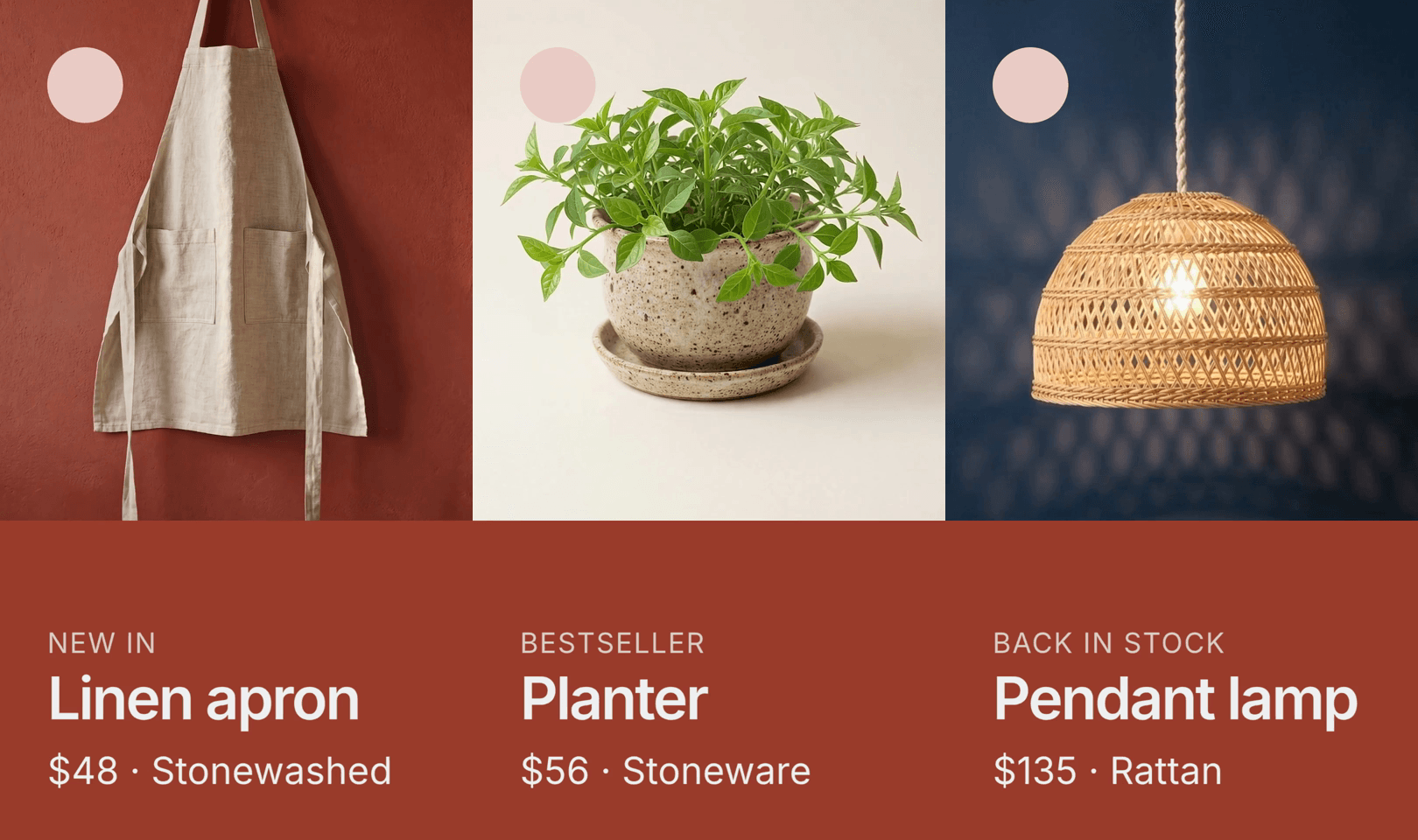
Here are the three finished videos: the linen apron, the planter and the pendant lamp.
The example store
Field & Fold is a made-up online homeware and lifestyle store with hundreds of products, new arrivals every week, and a developer or agency on hand to build its content system.
Every one of those products could sell better with a video: in a 2026 Wyzowl survey, 85% of people said a video had convinced them to buy a product or service. At that volume, nobody can make them by hand.
Its product data comes from a simplified, Shopify-like export with one row per product:
handle,title,product_type,price,detail,badge,features,image_src
linen-apron,Linen apron,Textiles,$48,Stonewashed,new,stonewashed linen; adjustable neck strap; two front pockets; long ties,https://d2jn8jtjz02j0j.cloudfront.net/linen_apron_8117f4e43f.png
ceramic-planter,Planter,Ceramics,$56,Stoneware,bestseller,glazed stoneware; drainage hole; saucer included; speckled finish,https://d2jn8jtjz02j0j.cloudfront.net/ceramic_planter_ef7a64c06b.png
rattan-pendant,Pendant lamp,Lighting,$135,Rattan,restock,woven rattan shade; braided cotton cord; warm white bulb included; soft diffused light,https://d2jn8jtjz02j0j.cloudfront.net/rattan_pendant_ab1692d351.png
Most of these columns are what a store platform exports.
Two are filled in by the store: detail, a short fact for the screen, and badge, which says whether a product is new, a bestseller or back in stock. In Shopify, a badge like that usually lives in the product’s tags. A real Shopify export also has a Status column, but it means active, draft or archived, which is why the badge has its own column.
The packshots in this example were generated for the demo; in a real store, they’re the product photos you already have.
Where the pipeline sits
The pipeline has two inputs, the brand guide (brand.json) and the product export, and one output: an approved video for each product. In between are the five parts.
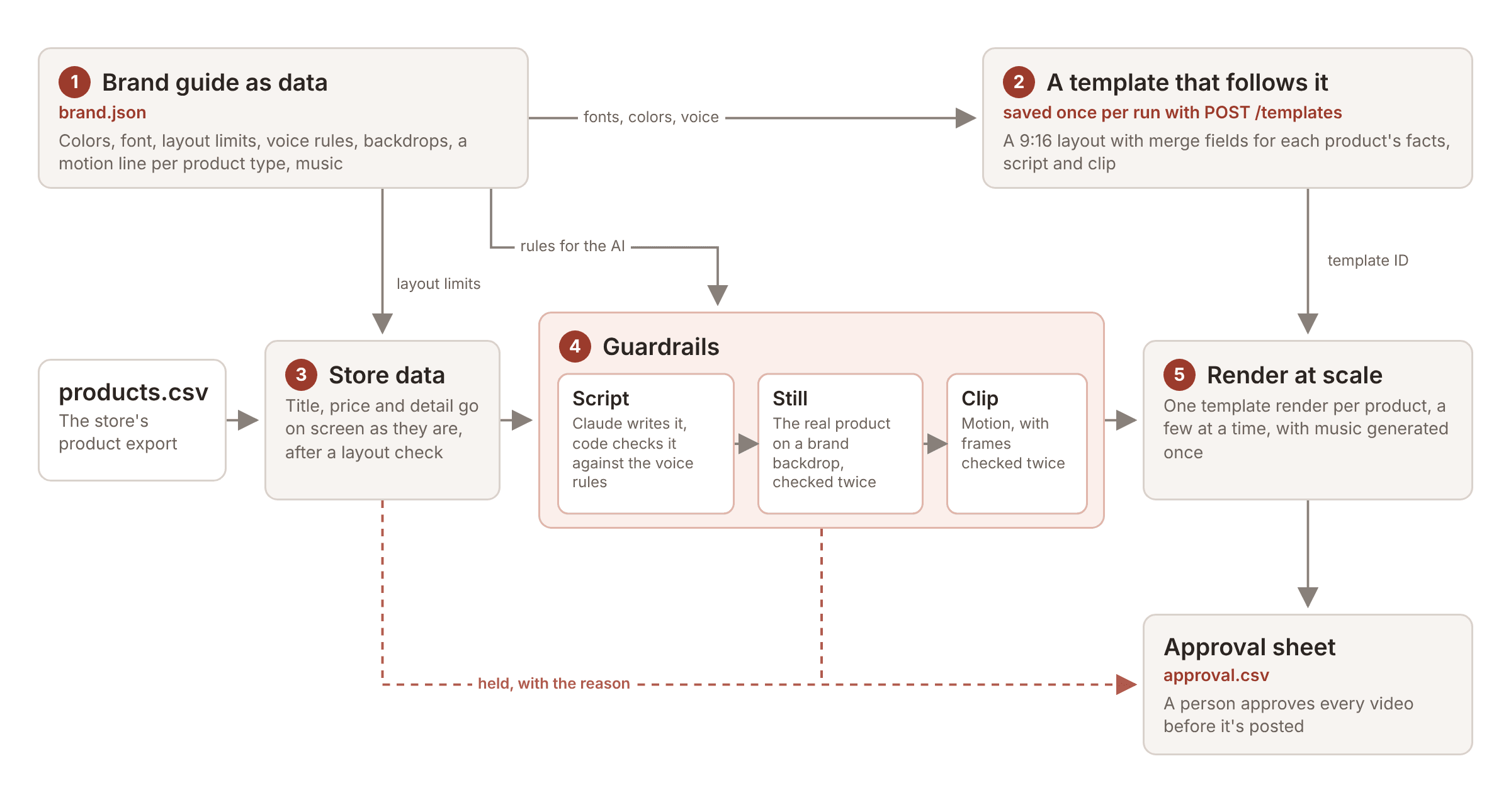
The idea that makes the rest work is that the brand guide is data the pipeline reads on every run, not a PDF people try to remember. The template is built from that file, and every script the AI writes and every image it makes is checked against it.
Before you start
You need:
- Node.js 22.9 or later, and ffmpeg on your PATH. The script uses ffmpeg to pull frames out of each clip so they can be checked.
- A Shotstack API key in the
SHOTSTACK_API_KEYenvironment variable. The code calls the production API athttps://api.shotstack.io/edit/v1, and production renders and AI generation use credits; see Shotstack pricing. The sandbox renders for free with a watermark, but AI generation there is charged to your production credits. - An Anthropic API key in
ANTHROPIC_API_KEY. Claude writes the voice-over scripts and checks the generated images, but any LLM that can read images can do both.
The project has four files in one folder: pipeline.js, brand.json, products.csv and package.json. The complete pipeline.js is at the end of this guide, brand.json is in part 1 and products.csv is in part 3. The package.json tells Node that the script uses ES modules:
{
  "name": "ai-content-pipeline",
  "private": true,
  "type": "module",
  "engines": { "node": ">=22.9" }
}
To run it:
export SHOTSTACK_API_KEY=your_production_key
export ANTHROPIC_API_KEY=your_anthropic_key

node pipeline.js --dry    # writes the template to out/template.json, no API calls
node pipeline.js          # shows the product count and the most it can spend, then stops
node pipeline.js --yes    # makes a video for every product in products.csv
A real run asks for --yes because every product can cost up to four generations and a render, and each render also generates a voice-over. If you run it again, products that already have a video in out/ are skipped, and new rows are added to the approval sheet instead of replacing it.
1. The brand guide as data
Everything that makes a Field & Fold video look and sound like Field & Fold is in one file:
{
  "name": "Field & Fold",
  "colors": {
    "panel": "#9b3b2c",
    "text": "#eef1f2",
    "mark": "#ecccc6"
  },
  "font": {
    "family": "Inter",
    "src": "https://fonts.gstatic.com/s/inter/v20/UcCo3FwrK3iLTfvlaQc78lA2.ttf"
  },
  "layout": {
    "titleMax": 13,
    "detailMax": 17
  },
  "labels": {
    "new": "New in",
    "bestseller": "Bestseller",
    "restock": "Back in stock",
    "small-batch": "Small batch",
    "gift": "Gift idea"
  },
  "voice": {
    "tone": "Warm, confident and short, like a good shop window. Two beats: a hook that names the product (back, new, meet the...), then one line about how it feels or fits into someone's day. Sell the moment, not the spec sheet.",
    "maxWords": 12,
    "avoid": [
      "best",
      "ultimate",
      "amazing",
      "perfect",
      "game-changer",
      "revolutionary",
      "unleash",
      "elevate",
      "must-have",
      "iconic",
      "luxe",
      "stunning"
    ],
    "claimsNeedData": [
      "organic",
      "recycled",
      "sustainable",
      "ethical",
      "handmade",
      "handcrafted",
      "by hand",
      "waterproof",
      "lifetime",
      "eco-friendly",
      "vegan"
    ],
    "avoidPatterns": [
      "listing more than two features",
      "describing how a part works (drains, adjusts, attaches)",
      "repeating the hook idea in other words"
    ],
    "hooks": {
      "new": "open with Meet the... or New in:",
      "bestseller": "open with Our bestselling...",
      "restock": "open with Our ... is back.",
      "small-batch": "open with Made in small batches:",
      "gift": "open as a gift idea"
    },
    "examples": [
      "Our linen shirt is back. Light and made to be lived in.",
      "The stoneware mug. Just the right weight for the first coffee.",
      "Meet the brass desk lamp. Warm light for late ideas.",
      "Canvas sneakers, made for long days and longer walks."
    ]
  },
  "voiceover": {
    "model": "elevenlabs-multilingual-v2",
    "voice": "Sarah"
  },
  "visual": {
    "backdrops": [
      "brick-red",
      "chalk-white",
      "deep navy",
      "mustard-yellow",
      "blush-pink",
      "deep forest-green"
    ],
    "shot": "Studio product photo, vertical framing. The exact product from the reference image, alone, on a {backdrop} seamless paper backdrop, {light}. Keep the product's color, shape, material and details exactly as in the reference.",
    "scenes": {
      "Textiles": "Photo, vertical framing. The exact product from the reference image hanging from a wooden peg on a {backdrop} painted kitchen wall, front facing the camera, its ties hanging loose. Below it, the edge of a pale wooden worktop lightly dusted with flour, with a small heap of flour and a wooden rolling pin. {light}. Keep the product's color, shape, material and details exactly as in the reference."
    },
    "light": "soft natural side light, a gentle shadow",
    "rules": [
      "Product only: no people, faces, hands or body parts.",
      "No text, logos, labels or packaging.",
      "No window, no props except the ones the shot describes, and nothing that could be mistaken for a second product."
    ],
    "motion": {
      "Apparel": "A soft breeze lifts the hem and sleeves, which sway and slowly settle.",
      "Textiles": "The apron has just been hung on the peg: it swings gently and settles, its long ties swaying. A soft puff of flour rises from the worktop and drifts slowly through the light, then settles.",
      "Ceramics": "A small green seedling pushes up out of the planter and grows into a lush leafy plant, new leaves unfurling one after another. The planter and its saucer never move.",
      "Lighting": "The lamp sways gently on its cord, then switches on; warm light glows through the shade and throws patterned shadows across the backdrop.",
      "Glassware": "The water inside ripples gently and light shimmers through the glass onto the backdrop."
    },
    "camera": "The camera stays still or slowly pushes in, and the motion is clearly visible. The product never turns or rotates, so no unseen side is shown, and its shape, color and details never change. No people or hands appear."
  },
  "music": {
    "model": "elevenlabs-music",
    "prompt": "Warm, calm acoustic background track, soft guitar and light percussion, 90 BPM, unhurried, instrumental only",
    "options": {
      "forceInstrumental": true
    }
  }
}
Each section drives a different part of the pipeline:
colorsandfontset up the template, andlayoutholds the character limits the store’s data is checked against.labelsgives the line above the title, picked by each product’s badge.voiceis what the AI is told about tone, and what code checks in every script it writes.voiceoveris the voice that reads the script.visualholds the backdrops and photo style for the product shots, a scene for any product type that needs one, the rules every shot has to follow, and one line of motion per product type.musicis the prompt for the background track.
None of the code is specific to homeware. A clothing or beauty store would change the backdrops and write a motion line for each of its own product types in brand.json, along with its labels and voice rules, and run the same script.
If a product has a type with no motion line, or a badge with no label, the script holds it and says what to add.
2. A template that follows the guide
Every video uses the same 9:16 layout. The animated product fills the top 62%, and the brand panel below it holds the label, the title, the price and detail, and captions from the voice-over, with music underneath.
The fonts, colors, layout and music never change. Each render fills in six merge fields: LABEL, TITLE, DETAIL, SCRIPT (the checked voice-over script), CLIP (the checked motion clip) and MUSIC, which is the same music file for every product.
buildTemplate() in pipeline.js builds the template from brand.json, so the two can’t drift apart. Run node pipeline.js --dry to write it to out/template.json without calling any API. This is the full template:
{
  "timeline": {
    "background": "#9b3b2c",
    "fonts": [{ "src": "https://fonts.gstatic.com/s/inter/v20/UcCo3FwrK3iLTfvlaQc78lA2.ttf" }],
    "tracks": [
      {
        "clips": [
          {
            "asset": {
              "type": "rich-text",
              "text": "{{LABEL}}",
              "font": {
                "family": "Inter",
                "size": 64,
                "weight": 400,
                "color": "#eef1f2",
                "opacity": 0.8
              },
              "style": { "letterSpacing": 3, "lineHeight": 1, "textTransform": "uppercase" },
              "align": { "horizontal": "left", "vertical": "middle" }
            },
            "start": 0.3,
            "length": "end",
            "width": 864,
            "height": 83,
            "position": "center",
            "offset": { "x": 0, "y": -0.2656 },
            "transition": { "in": "reveal" }
          }
        ]
      },
      {
        "clips": [
          {
            "asset": {
              "type": "rich-text",
              "text": "{{TITLE}}",
              "font": {
                "family": "Inter",
                "size": 135,
                "weight": 600,
                "color": "#eef1f2",
                "opacity": 1
              },
              "style": { "letterSpacing": -5, "lineHeight": 1, "textTransform": "none" },
              "align": { "horizontal": "left", "vertical": "middle" }
            },
            "start": 0.43,
            "length": "end",
            "width": 864,
            "height": 176,
            "position": "center",
            "offset": { "x": 0, "y": -0.3318 },
            "transition": { "in": "reveal" }
          }
        ]
      },
      {
        "clips": [
          {
            "asset": {
              "type": "rich-text",
              "text": "{{DETAIL}}",
              "font": {
                "family": "Inter",
                "size": 86,
                "weight": 400,
                "color": "#eef1f2",
                "opacity": 1
              },
              "style": { "letterSpacing": 0, "lineHeight": 1, "textTransform": "none" },
              "align": { "horizontal": "left", "vertical": "middle" }
            },
            "start": 0.56,
            "length": "end",
            "width": 864,
            "height": 112,
            "position": "center",
            "offset": { "x": 0, "y": -0.4177 },
            "transition": { "in": "reveal" }
          }
        ]
      },
      {
        "clips": [
          {
            "asset": {
              "type": "rich-caption",
              "src": "alias://voice",
              "font": { "family": "Inter", "size": 44, "weight": 600, "color": "#eef1f2" },
              "animation": { "style": "fade" }
            },
            "start": 0,
            "length": "end",
            "width": 864,
            "height": 140,
            "position": "center",
            "offset": { "x": 0, "y": -0.1667 }
          }
        ]
      },
      {
        "clips": [
          {
            "asset": {
              "type": "svg",
              "src": "<svg xmlns=\"http://www.w3.org/2000/svg\" width=\"173\" height=\"173\" viewBox=\"0 0 173 173\"><circle cx=\"86.5\" cy=\"86.5\" r=\"86.5\" fill=\"#ecccc6\"/></svg>"
            },
            "start": 0,
            "length": "end",
            "fit": "none",
            "width": 173,
            "height": 173,
            "position": "center",
            "offset": { "x": -0.3199, "y": 0.3987 },
            "transition": { "in": "fade" }
          }
        ]
      },
      {
        "clips": [
          {
            "asset": {
              "type": "svg",
              "src": "<svg xmlns=\"http://www.w3.org/2000/svg\" width=\"1080\" height=\"730\" viewBox=\"0 0 1080 730\"><rect width=\"1080\" height=\"730\" fill=\"#9b3b2c\"/></svg>"
            },
            "start": 0,
            "length": "end",
            "fit": "none",
            "width": 1080,
            "height": 730,
            "position": "bottom"
          }
        ]
      },
      {
        "clips": [
          {
            "asset": { "type": "video", "src": "{{CLIP}}", "volume": 0 },
            "start": 0,
            "length": 6.5,
            "width": 1080,
            "height": 1200,
            "fit": "crop",
            "position": "center",
            "offset": { "x": 0, "y": 0.1901 }
          }
        ]
      },
      {
        "clips": [
          {
            "asset": {
              "type": "audio",
              "model": "elevenlabs-multilingual-v2",
              "prompt": "{{SCRIPT}}",
              "options": { "voice": "Sarah" }
            },
            "alias": "voice",
            "start": 0.4,
            "length": "auto"
          }
        ]
      },
      {
        "clips": [
          {
            "asset": { "type": "audio", "src": "{{MUSIC}}", "volume": 0.35 },
            "start": 0,
            "length": 6.5
          }
        ]
      }
    ]
  },
  "output": { "format": "mp4", "size": { "width": 1080, "height": 1920 } },
  "merge": [
    { "find": "LABEL", "replace": "" },
    { "find": "TITLE", "replace": "" },
    { "find": "DETAIL", "replace": "" },
    { "find": "SCRIPT", "replace": "" },
    { "find": "CLIP", "replace": "" },
    { "find": "MUSIC", "replace": "" }
  ]
}
A few things to notice:
- The voice-over isn’t a file. Its audio clip has a
modeland aprompt, the merged script, and Shotstack generates the speech while the video renders. The AI generation docs explain how prompts on assets work, and the guide to AI video, image, voice and music generation lists the models. - The captions use
alias://voiceto transcribe that voice-over clip, so they follow the speech. - The product clip is positioned by its center, with an offset that puts it at the top of the frame. In testing,
"position": "top"left the cropped clip in the middle of the frame instead. - The music is a plain audio file,
{{MUSIC}}. Part 5 explains why it’s generated before the renders instead of in each one.
The script saves the template with POST /edit/v1/templates and renders every product from the ID it gets back:
export async function saveTemplate() {
  const { response } = await shotstack('POST', '/templates', {
    name: `${brand.name} product video`,
    template: buildTemplate()
  });
  if (!response?.id)
    throw new Error('the template was saved but the reply has no id');
  return response.id;
}
If you haven’t worked with them before, the guides to templates and merge fields cover how they work.
Or let Director build the template in Studio
You don’t have to write the template in code. Director, the AI agent in Shotstack Studio, builds and edits templates from a chat. It takes your logo, product photos and brand guide as a PDF, and follows them when it designs a video.
To make a template like the one above:
- Open Studio and attach the logo, one product photo and the brand guide.
- Describe the layout, and name each part that changes per product as a merge field.
- Check the result on the canvas. Ask for changes in plain words, or edit it by hand on the timeline or in the JSON editor.
- Save it as a template.
A prompt for this store could look like this:
Make a 1080x1920 product video, 6.5 seconds long, that follows the attached brand guide. Put the product clip in the top 62% of the frame and a solid panel in the brand red below it. In the panel, show a small uppercase label, the product title and one short detail line, left-aligned in the brand font. Put the logo in the top left corner. Use merge fields for the parts that change: {{LABEL}}, {{TITLE}}, {{DETAIL}} and {{CLIP}} for the product clip.
Then ask for changes the same way, such as “make the title bigger” or “move the label closer to the title”. Each change is a message, not a new design. To add the voice-over, captions and music, paste those clips from the JSON above into the JSON editor.
A template saved in Studio is the same kind of template the script saves with POST /templates, so it renders the same way: its ID and the merge values for one product.
The rest of the pipeline doesn’t change. The guardrails in part 4 still write and check the script, still and clip for each product before any merge values are sent. If you don’t write code, the n8n node can send the same render request for each row of a spreadsheet.
3. The store’s own data
The title, price and detail go on screen exactly as they are in the export. They never come from the AI, so what needs checking is whether they’re there and whether they fit. The script checks every row against the layout limits in brand.json before it spends anything on that row:
// What goes on screen comes from the data, never from the AI. Every row is checked against
// the layout and the brand guide before anything is spent on it.
export function checkRow(row) {
  const values = {
    LABEL: brand.labels[row.badge] ?? '',
    TITLE: row.title ?? '',
    DETAIL: `${row.price} · ${row.detail}`
  };
  const problems = ['handle', 'title', 'price', 'detail']
    .filter(field => !row[field])
    .map(field => `the ${field} is missing`);
  if (row.handle && !/^[a-z0-9-]+$/.test(row.handle))
    problems.push(`the handle "${row.handle}" can only use a-z, 0-9 and -`);
  if (!values.LABEL)
    problems.push(`brand.json has no label for the badge "${row.badge}"`);
  if (!brand.visual.motion[row.product_type])
    problems.push(
      `brand.json has no motion line for the product type "${row.product_type}"`
    );
  if (!/^https:\/\//.test(row.image_src ?? ''))
    problems.push('the packshot URL is missing or not https');
  if (values.TITLE.length > brand.layout.titleMax)
    problems.push(
      `the title "${values.TITLE}" is ${values.TITLE.length} characters; the layout fits ${brand.layout.titleMax}`
    );
  if (values.DETAIL.length > brand.layout.detailMax)
    problems.push(
      `"${values.DETAIL}" is ${values.DETAIL.length} characters; the layout fits ${brand.layout.detailMax}`
    );
  return { values, problems };
}
readProducts() reads the export, including quoted fields that contain commas, which real exports are full of.
The script doesn’t shorten a row that fails. It holds it, and the reason goes into the approval sheet. In the first run of this pipeline, the check held two rows, one with the detail “Glazed stoneware” and one with the title “Rattan pendant”. Run against those values, the check says:
ceramic-planter: held, "$56 · Glazed stoneware" is 22 characters; the layout fits 17
rattan-pendant: held, the title "Rattan pendant" is 14 characters; the layout fits 13
Both were shortened in the export, to “Stoneware” and “Pendant lamp”, and the run repeated. That’s deliberate: the store’s data decides what appears on screen, so a person fixes the data, and the AI never rewrites it.
4. Guardrails that keep every video on brand
The AI does three jobs in this pipeline that need checking: it writes the voice-over script, it places the real product on a brand backdrop, and it animates that photo. It also reads the script aloud and makes the music, but those start from the checked script and a fixed prompt.
All three results are checked before anything renders, because on-brand output is where AI tools fall short: according to Gartner, 77% of marketers are exploring generative AI, but only 44% see significant benefits, and getting on-brand content out of the tools is one of the hurdles.
The checks are a first filter that catches obvious failures early, and a person still approves every video at the end.
Words
The AI writes only the voice-over script, and the script should sound like an ad, not a spec sheet. The voice rules in brand.json ask for two beats: a hook that comes from the product’s badge (“Our rattan pendant lamp is back.”) and one line about how the product feels or fits into someone’s day (“Soft light for slow evenings.”).
The example lines give the model a pattern to copy. Early versions of this pipeline had neither the two-beat rule nor the examples, and the scripts read like product descriptions: “Water drains through the hole into the saucer.” With the rules and examples in place, the same planter got “Our bestselling planter. Speckled stoneware to brighten a sunny windowsill.”
Code then checks every script:
const escapeRegExp = text => text.replace(/[.*+?^${}()|[\]\\]/g, '\\$&');
const wordPattern = word => new RegExp(`\\b${escapeRegExp(word)}\\b`, 'i');

export function checkScript(script, row) {
  const { voice } = brand;
  const words = script.split(/\s+/).filter(Boolean);
  if (!words.length) return ['the script is empty'];
  const problems = [];
  if (words.length > voice.maxWords)
    problems.push(
      `it is ${words.length} words; the limit is ${voice.maxWords}`
    );
  const avoided = voice.avoid.filter(word => wordPattern(word).test(script));
  if (avoided.length)
    problems.push(`it uses words the brand avoids: ${avoided.join(', ')}`);
  const facts = `${row.title} ${row.features} ${row.detail}`;
  const claims = voice.claimsNeedData.filter(
    word => wordPattern(word).test(script) && !wordPattern(word).test(facts)
  );
  if (claims.length)
    problems.push(
      `it claims something the product data doesn't say: ${claims.join(', ')}`
    );
  const spoken = script.replace(new RegExp(escapeRegExp(row.title), 'gi'), '');
  if (/[0-9$€£%]|\b(dollars?|cents?|bucks|discount|sale)\b/i.test(spoken))
    problems.push(
      'it mentions a number, price or discount (the price is on screen, from the data)'
    );
  if (/[!"“”]|\p{Extended_Pictographic}/u.test(script))
    problems.push('it has an exclamation mark, quote marks or an emoji');
  if (script.split(/[,;]/).length > 2)
    problems.push('it reads like a feature list');
  return problems;
}
A script that fails goes back to the model with the reasons, and after three failed tries the product is held for a person. This is what the check says about a few scripts written to fail it:
| Script | What the check says |
|---|---|
| The best apron you will ever own, now only forty dollars! | It uses a word the brand avoids (best), mentions a price, and has an exclamation mark |
| Our eco-friendly apron is handmade and will elevate your kitchen. | It uses a word the brand avoids (elevate) and claims handmade and eco-friendly, which the data doesn’t say |
| Stonewashed linen, adjustable strap, two pockets, long ties, easy care. | It reads like a feature list |
A word list has limits, though. “Meet our cotton apron” passes even though the apron is linen, because the check doesn’t know which words are materials. Catching that is one of the jobs of the person who approves the video.
Pictures
A text-to-image model invents its own version of a product, and a store can’t sell from that.
Instead, an image-edit model gets the store’s packshot as a reference and is asked to place that exact product on one of the brand’s backdrops, or in the scene brand.json sets for its type. The apron, for example, hangs on a peg above a floury worktop, so it looks in use without showing a person.
The prompt is assembled from brand.json (the shot or scene, the light and the rules), so nobody types a free prompt:
const prompt = [
  (visual.scenes?.[row.product_type] ?? visual.shot)
    .replace('{backdrop}', backdrop)
    .replace('{light}', visual.light),
  ...visual.rules,
  ...(issues
    ? [`Fix these problems from the last attempt: ${issues.join(' ')}`]
    : [])
].join(' ');
An LLM with vision then compares the result with the packshot: color, shape, material and details. It fails the image for any difference a shopper would notice, or for anything the brand.json rules forbid, such as a person, a hand, text, a logo or a second product.
The check runs twice and both answers have to pass, because the same image can pass one check and fail the next. While this pipeline was being built, one image passed once and failed twice. Only a well-formed answer counts as a pass:
// Only a well-formed reply with "match": true and no issues counts as a pass
export function readVerdict(reply) {
  const verdict = parseJson(reply);
  if (
    !verdict ||
    typeof verdict.match !== 'boolean' ||
    !Array.isArray(verdict.issues)
  ) {
    return {
      pass: false,
      issues: ['the checker reply was not in the expected format']
    };
  }
  const issues = verdict.issues.map(String);
  if (!verdict.match && !issues.length)
    issues.push('the checker failed it without saying why');
  return { pass: verdict.match && !issues.length, issues };
}
A failed image is generated again with the checker’s findings added to the prompt. That also changes the request, which matters, because Shotstack returns the stored file for a generation request it has seen before. An unchanged retry would get the same image back.
In a later test run, the image model put a window in the shot. The prompt asked for “soft side light from a window”, and the model took it literally. Both checks passed the image, because at that point they only compared the product and looked for people, text and logos.
The fix was to change the light in brand.json to “soft natural side light”, add “no window” and a limit on props to the rules, and give the checker the same rules as the image model. The next run came out clean.

Motion
The approved still goes to an image-to-video model with the motion line for the product’s type. Real movement works well: an apron swinging on its peg as flour drifts past, a lamp switching on, a plant growing out of a planter. A turn doesn’t, because the model has to invent the side it hasn’t seen.
When this pipeline was first tested, a planter on a turntable grew a handle and became a teacup. So the motion lines never turn the product, and every clip is generated and checked before it goes anywhere near a render:
// Frames from the middle and the end of the part of the clip that appears in the video
async function framesFrom(file) {
  return Promise.all(
    [SECONDS / 2, SECONDS - 0.25].map(async (second, i) => {
      const jpg = `${file}.frame${i + 1}.jpg`;
      fs.rmSync(jpg, { force: true });
      await execFileAsync('ffmpeg', [
        '-v',
        'error',
        '-y',
        '-ss',
        String(second),
        '-i',
        file,
        '-frames:v',
        '1',
        '-vf',
        'scale=512:-1',
        jpg
      ]).catch(() => {});
      if (!fs.existsSync(jpg))
        throw new Error(
          `ffmpeg could not take a frame at ${second} seconds, the clip may be shorter`
        );
      return {
        type: 'base64',
        media_type: 'image/jpeg',
        data: fs.readFileSync(jpg).toString('base64')
      };
    })
  );
}
Those frames go through the same two-answer check against the same packshot, and they fail if the product changes or a person, hand, text or logo appears.
The checker also gets the motion line, so a plant growing out of the planter counts as the motion that was asked for, not as a change to the product. Only a clip that passes goes into the template as CLIP.
In an earlier run, with the apron laid flat on a backdrop, the first apron clip failed. Both answers from the checker said the apron changed shape partway through: “The lower body is rounded and curved inward instead of a straight rectangular skirt with a flat hem.” The second clip passed.
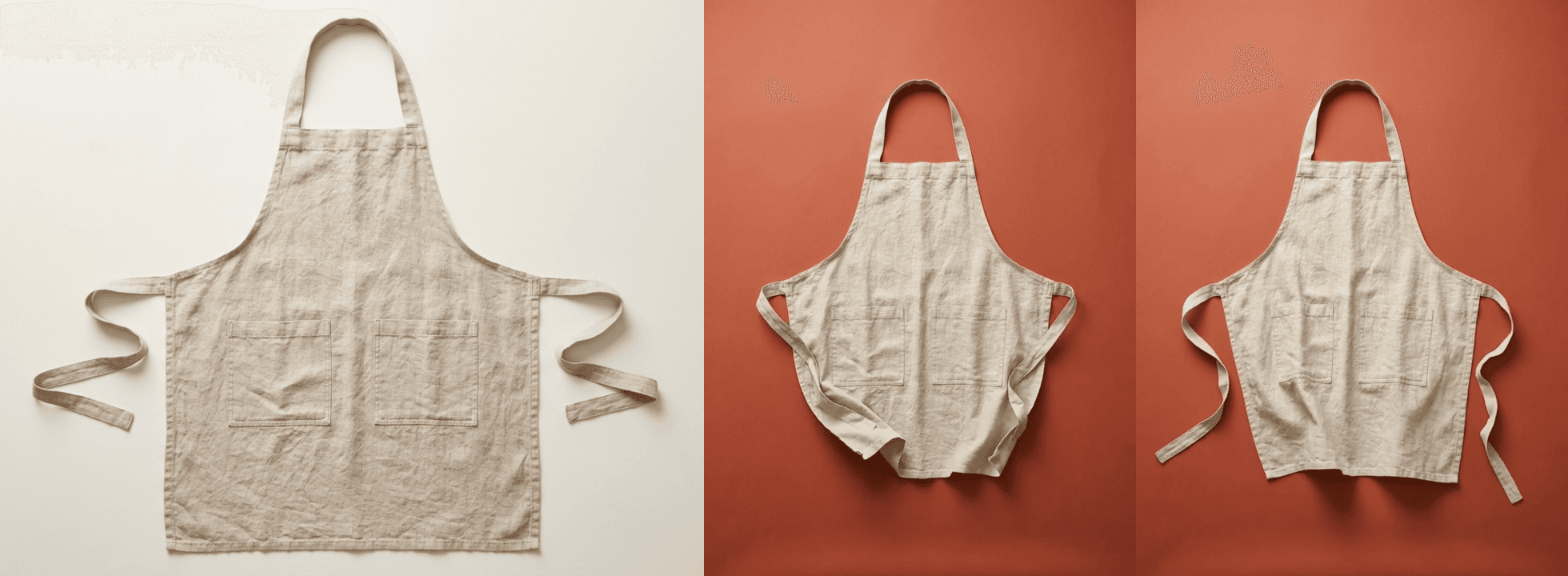
Two frames are a sample, not proof, so the check can miss a change that doesn’t show in either of them. That’s one more reason the last step is a person.
A person approves every video
Every product ends up as a row in out/approval.csv, with its script and a link to the video, or with the reason it was held:
handle,product,script,video,approved,notes
"linen-apron","Linen apron","Meet the linen apron. Stonewashed soft, ready for slow Sunday cooking.","https://d2jn8jtjz02j0j.cloudfront.net/linen_apron_in_use_69966d3b66.mp4","",""
"ceramic-planter","Planter","Our bestselling planter. Speckled stoneware to brighten a sunny windowsill.","https://d2jn8jtjz02j0j.cloudfront.net/ceramic_planter_growing_ce438f59c4.mp4","",""
"rattan-pendant","Pendant lamp","Our rattan pendant lamp is back. Soft light for slow evenings.","https://d2jn8jtjz02j0j.cloudfront.net/rattan_pendant_1dd0eb45a0.mp4","",""
The approval step stays, even with all these checks, because each check only covers what it was built to catch. The word list can’t tell linen from cotton. The vision check sees two frames of each clip, and two answers from the same model can share a blind spot.
The captions are transcribed from the voice-over, so “bestselling” can come out as “best selling”. The window got past every check until the rules caught up with it.
The checks mean a person spends their time on videos that are worth posting; the person decides what gets posted. That’s the step that protects the brand: in a 2026 Gartner survey, 49% of U.S. consumers said generative AI has made the quality of content worse.
Failed attempts also cost money: every image or clip retry is a new generation billed in credits (see pricing), and every script retry is another LLM call, which is why the script holds a product after three tries at the script, or two at the image or the clip.
5. Render at scale
With a checked script and clip, each product becomes one render of the saved template: POST /edit/v1/templates/render with the template ID and the product’s merge values.
// Renders one video from the template and waits for it. The status response has a download
// URL that expires after 24 hours, and the owner ID that the permanent CDN URL is built from.
export async function renderVideo(templateId, values) {
  const merge = Object.entries(values).map(([find, replace]) => ({
    find,
    replace
  }));
  const { response: queued } = await shotstack('POST', '/templates/render', {
    id: templateId,
    merge
  });
  if (!queued?.id)
    throw new Error(
      'the render request was accepted but the reply has no render id'
    );
  const done = await waitFor(
    async () => {
      const { response: render } = await shotstack(
        'GET',
        `/render/${queued.id}`
      );
      if (!render)
        throw new Error(`the status reply for render ${queued.id} is empty`);
      if (render.status === 'failed')
        throw new Error(`render ${queued.id} failed: ${render.error}`);
      return render.status === 'done' ? render : null;
    },
    { every: 6, minutes: 20 }
  );
  if (!done.url || !done.owner)
    throw new Error(`render ${queued.id} is done but has no url`);
  return {
    id: done.id,
    downloadUrl: done.url,
    url: `https://cdn.shotstack.io/au/v1/${done.owner}/${done.id}.mp4`
  };
}
The download URL in the render status expires after 24 hours, which is too soon for an approval sheet someone might open next week.
By default, Shotstack also copies every render to its hosting and CDN, and that permanent URL is built from the same status response, so it’s the one that goes in the sheet. The file can take a few seconds to appear there after the render is done. The script downloads its own copy from the temporary URL straight away.
The music prompt is the same for every product, so the script generates the track once with POST /edit/v1/generate, before any video renders, and passes the same file to every render as MUSIC. Shotstack stores every generated file, and a request it has seen before returns the stored file at no charge.
Inside a render, though, that only applies to files that existed before the render started, so if the music were generated inside each render, renders running in parallel could each pay for it. Generating it first means a batch never pays for it more than once:
// The music is the same for every product, so it's generated once, before any video renders,
// and every video uses the same file.
export function generateMusic() {
  const { model, prompt, options } = brand.music;
  return generate({ type: 'audio', model, prompt, options }, SECONDS);
}
Products run a few at a time, and an error in one product holds that product without stopping the rest:
await inParallel(ready, PRODUCTS_AT_ONCE, async ({ row, backdrop }) => {
  try {
    sheet.add(await makeVideo(row, backdrop, templateId, music));
  } catch (error) {
    console.log(`${row.handle}: held, ${error.message}`);
    sheet.add({ row, notes: `held: ${error.message}` });
  }
});
Three products at a time and a status check every few seconds are fine for a demo. At 500 products, three things change:
- Raise
PRODUCTS_AT_ONCEas far as your plan’s limits allow. - Let a webhook replace the polling. The template render request takes only the template ID and the merge values, so the
callbackURL goes into the template itself, and Shotstack posts to it when each render is done or fails. The webhooks docs show the payload. - Run the script on a schedule, for example weekly for new arrivals, from a scheduled workflow in n8n or Make. The n8n guide shows Shotstack’s n8n node, if you’d rather build the same steps as a workflow. Filter the export to new or changed products first, so finished videos aren’t made again.
For more on rendering large batches from a spreadsheet, see bulk videos from a CSV.
Creative automation: when to build it and when to buy it
Creative automation is the usual name for this kind of work: producing many on-brand variations of an asset from templates and data, with the brand’s rules built in instead of applied by hand. Automated content creation is the wider idea, covering any content a system produces without someone making each piece.
| Buy a creative automation tool | Build on a video API | |
|---|---|---|
| Fits when | A few dozen videos a month, and nobody to maintain a script | Data and rules already live in your systems, or one pipeline serves several brands or clients |
| Brand rules | Set up in the tool | Stored as data the code enforces on every run |
| Checks on the AI’s work | What the tool offers | Any check you can code, like comparing each image with the real product |
| Approval and publishing | The tool’s workflow | Your own steps |
| Upkeep | The vendor’s | Yours |
For the options in between, see how to automate short-form videos.
The complete script
This is the whole of pipeline.js. Save it next to brand.json, products.csv and package.json, then run it with the commands in the Before you start section.
// On-brand product videos from a brand guide (brand.json) and a product export (products.csv).
//
//   node pipeline.js --dry              write the template to out/template.json, no API calls
//   node pipeline.js [file.csv]         show what a run would do, then stop
//   node pipeline.js [file.csv] --yes   make a video for every product (production: uses credits)
//
// Needs SHOTSTACK_API_KEY (production key), ANTHROPIC_API_KEY and ffmpeg on your PATH.
import fs from 'node:fs';
import path from 'node:path';
import { execFile } from 'node:child_process';
import { parseArgs, promisify } from 'node:util';
import { fileURLToPath } from 'node:url';

const SHOTSTACK = 'https://api.shotstack.io/edit/v1';
const CLAUDE_MODEL = 'claude-sonnet-5-5';
const IMAGE_MODEL = 'nano-banana-2-edit';
const VIDEO_MODEL = 'wan-3.0-prime-image-to-video';
const PRODUCTS_AT_ONCE = 3;
const MAX_TRIES = { script: 3, still: 2, clip: 2 };
const execFileAsync = promisify(execFile);
const REQUEST_TIMEOUT = 60_000;
const DOWNLOAD_TIMEOUT = 300_000;

// Files next to this script, wherever the script is run from
const here = file => fileURLToPath(new URL(file, import.meta.url));
const OUT = here('out');

function readBrand() {
  try {
    return JSON.parse(fs.readFileSync(here('brand.json'), 'utf8'));
  } catch (error) {
    console.error(`brand.json: ${error.message}`);
    process.exit(1);
  }
}

export const brand = readBrand();

// ---------- The template ----------
// A 1080x1920 video, 6.5 seconds long. The product clip fills the top 62% and the brand
// panel covers the rest. Fonts, colors, layout and music never change between videos;
// the merge fields in {{ }} are filled in for each product.
const WIDTH = 1080;
const HEIGHT = 1920;
const SECONDS = 6.5;
const PANEL_TOP = 1190; // 62% of the height
const MARGIN = 108;
const TEXT_WIDTH = WIDTH - 2 * MARGIN;

// Shotstack offsets are measured from the center of the frame, as a fraction of its size.
// This turns a point in pixels (from the top left) into an offset.
const round = n => Math.round(n * 10000) / 10000;
const offsetFor = (x, y) => ({
  x: round((x - WIDTH / 2) / WIDTH),
  y: round((HEIGHT / 2 - y) / HEIGHT)
});

// One line of text in the panel, centered at height y and wiping in from the left
function textLine(
  text,
  { y, size, weight, start, letterSpacing = 0, uppercase = false, opacity = 1 }
) {
  return {
    asset: {
      type: 'rich-text',
      text,
      font: {
        family: brand.font.family,
        size,
        weight,
        color: brand.colors.text,
        opacity
      },
      style: {
        letterSpacing,
        lineHeight: 1,
        textTransform: uppercase ? 'uppercase' : 'none'
      },
      align: { horizontal: 'left', vertical: 'middle' }
    },
    start,
    length: 'end',
    width: TEXT_WIDTH,
    height: Math.round(size * 1.3),
    position: 'center',
    offset: offsetFor(WIDTH / 2, y),
    transition: { in: 'reveal' }
  };
}

const svg = (width, height, shape) =>
  `<svg xmlns="http://www.w3.org/2000/svg" width="${width}" height="${height}" viewBox="0 0 ${width} ${height}">${shape}</svg>`;

export function buildTemplate() {
  const { colors, font, voiceover } = brand;
  const panelHeight = HEIGHT - PANEL_TOP;
  return {
    timeline: {
      background: colors.panel,
      fonts: [{ src: font.src }],
      tracks: [
        // The facts, straight from the product data: label, title, then price and detail
        {
          clips: [
            textLine('{{LABEL}}', {
              y: 1470,
              size: 64,
              weight: 400,
              start: 0.3,
              letterSpacing: 3,
              uppercase: true,
              opacity: 0.8
            })
          ]
        },
        {
          clips: [
            textLine('{{TITLE}}', {
              y: 1597,
              size: 135,
              weight: 600,
              start: 0.43,
              letterSpacing: -5
            })
          ]
        },
        {
          clips: [
            textLine('{{DETAIL}}', {
              y: 1762,
              size: 86,
              weight: 400,
              start: 0.56
            })
          ]
        },
        // Captions, transcribed from the voice-over clip
        {
          clips: [
            {
              asset: {
                type: 'rich-caption',
                src: 'alias://voice',
                font: {
                  family: font.family,
                  size: 44,
                  weight: 600,
                  color: colors.text
                },
                animation: { style: 'fade' }
              },
              start: 0,
              length: 'end',
              width: TEXT_WIDTH,
              height: 140,
              position: 'center',
              offset: offsetFor(WIDTH / 2, 1280)
            }
          ]
        },
        // The brand mark, top left
        {
          clips: [
            {
              asset: {
                type: 'svg',
                src: svg(
                  173,
                  173,
                  `<circle cx="86.5" cy="86.5" r="86.5" fill="${colors.mark}"/>`
                )
              },
              start: 0,
              length: 'end',
              fit: 'none',
              width: 173,
              height: 173,
              position: 'center',
              offset: offsetFor(MARGIN + 86.5, MARGIN + 86.5),
              transition: { in: 'fade' }
            }
          ]
        },
        // The brand panel over the bottom 38%
        {
          clips: [
            {
              asset: {
                type: 'svg',
                src: svg(
                  WIDTH,
                  panelHeight,
                  `<rect width="${WIDTH}" height="${panelHeight}" fill="${colors.panel}"/>`
                )
              },
              start: 0,
              length: 'end',
              fit: 'none',
              width: WIDTH,
              height: panelHeight,
              position: 'bottom'
            }
          ]
        },
        // The product clip, cropped to fill the top 62% (with 5 px to spare above and below, so no
        // edge shows). With position "top" it did not sit at the top in our tests, so it's
        // positioned by its center plus an offset.
        {
          clips: [
            {
              asset: { type: 'video', src: '{{CLIP}}', volume: 0 },
              start: 0,
              length: SECONDS,
              width: WIDTH,
              height: PANEL_TOP + 10,
              fit: 'crop',
              position: 'center',
              offset: offsetFor(WIDTH / 2, PANEL_TOP / 2)
            }
          ]
        },
        // The voice-over, generated from the checked script while the video renders
        {
          clips: [
            {
              asset: {
                type: 'audio',
                model: voiceover.model,
                prompt: '{{SCRIPT}}',
                options: { voice: voiceover.voice }
              },
              alias: 'voice',
              start: 0.4,
              length: 'auto'
            }
          ]
        },
        // The music, generated once per run before any video renders
        {
          clips: [
            {
              asset: { type: 'audio', src: '{{MUSIC}}', volume: 0.35 },
              start: 0,
              length: SECONDS
            }
          ]
        }
      ]
    },
    output: { format: 'mp4', size: { width: WIDTH, height: HEIGHT } },
    merge: ['LABEL', 'TITLE', 'DETAIL', 'SCRIPT', 'CLIP', 'MUSIC'].map(
      find => ({ find, replace: '' })
    )
  };
}

// ---------- The store's data ----------
// Reads a CSV export, including quoted fields that contain commas, quotes or line breaks.
const COLUMNS =
  'handle title product_type price detail badge features image_src'.split(' ');

export function readProducts(file) {
  let text;
  try {
    text = fs.readFileSync(file, 'utf8').replace(/^\uFEFF/, '');
  } catch (error) {
    throw new Error(`Can't read ${file}: ${error.code ?? error.message}`);
  }
  const rows = [[]];
  let field = '';
  let quoted = false;
  for (let i = 0; i < text.length; i++) {
    const char = text[i];
    if (quoted) {
      if (char === '"' && text[i + 1] === '"') {
        field += '"';
        i++;
      } else if (char === '"') quoted = false;
      else field += char;
    } else if (char === '"') quoted = true;
    else if (char === ',') {
      rows.at(-1).push(field);
      field = '';
    } else if (char === '\n') {
      rows.at(-1).push(field.replace(/\r$/, ''));
      rows.push([]);
      field = '';
    } else field += char;
  }
  if (quoted)
    throw new Error(`${file} has a quoted field that is never closed`);
  rows.at(-1).push(field);
  const [header = [], ...records] = rows.filter(row =>
    row.some(value => value.trim())
  );
  const names = header.map(name => name.trim());
  const absent = COLUMNS.filter(name => !names.includes(name));
  if (absent.length)
    throw new Error(`${file} has no ${absent.join(', ')} column`);
  const odd = records.findIndex(record => record.length !== names.length);
  if (odd >= 0)
    throw new Error(
      `${file}, row ${odd + 1}: ${records[odd].length} fields, but the header has ${names.length}`
    );
  return records.map(record =>
    Object.fromEntries(names.map((name, i) => [name, record[i].trim()]))
  );
}

// What goes on screen comes from the data, never from the AI. Every row is checked against
// the layout and the brand guide before anything is spent on it.
export function checkRow(row) {
  const values = {
    LABEL: brand.labels[row.badge] ?? '',
    TITLE: row.title ?? '',
    DETAIL: `${row.price} · ${row.detail}`
  };
  const problems = ['handle', 'title', 'price', 'detail']
    .filter(field => !row[field])
    .map(field => `the ${field} is missing`);
  if (row.handle && !/^[a-z0-9-]+$/.test(row.handle))
    problems.push(`the handle "${row.handle}" can only use a-z, 0-9 and -`);
  if (!values.LABEL)
    problems.push(`brand.json has no label for the badge "${row.badge}"`);
  if (!brand.visual.motion[row.product_type])
    problems.push(
      `brand.json has no motion line for the product type "${row.product_type}"`
    );
  if (!/^https:\/\//.test(row.image_src ?? ''))
    problems.push('the packshot URL is missing or not https');
  if (values.TITLE.length > brand.layout.titleMax)
    problems.push(
      `the title "${values.TITLE}" is ${values.TITLE.length} characters; the layout fits ${brand.layout.titleMax}`
    );
  if (values.DETAIL.length > brand.layout.detailMax)
    problems.push(
      `"${values.DETAIL}" is ${values.DETAIL.length} characters; the layout fits ${brand.layout.detailMax}`
    );
  return { values, problems };
}

// ---------- API helpers ----------
const sleep = seconds =>
  new Promise(resolve => setTimeout(resolve, seconds * 1000));

// fetch with a time limit. A 429 is retried, because the server refused the request and
// created nothing. A 408, a 5xx, a timeout or a network error is retried only when
// `repeatable` is true: on a POST that starts a paid job, the job may already exist, so a
// retry could pay twice.
async function send(
  url,
  options,
  { repeatable = true, timeout = REQUEST_TIMEOUT } = {}
) {
  for (let attempt = 1; ; attempt++) {
    let res;
    try {
      res = await fetch(url, {
        ...options,
        signal: AbortSignal.timeout(timeout)
      });
    } catch (error) {
      if (repeatable && attempt < 5) {
        await sleep(2 ** attempt * 2);
        continue;
      }
      const { host } = new URL(url);
      throw new Error(
        error.name === 'TimeoutError'
          ? `${host} did not answer in ${timeout / 1000} seconds`
          : `Can't reach ${host} (${error.cause?.code ?? error.message})`
      );
    }
    const temporary =
      res.status === 429 ||
      (repeatable && (res.status === 408 || res.status >= 500));
    if (!temporary || attempt === 5) return res;
    await sleep(2 ** attempt * 2);
  }
}

// The reason in an error body: Shotstack sends errors[0].detail, response.error or message,
// and Anthropic sends error.message
function errorDetail(body) {
  const detail =
    body?.errors?.[0]?.detail ??
    body?.response?.error ??
    body?.error?.message ??
    body?.message;
  return typeof detail === 'string'
    ? detail
    : JSON.stringify(body).slice(0, 300);
}

// Sends the request and returns the parsed JSON body
async function request(url, options, retry) {
  const res = await send(url, options, retry);
  const body = await res.json().catch(() => null);
  if (!res.ok)
    throw Object.assign(
      new Error(
        `${options?.method ?? 'GET'} ${url} returned ${res.status}: ${errorDetail(body)}`
      ),
      { status: res.status }
    );
  if (!body || typeof body !== 'object')
    throw new Error(`${url} returned a body that is not a JSON object`);
  return body;
}

const shotstack = (method, path, body) =>
  request(
    `${SHOTSTACK}${path}`,
    {
      method,
      headers: {
        'x-api-key': process.env.SHOTSTACK_API_KEY,
        'content-type': 'application/json'
      },
      body: body && JSON.stringify(body)
    },
    { repeatable: method === 'GET' }
  );

// A retry here is safe: a failed request has no effect, and a repeated one costs a few tokens
async function askClaude(system, content) {
  const reply = await request('https://api.anthropic.com/v1/messages', {
    method: 'POST',
    headers: {
      'x-api-key': process.env.ANTHROPIC_API_KEY,
      'anthropic-version': '2023-06-01',
      'content-type': 'application/json'
    },
    body: JSON.stringify({
      model: CLAUDE_MODEL,
      max_tokens: 1000,
      system,
      messages: [{ role: 'user', content }]
    })
  });
  return reply.content.map(block => block.text ?? '').join('');
}

// The JSON object in a model's reply (ignoring code fences or text around it), or null
function parseJson(text) {
  try {
    return JSON.parse(text.slice(text.indexOf('{'), text.lastIndexOf('}') + 1));
  } catch {
    return null;
  }
}

// Calls check() until it returns something, with a time limit
async function waitFor(check, { every, minutes }) {
  const deadline = Date.now() + minutes * 60_000;
  for (;;) {
    const result = await check();
    if (result) return result;
    if (Date.now() > deadline)
      throw new Error(`still not finished after ${minutes} minutes`);
    await sleep(every);
  }
}

export async function download(url, file) {
  const res = await send(url, undefined, { timeout: DOWNLOAD_TIMEOUT });
  if (!res.ok) throw new Error(`downloading ${url} returned ${res.status}`);
  fs.writeFileSync(`${file}.part`, Buffer.from(await res.arrayBuffer()));
  fs.renameSync(`${file}.part`, file);
}

// Generates one image, video or audio file and returns its URL. An identical request
// returns the file generated last time, at no charge.
export async function generate(asset, length) {
  let job = await shotstack(
    'POST',
    '/generate',
    length ? { asset, length } : { asset }
  );
  return waitFor(
    async () => {
      if (job.status !== 'done' && job.status !== 'failed')
        job = await shotstack('GET', `/generate/${job.id}`);
      if (job.status === 'failed')
        throw new Error(`${asset.type} generation failed: ${job.error}`);
      if (job.status === 'done' && !job.url)
        throw new Error(`${asset.type} generation is done but has no url`);
      return job.status === 'done' ? job.url : null;
    },
    { every: 4, minutes: 15 }
  );
}

// ---------- Guardrails on the words ----------
const escapeRegExp = text => text.replace(/[.*+?^${}()|[\]\\]/g, '\\$&');
const wordPattern = word => new RegExp(`\\b${escapeRegExp(word)}\\b`, 'i');

export function checkScript(script, row) {
  const { voice } = brand;
  const words = script.split(/\s+/).filter(Boolean);
  if (!words.length) return ['the script is empty'];
  const problems = [];
  if (words.length > voice.maxWords)
    problems.push(
      `it is ${words.length} words; the limit is ${voice.maxWords}`
    );
  const avoided = voice.avoid.filter(word => wordPattern(word).test(script));
  if (avoided.length)
    problems.push(`it uses words the brand avoids: ${avoided.join(', ')}`);
  const facts = `${row.title} ${row.features} ${row.detail}`;
  const claims = voice.claimsNeedData.filter(
    word => wordPattern(word).test(script) && !wordPattern(word).test(facts)
  );
  if (claims.length)
    problems.push(
      `it claims something the product data doesn't say: ${claims.join(', ')}`
    );
  const spoken = script.replace(new RegExp(escapeRegExp(row.title), 'gi'), '');
  if (/[0-9$€£%]|\b(dollars?|cents?|bucks|discount|sale)\b/i.test(spoken))
    problems.push(
      'it mentions a number, price or discount (the price is on screen, from the data)'
    );
  if (/[!"“”]|\p{Extended_Pictographic}/u.test(script))
    problems.push('it has an exclamation mark, quote marks or an emoji');
  if (script.split(/[,;]/).length > 2)
    problems.push('it reads like a feature list');
  return problems;
}

// The AI writes only the voice-over script. Code checks it, and failures go back with the reasons.
export async function writeScript(row) {
  const { voice } = brand;
  const system = [
    `You write voice-over scripts for ${brand.name} product videos. ${voice.tone}`,
    'Reply with one JSON object and nothing else: {"script": "..."}',
    `Use at most ${voice.maxWords} words, in two short beats. Only claim what the product's features say, but you don't have to mention them.`,
    `Don't do these: ${voice.avoidPatterns.join('; ')}.`,
    `Never use numbers, prices, discounts, exclamation marks, quote marks or emoji. Never use these words: ${voice.avoid.join(', ')}.`,
    `Scripts in our voice:\n${voice.examples.map(line => `- ${line}`).join('\n')}`
  ].join('\n');
  const product = `Product: ${row.title}. Type: ${row.product_type}. Features: ${row.features}. Detail: ${row.detail}. Badge: ${row.badge}, so ${voice.hooks[row.badge] ?? 'open by naming the product'}.`;
  const attempts = [];
  let prompt = product;
  for (let i = 0; i < MAX_TRIES.script; i++) {
    const script = String(
      parseJson(await askClaude(system, prompt))?.script ?? ''
    ).trim();
    const problems = checkScript(script, row);
    attempts.push({ script, problems });
    if (!problems.length) {
      console.log(`${row.handle}: script passed on try ${i + 1}: "${script}"`);
      return { script, attempts };
    }
    console.log(
      `${row.handle}: script try ${i + 1} failed ("${script}"): ${problems.join('; ')}`
    );
    prompt = `${product}\nYour last script was "${script}". Fix these problems: ${problems.join('; ')}.`;
  }
  return { script: null, attempts };
}

// ---------- Guardrails on the pictures ----------
// An LLM with vision compares generated images with the store's packshot. The check runs
// twice and both answers must pass, because the same image can pass once and fail the next time.
const CHECKER =
  'You check product images for an online store. Reply with one JSON object and nothing else: {"match": true or false, "issues": ["..."]}. When match is true, issues must be an empty list. Describe each issue in terms of the product, not image numbers.';

// Only a well-formed reply with "match": true and no issues counts as a pass
export function readVerdict(reply) {
  const verdict = parseJson(reply);
  if (
    !verdict ||
    typeof verdict.match !== 'boolean' ||
    !Array.isArray(verdict.issues)
  ) {
    return {
      pass: false,
      issues: ['the checker reply was not in the expected format']
    };
  }
  const issues = verdict.issues.map(String);
  if (!verdict.match && !issues.length)
    issues.push('the checker failed it without saying why');
  return { pass: verdict.match && !issues.length, issues };
}

async function compareWithPackshot(row, images, instructions) {
  const content = [
    { type: 'text', text: "Image 1, the store's product photo:" },
    { type: 'image', source: { type: 'url', url: row.image_src } },
    ...images.flatMap((source, i) => [
      { type: 'text', text: `Image ${i + 2}:` },
      { type: 'image', source }
    ]),
    { type: 'text', text: instructions }
  ];
  const verdicts = (
    await Promise.all([1, 2].map(() => askClaude(CHECKER, content)))
  ).map(readVerdict);
  return {
    pass: verdicts.every(v => v.pass),
    issues: [...new Set(verdicts.flatMap(v => v.issues))]
  };
}

// An image-edit model puts the store's real product on a brand backdrop, or in the scene
// brand.json sets for its type, using the packshot as its reference. The prompt comes from brand.json, so nobody types a free prompt.
export async function makeStill(row, backdrop) {
  const { visual } = brand;
  const attempts = [];
  for (let i = 0; i < MAX_TRIES.still; i++) {
    const issues = attempts.at(-1)?.check.issues;
    const prompt = [
      (visual.scenes?.[row.product_type] ?? visual.shot)
        .replace('{backdrop}', backdrop)
        .replace('{light}', visual.light),
      ...visual.rules,
      ...(issues
        ? [`Fix these problems from the last attempt: ${issues.join(' ')}`]
        : [])
    ].join(' ');
    const url = await generate({
      type: 'image',
      model: IMAGE_MODEL,
      prompt,
      options: {
        imageUrls: [row.image_src],
        aspectRatio: '3:4',
        resolution: '2K'
      }
    });
    // The checker gets the same rules from brand.json as the image model
    const check = await compareWithPackshot(
      row,
      [{ type: 'url', url }],
      `Image 2 is a generated studio shot that must show exactly the same product as image 1 ("${row.title}"), and no other product. Compare color, shape, material and visible details. Fail it if anything a shopper would notice is different, or if it breaks any of these rules: ${visual.rules.join(' ')}`
    );
    attempts.push({ url, check });
    if (check.pass) {
      console.log(`${row.handle}: still passed both checks on try ${i + 1}`);
      return { url, attempts };
    }
    console.log(
      `${row.handle}: still try ${i + 1} failed: ${check.issues.join('; ')}`
    );
  }
  return { url: null, attempts };
}

// ---------- Guardrails on the motion ----------
// Frames from the middle and the end of the part of the clip that appears in the video
async function framesFrom(file) {
  return Promise.all(
    [SECONDS / 2, SECONDS - 0.25].map(async (second, i) => {
      const jpg = `${file}.frame${i + 1}.jpg`;
      fs.rmSync(jpg, { force: true });
      await execFileAsync('ffmpeg', [
        '-v',
        'error',
        '-y',
        '-ss',
        String(second),
        '-i',
        file,
        '-frames:v',
        '1',
        '-vf',
        'scale=512:-1',
        jpg
      ]).catch(() => {});
      if (!fs.existsSync(jpg))
        throw new Error(
          `ffmpeg could not take a frame at ${second} seconds, the clip may be shorter`
        );
      return {
        type: 'base64',
        media_type: 'image/jpeg',
        data: fs.readFileSync(jpg).toString('base64')
      };
    })
  );
}

// An image-to-video model animates the approved still with the motion line for its product
// type. The clip is checked before it goes anywhere near a render.
export async function makeClip(row, still) {
  const { visual } = brand;
  const attempts = [];
  for (let i = 0; i < MAX_TRIES.clip; i++) {
    const issues = attempts.at(-1)?.check.issues;
    const prompt = [
      visual.motion[row.product_type],
      visual.camera,
      ...(issues
        ? [`Avoid these problems from the last attempt: ${issues.join(' ')}`]
        : [])
    ].join(' ');
    // The model makes whole seconds and bills them rounded up, so ask for whole seconds
    const url = await generate(
      {
        type: 'video',
        model: VIDEO_MODEL,
        prompt,
        options: {
          startSrc: still,
          aspectRatio: '3:4',
          resolution: '1080p',
          generateAudio: false
        }
      },
      Math.ceil(SECONDS)
    );
    const file = path.join(OUT, 'clips', `${row.handle}-${i + 1}.mp4`);
    await download(url, file);
    const check = await compareWithPackshot(
      row,
      await framesFrom(file),
      `The other images are frames from a short video of "${row.title}". Every frame must show exactly the same product as image 1: the same shape, parts, color and material, with nothing added or removed (for example no new handle, strap or lid). Fail it if the product changes in any frame, or if a person, hand, text or logo appears. The motion this video was asked for is expected and passes: ${visual.motion[row.product_type]}`
    );
    attempts.push({ url, check });
    if (check.pass) {
      console.log(`${row.handle}: clip passed both checks on try ${i + 1}`);
      return { url, attempts };
    }
    console.log(
      `${row.handle}: clip try ${i + 1} failed: ${check.issues.join('; ')}`
    );
  }
  return { url: null, attempts };
}

// ---------- Rendering ----------
export async function saveTemplate() {
  const { response } = await shotstack('POST', '/templates', {
    name: `${brand.name} product video`,
    template: buildTemplate()
  });
  if (!response?.id)
    throw new Error('the template was saved but the reply has no id');
  return response.id;
}

// The music is the same for every product, so it's generated once, before any video renders,
// and every video uses the same file.
export function generateMusic() {
  const { model, prompt, options } = brand.music;
  return generate({ type: 'audio', model, prompt, options }, SECONDS);
}

// Renders one video from the template and waits for it. The status response has a download
// URL that expires after 24 hours, and the owner ID that the permanent CDN URL is built from.
export async function renderVideo(templateId, values) {
  const merge = Object.entries(values).map(([find, replace]) => ({
    find,
    replace
  }));
  const { response: queued } = await shotstack('POST', '/templates/render', {
    id: templateId,
    merge
  });
  if (!queued?.id)
    throw new Error(
      'the render request was accepted but the reply has no render id'
    );
  const done = await waitFor(
    async () => {
      const { response: render } = await shotstack(
        'GET',
        `/render/${queued.id}`
      );
      if (!render)
        throw new Error(`the status reply for render ${queued.id} is empty`);
      if (render.status === 'failed')
        throw new Error(`render ${queued.id} failed: ${render.error}`);
      return render.status === 'done' ? render : null;
    },
    { every: 6, minutes: 20 }
  );
  if (!done.url || !done.owner)
    throw new Error(`render ${queued.id} is done but has no url`);
  return {
    id: done.id,
    downloadUrl: done.url,
    url: `https://cdn.shotstack.io/au/v1/${done.owner}/${done.id}.mp4`
  };
}

// A person approves every video before it's posted. Rows are added as products finish,
// and a sheet from an earlier run keeps its rows and its review.
export function approvalSheet(file) {
  // A cell that starts with = + - or @ would run as a formula in a spreadsheet
  const cell = value =>
    `"${String(value ?? '')
      .replace(/^[=+\-@]/, "'$&")
      .replace(/"/g, '""')}"`;
  if (!fs.existsSync(file))
    fs.writeFileSync(file, 'handle,product,script,video,approved,notes\n');
  return {
    // A row that is already in the sheet is not added again
    add: ({ row, script, video, notes = '' }) => {
      const held = notes.startsWith('held:');
      const line = [
        row.handle,
        row.title,
        script,
        video,
        held ? 'no' : '',
        notes
      ]
        .map(cell)
        .join(',');
      if (!fs.readFileSync(file, 'utf8').split(/\r?\n/).includes(line))
        fs.appendFileSync(file, line + '\n');
    }
  };
}

async function makeVideo(row, backdrop, templateId, music) {
  const copy = await writeScript(row);
  if (!copy.script)
    return {
      row,
      notes: `held: the script failed the brand checks ${MAX_TRIES.script} times (${copy.attempts.at(-1).problems.join('; ')})`
    };
  const still = await makeStill(row, backdrop);
  if (!still.url)
    return {
      row,
      script: copy.script,
      notes: `held: the product still failed the checks (${still.attempts.at(-1).check.issues.join('; ')})`
    };
  const clip = await makeClip(row, still.url);
  if (!clip.url)
    return {
      row,
      script: copy.script,
      notes: `held: the motion clip changed the product (${clip.attempts.at(-1).check.issues.join('; ')})`
    };
  const video = await renderVideo(templateId, {
    ...checkRow(row).values,
    SCRIPT: copy.script,
    CLIP: clip.url,
    MUSIC: music
  });
  console.log(`${row.handle}: done, ${video.url}`);
  try {
    await download(video.downloadUrl, path.join(OUT, `${row.handle}.mp4`));
  } catch (error) {
    return {
      row,
      script: copy.script,
      video: video.url,
      notes: `the render is done, but the download failed (${error.message}). Download it from ${video.downloadUrl} within 24 hours, and save it as out/${row.handle}.mp4 to skip it on the next run`
    };
  }
  return { row, script: copy.script, video: video.url };
}

// Runs fn on every item, with at most `limit` running at the same time
async function inParallel(items, limit, fn) {
  let next = 0;
  const worker = async () => {
    while (next < items.length) await fn(items[next++]);
  };
  await Promise.all(
    Array.from({ length: Math.min(limit, items.length) }, worker)
  );
}

async function main() {
  const { values: flags, positionals: files } = parseArgs({
    options: { dry: { type: 'boolean' }, yes: { type: 'boolean' } },
    allowPositionals: true
  });
  if (files.length > 1) throw new Error('Pass one .csv file at most.');
  if (flags.dry) {
    fs.mkdirSync(OUT, { recursive: true });
    fs.writeFileSync(
      path.join(OUT, 'template.json'),
      JSON.stringify(buildTemplate(), null, 2)
    );
    return console.log('Wrote out/template.json');
  }

  // Check the setup before spending anything
  const missing = ['SHOTSTACK_API_KEY', 'ANTHROPIC_API_KEY'].filter(
    key => !process.env[key]
  );
  if (missing.length)
    throw new Error(
      `Set ${missing.join(' and ')} first (see .env.example). To check the template without keys, use --dry.`
    );
  try {
    await execFileAsync('ffmpeg', ['-version']);
  } catch {
    throw new Error(
      'ffmpeg is not on your PATH. The pipeline uses it to check each clip. Install it, then run again.'
    );
  }
  const products = readProducts(
    files[0] ? path.resolve(files[0]) : here('products.csv')
  );

  // Check every row, and skip the products that already have a video
  const ready = [];
  const held = [];
  const handles = new Set();
  products.forEach((row, i) => {
    const { problems } = checkRow(row);
    if (handles.has(row.handle))
      problems.push(`the handle "${row.handle}" is used by an earlier row`);
    handles.add(row.handle);
    if (problems.length) {
      console.log(`${row.handle}: held, ${problems.join('; ')}`);
      held.push({ row, notes: `held: ${problems.join('; ')}` });
    } else if (fs.existsSync(path.join(OUT, `${row.handle}.mp4`))) {
      console.log(
        `${row.handle}: skipped, out/${row.handle}.mp4 already exists`
      );
    } else {
      ready.push({
        row,
        backdrop: brand.visual.backdrops[i % brand.visual.backdrops.length]
      });
    }
  });

  // Each product can use every try on its stills and clips, and its render generates a
  // voice-over. The music is generated once.
  const worstCase = `${ready.length} products, at most ${ready.length * (MAX_TRIES.still + MAX_TRIES.clip + 1) + 1} generations (images, clips, voice-overs and music) and ${ready.length} renders, all on production credits.`;
  if (ready.length && !flags.yes)
    throw new Error(`${worstCase} Add --yes to start. Nothing was spent.`);
  fs.mkdirSync(path.join(OUT, 'clips'), { recursive: true });
  const sheet = approvalSheet(path.join(OUT, 'approval.csv'));
  held.forEach(sheet.add);
  if (!ready.length) return console.log('No products to make.');
  console.log(worstCase);

  // A rejected Anthropic key would otherwise show up only after the music is paid for
  await request('https://api.anthropic.com/v1/models?limit=1', {
    headers: {
      'x-api-key': process.env.ANTHROPIC_API_KEY,
      'anthropic-version': '2023-06-01'
    }
  });
  const templateId = await saveTemplate();
  const music = await generateMusic();
  console.log(`Template ${templateId} ready, music ready`);

  await inParallel(ready, PRODUCTS_AT_ONCE, async ({ row, backdrop }) => {
    try {
      sheet.add(await makeVideo(row, backdrop, templateId, music));
    } catch (error) {
      console.log(`${row.handle}: held, ${error.message}`);
      sheet.add({ row, notes: `held: ${error.message}` });
    }
  });
  console.log('Approval sheet: out/approval.csv');
}

// Run main() only when this file is run directly, so other scripts can import its functions
if (process.argv[1] === fileURLToPath(import.meta.url)) {
  main().catch(error => {
    console.error(error.message);
    process.exit(1);
  });
}
Turn your brand guide into a video pipeline: try it out
You now have the five parts of an on-brand AI content pipeline: a brand guide the code reads on every run, a template built from it, product data that decides what appears on screen, guardrails that check every script, image and clip, and renders that scale to the whole catalog.
Change brand.json and the export, and the same script makes videos for a different brand.
Get a free API key and build your own pipeline: sign up for Shotstack.
Frequently asked questions (FAQs)
Where can I get AI content pipeline automation that includes video creation?
You can buy it as part of a creative automation product or build it on a video API. Shotstack’s Edit API covers the video side in one place: templates, rendering, and AI generation of images, video clips, voice-overs and music. You add the brand guide, your data and the checks, which is how this guide makes an on-brand video for every product in one Node.js script.
What should an enterprise look for in AI content pipeline automation for brand videos?
Look for brand rules stored as data that the pipeline enforces, facts such as titles and prices taken from your own data rather than from the AI, automated checks on the AI’s scripts and visuals before anything renders, and a human approval step with a record of what was held and why. At scale, it also needs parallel rendering with webhooks, permanent links to finished videos, and costs you can predict, including a way to price a generation before you run it.
How do you stop AI from changing the product in a video?
Give the model the real product photo as a reference instead of a text description, keep the motion simple (no turns that would show a side the model hasn’t seen), and compare the generated images and frames with the product photo before anything renders. Then have a person approve the video, because a check that samples a few frames can miss a change in the frames it skips.
Do AI-generated brand videos still need human approval?
Yes. Automated checks catch obvious failures, but they rely on word lists, sample a few frames, and can share blind spots. While testing this pipeline, a generated shot with a window in it passed every check until the brand rules were updated to cover it.
How much does automated content creation with AI cost?
It depends on the models you use and how often a check forces a retry. On Shotstack, renders and AI generation both use credits, with generation billed per model (pricing), an identical generation request returns the stored file at no charge, and POST /edit/v1/generate/quote estimates what a generation will cost before you run it. Your LLM provider bills the script-writing and checking calls separately.
Get started with Shotstack's video editing API in two steps:
- Sign up for free to get your API key.
- Send an API request to create your video:
curl --request POST 'https://api.shotstack.io/v1/render' \
--header 'x-api-key: YOUR_API_KEY' \
--data-raw '{
  "timeline": {
    "tracks": [
      {
        "clips": [
          {
            "asset": {
              "type": "video",
              "src": "https://shotstack-assets.s3.amazonaws.com/footage/beach-overhead.mp4"
            },
            "start": 0,
            "length": "auto"
          }
        ]
      }
    ]
  },
  "output": {
    "format": "mp4",
    "size": {
      "width": 1280,
      "height": 720
    }
  }
}'

Published October 26, 2026
Joyce Echessa is a full-stack web developer specializing in JavaScript, currently expanding into AI engineering through hands-on learning and projects. She writes developer tutorials for Shotstack. More from Joyce
Experience Shotstack for yourself.
- Seamless integration
- Dependable high-volume scaling
- Blazing fast rendering
- Save thousands